dsh-freellmapi
stallenlu/dsh-freellmapi
Registers FreeLLMAPI as a dsh model provider, with the router itself bundled in the plugin. It launches the vendored server with the host binary and exposes the freellmapi route; the sidebar panel starts and stops that process, lists the router catalogue, probes which claimed models actually answer, and ranks them by the stability, speed and intelligence scores the router computes for itself. Provider keys, routing strategy and usage remain in the router console, which the panel links to.
インストール
dsh plugin --profile web add github:stallenlu/dsh-freellmapiREADME
English | 中文
dsh-freellmapi
FreeLLMAPI as a first-class model provider in DeepSeek Harness — and the router itself ships inside the plugin, so there is nothing else to install, clone, or build.
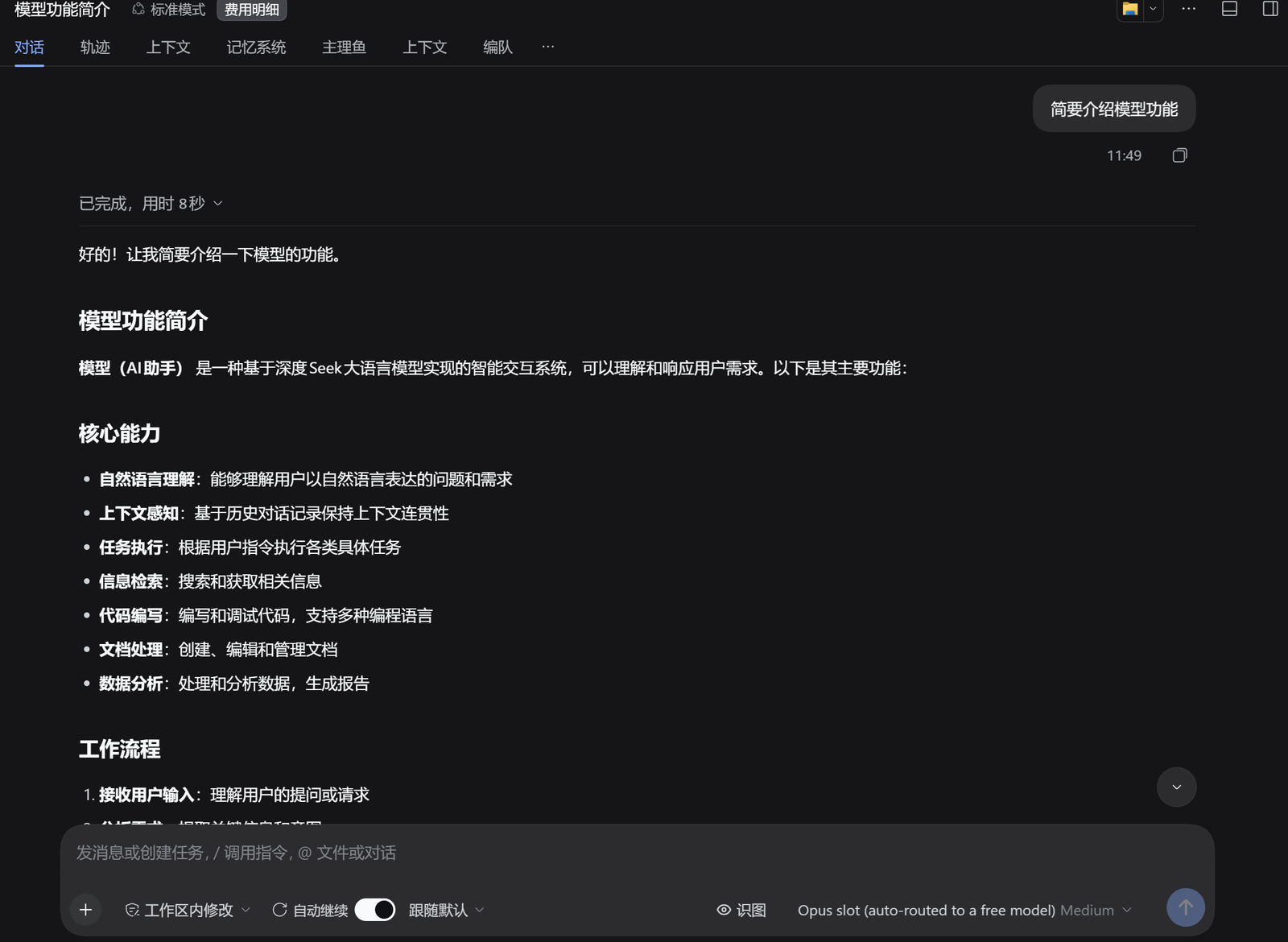
A real answer, from a free model the router picked.
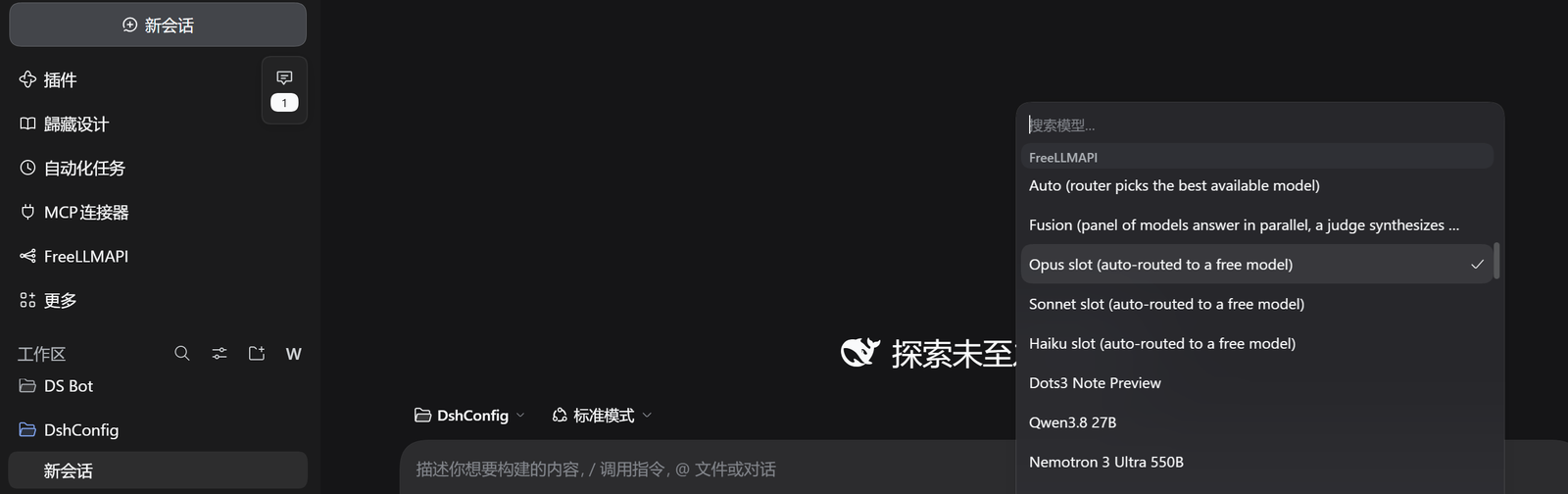
It is a normal provider. freellmapi sits in the model picker next to
everything else, and every model the router reaches is one entry:
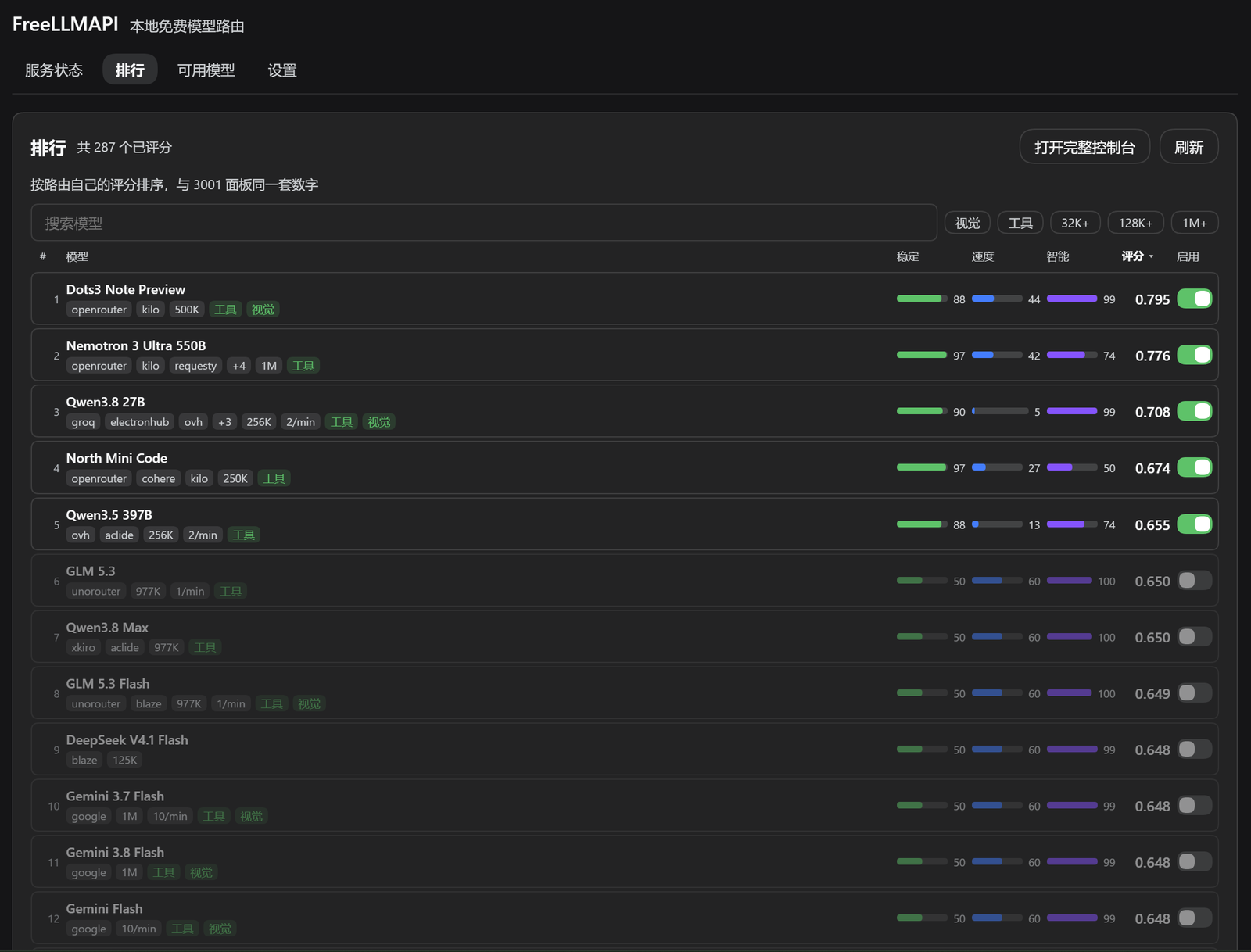
The Ranking tab. One row per model with a stability / speed / intelligence bar, the combined score, the serving platforms, rate limits and context window:
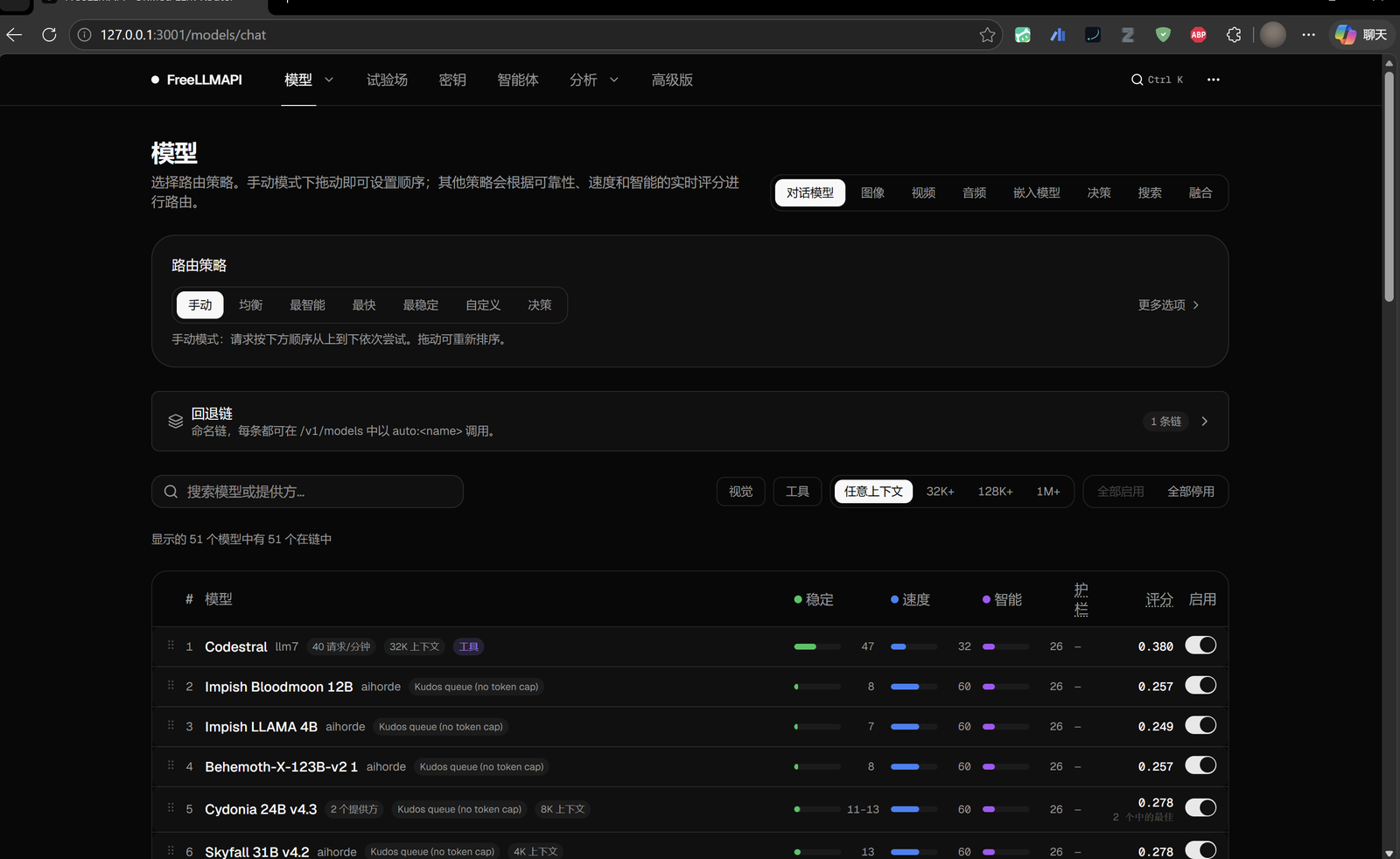
And the router's own console, one click away, for provider keys, routing strategy and usage — the parts a panel should not reimplement:
What it does
-
Bundles the router.
vendor/carries the FreeLLMAPI server (compiledserver-dist, the dashboard SPA inclient-dist, and the 95-package runtime closure). The plugin launches it with the host's own binary — no system Node, no Docker, noE:\...checkout. -
Registers the provider route
freellmapiand advertises the router's live catalogue. The router's ownavailableflag is a database bit, not an answer, so the plugin probes the models it claims and drops the ones that return "model not found"; the panel lists both numbers and lets you tick exactly which ids the picker should offer. The panel is split into Status / Ranking / Models / Settings tabs, and the same Settings form also shows on DSH's plugin page. -
Shows the router's own ranking, natively. The Ranking tab draws the same table as the bundled dashboard's model page — one row per model with a stability / speed / intelligence bar, the combined score to three decimals, the serving platforms, rate limits and context window. It is sortable by any of the three axes or the score, filterable by name, vision, tools and minimum context window, and every row has its own enable switch plus the usual "enable shown" / "disable shown" bulk actions before you apply.
The numbers are not a reimplementation: the tab opens the router's database read-only and computes them with the router's own
getRoutingScores()andgetModelGroups(), so the panel and http://127.0.0.1:3001 cannot disagree.What the panel deliberately does not copy is the parts only the dashboard can own — provider keys, routing strategy, usage charts. Both the Ranking tab and the status card carry an Open the full console button for those.
-
Wears the host's theme. Every colour in the panel is a DSH theme token (
--dsw-alias-*), not a hard-coded hex, so it flips between light and dark together with the rest of the app. The panel also measures its own resolved background and setscolor-schemeon its subtree — a native<select>popup is drawn by the OS, and without that it opens white inside a dark app. -
Lets you choose where it shows up. The Settings tab has an Entry picker — both places, sidebar only, or plugin page only. Choosing "plugin page only" hides the sidebar icon and embeds the model list on that page instead, so the plugin is never left without a way in.
-
The model list sorts by name, context size, or measured availability, and every mode keeps the rows the picker actually offers at the top. Bulk ticking leads with "Tick usable" (offered or probe-answered), and all three buttons act on the rows the search box left visible — so "type qwen, tick usable" selects the working qwen models, not all 287.
-
Mints and reuses its own key. On first boot the router generates a unified API key; the plugin reads it straight out of the router's SQLite database, so a fresh install works with zero setup. Setting
FREELLMAPI_API_KEYoverrides it — that is the only handle you get for rotating it deliberately. -
Starts, stops, and health-checks the router from the panel or from the
freellmapitool. -
Keeps its state under
$DSH_HOME/dsh-freellmapi/runtime/: the SQLite database and theENCRYPTION_KEYthat decrypts the stored provider keys live together, so a restart never loses them.
Setup
Install the packed tarball from the releases page, or from the dshmarket listing:
dsh plugin --profile web add "https://github.com/stallenlu/dsh-freellmapi/releases/download/v1.2.10/dsh-freellmapi-1.2.10.tgz"
Not dsh plugin --profile web add github:stallenlu/dsh-freellmapi. The git
tree does not carry vendor/node_modules — a 95-package runtime closure the
router needs — so a git install produces a plugin that cannot start its server.
The market page adds that GitHub line to every entry it lists; for this plugin
it is the wrong one.
- Enable the plugin (it is a bundle: one line in the profile's
package.jsonand one patch entry, both already written bycordis.patch.yml). - Open the FreeLLMAPI panel in the sidebar, press Start. First boot
takes a few seconds and prints
Seeded 25 models and fallback config. WithautoStarton (the default) this also happens on its own — opening the model list is enough, because discovery starts the router before it asks for the catalogue. - Pick
freellmapias the provider andauto(or any catalogue id) as the model. - To actually get answers, add at least one provider key at http://127.0.0.1:3001 — seven providers (aihorde, aisense, halx, keenable, kilo, ovh, parallel) are keyless and work immediately; the rest need your own signup.
Settings
Stored in $DSH_HOME/dsh-freellmapi/settings.json:
| key | default | meaning |
|---|---|---|
baseURL | http://127.0.0.1:3001/v1 | OpenAI-compatible base of the router; its port is what the plugin launches on |
requestTimeoutMs | 300000 | per-attempt timeout; the harness maps it to TIMEOUT |
defaultMaxTokens | 8192 | cap applied when a call sends no max_tokens |
autoStart | true | start the router when the host boots |
proxy | inherit | inherit follows the system proxy; direct sets NO_PROXY=* for the router |
probeModels | true | send each claimed-available model one real request and drop the ones that answer "model not found" |
enabledModels | [] | empty follows the probes; a non-empty list is yours — those ids and only those, dead or not |
The probe cache is probes.json next to the settings file, valid for 3 hours. A
429 or a timeout is a moment, not a fact, so it never removes a model — only a
404/422 does. Probing costs one short completion per model at three at a time.
proxy exists because the router inherits the OS proxy setting, and a proxy
whose HTTPS CONNECT is broken turns every upstream call into ECONNRESET
while the dashboard and /v1/models keep answering — which looks like the
router is broken. Switching to direct is the one-line diagnosis.
autoStart defaults to on because the router is part of the plugin: with it off,
the provider route is registered but answers nothing until you press Start.
A corrupt settings file fails loudly instead of silently resetting — losing a key path quietly is worse than a visible error.
Layout
lib/index.js       host half: adapter registration, tool, HTTP API, lifecycle
lib/runtime.js     bundled-router paths, ENCRYPTION_KEY bootstrap, child env
lib/adapter.js     provider adapter: catalogue, metadata, one HTTP attempt
lib/chat.js        harness message blocks -> OpenAI chat wire projection
lib/stream.js      SSE -> harness stream vocabulary, one attempt
lib/supervisor.js  router process: reachability, start, stop, key handoff
lib/store.js       settings file + credential resolution
lib/probe.js       real availability: one request per claimed model, cached verdicts
lib/ranking.js     the dashboard's ranking table, read out of the router's database
lib/kernel.js      the only @deepseek-ai/* seam (attribution user agent)
lib/client.js      browser half: sidebar panel, ranking, model list, settings
vendor/            the bundled router: server-dist, client-dist, node_modules
assets/            storefront tile and the four listing screenshots
screenshots.json   storefront images, read by the dshmarket listing
smoke.mjs          offline checks; add --live to hit a running router
Why the router is vendored
Upstream ships the server as an unpublished private workspace package, its installer requires Docker, and the desktop build is an Electron app that cannot run headless here. Vendoring the compiled output plus its runtime closure is the only shape that satisfies "a DSH plugin you install and use", and it keeps the plugin honest: the adapter talks HTTP to a process it owns.
vendor/server-dist/db/index.js carries one local patch: defaultDbFactory
falls back to node:sqlite when better-sqlite3 cannot be loaded, because the
host runs Node 24 (ABI 149) while the shipped native addon targets ABI 127.
Thanks
The hard part is not mine. The router, the provider catalogue, the routing and
failover logic, the encrypted key store and the stability / speed / intelligence
scoring all come from tashfeenahmed/freellmapi
by Tashfeen Ahmed — tens of free LLM
providers and hundreds of free model endpoints behind a single /v1, plus any
custom OpenAI-compatible endpoint you point it at.
This plugin carries that work into DeepSeek Harness and gives it a panel — the
vendor/ tree is a snapshot of upstream's compiled output, unmodified except
for the node:sqlite fallback noted above. If FreeLLMAPI is useful to you, the
star belongs upstream.
Tests
node smoke.mjs           # offline: shaping, usage, finish reasons, pairing, runtime
node smoke.mjs --live    # also: real catalogue + one real completion
The live check needs a router on baseURL with a usable provider key; it skips
with a reason when either is missing.
License
MIT. The bundled router is MIT, Copyright (c) 2026 Tashfeen Ahmed; see
vendor/LICENSE.