dsh-change-review-live
sujingkpo/dsh-change-review-live
DeepSeek Harness用のライブ変更レビューです。セッションごとにwrite/editツール呼び出しを追跡し、変更ファイルを入力欄上に一覧表示して、プラグイン登録の右サイドバータブで行単位の差分を開きます。セッションログ/初期版/Gitの比較モード、変更単位・ファイル単位の復元、サブエージェント集約、SSE更新に対応。右サイドバー中心に作り直したcirelir/dsh-change-reviewのフォークです。
インストール
dsh plugin --profile web add github:sujingkpo/dsh-change-review-liveREADME
dsh-change-review-live
[!IMPORTANT] This project is a fork of cirelir/dsh-change-review, substantially reworked on top of it (right-sidebar diff tabs, a live review list, a rename). The original author's copyright and the MIT license are retained — see LICENSE.
dsh-change-review-live is a live change-review plugin for DeepSeek Harness (DSH): it tracks every write / edit tool call in your session and renders the changes as line-level diffs in real time — the change list lives above the composer, the diff itself opens in its own tab in the right sidebar, and every change can be reverted per-operation or for the whole file. Session-isolated, subagent-aggregated, pushed live over SSE, with fully customizable colors.
One package carries both the Host logic and the browser UI (
dsh.bundle+dsh.clientmanifests).
✨ Features
| Feature | Description |
|---|---|
| Auto tracking | Listens to write / edit tool calls and records the before/after content, the timestamp and the turn each change belongs to |
| Line-level diff | LCS diff: added (green) / removed (red) / context (gray) lines with both-side line numbers; long unchanged stretches collapse into an ⋯ N lines skipped (unchanged) row |
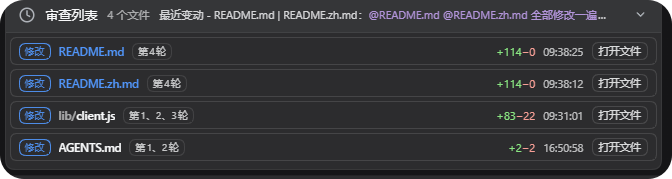
| Review list | A persistent panel above the composer: status chip + path + turn badge + that turn's question + +N/−N + time. Click the header to collapse/expand; once expanded, drag to resize (the height is remembered per session on the Host) |
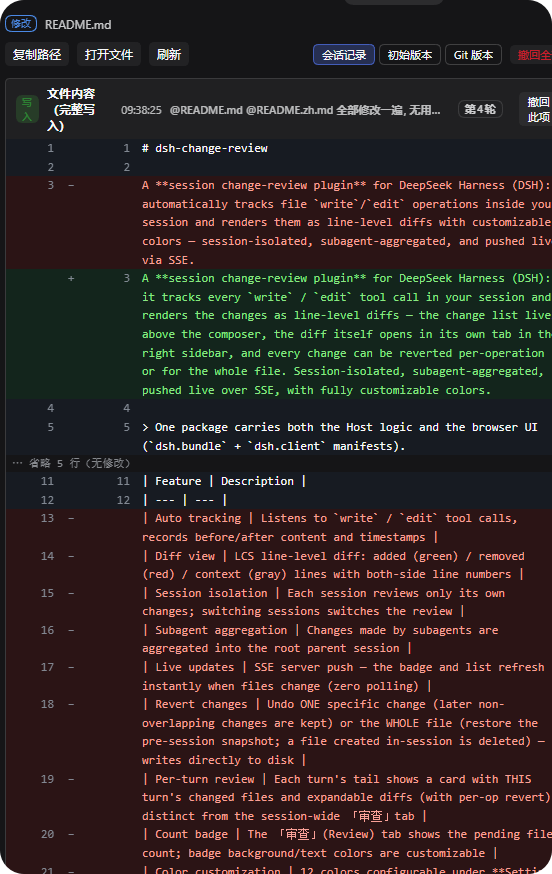
| Sidebar diff tab | A sidebar tab type registered by this plugin: the chip reads filename (diff) with a red/green diff icon, the body shows the file's full diff and its revert actions |
| Three comparison modes | Per file you can switch between session log (this session's recorded operations), initial version (the file as it was before this session's first change) and Git version (HEAD) |
| Revert | Undo a single change (later non-overlapping changes are kept) or every change to a file (restore the state before this session's first change; a file created in this session is deleted) — each action asks for confirmation and then writes the file on disk |
| Open file | Prefers opening the file inside DSH's right sidebar; when that service is missing or the address has no owner it falls back to the OS default handler |
| Context menu | On a diff line: copy path#line (copying a line range when several lines are selected) |
| File status | added / modified / deleted chips. Deleted means the file is not on disk right now (a file created and then deleted also shows as deleted): the name is struck through and Open file is disabled, while the diff stays reviewable and revertible |
| Color customization | Under Settings → 实时审查: 12 colors, each with an opacity slider (rgba), applied instantly and saved automatically; light/dark presets and a restore-defaults button included |
| Session isolation / subagent aggregation | Each session sees only its own changes; subagent changes are aggregated up the owner chain to the root parent session |
| Live updates | The Host broadcasts over SSE, so the list and the diff tab refresh as files change, with polling as a fallback |
📸 Screenshots
Review list — every file this session changed, listed live above the composer: status chip, path, turn, that turn's question and +N/−N
Sidebar diff tab — click a file name to review its per-operation diffs, section-level revert and the three comparison modes in the right sidebar
📦 Install
dsh plugin add
dsh plugin --profile web add github:sujingkpo/dsh-change-review-live
Installed straight from the GitHub repository (the package is not published on npm yet); replace
webwithdesktopto install into the DSH Desktop profile. Restart DSH afterwards.The client bundle declares
platform: web, sodsh weband DSH Desktop share it; it relies on DSH's right-sidebar APIs (sidebarRightTabs/sidebarRight).
🚀 Usage
- Once a session writes or edits a file, the Review list panel appears above the composer (collapsed by default; it stays hidden while there is nothing to review). Click its header to expand — rows are ordered by most recent change
- Each row shows the status chip, the path (the directory part may elide, the file name never does), a
turn Nbadge, that turn's question,+N/−Nand the time, ending with an Open file action - Clicking the row or the file name opens that file's diff in the right sidebar; the trailing Open file control opens the file itself in the sidebar instead (disabled while the file is deleted)
- The sidebar diff tab has two header rows: the first holds the status chip and the path (hover for the absolute path); the second holds the actions — Copy path / Open file / Refresh / comparison mode (session log · initial version · Git version) / Revert all (session-log mode only)
- The diff is grouped into
edit/writesections, each header showing its label, time, that turn's question, theturn Nbadge and Revert this (session-log mode only) - Refresh semantics: session log updates automatically as the session changes (SSE, plus a 15-second fallback poll); initial version / Git version never auto-refresh — use the Refresh button. Polling pauses while the tab is not visible (sidebar collapsed or tab in the background)
- Right-click a diff line to copy
path#line(a line range when several lines are selected) - Colors: Settings → 实时审查; changes apply instantly and are saved automatically
🎨 Color Configuration
| Item | Key | Light default | Dark preset | Where it shows |
|---|---|---|---|---|
| Added line background | addBg | #e6ffec | #10251c | Added diff lines |
| Added line text | addFg | #1a7f37 | #7ee787 | Added diff lines |
| Removed line background | delBg | #ffebe9 | #2d1415 | Removed diff lines |
| Removed line text | delFg | #cf222e | #ffa198 | Removed diff lines |
| Context background | ctxBg | #f6f8fa | #161b22 | Context diff lines |
| Line numbers / markers | gutter | #57606a | #8b949e | Line numbers and the +/− markers |
| Badge background | badgeBg | #0969da | #4493f8 | No longer displayed (see below) |
| Badge text | badgeFg | #ffffff | #0d1117 | No longer displayed (see below) |
| Added count (turn footer) | turnAdd | #1a7f37 | #7ee787 | Row +N, the added chip, the right half of the sidebar tab icon |
| Removed count (turn footer) | turnDel | #cf222e | #ffa198 | Row −N, the deleted chip, the left half of the sidebar tab icon |
| Card background (turn footer) | turnBg | rgba(255,183,77,.1) | same | No longer displayed (see below) |
| Card border (turn footer) | turnBorder | #ffb74d | same | No longer displayed (see below) |
badgeBg/badgeFgandturnBg/turnBorderused to style the review view tab's count badge and the per-turn review card. Both surfaces have been removed; the settings page still lists these four items, but changing them no longer affects any UI.
🧠 Behavior Notes
- Scope: every
write/editcall in the current process, bucketed per session; subagent changes are aggregated up the owner chain to the root parent session - Real time: the Host broadcasts over SSE (
/diff-review/events); the client only processes events for the current session, with polling as a fallback - Persistence:
- Review records:
$DSH_HOME/diff-review/<sessionId>.json(falling back to~/.dshwhenDSH_HOMEis unset), debounced auto-save plus a synchronous flush on exit, restored automatically after a restart — delete that directory to wipe the history - UI preferences: the panel height per session under
$DSH_HOME/diff-review/ui/<sessionId>.json - Colors: browser localStorage (
dsh.diff-review.colors)
- Review records:
- Status rules:
added= the file's first operation had no prior content (created in this session);deleted= the file is not on disk right now (delete commands are never parsed); everything else ismodified - Turn attribution: each operation is tagged with the turn it happened in by scanning the session log's
turn/startevents; records written before that tagging existed are back-filled from the timeline - How revert works: every operation stores the full before/after snapshot reported by the write/edit tool. Reverting the newest operation restores that snapshot exactly; reverting a middle one performs a three-way line merge that keeps later non-overlapping changes and refuses on overlap
- Capacity guards: at most 100 operations per file; up to 1500 lines per diff side; a 2000-line-per-side limit on the three-way merge; display fragments capped at 350,000 characters; files larger than 5,000,000 characters get no snapshot (that record degrades to a fragment diff and cannot be reverted)
- Where changes take effect: Host-side changes (
lib/index.js) need a DSH restart; browser-side changes (lib/client.js) only need a page refresh
🗂 Architecture
Host (lib/index.js)
  · tools/result listener → per-session buckets + turn attribution
  · LCS line diff, three-way merge revert
  · HTTP: /diff-review/{events (SSE) · summary · file · turn · against · revert · ui-prefs · open}
        │  HTTP + SSE (same origin)
Browser UI (lib/client.js, __ModuleLoader__ bundle)
  · hidden SessionProbe syncing the current session
  · LivePanel: the review list above the composer (conversation.input.dock)
  · self-registered sidebar tab type dsh-change-review-live:diff-review: body under sidebar.right.pane.tab, chip icon under sidebar.right.pane.tab.title
  · Settings page 「实时审查」 for color customization
⚖️ Disclaimer
Plugin code runs with the same privileges as your harness process. Review the source before installing; inclusion in community markets is not a security endorsement.
📄 License
MIT