dsh-feishu-bridge
wz-heng/dsh-feishu-bridge
フェイルクローズ方式の Feishu(Lark)チャネルブリッジ。ボットとチャットして dsh エージェントのターンを受け取れます — オプトインのヒューマン・イン・ザ・ループ ツール承認付き(すべての bash 呼び出し前に Allow/Deny カード、フェイルクローズなタイムアウト)。公式 Python SDK のみを使用する統合(バージョン固定)、デフォルト拒否のホワイトリスト、Webhook の署名/タイムスタンプ/リプレイ検証、チャットごとのスティッキーセッション、最新 SDK との互換性を毎日確認するカナリア、バイリンガルドキュメントを備えます。
インストール
dsh plugin --profile web add github:wz-heng/dsh-feishu-bridgeREADME
dsh-feishu-bridge
English | 中文


The SDK canary runs daily against the latest deepseek-harness-sdk and lark-channel-sdk releases (not the pinned versions this repo ships), so a breaking upstream change gets caught within a day instead of silently bit-rotting.
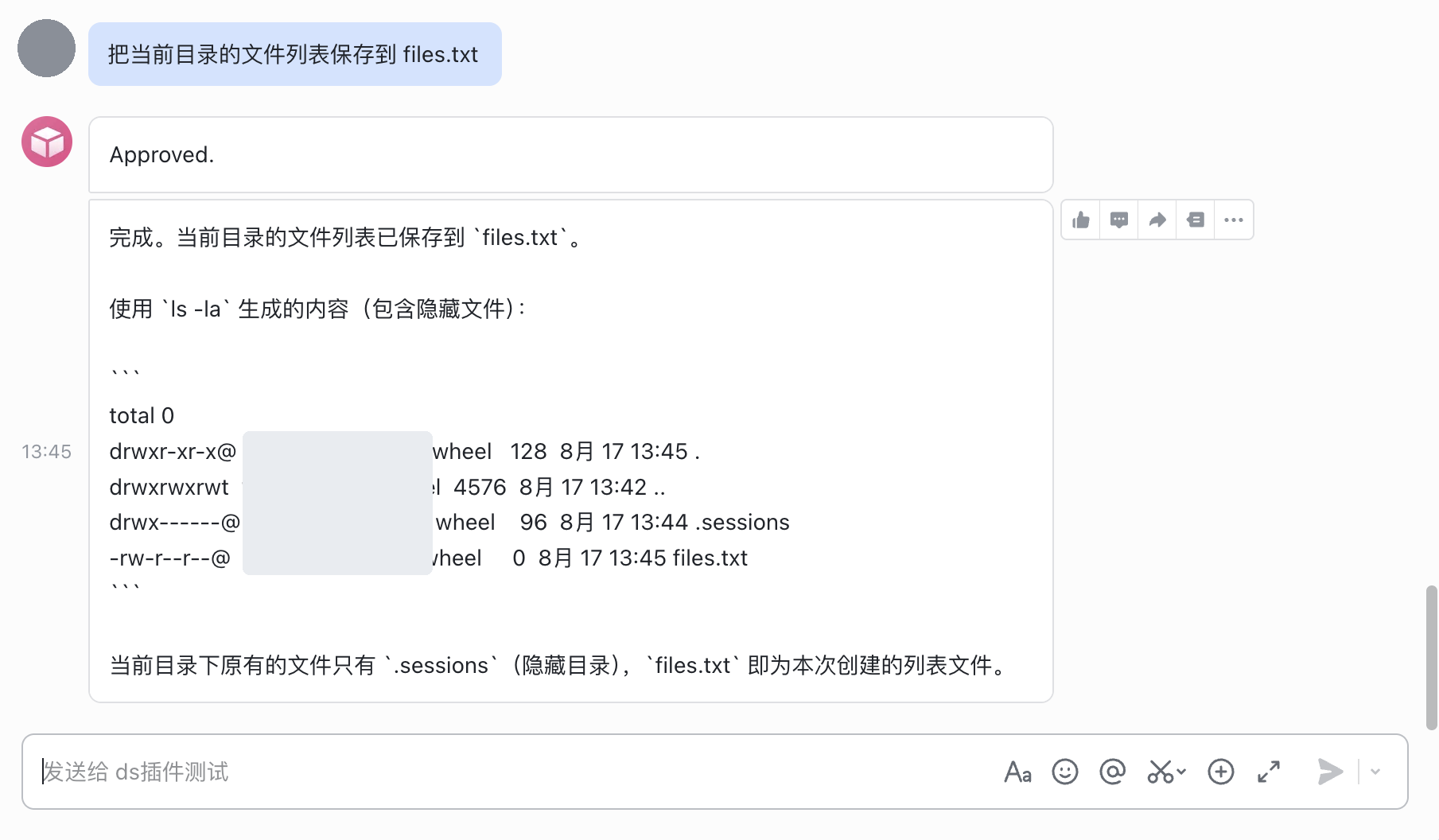
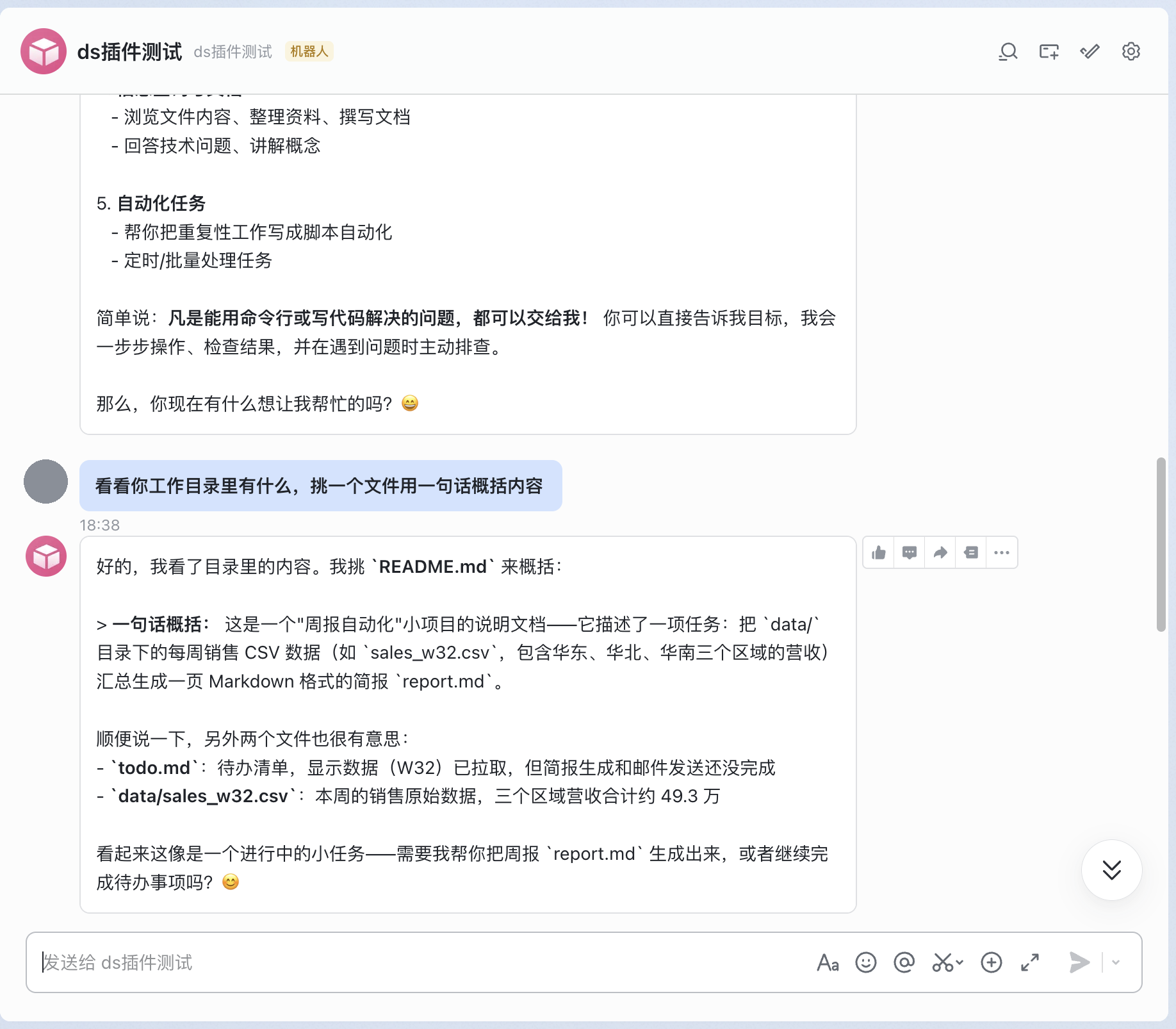
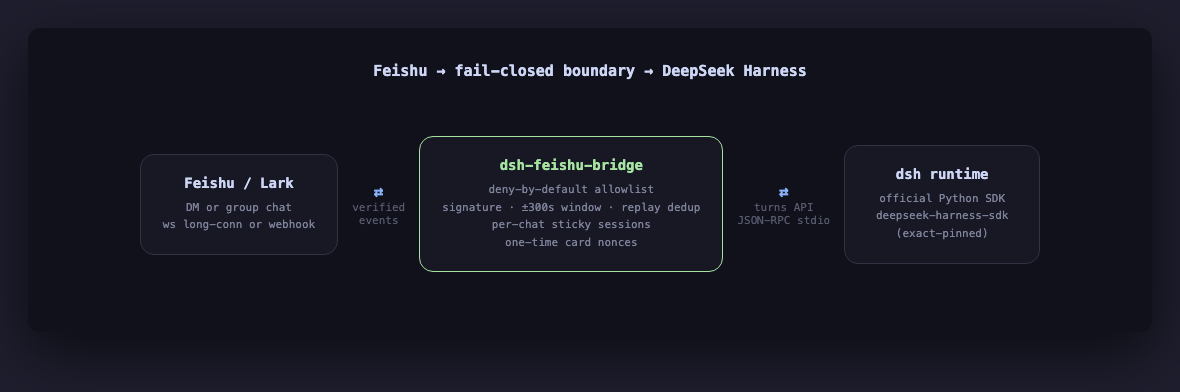
A Feishu (Lark) channel bridge for DeepSeek Harness (dsh): message a Feishu bot, it runs a dsh agent turn, the reply comes back to the chat.
This is an independent community project. It is not built, maintained, or endorsed by DeepSeek. It drives dsh entirely through its public Python SDK (deepseek-harness-sdk) — a subprocess boundary, no forked/patched harness code.
What this is
- A production-grade Feishu bot bridge: fail-closed allowlist, one-time card nonces, per-chat verbosity, sticky sessions, both
wsandwebhooktransports. - The thin adapter that talks to
deepseek-harness-sdklives in one file,src/dsh_feishu_bridge/dsh_adapter.py, and the SDK version is pinned exactly — the harness is a v0.1 developer preview that documents breaking changes between releases. That same adapter also carries a small capability-detection shim (probes the installed SDK's actualDeepSeekHarnessConfigfields viainspect.signature, never a hardcoded version check) so the nightly SDK canary — which installs the latest pre-release unpinned — keeps passing across a breaking field rename instead of just going red; seedocs/architecture.md"SDK compat".
Screenshots
Quickstart (5 minutes)
git clone https://github.com/wz-heng/dsh-feishu-bridge.git
cd dsh-feishu-bridge
python3.12 -m venv .venv
. .venv/bin/activate
pip install -e ".[dev]"
Set your credentials as environment variables — never in a committed file:
export DEEPSEEK_API_KEY=sk-your-key-here
# export DEEPSEEK_BASE_URL=http://127.0.0.1:8000/v1   # only if using a proxy

export FEISHU_APP_ID=cli_xxxxxxxx
export FEISHU_APP_SECRET=xxxxxxxx
export FEISHU_TRANSPORT=ws          # or "webhook" if you have a public URL
# export FEISHU_VERIFICATION_TOKEN=xxxx   # required when FEISHU_TRANSPORT=webhook
# export FEISHU_ENCRYPT_KEY=xxxx          # required when FEISHU_TRANSPORT=webhook

# Fail-closed allowlist — REQUIRED. With no ids configured the bot answers
# no one; every message is rejected by design (see "Security posture" below).
export FEISHU_ALLOWED_OPEN_IDS=ou_xxxxxxxxxxxxxxxx
# export FEISHU_ALLOWED_CHAT_IDS=oc_xxxxxxxxxxxxxxxx   # optional group allowlist
Run it:
python -m dsh_feishu_bridge
# or: dsh-feishu-bridge
Message the bot in Feishu — from a private chat, send /pair <code> using the one-time code printed to the bridge's console at startup (see "Getting your open_id" below). A correct code puts your open_id on the allowlist immediately, no restart needed. Anything else from an unlisted open_id is silently rejected.
Getting your open_id
The bridge prints a one-time pairing code to its own console the moment it starts:
[dsh-feishu-bridge] Pairing code: 7K9XQPRT
Send '/pair 7K9XQPRT' to the bot in a PRIVATE chat to get on the allowlist. Valid for 900s or 5 wrong tries, whichever comes first.
Message the bot in a private (1:1) chat, not a group — /pair <code> is deliberately not accepted in groups, so a code never has to travel through one. A correct code adds your open_id to the allowlist immediately (no restart) and persists it to FEISHU_PAIRING_STATE_PATH (default data/feishu_paired_open_ids.json, a {"open_ids": [...]} file) so it survives the next restart too. One code, one successful pairing, per process — restart the bridge to mint a fresh one; wrong guesses beyond FEISHU_PAIRING_MAX_ATTEMPTS (default 5) or past FEISHU_PAIRING_TTL_SECONDS (default 900s / 15 min) retire the round early. Turn the whole feature off with FEISHU_PAIRING=0 if you'd rather manage the allowlist by hand.
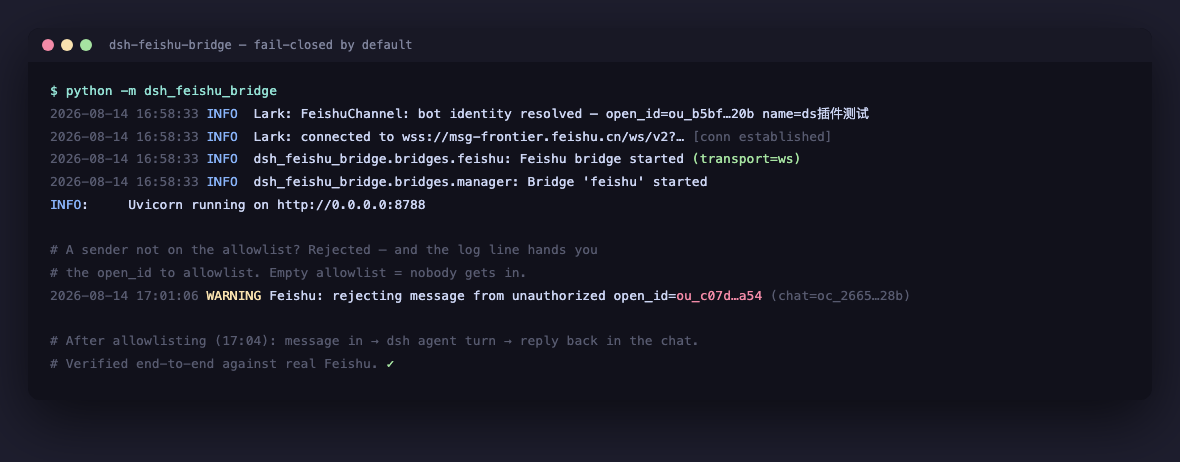
Fallback: reading it off the log. With pairing disabled (or if you'd rather not use it), send the bot any message once — it will not reply, this is expected, fail-closed — and check the server log for a line like:
Feishu: rejecting message from unauthorized open_id=ou_xxxxxxxxxxxxxxxx (chat=oc_xxxx)
Copy that open_id into FEISHU_ALLOWED_OPEN_IDS and restart.
Revoking access. An env-configured id is revoked by removing it from FEISHU_ALLOWED_OPEN_IDS and restarting. A paired id is separate — remove it from FEISHU_PAIRING_STATE_PATH's open_ids list (or delete the file) and restart.
Install as a dsh plugin
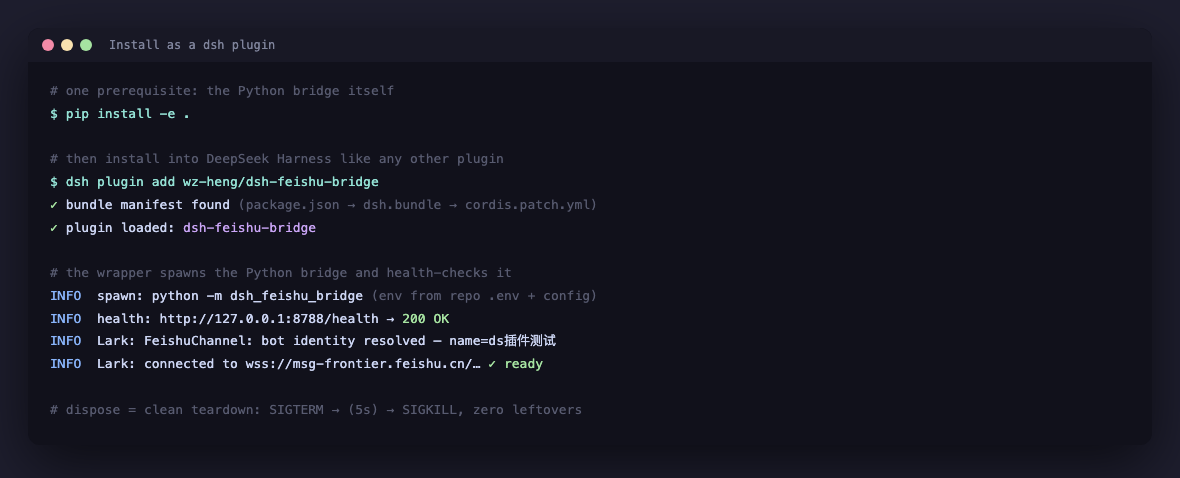
Instead of running the standalone process above, dsh plugin add can install this repo into a dsh profile: the plugin is a thin Node/cordis shell (package.json, cordis.patch.yml, lib/) that spawns and supervises the same unmodified Python process — it does not reimplement or patch any bridge logic.
Two steps, in order — the plugin never installs Python dependencies for you:
-
Install the Python side yourself first, exactly as in the Quickstart above:
git clone https://github.com/wz-heng/dsh-feishu-bridge.git
cd dsh-feishu-bridge
python3.12 -m venv .venv
. .venv/bin/activate
pip install -e .
Set
FEISHU_APP_ID/FEISHU_APP_SECRET/FEISHU_ALLOWED_OPEN_IDS/ etc. — either exported in the shell that startsdsh, or in a.envfile at this repo's root (KEY=valueper line; the plugin reads it directly and merges it into the spawned process's inherited environment, since the Python side itself only readsos.environ). -
Then add the plugin to your profile:
dsh plugin --profile <name> add /path/to/dsh-feishu-bridgedshstarts the bridge as a managed child the next time that profile boots: it spawns<repo>/.venv/bin/python -m dsh_feishu_bridge(falling back topython3onPATHif no.venvexists at the repo root), waits forGET /healthto report{"status": "ok"}, and on profile/plugin dispose sendsSIGTERM, escalating toSIGKILLif the process hasn't exited within 5 seconds — the same clean-shutdown behavior asCtrl-C-ing the standalone process, just automatic.Every row config field is optional (
host,port,pythonBin,startupTimeoutMs,env) — a bareaddwith no row edits works as long as step 1 is done and the defaults (0.0.0.0:8788, repo-root.venv) match your setup.host/portsetDSH_FEISHU_BRIDGE_HOST/DSH_FEISHU_BRIDGE_PORTin the spawned process's env (see "Configuration reference" below) — they change where the Python side actually binds, and the plugin's own health check follows the same value, so the two never drift apart. Override in your profile's owncordis.patch.yml, e.g. to point at a different interpreter and port:- insert: - id: feishu-bridge name: dsh-feishu-bridge config: pythonBin: /usr/local/bin/python3.12 port: 8799
This wrapper is v1: no build step (plain ESM under lib/), zero npm dependencies, and it never bootstraps a Python environment — there's no established convention for that among installable dsh plugins wrapping an external process today, so this repo doesn't invent one. Its own tests live under tests-node/ (node --test tests-node/**/*.test.mjs), separate from the Python suite in tests/.
Commands
| Command | What it does |
|---|---|
/new [name] | Start a fresh session |
/sessions | List sessions (tap one to switch) |
/switch <id> | Point at an existing session |
/current | Show current session info |
/quiet | Only show replies (default) |
/verbose | Also show status/result lines |
/help | List commands |
/pair <code> | Onboard yourself onto the allowlist — the one command that works before you're on it; private chats only, see "Getting your open_id" |
Remote tool approval
A human-in-the-loop gate on agent tool execution: nothing the model asks to run executes until someone explicitly allows it from Feishu.
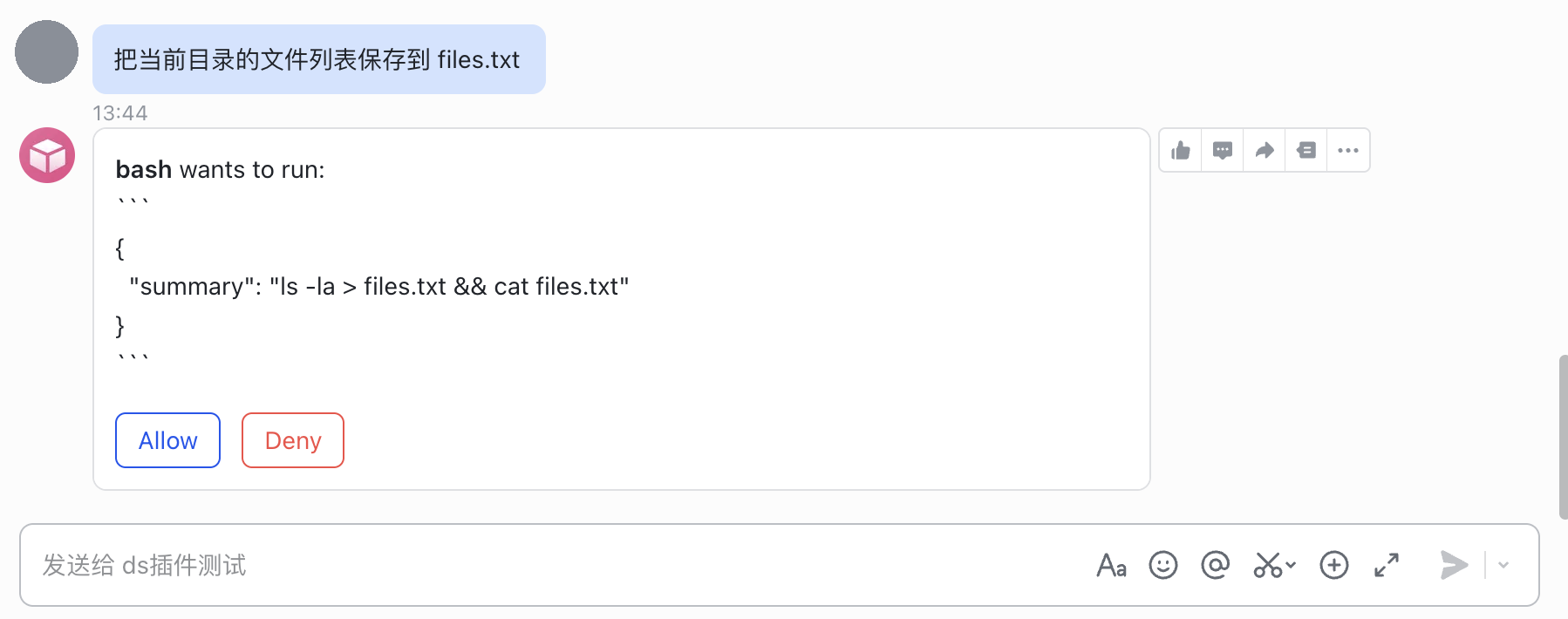
Opt in with DSH_APPROVAL_MODE=1 and every bash call the agent makes blocks until a human taps Allow or Deny on a Feishu card sent to the session's owning chat, with a fail-closed timeout (DSH_APPROVAL_TIMEOUT_SECONDS, default 60s — a card nobody answers in time is denied, never allowed). Off by default; existing deployments are unaffected.
This does not need (and does not compose) a sandboxing bash executor — approval mode is a human-in-the-loop gate on tool execution, independent of filesystem confinement. Combine the two if you want both: point DSH_WORKSPACE at a disposable directory/container (see "Security posture" below) the way you already would without approval mode.
Under the hood: approval mode swaps in a bundled Cordis composition (src/dsh_feishu_bridge/approval_runtime/cordis.yml) that marks bash calls as needing approval and relays the decision to this bridge over a loopback-only HTTP callback — never the public webhook/health port, and never reachable from outside this machine. See docs/architecture.md "Remote tool approval" for the full design and why it doesn't (and structurally can't, today) go through the dsh SDK's own JSON-RPC channel.
Configuration reference
Everything is an environment variable. An optional YAML file (path via DSH_FEISHU_BRIDGE_CONFIG, or --config) can supply the non-secret knobs (allowlists, model, provider) — see examples/config.example.yaml. Env vars always win when both are set, and credentials are never read from the YAML file on purpose.
| Env var | Default | Meaning |
|---|---|---|
DEEPSEEK_API_KEY | — | Required. Same var the SDK itself reads. |
DEEPSEEK_BASE_URL | — | Optional, for an OpenAI-compatible proxy. |
DSH_PROVIDER | deepseek-official | Provider route (see SDK docs). |
DSH_MODEL | deepseek-v4-flash | Model id. |
DSH_MAX_TOKENS | unset | Optional per-request output cap. |
DSH_CORDIS | unset | Path to a custom Cordis composition; omit to use the bundled default. Mutually exclusive with DSH_APPROVAL_MODE (that mode ships its own composition — see "Remote tool approval"). |
DSH_SESSION_ROOT | unset | Where the runtime writes its JSONL session logs. |
DSH_WORKSPACE | current dir | The workspace the agent's tools operate in. |
DSH_APPROVAL_MODE | 0 | 1/true/yes/on to require a Feishu Allow/Deny tap before every bash call — see "Remote tool approval". |
DSH_APPROVAL_TIMEOUT_SECONDS | 60 | How long a pending approval card waits before it's denied automatically (fail-closed). |
FEISHU_APP_ID / FEISHU_APP_SECRET | — | Both required together, or leave both unset. |
FEISHU_TRANSPORT | ws | ws (no public URL needed) or webhook. |
FEISHU_VERIFICATION_TOKEN | — | Required when FEISHU_TRANSPORT=webhook. |
FEISHU_ENCRYPT_KEY | unset | Required when FEISHU_TRANSPORT=webhook — enable "Encrypt Key" for this event subscription in the Feishu console and paste the same value here. Used to verify each request's X-Lark-Signature (see "Security posture"). |
FEISHU_DOMAIN | https://open.feishu.cn | Change for Lark international / a proxy. |
FEISHU_ALLOWED_OPEN_IDS | (empty) | Comma-separated. Required — empty means nobody is authorized. |
FEISHU_ALLOWED_CHAT_IDS | (empty = no restriction) | Comma-separated group allowlist. |
FEISHU_PAIRING | 1 | 0/false disables one-time pairing-code onboarding entirely — see "Getting your open_id". |
FEISHU_PAIRING_TTL_SECONDS | 900 | How long a pairing code stays valid after the bridge starts. |
FEISHU_PAIRING_MAX_ATTEMPTS | 5 | Wrong codes allowed before the round locks until restart. |
FEISHU_PAIRING_CODE_LENGTH | 8 | Pairing code length; must be at least 8 (boot failure otherwise). |
FEISHU_PAIRING_STATE_PATH | data/feishu_paired_open_ids.json | Where paired open_ids persist ({"open_ids": [...]}) — never the env allowlist, so removing an id from FEISHU_ALLOWED_OPEN_IDS still revokes it after a restart. |
DSH_FEISHU_BRIDGE_HOST | 0.0.0.0 | HTTP server bind address (health check + webhook route). |
DSH_FEISHU_BRIDGE_PORT | 8788 | HTTP server port. |
Security posture
- Fail-closed by default. No configured
FEISHU_ALLOWED_OPEN_IDSmeans every sender is rejected — there is no implicit allow-all. This is deliberate: an agent bridge with a blank allowlist would otherwise let anyone in your tenant run arbitrary agent turns. - Webhook mode requires both a verification token and an encrypt key. Without either, the webhook route is never registered — the process refuses to boot half-configured rather than silently accepting unverified events. The encrypt key is not optional: a verification token alone is a static value carried in the request body, not a per-request signature, so it cannot authenticate where a request actually came from.
- Every webhook request is signature-, timestamp-, and replay-verified at this bridge's own boundary — before it is ever handed to the underlying SDK.
X-Lark-Signatureis checked againstsha256(timestamp + nonce + encrypt_key + body); the timestamp must fall within a 5-minute window of "now"; and a(timestamp, nonce)pair already seen is rejected as a replay. A request that fails any of these checks gets a401and never reaches message handling. The one deliberate exception is Feishu's own "save request URL" console step: that handshake is never signed (no subscription is confirmed yet to sign against), so this bridge checks onlyFEISHU_VERIFICATION_TOKENfor it and echoes the challenge back directly — the same, already-mandatory check the underlying SDK would otherwise perform. - Card buttons (session-switch, tool-approval) use one-time, identity-bound nonces. A nonce is minted for one exact action + session (+ tool call, for approval); a second click, a replayed nonce, or a tampered card value is rejected without being honored.
- Sessions are owned by the chat that created them.
/sessionsonly lists (and/switchonly accepts) sessions owned by the requesting chat — even between two allowlisted chats, one can't list or hijack another's session id and start receiving its replies. Tool-approval decisions apply the same ownership check server-side, not just via nonce scoping. - Approval mode's callback server never leaves loopback. It binds
127.0.0.1on its own ephemeral port, separate from the public webhook/health port, and the address is only ever handed to the harness subprocess's own environment — never advertised anywhere a remote caller could reach it. - The pairing code lives only on console stdout, the same trust boundary
.envalready sits in — whoever can read the console can already edit the allowlist directly. It's printed once at startup and never appears in a log line again. Submissions are checked with a constant-time comparison, the code is single-use, it expires (FEISHU_PAIRING_TTL_SECONDS), and it locks afterFEISHU_PAIRING_MAX_ATTEMPTSwrong guesses;/pairis silently ignored in group chats, and every reply a stranger can get from it gives them nothing about why a code failed beyond "wrong" or "no longer available." - Run this bridge's process with the least privilege the composition needs. The bundled default
dshcomposition (examples/jsonrpc-agentupstream) usesdanger-full-accessbash — run it in a disposable workspace/container, not against a machine you care about, whether or not you also turn on approval mode (the two are independent controls; see "Remote tool approval").
Limitations (v1, by design)
These are deliberate scope decisions driven by what deepseek-harness-sdk v0.1 actually exposes today — documented here rather than silently missing:
- No incremental streaming.
DeepSeekHarness.run()is a synchronous call that blocks until the turn is idle; the SDK'son_notificationhook receives raw protocol notifications mid-call, but their event schema isn't part of the documented v0.1 contract. So the bridge posts one status line at turn start and the full reply once the turn completes — not a token-by-token stream like some other bridges. - Sessions are sticky only within one bridge process. A restart starts a fresh
DeepSeekHarnesssubprocess, and cross-restart resume via a sharedsession_rootisn't a behavior the SDK's v0.1 docs commit to — so this bridge doesn't build undocumented persistence on top of it. A chat's sticky session pointer and its/quiet//verbosepreference both reset on restart. - Text messages only — no voice, image, or file attachments, and no topic/thread replies (one sticky session per chat would silently cross wires across threads).
- One model configuration per bridge process — provider/model/cordis composition are subprocess-wide, not per-chat. There's no
/agent-style rebind command; run a second bridge process (different port, different Feishu app or allowlist) if you need a second configuration. - One pairing code at a time, self-service only.
/paircan only add the sender's ownopen_id— there's no way to pair someone else's account for them, and only one code is ever live per process. A second person needing access waits for (or the operator triggers) a restart to get a fresh code.
Development
pip install -e ".[dev]"
pytest                       # fast — no network, no subprocess, no API quota
pytest -m real_sdk           # real smoke test: needs DEEPSEEK_API_KEY + the runtime; auto-skips otherwise
The test suite fakes both edges: a scripted DshBackend stands in for the real SDK (no subprocess spawned, no quota spent), and a local FakeFeishuServer stands in for open.feishu.cn to assert what the bridge actually sends outbound. See tests/.
If your network runs through a proxy (e.g. Clash) without a 127.0.0.1/localhost exemption, export no_proxy=127.0.0.1,localhost before running the loopback-server tests — otherwise the proxy can swallow the bridge's own outbound calls to the fake server. The bridge itself already forces trust_env=False for loopback domains at runtime, so this only matters for the test process.
The dsh plugin shell (lib/, see "Install as a dsh plugin" above) has its own, separate JS test suite — no Python involved:
node --test tests-node/**/*.test.mjs
License
MIT — see LICENSE.