dsh-compact-threshold
xlcg10086/dsh-compact-threshold
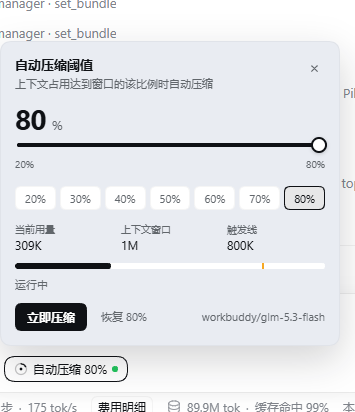
Composer control for the automatic context-compaction threshold. A 20%-80% slider rewrites the running BasicCompactionEngine config per step, shows current usage, context window and the effective trigger line, and compacts immediately when the threshold drops below current usage and the agent is idle.
インストール
dsh plugin --profile web add github:xlcg10086/dsh-compact-thresholdREADME
dsh-compact-threshold
在 DeepSeek Harness(DSH)的输入框旁实时调节上下文自动压缩阈值(20%–80%)。不重启 DSH,不改 profile 配置;把阈值调到当前用量以下时,空闲状态下会立即触发一次压缩。
功能
- 输入框左下角的「自动压缩 XX%」胶囊,点击打开控制面板。
- 滑条范围固定为 20%–80%,支持 20/30/40/50/60/70/80 快捷档。
- 实时显示当前用量、上下文窗口、触发线和用量进度条。
- 调整后立即作用于当前运行中的压缩引擎;无需重启 DSH。
- 当新阈值低于当前用量时:
- Agent 空闲:立即执行一次
compactNow(与/compact相同的底层路径)。 - Agent 运行中:在下个 step 的自动压力检查中压缩。
- Agent 空闲:立即执行一次
- 「立即压缩」按钮可手动触发一次压缩。
- 中英文界面,跟随 DSH 语言设置。
- 不读取、不上传任何会话内容;用量统计使用 DSH 本地的
tokenMeter(chars / 4启发式,增量计算,零网络请求、零 token)。
安装
DSH Desktop(推荐)
在 设置 → 插件 → 安装本地包 / 从压缩包安装 中选择 GitHub Release 的 .tgz,或在插件管理器里安装本仓库:
plugin_manager install_bundle target=<本仓库目录或 release tarball>
安装后在 插件 页启用 dsh-compact-threshold,无需重启(新 bundle 通过 HMR 生效)。
DSH CLI
# 从 GitHub Release 的预构建 tarball 安装
dsh plugin --profile <profile> add \
  https://github.com/xlcg10086/dsh-compact-threshold/releases/download/v1.0.0/dsh-compact-threshold-1.0.0.tgz
也可以直接从 GitHub 安装源码(需要本地构建环境):
dsh plugin --profile <profile> add github:xlcg10086/dsh-compact-threshold
使用
- 在输入框左下角找到「自动压缩 80%」。
- 点击胶囊打开面板。
- 拖动滑条或点击快捷档调整阈值。
- 查看「当前用量 / 上下文窗口 / 触发线」,确认触发线位置。
- 需要立刻释放上下文时点击「立即压缩」。
面板中的「触发线」是插件实际会使用的阈值:它取 min(窗口 × 比例, 窗口 - 输出预留 - headroom),因此输出预留较大的模型(例如 500K 窗口、184K 输出预留)会显示低于滑条比例的实际触发百分比。
工作原理
DSH 的 BasicCompactionEngine 在构造时会把 compaction-basic 配置解析成冻结对象,之后每个 step 读取 this.config 做压力判断。本插件不修改任何 profile 配置,而是:
- 通过
agentPresets.serviceFor(agent, 'compaction')取得该 Agent 所在 preset 隔离域中的真实压缩引擎实例; - 在
agent/created、agent/pre-step和agent/status事件中,把当前滑条比例写入引擎实例的config.thresholdRatio; - 下一次
compactIfNeeded()因此使用新阈值——这是不需要重启 DSH 的关键; - 滑条降到低于当前用量时,根据 Agent 状态选择
compactNow()或下一个 step 的compactIfNeeded()。
阈值持久化在 $DSH_HOME/compact-control.json,重启 DSH 后保留。
为什么是 20%–80%
- 上限 80%:DSH 内置
compaction-basic的thresholdRatio默认与上限均为 0.8;超过 80% 会拖累模型性能,也会与内置配置冲突。 - 下限 20%:
retainRatio为 0.16,阈值必须明显大于保留比例,否则会出现「刚压缩完立刻又触发」的抖动。20% 留出了足够的安全边界。
兼容性
- DSH
>= 0.2.1-rc.2 - Web Client(
dsh.client.platform: "web") - 已验证:DSH Desktop 2.0.18 / DSH 0.2.1-rc.2,Windows
隐私
插件不包含任何网络请求、遥测或外部服务调用。它只读写:
- 当前会话的本地
tokenMeter测量值; - 当前压缩引擎的运行时配置;
$DSH_HOME/compact-control.json中的阈值。
开发
# 语法检查
node --check index.js
node --check client.js

# 本地安装(DSH Desktop 插件管理器)
plugin_manager install_bundle target=<本仓库绝对路径>
插件结构:
index.js— Host:阈值状态、HTTP 路由、压缩引擎注入、立即压缩client.js— Client:conversation.input.left槽位中的胶囊与面板cordis.patch.yml— bundle 补丁locale/*.json— DSH 插件列表显示元数据icon.svg、assets/icon-256.png— 插件图标
English
Live auto-compaction threshold control (20%–80%) for the DeepSeek Harness composer. Adjust the threshold without restarting DSH; lowering it below current usage triggers compaction immediately when the agent is idle. See the Chinese sections above for the full design notes, or install the release tarball:
dsh plugin --profile <profile> add \
  https://github.com/xlcg10086/dsh-compact-threshold/releases/download/v1.0.0/dsh-compact-threshold-1.0.0.tgz
License
MIT © 2026 xlcg10086