dsh-git-workbench
yann9/dsh-git-workbench
JetBrains-style Git workbench for DSH: hunk and line-level staging, side-by-side diff with word-level highlighting, commit graph and branch operations, three-way conflict merge, and commit messages drafted with the host model.
インストール
dsh plugin --profile web add github:yann9/dsh-git-workbenchREADME
dsh-git-workbench
A JetBrains-style Git workbench for DeepSeek Harness. Local Changes tree, hunk- and line-level staging, side-by-side diff, commit window, commit graph, annotate, interactive rebase, shelve, three-way conflict resolution — all next to the conversation, no terminal switching.
The goal is not "being able to commit", but seeing which line changed, which hunk gets staged, and which branch the commit lands on as clearly as in IDEA.




中文 · Features · HTTP API · Architecture · Design notes · Development
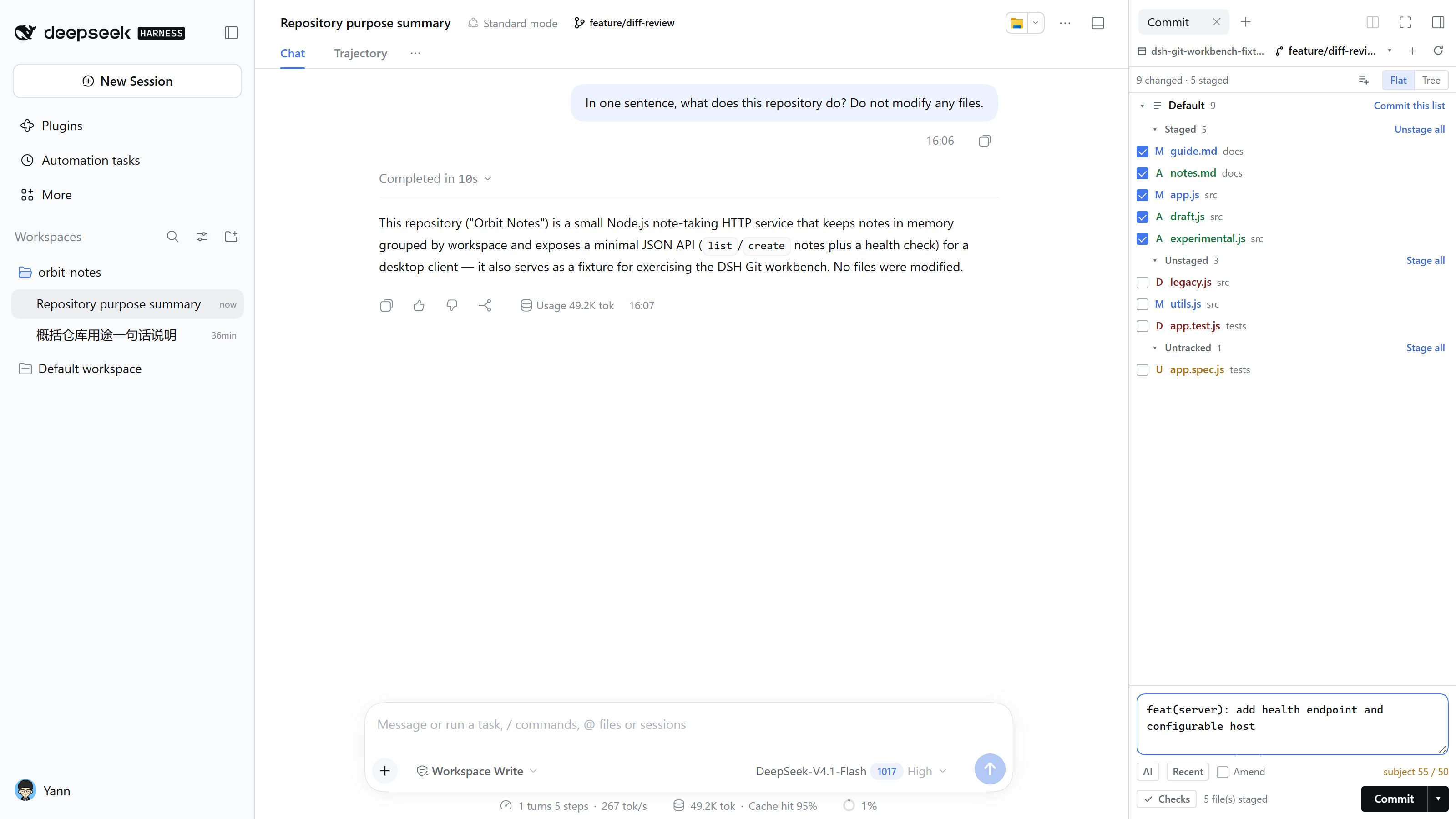
What it is
DSH's right sidebar is a draggable tab area, which maps to IDE tool windows; the diff opens in the main area like an editor tab and is a singleton — opening another file replaces the content instead of stacking tabs.
| JetBrains | Here | Contents |
|---|---|---|
| Commit tool window | Commit tab | changes tree + changelists + conflicts + message + AI / Recent / Checks / Amend |
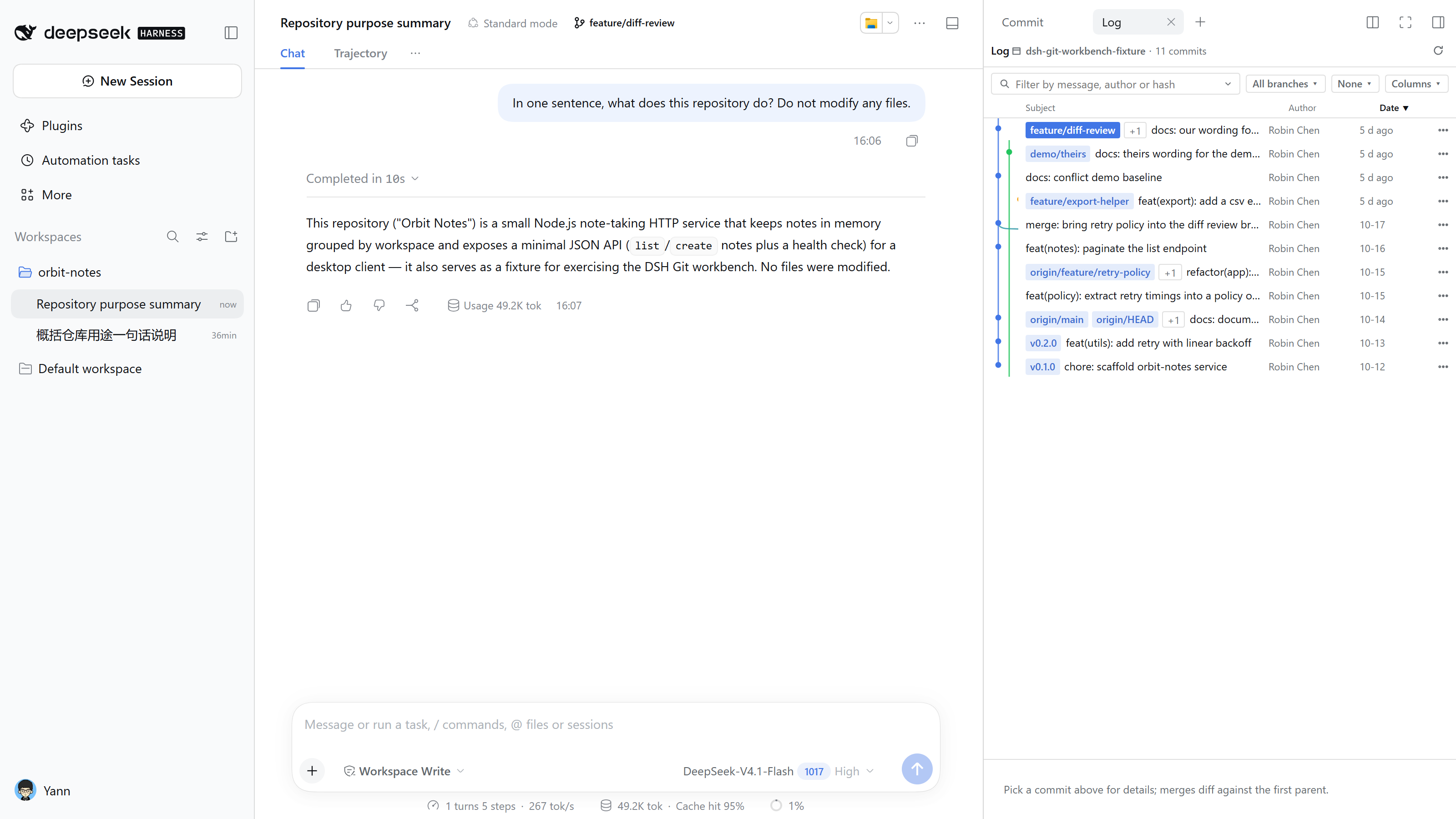
| Log tool window | History tab | commit graph + commit details + file list, read-only |
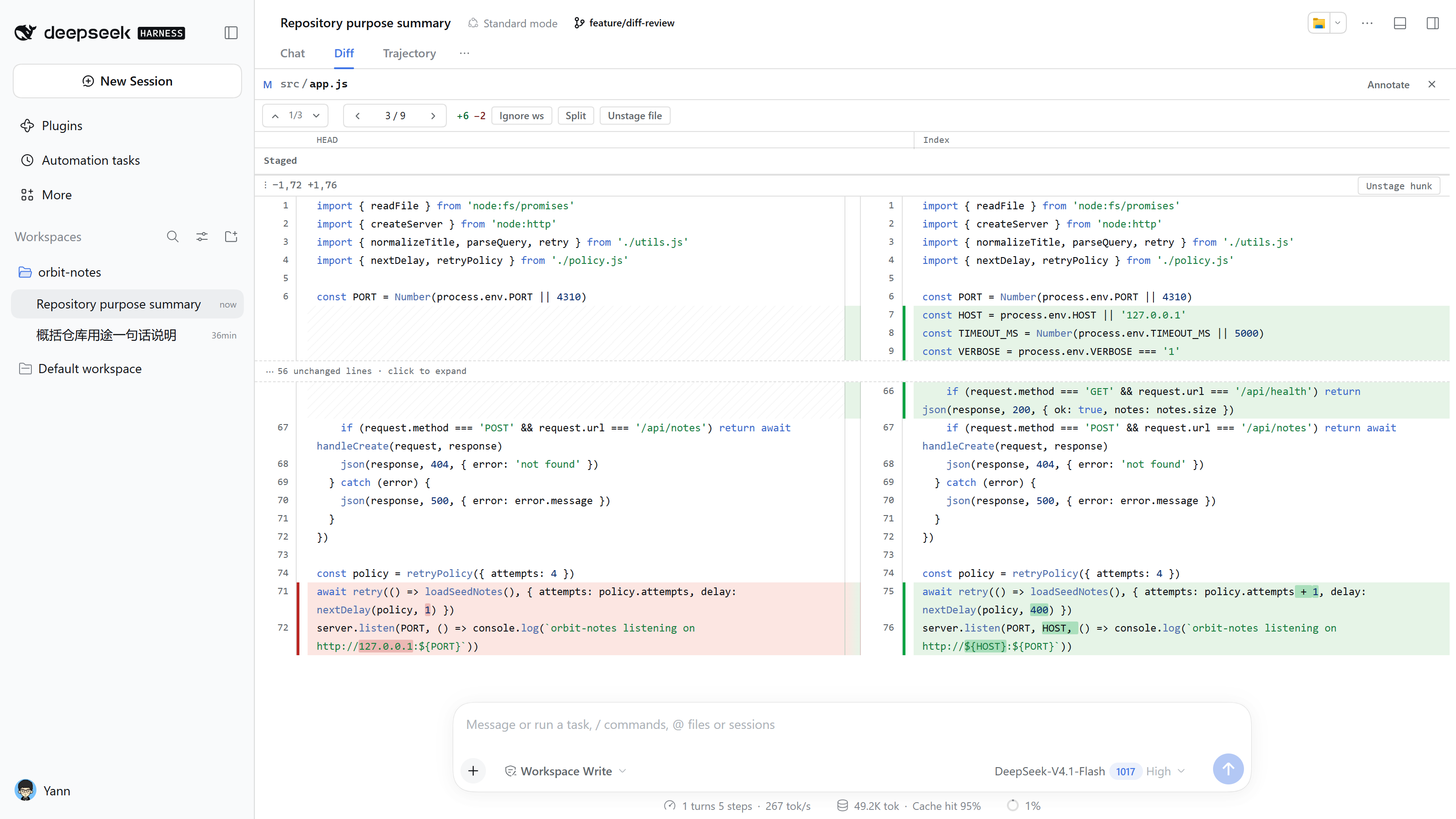
| Editor diff tab | Diff view (main area) | side-by-side / unified, hunk & line staging, annotate, conflict view |
Commit and history keep their own selection, scroll, filters and draft; the diff decides what it shows and whether it is writable from its source (working = writable, commit / turn = read-only).
It also plugs into DSH surfaces you already use: the branch chip in the session header, the branch picker in the new-session hero, the Git buttons on turn cards and the Files tab, and the change bar above the composer. The repository follows the session cwd — switching sessions switches repositories.
Screenshots
| Diff (side-by-side, word-level) | History (graph + sortable table) |
|---|---|
 |  |
| Conflict resolution | Stash (name + partial files) |
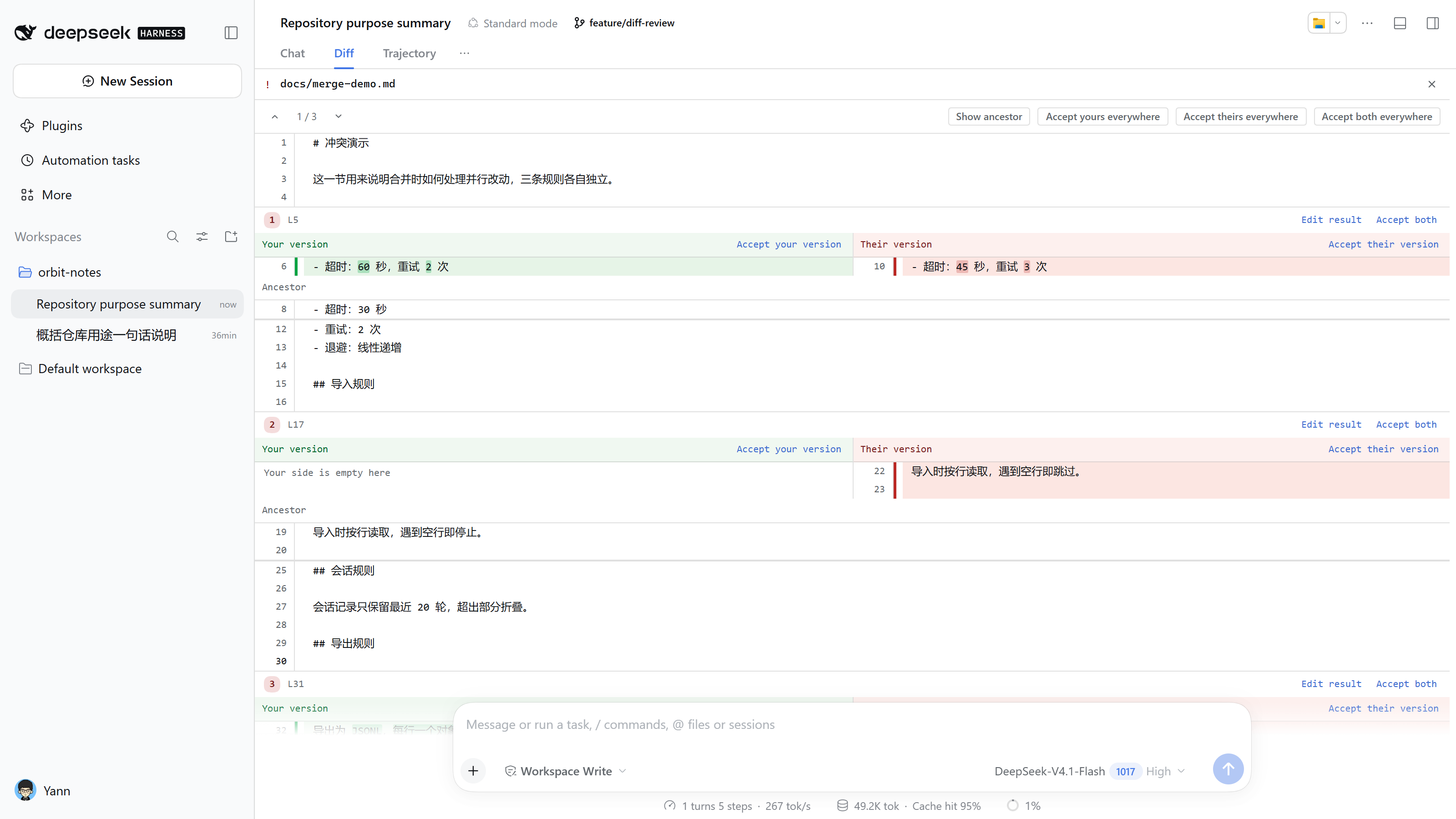 | 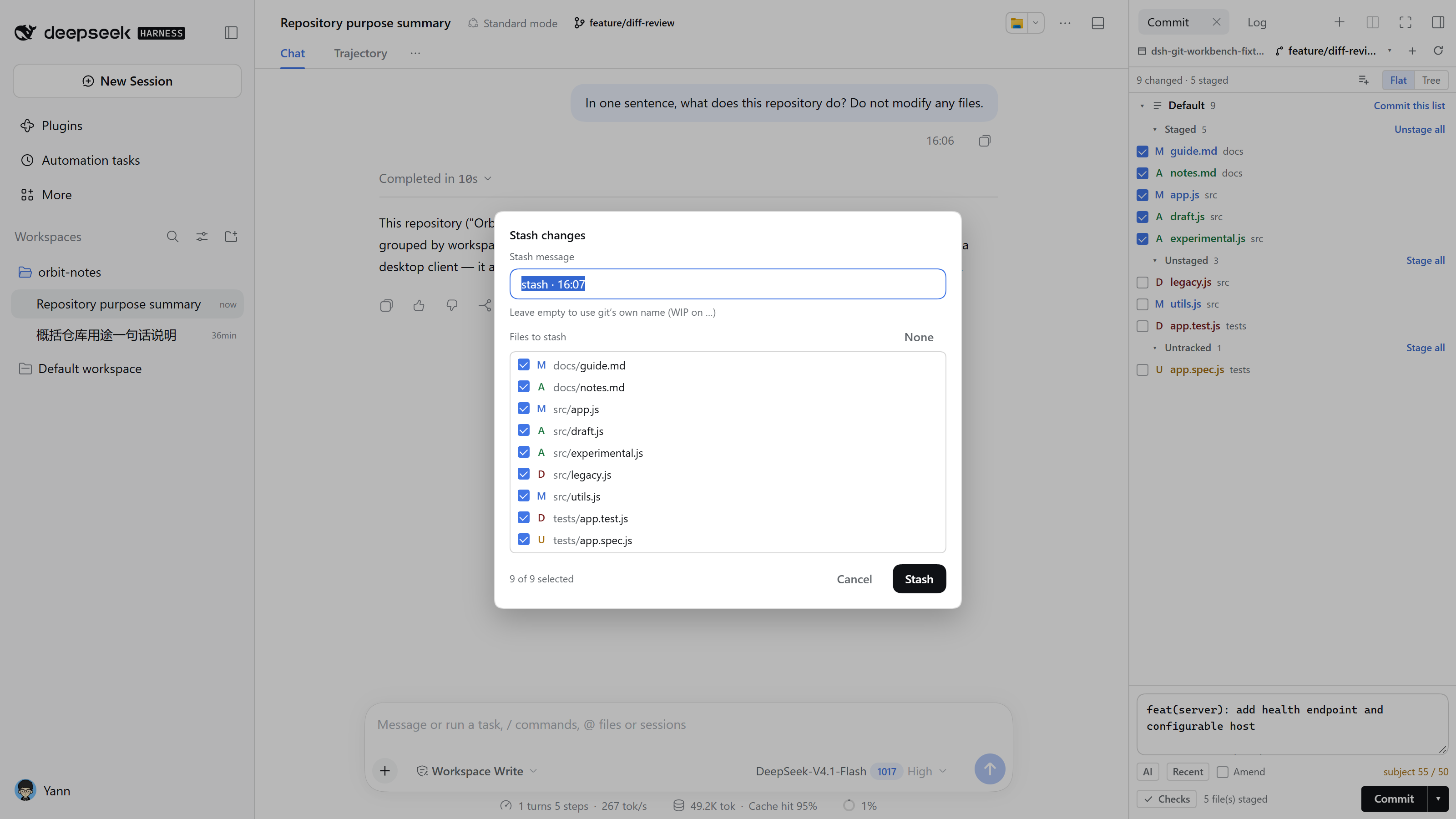 |
The Chinese-UI set is the same files with .zh before the extension, used by README.zh.md. The workbench follows the host theme and has no theme switch of its own, so dark mode needs no separate set.
Install
Requires git on PATH, Node ^22.19.0 || >=24.0.0, pnpm, and DSH 0.2.1-rc.2 or newer.
# install from npm
dsh plugin --profile web add @yann9/dsh-git-workbench

# or from a local checkout (link: symlinks, file: copies)
dsh plugin --profile web add link:<absolute path to this repo>

# the bundle layer is read at startup only
dsh web
Open the ?token=... URL printed by the server. The Commit and History tabs are available from the sidebar's + guide page, and the branch chip in the session header works out of the box.
If the profile does not register the bundle automatically (occasionally happens with link: / file: installs), add the entry yourself — same effect as plugin add:
"dsh": { "profile": { "bundles": ["@deepseek-ai/dsh-base", "@deepseek-ai/dsh-web-app", "@yann9/dsh-git-workbench"] } }
A file: install copies the code, so a change needs another add; use link: while developing — one restart is enough, at the price of maintaining that bundle entry yourself.
Upgrade and remove (also needs a dsh web restart):
dsh plugin --profile web add @yann9/dsh-git-workbench@latest
dsh plugin --profile web remove @yann9/dsh-git-workbench
/dsh-git/ serves JSON API and SSE only — there is no standalone page. See docs/api.md.
Configuration
Everything is editable in Settings → Plugins → Git workbench, or in the profile's cordis.patch.yml:
- insert:
    - id: git-workbench
      name: '@yann9/dsh-git-workbench'
      config:
        repoPath: ''                   # fallback repo when there is no session cwd
        maxLog: 400
        readOnly: false                # true = every write API returns 403
        branchPattern: 'session/{date}-{time}'
        confirmDirtySwitch: true
        diffFullFile: true
        diffWrap: true
        diffFoldThreshold: 8
        diffSideBySide: true
        listMode: 'last'               # 'tree' | 'flat' | 'last'
        commitLanguage: 'auto'         # 'auto' | 'zh' | 'en'
        llmProvider: ''                # empty: the route DSH has selected
        llmModel: ''                   # empty: that route's selected model
Unwritten keys take the defaults above. readOnly: true turns the workbench into a read-only review panel: staging, committing, branches, the network and conflict resolution are all disabled, and the HTTP write endpoints return 403 (except /config).
Highlights
- Staging — whole file, hunk (cropped patch →
git apply --cached), or individual lines; unstaging is equally precise. Commits always use the index. - Reading diffs — side-by-side / unified, dual line numbers, word-level highlights, ignore-whitespace (read-only), context folding,
‹ n/m ›file navigation andF7hunk navigation. - Committing —
Ctrl+Enter, AI draft,↑to recall previous messages, amend, changelists, and before-commit checks taken from the repo's ownpackage.jsonscripts. - History — DAG graph, sortable and resizable columns, group by branch/author/date, structured filters (
author:message:hash:tag:branch:date:), multi-select for batch cherry-pick / revert. - Rewriting history — interactive rebase (pick/squash/fixup/drop), reword, undo commit, cherry-pick, revert, soft/hard reset — all behind explicit confirmations.
- Branches & remotes — switch/create/rename,
↑N ↓Nahead-behind badges, set/unset upstream, compare, rebase onto, fetch/pull/push (Pick a remote on first push), manage remotes. - Conflicts & sequencer — separate unmerged group, three-way view with per-block choices or a hand-written merged result, status bar with continue/abort while a merge, cherry-pick or rebase is paused.
- Stash — name + select files (partial stash uses a temporary index so unrelated staged content is untouched), read-only preview, apply/pop/drop.
- Git console — every real argv, exit code, duration and output per repository; failures expand automatically.
- Empty directory — one-click
git initwithout touching existing files. - Bilingual — follows DSH's language preference (falling back to the browser language) and switches live; git's English refusals are localized rather than dumped into the UI.
The full 50+ item comparison against JetBrains is in docs/features.md.
Keyboard shortcuts
| Action | Shortcut / gesture |
|---|---|
| Refresh | F5 |
| Commit | Ctrl/Cmd + Enter |
| Focus the message box | Ctrl/Cmd + K |
| Draft the message with the model | Ctrl/Cmd + G |
| Previous / next file | Alt + ↑ / Alt + ↓, or the ‹ n/m › in the diff header |
| Previous / next hunk | Shift + F7 / F7, or the ↑ Hunk ↓ toolbar — walking off either end continues into the neighbouring file |
| Revert the current hunk | Ctrl + Alt + R (working-tree source, asks first) |
| Pick a file from the current set | click the 3 / 5 in the diff header |
| Back to the conversation from a diff | Esc, or the ✕ at the top right |
| Walk the history one commit at a time | ↑ / ↓, Home / End; Enter or a double-click opens the diff |
| Multi-select commits | Ctrl/⌘-click, Shift-click for a range, Ctrl+A for everything visible, Esc to clear |
| Recall a previous message in an empty box | ↑ / ↓ |
| Stage selected lines | click the + / − at the line head to select, then Stage selected lines |
Documentation
| Document | Contents |
|---|---|
| docs/features.md | The full item-by-item comparison against JetBrains, layout breakpoints, known limitations, roadmap |
| docs/api.md | Every /dsh-git/api endpoint, its parameters, caching and CSRF conventions, plus the 8 tools for the model |
| docs/architecture.md | The host / client split, DSH slots, state synchronization, localization, security model |
| docs/jetbrains-parity.md | Why it does not copy JetBrains, why there is no iframe, why read-only is a rendering path |
| docs/development.md | The development loop, tests, the dev server, screenshot conventions, the release checklist for GitHub / npm |
| CONTRIBUTING.md | The checks and conventions to follow before opening a PR |
| CHANGELOG.md | Version history |
Development
npm test                     # 137 tests against real git repositories

node scripts/dev-server.js <repo> 5178   # API only, no UI
No build step: host and client are plain ESM, so link: + restart is the whole loop. See docs/development.md.
Security
Every git call is spawn('git', argv) with no shell; writes are serialized; paths are validated against .. and option injection; cross-origin requests are rejected; readOnly: true blocks all writes; no credentials are ever collected and network operations never prompt (120 s timeout, GIT_TERMINAL_PROMPT=0). Details: docs/architecture.md.
Versioning
semver, with package.json, the CHANGELOG.md heading and the git tag (v0.1.0) always kept in sync. CI runs the test suite on Ubuntu and Windows across Node 22 / 24 — four jobs, all green before a merge.
Pushing a tag is the release: .github/workflows/release.yml gates on the same matrix, creates the GitHub Release with notes grouped by conventional commit type, and stages the tarball on npm through Trusted Publishing (OIDC — no token in the repository). A staged tarball is not installable until the maintainer approves it with 2FA, so every publish keeps its human check; the workflow checks the packed file list before the tarball leaves the machine. See docs/development.md for the workflow and the Trusted Publisher binding.