dsh-plugin-sets
ytclaw01/dsh-plugin-sets
Saves the Plugins page as named scenes of plugin bundles, MCP servers and skills, then applies a scene as a minimal diff with undo, a composer shortcut, and a refusal to switch while a chat is running.
インストール
dsh plugin --profile web add github:ytclaw01/dsh-plugin-setsREADME
DSH场景设置 · dsh-plugin-sets
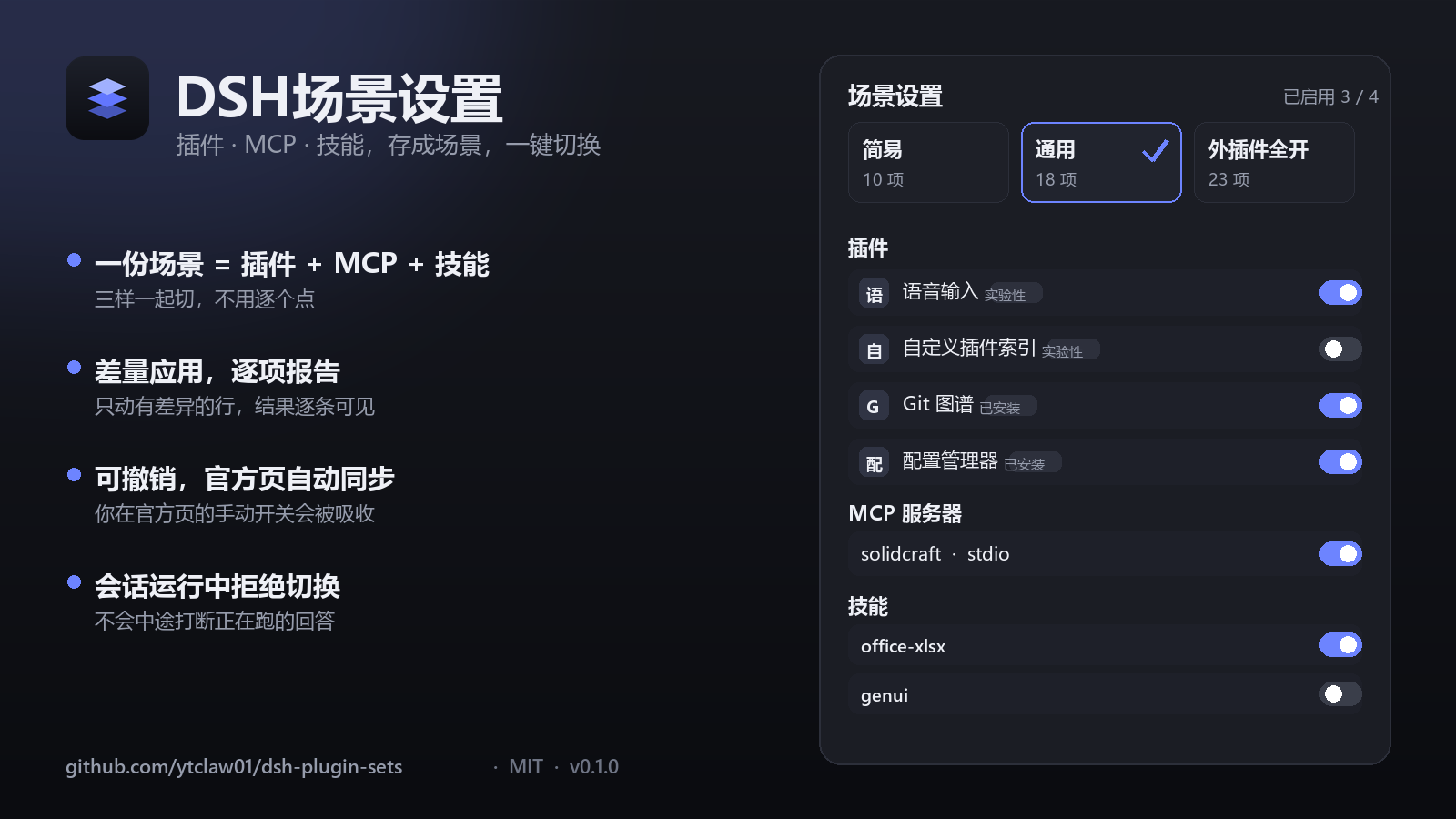
把官方「插件」页的启用状态存成一份份场景,一键切换;同一份场景里还带着 MCP 服务器与技能开关。
A DSH plugin that saves the official Plugins page state as named scenes — plugin bundles, MCP servers and skill switches together — and switches between them in one click.
- 插件包 / bundle:
dsh-plugin-sets - 入口 / entry: 设置 → DSH场景设置(
Settings → DSH scene settings) - 需要 / requires: DSH 桌面版或 Web 版(
dsh.bundle+dsh.client),在@deepseek-ai/dsh-desktop-runtime0.2.2-rc.3 上验证
中文
它做什么
一个场景 = 三样东西的快照:
- 插件:官方「插件」页里那些带开关的 bundle(内置插件配置 / 实验性插件 / 已安装插件,布局和顺序都照官方页来,包括「更多」展开和被官方隐藏的条目)
- MCP 服务器:
@deepseek-ai/dsh-mcp-client那几行(例如 SolidCraft),可以单独开关 - 技能:把某些技能彻底停用——不是藏起来,而是让模型和
/skill都拿不到
应用一个场景做的是差量:只改和当前状态不一致的那几行,逐项执行并逐项报告结果。
主要功能
- 场景卡片:新建 / 修改 / 复制 / 重命名 / 删除 / 应用,右键出菜单
- 输入框快捷键:新会话的输入框左侧有场景 chip,点开即选即应用
- 撤销上次应用:把最近一次应用前的 bundle、MCP、技能状态整体还原
- 跟随官方页:激活中的场景会一直跟官方页保持一致——你在官方页手动开关某行,这个改动会被吸进当前场景,两边不打架
- 会话保护:只要有会话正在跑(回合未结束),应用与撤销会被拒绝并提示,避免在回答中途把工具换掉
- 需要重启时给选择:某项改动必须重启 DSH 才生效时,可以「继续应用」或「停在这里」,之后再手动重启
- 中英跟随:界面语言跟随 DSH 自己的语言设置,不另设开关
安装
三种方式任选:
- 插件市场:设置 → 插件市场 → 搜索
dsh-plugin-sets - 命令行:
同一个包也发布在 npm(同名),可用dsh plugin add github:ytclaw01/dsh-plugin-setsnpm i dsh-plugin-sets获取源码或做版本校验;DSH 内的安装与启用仍建议用上面的 GitHub 地址 - 从源码:
Settings → 插件 → 添加插件,填本仓库地址;或本地目录用plugin_manager install_bundle
安装后到 设置 → DSH场景设置。
使用
- 「+新建场景」→ 在第 1 步「场景设置」里挑插件 → 第 2 步「MCP」挑服务器 → 第 3 步「技能」关掉不需要的
- 「保存」→ 回到场景卡片,点「应用场景」,确认差量后执行
- 日常切换:输入框左侧 chip 直接选;或右键卡片「应用场景」
数据与安全
- 唯一的持久化数据:
<DSH_HOME>/dsh-plugin-sets/scenes.json(默认~/.dsh/dsh-plugin-sets/scenes.json),原子写入 - 只提供本机回环接口
/api/plugin-sets/*,带同源 JSON 校验;不监听外网端口 - 改插件状态走 DSH 官方
pluginManager(写 profile 的 patch 覆盖),不修改任何第三方插件文件 - 停用技能用的是「影子 provider」:以更低的
rank重新登记同名技能并把modelInvocable/userInvocable置为 false;技能本体仍在磁盘上 - 无遥测、无外发请求、不需要任何 API key
已知限制
- 技能掩码依赖本插件的 host 半常驻:本插件崩溃时掩码会失效,被停用的技能会重新可用(fail-open,偏向「不会把技能永久搞坏」)
- 如果同时装了别的技能管理插件(例如
@michengai/dsh-skills-manager),两边都能改同一批技能;本插件用rank: 0优先,所以另一页的开关可能在视觉上「不生效」 - 只有 web UI 有设置页(
dsh.client.platform: web)
贡献
欢迎 issue / PR。代码结构很简单:
index.js— host 半:路由、场景存储、差量应用、技能影子 provider、会话运行检测client.js— client 半:设置页与输入框 chip(纯 React,不依赖 DSH 的客户端包)cordis.patch.yml— 让 DSH 装上它的 loader patch
English
What it does
A scene is a snapshot of three things:
- Plugins — the same bundle rows the official Plugins page shows (builtin config / experimental with its “More” list / installed, same grouping and ordering)
- MCP servers — rows of
@deepseek-ai/dsh-mcp-client, switchable per server - Skills — skills that are truly unusable: neither the model nor
/skillcan resolve them
Applying a scene is a diff: only rows that differ from the live state are touched, one by one, each with its own result.
Features
- Scene cards: create / edit / duplicate / rename / delete / apply (right-click for the menu)
- A composer chip that applies a scene before the first message
- Undo the last apply (plugins, MCP and skills restored together)
- The active scene stays identical to the official page: manual toggles there are absorbed into it
- Applies are refused while any chat is running, so a running answer never loses its tools mid-step
- When a change needs a DSH restart you choose: continue applying, or stop here
- UI language follows DSH's own locale setting; no separate toggle
Install
dsh plugin add github:ytclaw01/dsh-plugin-sets
The same package is also published to npm under the same name (npm i dsh-plugin-sets) for source access and version checks; installing inside DSH is still best done from the GitHub address above.
Alternatively install it from the plugin market, or point Settings → Plugins → Add plugin at this repository. Then open Settings → DSH scene settings.
Data and safety
- The only persistent state is
<DSH_HOME>/dsh-plugin-sets/scenes.json, written atomically - Loopback-only HTTP routes (
/api/plugin-sets/*) with same-origin JSON checks; nothing is exposed to the network - Plugin state is changed through DSH's own
pluginManager(profile patch overrides); no third-party plugin files are ever modified - Disabled skills are masked by a shadow provider (
modelInvocable: false,userInvocable: false,rank: 0); the skill files stay on disk - No telemetry, no outbound requests, no API keys
Known limitations
- The skill mask lives in this plugin's host half: if it crashes, masks disappear and the skills become usable again (fail-open)
- If another skill manager (e.g.
@michengai/dsh-skills-manager) is installed, both can toggle the same skills; this plugin wins withrank: 0, which can make the other page's switch look ineffective - The settings page is web-only (
dsh.client.platform: web)
Contributing
Issues and pull requests are welcome. Layout:
index.js— host half: routes, scene store, diff apply, skill shadow provider, running-session guardclient.js— client half: settings page and composer chip (plain React, no DSH client packages)cordis.patch.yml— loader patch that installs it
致谢 / Thanks
欢迎其他用户一起共同完善此插件。我可以添加协同维护者或者捐赠给开源组织,谢谢。
Contributions are welcome — I'm happy to add co-maintainers or donate this project to an open-source organization. Thank you.
License
MIT