dsh-github-trending-masonry
zhang-eli/dsh-github-trending-masonry
GitHub Trending in the DSH sidebar: daily, weekly and monthly boards with category chips, model-written project intros in the UI language, and one-click starring that syncs to a GitHub account or stays in a local collection. It reads github.com, api.github.com and raw.githubusercontent.com, sends README excerpts to your current model to write the introductions and text to Google Translate when a translation is needed, and stars with the GitHub token you connect (or GITHUB_TOKEN / GH_TOKEN from the environment); its HTTP routes (/dsh-github-trending-masonry/...) have no DSH access check.
インストール
dsh plugin --profile web add github:zhang-eli/dsh-github-trending-masonryREADME
GitHub Trending (DSH plugin)
Browse GitHub Trending's daily, weekly and monthly boards in a masonry layout, with one-click starring that syncs to GitHub.
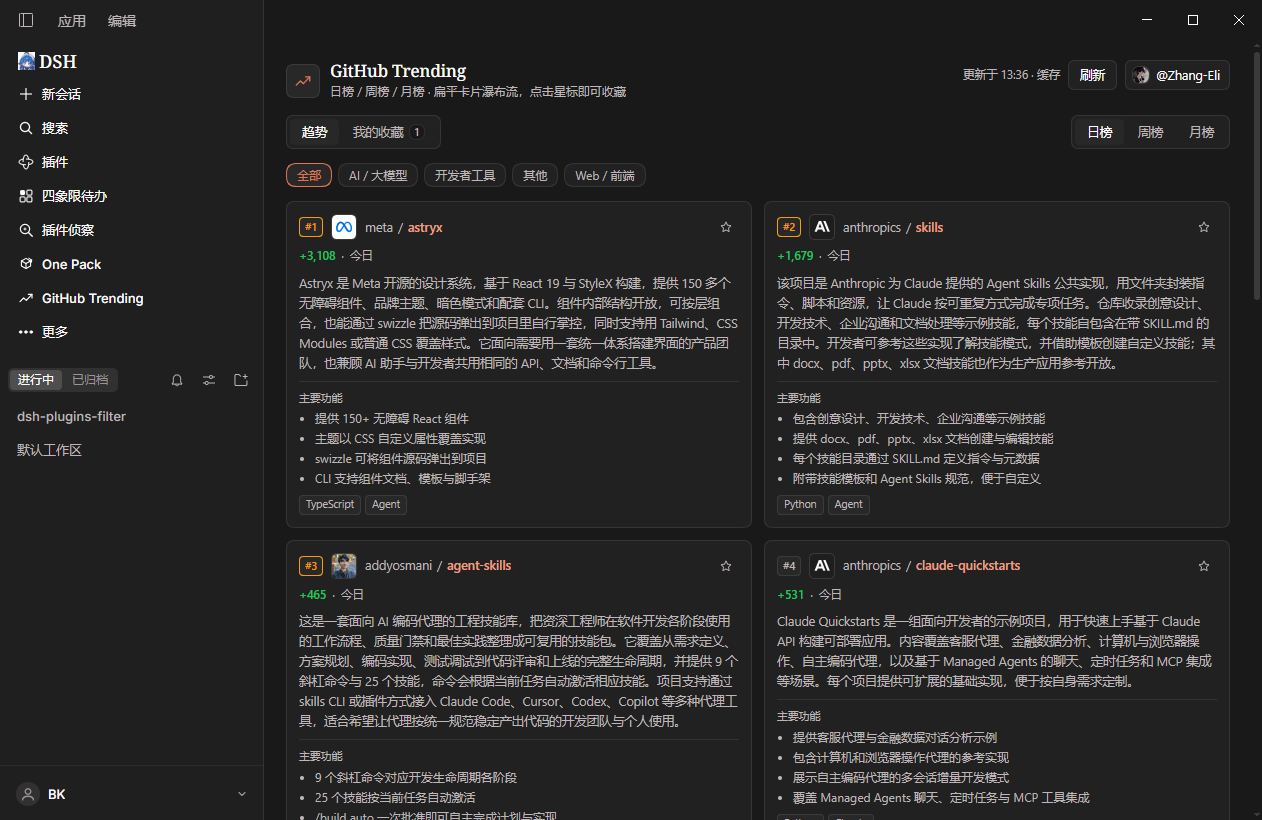
What it does
- Daily / weekly / monthly boards: GitHub Trending's three time windows, one tab switch apart.
- A readable introduction for every project: the Harness model (your current default model, no extra API key) writes a fluent 2-4 sentence introduction plus 3-4 highlight bullets that explain what the project is and what it solves — written for readers, not copied from the README.
- Speaks your UI language: a Chinese panel gets Chinese introductions, an English panel gets English ones, so cards match the interface around them.
- Masonry cards: responsive columns where a longer introduction simply makes a taller card, and the whole board scrolls as one page.
- Instant tab switches: once the visible board loads, the other two are readied in the background; reopening the panel paints the last content immediately, and the refresh button is there when you want live data.
- One-click star: connect a GitHub account (Personal Access Token) and the star lands on your real account; without an account it is kept in "我的收藏" and survives restarts.
- Only what matters on a card: the introduction, the tech stack, the period tag and the category chips.
Install
dsh plugin --profile desktop add dsh-github-trending-masonry
Restart DSH, then click the trending icon in the sidebar icon list to open the panel.
Using it
- Click the trending icon in the sidebar → the panel opens in the main column.
- Switch 日榜 / 周榜 / 月榜 at the top, filter by the category chips, click a card's top-right star to star the project.
- 我的收藏 lists everything you starred, newest first: a
GitHubbadge means it was synced to your real account, a本地badge means it lives only on this machine. - The account button in the header lets you connect GitHub: paste a Personal Access Token (a classic token with the
public_reposcope is enough to star public repositories), and from then on stars go straight to your GitHub account. Everything works without connecting too — the collection then stays local, and disconnecting never deletes it.
Releases
0.1.0 — first public release
- Daily / weekly / monthly boards, masonry card layout, category filtering.
- Model-written introductions: a 2-4 sentence blurb plus 3-4 highlights, in your DSH UI language, cached per project.
- One-click star: synced to a connected GitHub account, or kept in "我的收藏" without one.
- Background prefetch and local caching: reopen the panel instantly, refresh for live data.
Detailed changes for later versions live in CHANGELOG.md.
Options
You normally do not need any of this. To change something, give the plugin a
config in the profile's cordis.patch.yml:
- id: github-trending-masonry
  name: dsh-github-trending-masonry
  config:
    ttlMinutes: 30        # how long a board is cached, 5..1440, default 30 min
    summaries: true       # model-written intros; false = show translated README text
    summaryProvider: ''   # use a different model route
    summaryModel: ''      # use a different model
    summaryConcurrency: 6 # parallel model calls, 1..8
    summaryTimeoutMs: 60000
    dataDir: ''           # where caches and the collection are stored
    token: ''             # pin a token here instead of connecting in the UI
When no account is connected in the UI, the GITHUB_TOKEN / GH_TOKEN
environment variables are used as well.
Data & privacy
- Board caches, introduction caches, your collection and the account metadata
all live on this machine, under
plugin-data/github-trending-masonry/in the profile directory. - The GitHub token is stored in the DSH credentials service; if that service is unavailable it falls back to an owner-only JSON file on this machine. The token is never sent anywhere except GitHub itself.
- Introductions are generated through DSH's own model service, so you do not need an API key of your own.
Good to know
- The first time a board loads, the model writes introductions, which costs a
small amount of tokens (11-25 per board, and only for projects it has not seen
yet); results are cached. Set
summaries: falseto turn this off entirely. - The plugin only tracks stars it issued itself. Repositories you starred on GitHub before will show as unstarred on their cards — click once and it is correct again, and starring twice is harmless.
- If GitHub changes the Trending markup, the panel keeps showing the last cached board and recovers automatically once parsing is updated.
The approach to reading GitHub Trending was inspired by the MIT-licensed
@royalsan/dsh-github-trending plugin; this plugin is an independent
implementation with its own UI, data model and caching.