dsh-theme-whalegirl
zhoucourier/dsh-theme-whalegirl
DSH Web UI 用の Whale Girl ライトテーマ。DreamSkin スキンパッケージから移植:ソースパレットから導出された完全な --dsw-* トークン再マッピングを伴う 1 つのネイティブランタイムテーマを登録し、アートワークをフロステッド UI の背後にアンビエントな固定壁紙として重ね、外観設定のリセットに対してテーマを固定します。
インストール
dsh plugin --profile web add github:zhoucourier/dsh-theme-whalegirlREADME
dsh-theme-whalegirl
DeepSeek-鲸鱼娘 (Whale Girl) theme for the DeepSeek Harness (DSH) Web UI — ported from the DreamSkin skin package ver_cb557ececaa5de3f3dbe.
English | 中文
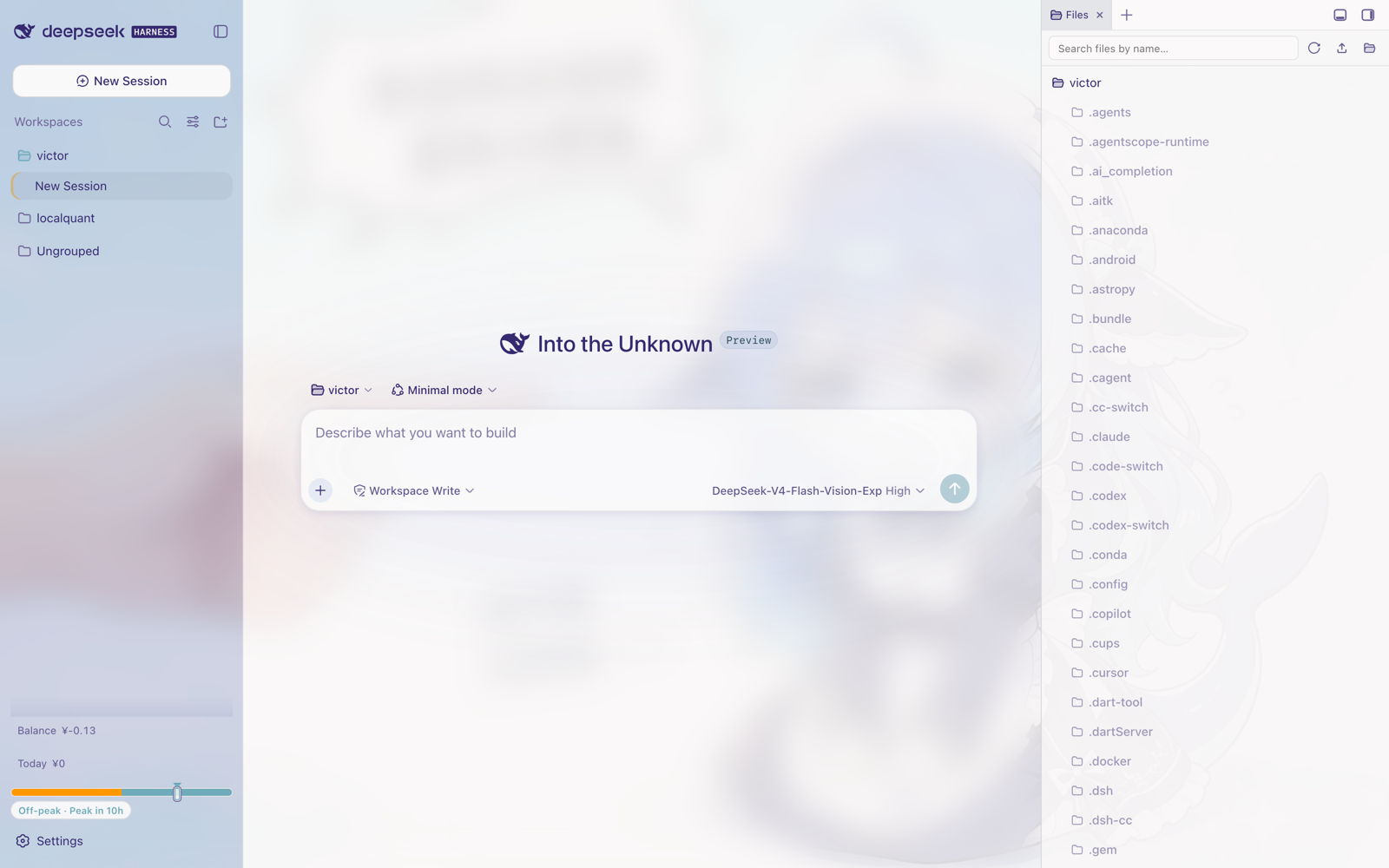
What it does
- Full token remap — registers one light theme (
deepseek-whalegirl) into DSH's native theme runtime with a complete--dsw-*dictionary (174 tokens): every surface, label, border, button, markdown block, scrollbar and state color derives from the DreamSkin palette. - Lightly frosted by default — the whale-girl artwork sits as a fixed backdrop behind the UI, but since 0.2.0 the frosted glass is drastically toned down: app-frame blur drops from 18px to 4px and surfaces are far more opaque, keeping just a hint of the artwork.
- User-adjustable glass & wallpaper — frame blur, surface/bubble translucency, wallpaper veil, wallpaper visibility & blur and the composer focus glow are adjustable live from the plugin's card on the settings page (stored per browser), with three presets: 清爽玻璃 / DreamSkin 原味 / 纯净实底.
- DreamSkin safe-css intent — rounded sidebar, coffee-accent composer focus ring (toggleable), sand selection color, soft violet-tinted shadows.
- Native integration — the theme pins itself through
theme.setTheme(); if the built-in Appearance scope resets the preference to system, the plugin re-asserts it. An explicit light/dark pick you make in Appearance wins until the plugin is toggled off/on again.
Palette anchors taken from the source skin:
| Role | Source value | Used for |
|---|---|---|
| text | #352970 | primary labels, ink ladder |
| highlight | #455b78 | brand & primary buttons |
| accent | #7a4e29 | composer focus ring |
| accentAlt | #ceb683 | active nav accent, selection |
| secondary | #85c1cc | blue/info ladder |
| panel / panelAlt | #abb4cf / #c3cee4 | periwinkle sidebar glass |
| background | #bd9999 | rose paper tint, bubbles |
Install
From the dsh-market plugin's Themes tab (search "whalegirl"), or from a terminal:
# prebuilt tarball from GitHub Releases (no build step)
dsh plugin --profile web add -w https://github.com/ZHOUcourier/dsh-theme-whalegirl/releases/latest/download/dsh-theme-whalegirl.tgz
Other sources:
# git
dsh plugin --profile web add -w github:ZHOUcourier/dsh-theme-whalegirl

# npm
dsh plugin --profile web add -w dsh-theme-whalegirl

# local checkout
dsh plugin --profile web add -w link:/path/to/dsh-theme-whalegirl
Then restart the profile:
dsh --profile web
The theme applies immediately once the plugin mounts. To switch away, pick a preference in Settings → General → Appearance (the plugin steps aside); to come back, toggle the plugin off/on in the market Themes tab.
Customize
Open Settings → the plugins page and find the 「鲸鱼娘 · 玻璃与壁纸」 card. Every change applies instantly; values are stored in this browser's localStorage (dsh-whalegirl.prefs.v1), not in the profile.
| Control | Range | Default | Effect |
|---|---|---|---|
| Presets | — | 清爽玻璃 | One-click 清爽玻璃 / DreamSkin 原味 / 纯净实底 |
| 主框背景模糊 | 0–24px | 4px | App-frame backdrop blur radius (the old port was hard-coded 18px) |
| 表面透明度 | 0–100% | 45% | 0 = fully opaque surfaces, 100 = original translucent design |
| 用户气泡透明度 | 0–100% | 60% | Translucency of the dusty-rose user bubbles |
| 壁纸遮罩浓度 | 0–100% | 55% | Strength of the paper veil over the artwork |
| 显示环境壁纸 | on/off | on | Hides artwork + veil for a plain paper background |
| 壁纸模糊 | 0–16px | 0px | Softens the artwork itself |
| 输入框咖啡色聚焦光晕 | on/off | on | The DreamSkin composer focus ring |
恢复默认 restores the defaults above. Upgrading from 0.1.x starts from the new (lighter) defaults; nothing is migrated.
Uninstall:
dsh plugin --profile web remove dsh-theme-whalegirl
Compatibility
- Requires a DSH web client profile (
dsh.client.platform: "web", client bundle viaexports["./client"]). - Light appearance only — faithful to the source skin, which ships one light palette.
- Works alongside other plugins; nothing outside the gated body attribute
data-dsh-whalegirlis touched when disabled.
Development
npm run build   # wrap src/client.js into lib/client.js + embed assets/background.jpg
npm test        # smoke test: register/guard/dispose against a mocked DOM
npm run check   # verify lib/ matches src/ (CI)
The build is dependency-free (plain Node). lib/ is committed so installs never need a build step.
Credits
- Theme artwork & palette: DeepSeek-鲸鱼娘 on DreamSkin.
- Plugin shape follows the official
dsh.bundlemanifest convention.
License
MIT. The bundled artwork comes from the DreamSkin package linked above; all rights of the original artwork remain with its author.