dsh-settings-drawer
zizhongfeiyang/dsh-settings-drawer
DeepSeek Harness 設定の左ナビに表示する項目を選択可能にします。
インストール
dsh plugin --profile web add github:zizhongfeiyang/dsh-settings-drawerREADME
Settings Drawer (dsh-settings-drawer)
A DeepSeek Harness web UI plugin that lets you choose which settings sections, plugin tabs, and plugin configuration entries appear.
Unchecking an item hides its entry immediately. Core pages (General, Models, Plugins, Agent Presets, Account) stay visible by default. Hiding an entry does not disable its plugin.
Preview
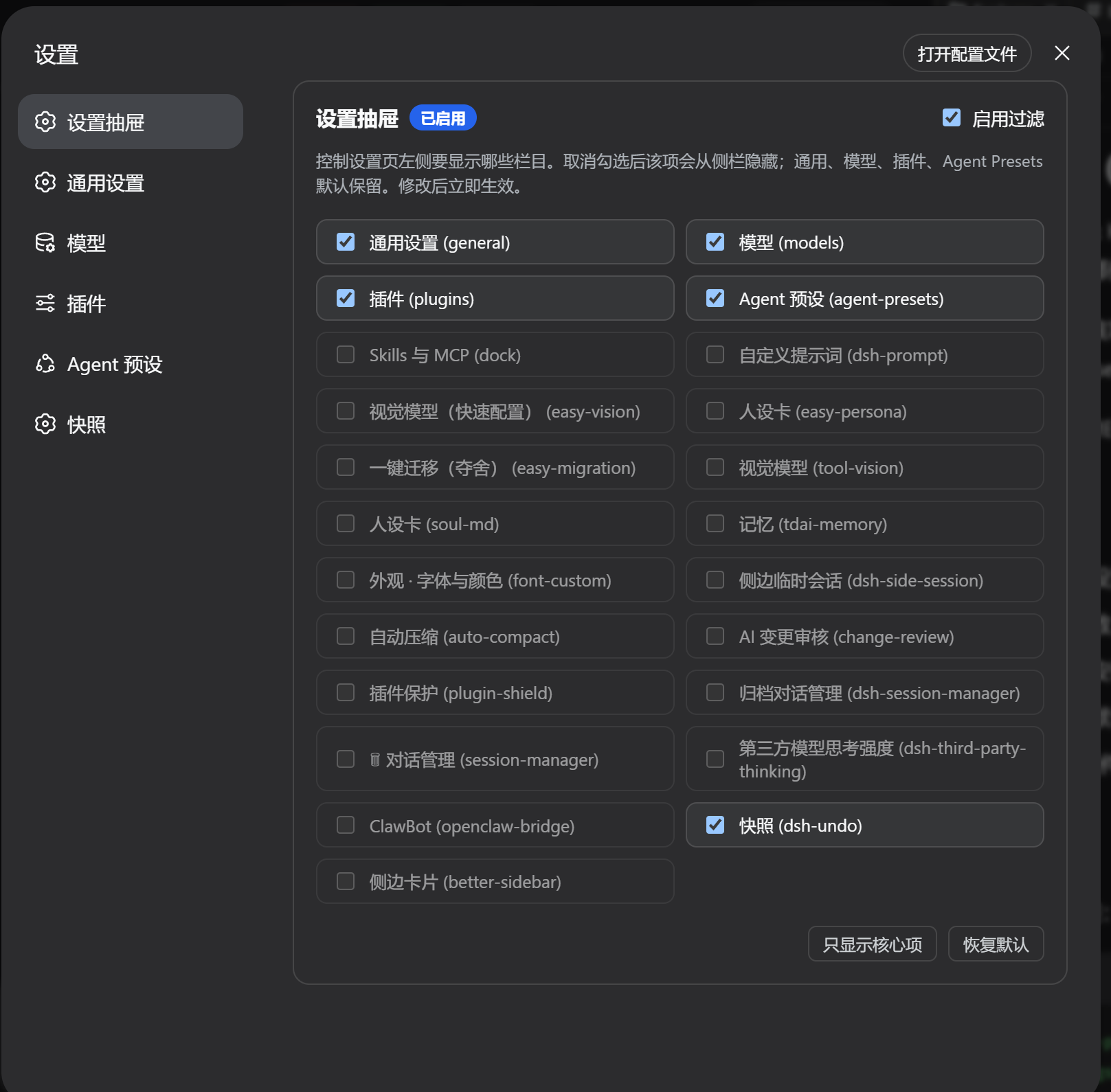
The screenshot shows 1.2.0; 1.3.0 groups the live entries by surface.
Features
- Hide or show any settings section from the left navigation.
- Changes apply immediately and persist in your browser.
- Discovers live
settings.section,settings.plugins.tab, andplugins.itemcontributions, including new DSH 0.2 plugin configuration entries. - Removed plugins no longer linger: the list only shows currently registered sections.
- Manual refresh (
⟳) re-syncs the list without deleting preferences for temporarily unloaded plugins. - Core settings pages, including Account, stay visible by default; new plugin tabs and configuration entries also start visible.
- Disabling or unloading the drawer restores the original registry and releases subscriptions.
- No dependency on generated CSS class names or DOM mutation observers.
- Pure client-side UI plugin — no extra services, no network calls.
Install
From GitHub:
dsh plugin --profile web add github:zizhongfeiyang/dsh-settings-drawer
Official DSH 0.2 Desktop uses the desktop profile. Install the bundled dsh command through the app's Manage dsh command menu, initialize Desktop by opening it once, then fully quit the app before running:
dsh plugin --profile desktop add github:zizhongfeiyang/dsh-settings-drawer
Use Desktop's bundled command for that profile; an npm-installed dsh cannot manage it. Older EAC distributions may still use web-desktop; select the profile your distribution actually runs. See the official Desktop command instructions.
From a locally packed or release tarball:
dsh plugin --profile web add ./dsh-settings-drawer-1.3.0.tgz
For Desktop tarballs, use --profile desktop with the bundled command. After installing, restart Desktop or the Web service and reload the page. When upgrading from 1.2.0, a full page reload or app restart is required to remove that version's unmanaged observer and registry wrapper.
Usage
- Open Settings.
- Open 设置抽屉 (Settings Drawer) at the top of the left nav.
- Uncheck items in 设置栏目, 插件标签, or 插件配置项. The corresponding entry disappears immediately. Groups with no registered entries are omitted.
- 只显示核心项 retains the core sections, the
allplugin tab, and the built-in Shell, Agent Loop, Subagent, and Web Search configuration entries. 恢复默认 clears saved overrides.
Configuration
| Item | Value |
|---|---|
| npm package name | dsh-settings-drawer |
| UI display name | 设置抽屉 / Settings Drawer |
| localStorage key | dsh_settings_drawer_config_v2 |
| Default visible sections | General, Models, Plugins, Agent Presets, Account, and the legacy dock / dsh-prompt entries |
| New plugin surfaces | Visible by default; independent visiblePluginTabs and visiblePluginItems maps |
1.2.0's enableDrawer and visibleCards values are retained under the same storage key. Explicit choices, including hiding a core page, are preserved. Unregistered entries disappear from the list without losing saved preferences.
Tested with
- 1.3.0: automated integration checks using the published DSH 0.2.0-rc.2 SlotRegistry/Cordis and React components, plus the published 0.1.0-rc.7 SlotCore contract.
- Historical 1.2.0 manual checks: DSH 0.1.0-rc.6 / rc.7, EAC 3.0.1 / 4.1.0, and Chrome-based Windows Web UI.
The 1.3.0 tests exercise registration, filtering, configuration migration, live updates, storage events, and unload/re-enable behavior. They do not boot a complete Desktop app or run a browser end-to-end test.
Development
npm ci --legacy-peer-deps --ignore-scripts
npm run check
npm test
npm pack
The legacy peer option is needed only for the two pinned test fixtures' different DSH peer contracts. Test dependencies are development-only and are not bundled into the installed plugin.
The package contains:
lib/index.js— host entrylib/client.js— browser clientcordis.patch.yml— bundle patchREADME.md,README.zh.md
Feedback
Found a bug or have a feature request? Open an issue and use the provided templates.
License
MIT