dsh-android
zseven-w/dsh-android
会話の中にあるライブ Android デバイス — エミュレータまたは USB 接続 phone を adb 経由で完全制御: ストリーミング、Gradle build/run、UI-tree または OCR での操作、logcat、process と memory、さらに 3 ボタンのナビゲーションパネルを含む 20 の agent tools。
インストール
dsh plugin --profile web add github:zseven-w/dsh-androidREADME

DSH Android
A live Android device inside a DeepSeek Harness conversation — emulator or USB phone, driven entirely through adb.
20 agent tools • in-process live stream, no external helper • three-button navigation panel • Gradle build & run • Vision OCR
npm: @zseven-w/dsh-android · Current plugin release: 0.1.0-rc.8 · Tested with DSH 0.1.5-rc.1
English · 简体中文 · 繁體中文 · 日本語 · 한국어 · Français · Español · Deutsch · Português · Русский · हिन्दी · Türkçe · ไทย · Tiếng Việt · Bahasa Indonesia
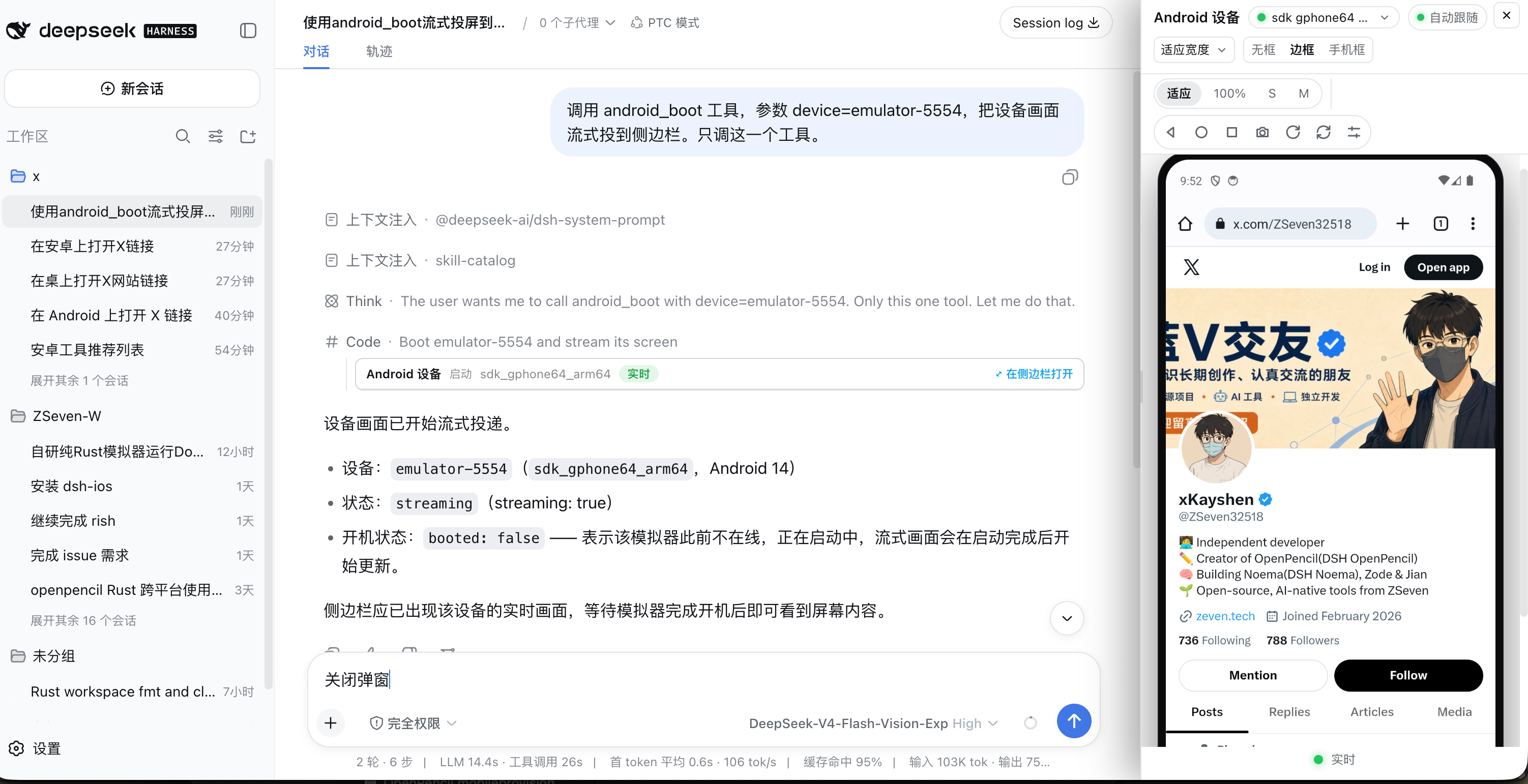
An Android device streamed and controlled from inside a DSH conversation — the agent's tool call in the center, the live device panel on the right
Why DSH Android
DSH Android gives the agent a real Android device inside the conversation — and gives you the pixels. The agent can start a stream on an emulator or a USB-connected phone, build and install a Gradle project, drive the UI by resource-id/text or by OCR, read logcat, and inspect processes and memory, while a live stream of the device renders in a persistent sidebar panel where you can tap, drag, rotate, and press Back / Home / Recents directly on the video. No image blocks and no screen-recording files: visual bytes reach the UI only through signed, expiring URLs served by the DSH webserver.
There is exactly one code path. adb devices -l reports a serial, and that serial is a device's only identity — emulator-5554, a USB serial, or an ip:port target all behave identically. The plugin is bound to no emulator product (AVD, Genymotion, WSA, a cloud device farm), and there is no simulator/real-device split to reason about.
| 📱 Live device in the conversation | A multipart/x-mixed-replace PNG stream produced in-process and served straight from the latest-frame buffer through signed /_dsh/dsh-android/* routes. |
| 🔌 No external stream helper, no inner port | One persistent adb exec-out child runs while :; do screencap -p; done; the host splits the concatenated PNGs into frames itself. There is no loopback stream server to proxy, no port range to manage, and nothing to adopt after an ungraceful exit. |
| 🧩 One adb code path | Emulators and phones are the same thing to adb and to this plugin. No simctl/WebDriverAgent dual stack, no build-and-trust dance before a physical device works. |
| 🛠️ 20 agent tools | Devices, boot/shutdown, screenshot, interact, Gradle build & run, app listing/launching, uiautomator UI tree + tap-by-element, list/feed row actions, Vision OCR find/tap/wait, logcat, processes, ANR/crash backtrace, meminfo, app info. |
| 👆 Three-button navigation panel | Tap and drag on the live video; a toolbar with ◁ Back · ○ Home · □ Recents plus rotate, screenshot, and refresh; a device menu for the notification shade, quick settings, lock, wake, and the assistant. |
| 🖼️ Native multimodal | On an image-capable model every capture tool (screenshot, interact, tap_element, tap_text, tap_row) returns the screenshot ITSELF as an image block — the model sees the screen directly. OCR stays for pixel-precise text taps and text-only routes; text-only models keep the plain JSON summary. |
| 🔐 Signed loopback-only routes | Every route requires a loopback peer, a loopback Host (DNS rebinding rejected), and Fetch-Metadata/Origin checks — before any capability is consulted. HMAC-SHA256 capabilities expire within 10 minutes. |
| 🔍 Semantic + visual automation | android_ui_tree dumps the uiautomator hierarchy and android_tap_element taps by resource-id, text, or content-description; when the tree is empty or the text is baked into an image, android_find_text / android_tap_text OCR the screen instead of guessing coordinates. |
Tools
All 20 tools are registered on every host and return plain JSON — visual bytes reach the UI only through presentationMeta + signed routes, never as image blocks. When adb cannot be resolved the tools stay registered and every call fails with an explanatory error naming the fix.
Coordinates are normalized 0..1 of the streamed frame everywhere. The frame follows the display rotation (a landscape app streams 2400×1080 on a 1080×2400 device) and input tap shares that same space, so no client-side rotation math exists anywhere in this plugin.
Core tools
| Tool | What it does | Key parameters |
|---|---|---|
android_devices | List every device adb devices -l reports (serial, state, emulator/physical, model, Android version, API level, AVD name) plus the machine's AVD names under avds. Use it to discover the serial the other tools take. A failed enumeration throws instead of returning an empty list. | — |
android_boot | Start the live stream. Pass an ONLINE serial to stream it immediately, or an AVD name to launch that emulator first and stream it once it finishes booting (minutes on a cold start). The stream stays alive for the conversation so the panel can show the device live. | device (required — a serial or an AVD name) |
android_shutdown | Shut an emulator down (adb emu kill) and stop the stream when it targets that device. A physical device is refused with the reason: adb cannot power off a phone. | device |
android_screenshot | Capture a PNG and return a small JSON summary (path, bytes, dimensions, device); the image renders in the card and the panel, never as an image block. | device (optional — streamed device, else the only online one) |
android_interact | Interact with the streamed device: tap at normalized 0..1 coordinates, type text, press a navigation or hardware button (back, home, recents, power, volume_up, volume_down, menu, enter, delete), send a swipe gesture, or scroll. After the action settles (~300 ms) a fresh screenshot shows the effect. | action (required — tap/type/button/gesture/scroll), x/y, text, name, json, device |
android_list_apps | List the packages installed on the device (pm list packages), with the version name from dumpsys package and a human label when one is resolvable — a third-party package name cannot be guessed, so list it or pass name to android_launch_app. | device, query (case-insensitive substring, CJK included), include_system (default false) |
android_launch_app | Launch an installed app by packageName, or by name (a case-insensitive label substring resolved through the same listing). Exactly one of the two. relaunch force-stops the app first. | packageName or name (exactly one), device, relaunch |
android_build_run | Build a Gradle project (./gradlew assembleDebug), install the resulting debug APK (adb install -r), and launch it. Takes minutes for a full build; on failure the result carries the tail of the Gradle error output. | projectPath (required), device |
UI-tree and row tools (uiautomator)
| Tool | What it does | Key parameters |
|---|---|---|
android_ui_tree | Dump the foreground app's uiautomator hierarchy as nodes — type (the class tail), text, contentDesc, resourceId, bounds in pixels, enabled, focused — capped at ~40 KB (the deepest levels are pruned and truncated is set). | device, max_depth, filter (case-insensitive substring over text/content-description/resource-id) |
android_tap_element | Tap an element by identity — resource_id matches the node's resource-id; text matches its text or content-description. Exact match first, then case-insensitive substring; nested duplicates collapse to one target and an ambiguous match lists up to 8 candidates instead of picking one. Disabled elements are refused. The tap lands on the element center, then a ~300 ms screenshot shows the effect; pass expect_text / expect_gone and the tap plus its verification become one round trip. | device, resource_id, text, expect_text, expect_gone |
android_ui_rows | Read a list/feed screen (RecyclerView and friends) as ROWS instead of a raw tree: repeated same-shaped children become rows carrying an index, a pixel frame, the aggregated label, and the counters parsed out of that label (number + classifier token, Chinese or English — no app vocabulary is hardcoded). Counter keys round-trip: pass one exactly as listed to android_tap_row.expect_count. | device, max_depth |
android_tap_row | Tap at a relative position inside one visible row (index from android_ui_rows; x/y as fractions of that row's frame, default 0.5 = center). The frame comes from a FRESH tree read, so no absolute coordinates are guessed, and an out-of-range index FAILS rather than clamping. With expect_count={key, delta} the tool re-reads the row after ~800 ms and verifies the counter moved by exactly ±1; an unknown key REFUSES the tap before it happens. | device, index (required), x, y, expect_count ({key, delta}) |
OCR, logs, and debug tools
| Tool | What it does | Key parameters |
|---|---|---|
android_find_text | OCR the CURRENT screen with the plugin-compiled Vision helper (accurate recognition, zh-Hans + en-US). Use it when the UI tree is empty or degenerate, for text rendered as graphics (badge counts, prices baked into images), or to independently verify what is on screen. Returns {device, size, items:[{text, confidence, rect}]} where rects are pixel boxes with a top-left origin, confidence-sorted and capped at ~40 KB. macOS host only. | device, query (case-insensitive substring), min_confidence (default 0.3) |
android_tap_text | OCR the CURRENT screen and tap the center of the best text match — the same exact → contains → candidate-list rules as android_tap_element, for text the UI tree cannot see. The matched pixel center is normalized against the frame size and sent as a tap; after ~300 ms a fresh screenshot shows the effect. macOS host only. | device, query (required), min_confidence, expect_text, expect_gone |
android_wait_for | Wait until text appears or disappears, polling the same capture + OCR pipeline every 600 ms until the condition holds or the timeout expires (default 8 s, max 60 s). A timeout is a normal matched:false answer, never an error. macOS host only. | device, text (required), mode (appear/disappear), timeout_ms, min_confidence |
android_logs | Read what the device logs: snapshot (logcat -d -v time over a recent window, default 2m) or follow (a bounded live capture for duration_seconds, default 10, max 60 — never a hanging stream). Filter to one app with bundle_id (the Android package name, resolved to its pid). Output is capped at ~300 lines / 30 KB with a narrowing hint. | device, mode (snapshot/follow), duration, duration_seconds, bundle_id, grep |
android_processes | List the device's running processes (ps -A) as {pid, name} — the pid source for android_backtrace. | device, filter (case-insensitive substring over the process name) |
android_backtrace | Ask the process to dump its stacks (kill -3) and read the resulting ANR trace from /data/anr/. Most non-rooted devices refuse that directory, so the tool degrades to the crash buffer (logcat -b crash -d) and reports honestly which engine answered and what it cannot see. | device, pid or bundle_id |
android_meminfo | Parse dumpsys meminfo <package>: total PSS, the Java/native/graphics split, and the top categories — the Android answer to a leak summary. | device, bundle_id (required) |
android_app_info | Installed-app facts from dumpsys package <package>: version name and code, data directory, code path, first-install time, and the system flag. A missing app returns installed: false plus a note naming android_list_apps — it does not throw. | device, bundle_id (required) |
Display surfaces
- Sidebar panel. The live view lives in a persistent right-hand panel (a fixed dock that pushes the conversation aside, or a centered overlay on narrow viewports). It renders the live PNG stream and accepts click-to-tap and drag-to-gesture directly on the video, with a toolbar carrying ◁ Back, ○ Home, □ Recents, rotate, screenshot, and refresh. A device menu runs the five device-level actions (notification shade, quick settings, lock, wake, assistant). The device picker lists every adb device in ONE list, grouped by kind, with offline AVDs shown as a hint pointing at
android_bootrather than a boot-on-click. Size modes and frame styles (frameless / bezel / phone shell) work as in the iOS twin; the panel adapts its aspect ratio from the frame's own natural size, so a rotation needs no configuration. - Compact conversation cards. Tool results render as one-line cards with no inline imagery: the device name, an action sub-label, a status badge, and an "open in sidebar" cue. Clicking the row opens the panel.
- Status capsule above the input. While the panel is closed and a stream is online, a small pill appears above the composer and opens the panel when clicked.
- Standard mode and Code Mode. Standard sessions use the host-projected
presentationMeta; nested Code Mode dispatches carry no meta, so the client reconstructs the identical meta from the durable result JSON — the panel, the cards, and the capsule work in both.
Security
- The browser never talks to adb, and there is no inner port to talk to. The stream is produced in this process and served from memory; every byte crosses the DSH webserver origin through plugin-owned
/_dsh/dsh-android/*routes:/stream/<token>(live multipart PNG),/screenshot/<token>(cached PNG), plus/grant,/switch-device,/devices,/capture,/status,/control, and/device-action. This is a strictly smaller attack surface than a proxied loopback stream server. - A triple loopback fence, applied before any capability is read. The transport peer must be a loopback address, the
Hostheader must name a loopback authority (so a DNS-rebindingHostis rejected), and Fetch-Metadata/Originmust be same-origin. Host and Origin are caller-controlled data and are never trusted on their own. - HMAC-SHA256 capabilities expiring within 10 minutes, formatted
base64url(payload).base64url(mac)and signed with a 32-byte per-DSH-home key (<DSH_HOME>/cache/dsh-android/stream-access.key, mode 0600, created atomically). A capability minted for one device stops working the moment another device takes the stream slot, and a screenshot capability cannot be replayed against the stream route. - The screenshot route serves exactly one directory. Paths are walked with
lstat(any symbolic link is refused), finished with arealpathcontainment check, opened withO_NOFOLLOW, size-bounded, and re-validated after the read — so a file swapped for a symlink between minting and fetching is never served. /grantnever boots anything. It only starts the frame loop for a device that is already online, and it refuses (409device_busy) to yank the stream away from another device. Switching devices requires the explicit/switch-devicegesture; booting an AVD stays with theandroid_boottool.- Keep-alive and idle stop. A crashed frame loop restarts in the background (~5 s delay); with zero consumers the stream stops itself after 5 minutes. Intentional stops are never fought.
Requirements
- Node ≥ 24.11.0.
- adb, from the Android SDK platform-tools, resolved in this order: the
ADBenvironment variable →adbonPATH→<ANDROID_HOME>/<ANDROID_SDK_ROOT>/the per-OS default SDK root +/platform-tools/adb. Install it withsdkmanager "platform-tools", with Android Studio, or withbrew install --cask android-platform-tools. Without adb the plugin still loads and all 20 tools register; every call then explains what is missing. - A device: an emulator of any product, or a phone with USB debugging enabled. The
emulatorlauncher is optional and onlyandroid_boot-by-AVD-name needs it — everything else works with whatever adb can see. - DSH ≥ 0.1.0-rc.6 with the web bundle for the panel. Headless profiles work too: all 20 tools function normally, just without the live view.
- macOS host for OCR (only
android_find_text/android_tap_text/android_wait_forneed it): the plugin compiles its bundledassets/ocr.swiftwithswiftcon first use into~/Library/Caches/dsh-android/bin/ocr. On Linux and Windows hosts those three tools report that OCR needs the macOS Vision framework; the other 17 are unaffected. Overrides:DSHPLUGIN_ANDROID_OCR_DIR,DSHPLUGIN_ANDROID_OCR_SWIFT,DSHPLUGIN_ANDROID_SWIFTC. - ADBKeyboard (optional, for CJK and emoji input):
adb shell input textis ASCII-only. Install ADBKeyboard on the device and select it as the active IME, and non-ASCII text is delivered through its broadcast interface. Without it, non-ASCII typing is REFUSED with the install hint — never silently mistyped.
Physical devices
There is no WebDriverAgent equivalent to build, sign, trust, or re-sign every seven days. Enable USB debugging, plug the phone in, accept the authorization prompt on the device, and it appears in android_devices with every tool working against it. An unauthorized device is reported as such with the prompt hint, not as a mysterious failure.
Three honest caveats:
- Frame rate is lower over USB — roughly 2–5 fps against a phone versus 5–10 fps on an emulator, because every frame crosses the USB link as a full PNG.
- CJK typing needs ADBKeyboard (see above); this affects emulators and phones alike.
android_shutdowncannot power off a phone. adb has no such verb; the tool says so instead of pretending.
Performance
Measured on an emulator (Android 14, 1080×2400):
| Persistent screencap loop | ≈ 8 fps |
ensureStreaming first frame | ~200 ms |
input tap round trip | ~130 ms |
The single persistent child is what buys this: spawning one adb per frame costs ~50–100 ms before any pixels move. Expect ~5–10 fps on an emulator and ~2–5 fps on a USB phone, depending on the machine and the screen density.
Install into DSH
dsh plugin --profile web add @zseven-w/dsh-android@latest
dsh web
Or add it as a dependency of an existing profile package:
pnpm add @zseven-w/dsh-android
Quick start
- Discover devices — "List the Android devices." →
android_devices. - Start the stream — "Stream emulator-5554." →
android_boot. The panel opens with the device live. (An AVD name boots that emulator first.) - Tap on the video — tap or drag directly on the panel, or let the agent drive: "Open Settings, then tap Display." →
android_interact, orandroid_ui_tree+android_tap_elementfor identity-based taps, orandroid_find_text+android_tap_textwhen the tree is blind. - Build and run your app — "Build and run /path/to/MyApp." →
android_build_run. A full Gradle build takes minutes; when it lands, the app launches and you watch it live in the panel. - Read the logs — "Show the last two minutes of logcat for com.example.app." →
android_logs.
Troubleshooting
- Every tool says adb is unavailable — the error names the three resolution tiers. Set
ADB=/path/to/adb, putadbonPATH, or install the SDK platform-tools (sdkmanager "platform-tools"). - The device is
unauthorized— accept the USB debugging prompt on the device screen.android_devicesreports the state honestly rather than hiding the device. android_bootcannot find an AVD — theemulatorlauncher was not discoverable. Start the emulator by any means; it appears inandroid_devicesas soon as adb sees it, andandroid_bootthen takes its serial.- Non-ASCII text is refused — install ADBKeyboard and select it as the input method (see Requirements). The refusal is deliberate:
input textwould silently drop or mangle the characters. android_find_textsays OCR is unavailable — OCR needs a macOS host (Apple's Vision framework). The 17 non-OCR tools work everywhere.- The stream stops by itself — that is the idle policy, not a crash: with zero consumers (panel closed, no cards mounted, no route active) the stream stops after 5 minutes and restarts on the next tool call or panel open. A crashed loop restarts on its own within ~5 seconds.
- Rotation looks wrong on the launcher — launchers and Settings pin themselves to portrait and ignore
user_rotation. That is normal Android behaviour, not a plugin bug; rotate inside an app that allows it.
Development
pnpm install
pnpm run build      # host tsc + client bundle → lib/
pnpm run typecheck
pnpm test           # every static suite; no device required
The scripts/ smoke suites exercise the built lib/. All of them are static except dev-emulator-smoke.mjs, which needs a device and reports SKIP (exit 0) when there is none.
| Script | What it covers |
|---|---|
node scripts/dev-adb-smoke.mjs | adb resolution (env / PATH / SDK) against a shim binary, devices -l parsing, binary-safe exec-out, the PNG frame splitter and its resync, input-text escaping, and the host lifecycle (stream, control, idle stop, dispose) against a fake toolchain. |
node scripts/dev-routes-static-smoke.mjs | The signed routes against a fake host: relative grants, expired/forged/cross-kind tokens, the loopback fence, 405/415/400 envelopes, coded device refusals, /control validation, the rotate shape, screenshot containment, and the live multipart stream. |
node scripts/dev-tools-smoke.mjs | The core tools against a fake host through the createAndroidTools seam. |
node scripts/dev-uitree-smoke.mjs | UI-tree and row tools: uiautomator XML parsing, selectors, depth capping, row and counter heuristics. |
node scripts/dev-logs-smoke.mjs | android_logs snapshot/follow, filters, caps, and process reaping. |
node scripts/dev-panel-smoke.mjs | Panel components, size modes, frame styles, dock/trigger/capsule logic (SSR only). |
node scripts/dev-emulator-smoke.mjs [serial] | Live device: first frame, sustained frame rate, tap round trip, dispose. |
Troubleshooting
Blank / white stream on an emulator
If the panel streams a solid white (or black) image while android_ui_tree
still sees real UI elements, the emulator's host-GPU framebuffer readback is
broken on your machine (a known gfxstream issue on some macOS hosts —
screencap itself returns blank frames, so every screen tool is affected).
Relaunch the emulator with software rendering:
emulator -avd <name> -gpu swiftshader_indirect
or set hw.gpu.mode=swiftshader_indirect in the AVD's config.ini. Physical
devices are never affected.
Roadmap
- A higher-frame-rate source. The
StreamSourceseam is deliberately pluggable: anscrcpy-server+ WebCodecs H.264 path would replace the per-frame PNG stream without touching the routes, the tools, or the panel. - Compose preview hot reload. The iOS twin hot-swaps SwiftUI previews as a dylib; Compose has no equivalent hot-swap primitive today, so this stays a future item rather than a shipped-and-flaky one.
Ecosystem
- DSH iOS Simulator — the same architecture for the iOS Simulator and USB-connected iPhones
- DSH Crew — dispatch work to DSH agents from Claude Code / Codex
- DSH Noema — long-term memory for DSH
- DSH OpenPencil — inspect and edit
.opdesign documents inside a conversation
Credits & License
- Android SDK platform-tools (
adb) — resolved at runtime, never redistributed: Google's SDK licence does not permit bundling it. - ADBKeyboard — Senzhk — the optional on-device IME behind non-ASCII typing (Apache-2.0; not bundled).
- Architecture and route posture shared with dsh-ios, from which this plugin is ported.
- See THIRD_PARTY_NOTICES.md for the full notices.
License: MIT