dsh-hello
ada87/dsh-hello
Phone access for DeepSeek Harness: pair a device, browse sessions, reply, approve tool calls, and open terminals and files.
설치
dsh plugin --profile web add github:ada87/dsh-helloREADME
DSH Hello


Non-official mobile BFF for DeepSeek Harness (dsh).
It is a normal dsh plugin: it runs inside the Host process, calls the Host's own
Cordis services, and speaks a small JSON + SSE protocol to the React Native app.
It does not use Typert Remote, does not fork dsh, and does not put a relay server between the user's phone and the user's Host.
Features
- The session list, everywhere. Open the drawer to read every session with tags, unread weight and live status.
- Reply without opening a laptop. Send a prompt, queue it behind the current turn, or steer mid-turn.
- Approve tool calls from the phone. Allow, always-allow or deny; answer the agent's structured questions.
- Terminal and files. Open a real PTY for the session, leave it running in the background, and browse the workspace.
- Push when you leave. Optional FCM/APNs notifications for turn end, approvals and questions, plus webhook targets (WeCom, ServerChan, ntfy, Bark, generic) that work without Google services.
- One token per device. Pair once; revoke any device from Settings at any time.
| Phone | Tablet |
|---|---|
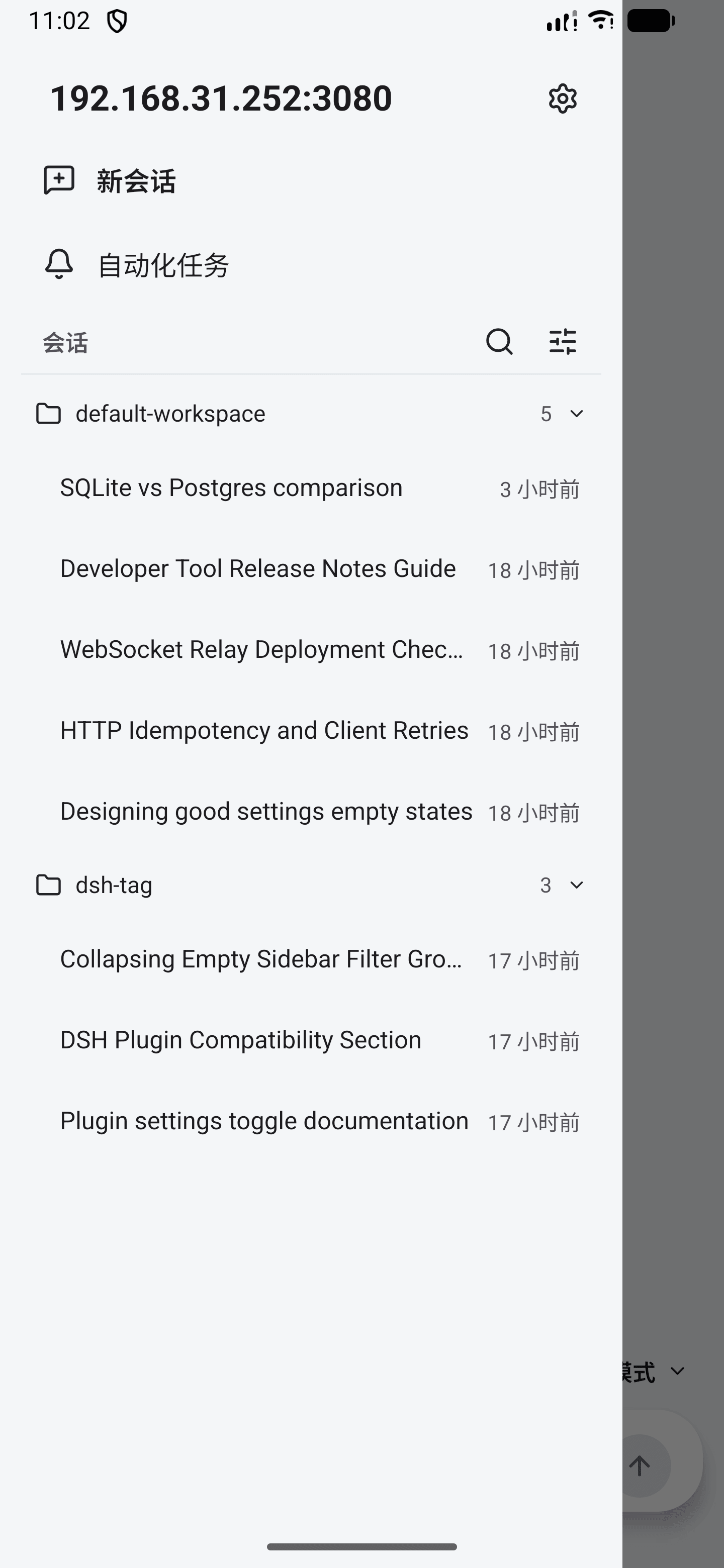 | 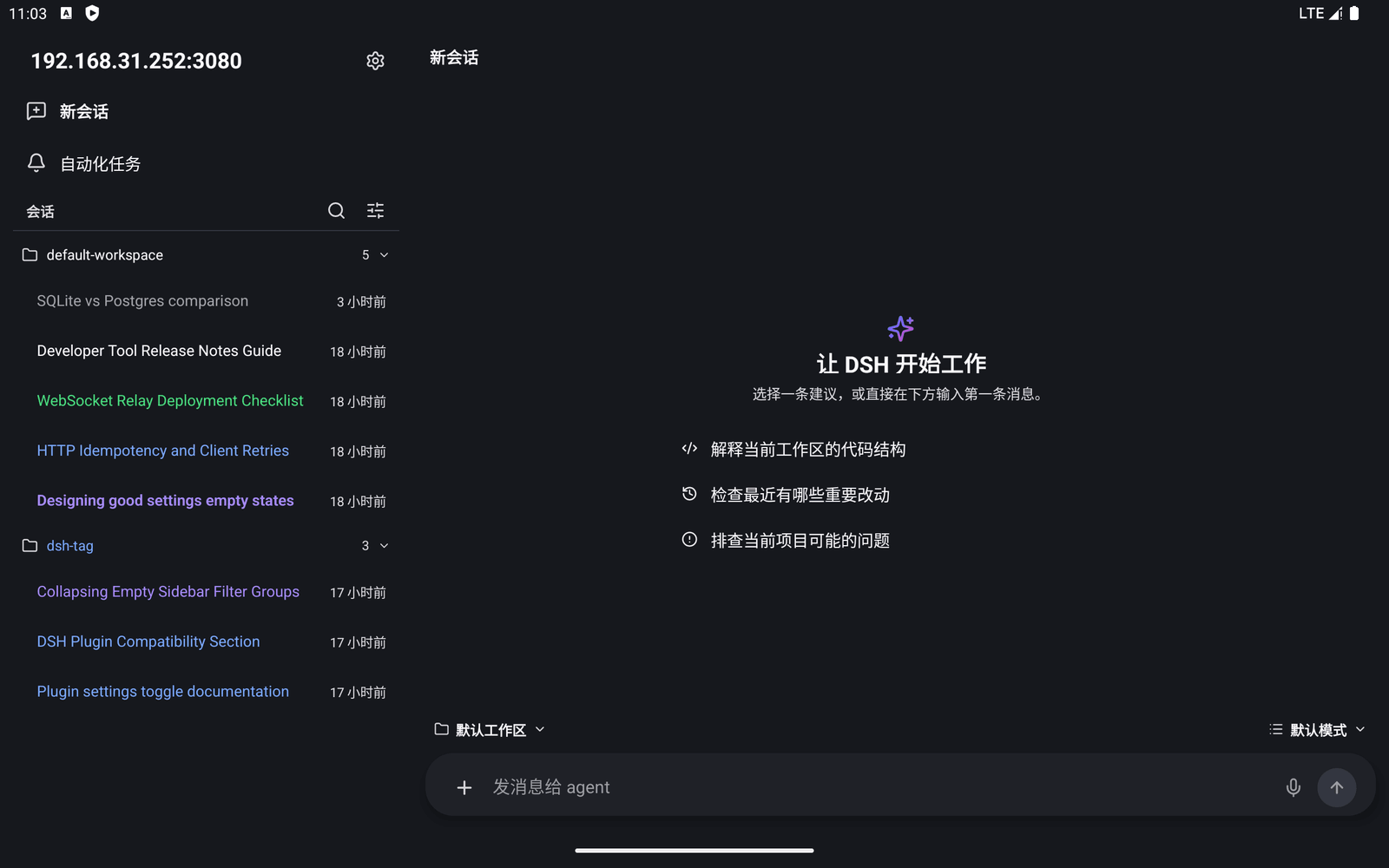 |
Install
dsh plugin --profile web add dsh-hello
From a checkout or a packed tarball:
dsh plugin --profile web add /path/to/dsh-hello
# or
pnpm pack
dsh plugin --profile web add ./dsh-hello-<version>.tgz
Restart dsh web. The terminal prints:
[dsh-hello] dsh 0.2.2-rc.3 satisfies >=0.2.2-0 <0.3.0
[dsh-hello] routes mounted at /dsh-hello (protocol 2, push none)
[dsh-hello] pairing code 1234 — open the app, enter the server URL, then this code.
The code has a five-minute TTL by default. After a successful pairing it rotates; the terminal prints the next one.
Pairing and compatibility
The pairing code is four digits by default (1234). The Settings page offers
three modes: One-time (fresh code, pairingTtlMs TTL), Permanent (does
not expire until changed) and Locked (no new devices; paired ones keep
working). Each client address gets pairingMaxAttempts (8) tries per TTL. Four
digits are convenient but low entropy: keep dsh on a trusted LAN/Tailscale, or
raise pairingCodeLength / lower pairingMaxAttempts before exposing it to the
internet.
The Host's compatibility gate enforces the engines.dsh range at install and
profile startup. If a linked or exempted install runs outside the tested range,
the plugin logs a warning and reports dshCompatible: false in /health
instead of failing to load.
Supported window: the latest three minor lines, starting with 0.2.2.
Prerelease suffixes (alpha, rc) do not create a new line; 0.2.2-rc.1 and
0.2.2-rc.3 are one line. The current matrix and test record live in
docs/COMPATIBILITY.md and compat/versions.json.
engines.dsh reads >=0.2.2-0 <0.3.0. 0.2.1 is outside the support window: it
lacks sessionController.state() and the page cursor, so the plugin no longer
carries shims for it. A Host outside the range still loads with a warning and
reports dshCompatible: false in /health.
Usage
- Open
dsh web→ Settings → DSH Hello to read the pairing code and manage paired devices. - In the app, enter the Host URL and the four-digit code; the device stores its own bearer token.
- The drawer lists sessions: open one to read, reply, approve tool calls, or open its terminal and files.
- Push is optional; register an FCM/APNs token under Settings when a relay is configured.
Why a plugin
The official browser client uses generated Typert codecs and /api/remote.mux.
Those artifacts are browser bundles, and dsh's /api route sits behind a
Host/Origin fence and browser cookies. A native app cannot consume either
cleanly. This plugin registers its own routes on the same webServer, authenticates
devices with its own bearer token, and uses the Host's own
sessionController / approval / userQuestions services.
Upgrade
Install from the npm registry (the default dsh plugin add dsh-hello) so dsh can
track releases. The dsh-hello page under Plugins then shows Update
available and a Versions section; Update removes the old version,
installs the selected one, keeps the bundle enabled, and recomposes with HMR or
asks for a restart. A failed update restores the previous version when possible.
The Update / Versions section is a dsh 0.2.2 feature. When the page has no update action, update from the CLI instead:
dsh plugin --profile web remove dsh-hello
dsh plugin --profile web add dsh-hello@latest
# restart dsh
The Web UI is preferred on 0.2.2+ because it checks engines.dsh before
touching the profile and rolls back a failed install. From the CLI:
dsh plugin --profile web add dsh-hello@latest
# restart dsh if the result asks for it
If you installed from a tarball or a link: path, that entry is not updatable;
switch it once:
dsh plugin --profile web remove dsh-hello
dsh plugin --profile web add dsh-hello@latest
dsh upgrades
The plugin is a profile dependency, so upgrading dsh keeps it installed. dsh
0.2.x releases stay inside the supported range. A dsh 0.3.x Host refuses this
version at startup and marks it incompatible: update dsh-hello to a release with
a matching range instead of reinstalling. Pairings and device tokens live in the
credential store under dsh-hello/* and survive plugin updates.
Coming from @xdnote/dsh-mobile
Remove the old package once; it owns the old /dsh-mobile routes and the old
credential keys:
dsh plugin --profile web remove @xdnote/dsh-mobile
dsh plugin --profile web add dsh-hello
Device records now live under dsh-hello/*, so pairings are not migrated: pair
the phone again. The app's storage keys are also @dsh-hello/* now, so install
the new app build rather than upgrading the old one in place.
Pairing code in the browser
Open dsh Web UI and go to Settings → dsh-hello, the section placed directly
after General (slot settings.section, order 5). It uses dsh's React
runtime and locale dictionaries, so it follows the Web UI theme and language.
The page shows:
- a lock switch: while locked,
POST /pairanswers403 pair-lockedand no new device can join, while devices that are already paired keep working; - the current numeric code and expiry;
- a QR payload (
{"v":1,"url":…,"code":…}); - the paired-device table;
- buttons to generate a new one-time code, set a fixed code, or restore one-time rotation.
The lock is persisted next to the fixed code in the credential store, so it
survives a Host restart. There is no standalone HTML page. The panel is
contributed by client/client.js through the settings.section and
settings.section.icon slots and reads three cookie-authenticated endpoints:
GET /admin/data– current code, QR payload, lock state and device list;POST /admin/pair-code– rotate, set or clear a fixed code;POST /admin/lock–{ "locked": true | false }.
Both are protected by the dsh browser session: the plugin calls
ctx.connection.admit() on the request headers, with loopback accepted as a
local fallback. Without a valid dsh login the endpoints return 401.
The browser half is part of the page's boot manifest, so after installing or
updating the plugin, restart dsh web and reload the Web UI (a hard refresh,
not just the settings tab). An already-open tab keeps the old module graph and
will not show the section.
Local development without publishing
Install the checkout once as a link; every rebuild is served from the same path:
dsh plugin --profile web add link:/absolute/path/to/dsh-hello
Then:
- Host + client half:
pnpm dev:host(TypeScript types, esbuild bundle, and theclient/client.jscopy); restartdsh web. - Before publishing:
pnpm build(types + bundle) andpnpm test.
Use a separate home if you do not want to touch your real profile:
DSH_HOME=$HOME/.dsh-dev dsh plugin --profile web add link:/absolute/path/to/dsh-hello
DSH_HOME=$HOME/.dsh-dev dsh web --port 4001
On Windows PowerShell:
$env:DSH_HOME="$HOME\.dsh-dev"
dsh plugin --profile web add link:D:/all-in-dsh/apps/dsh-hello
dsh web --port 4001
Fixed codes are normalized (letters/digits, 4–32 chars, dashes ignored) and
persisted in the dsh credential store under dsh-hello/pairing. They remain
valid until changed; use them only on a trusted network. One-time codes rotate
after a successful pairing and expire after pairingTtlMs.
Pairing
- The plugin generates a one-time code, prints it, and optionally prints a QR
payload (
{"v":1,"url":"http://host:port/dsh-hello","code":"..."}). The Settings-page QR uses the browser's base URL; the terminal QR uses the bind origin. - The app sends the code plus a stable public-key fingerprint
(
devicePublicKey). The server stores a hash of the bearer token and pins the fingerprint as the device id. - Tokens are not bound to
host:port, so changing IP, port, or tunnel does not require re-pairing. - Device records live in the dsh credential store under the owner-scoped key
dsh-hello/devices(grant payload). No token is stored incordis.yml. GET /dsh-hello/pair/codeis loopback-only and only exists to make local setup/curl tests convenient. Remote users read the code from the terminal.
Configuration
basePath defaults to /dsh-hello. The app's v1 discovery probes that exact
path, so a deployment that changes it also needs an app-side setting (planned).
The wire prefix and the persisted credential keys use the same dsh-hello name:
the app probes /dsh-hello/health, and pairings live under dsh-hello/*.
- id: dsh-hello
  name: 'dsh-hello'
  config:
    basePath: /dsh-hello
    allowedHosts: ['dsh.example.com']   # extra Host-header authorities
    requireSecure: false                # true when the Host itself serves TLS
    strictHostCheck: false              # true binds requests to a known authority
    pairingTtlMs: 300000
    pairingCodeLength: 4
    pairingMaxAttempts: 8
    interactionTarget: browser-only      # browser-only | browser-first | phone-first (Default | DSH first | Device first)
    approvalWaitTimeoutMs: 120000
    questionWaitTimeoutMs: 120000
    allowSessionWideGrants: true
    enableDebugRoutes: false            # true exposes authenticated /debug/* test routes
    maxBodyBytes: 65536
    rateLimitWindowMs: 60000
    rateLimitMax: 240
    dshVersionRange: '>=0.2.2-0 <0.3.0'
    push:
      provider: none                    # none | fcm | apns | relay
      # provider: relay
      # relayUrl: https://push.example.com
      # relayHostToken: dshr_...
      notifyTurnEnd: true
      notifyApproval: true
      notifyQuestion: true
relay mode sends only the notification payload and host token to your relay;
the relay holds the FCM/APNs credentials. Device tokens are registered with the
relay automatically when the app calls PUT /devices/me/push.
The notify* config values are host-wide defaults. Each device can then set its own approval, question and turnEnd subscriptions with PUT /devices/me/push/subscriptions; both direct sending and relay mode filter unsubscribed devices. Turn-end pushes are sent only when no app has a live global SSE connection. A connected app handles the event locally instead.
Push credentials are BYO. Put secrets in the dsh credential store under the
owner-scoped record dsh-hello/push when possible; the plugin reads that record
first and falls back to configuration:
{
  "provider": "fcm",
  "fcmServiceAccountJson": "{\"type\":\"service_account\",...}",
  "fcmProjectId": "my-project"
}
The equivalent configuration fallback (useful for tests) is:
    push:
      provider: fcm
      fcmServiceAccountJson: '{"type":"service_account",...}'
      fcmProjectId: my-project
or APNs:
    push:
      provider: apns
      apnsKey: |
        -----BEGIN PRIVATE KEY-----
        ...
      apnsKeyId: ABC123DEFG
      apnsTeamId: TEAM123456
      apnsTopic: com.example.dshapp
      apnsEnvironment: production
The plugin talks directly to Google/Apple; there is no author-operated relay.
Webhook notifications
Webhooks are independent of the app push provider: they work with
provider: none, and they do not need a phone token or GMS. Add one or more
targets under push.webhooks:
    push:
      webhooks:
        - name: wecom
          url: https://qyapi.weixin.qq.com/cgi-bin/webhook/send?key=...
          format: wecom
        - name: ntfy
          url: https://ntfy.sh/my-dsh-topic
          format: ntfy
        - name: bark
          url: https://api.day.app/<device-key>
          format: bark
        - name: serverchan
          url: https://<uid>.push.ft07.com/send/<sendkey>.send
          format: serverchan
        - name: hook
          url: https://example.com/dsh
          format: generic
      webhookContent: minimal   # minimal | standard
      webhookCooldownMs: 60000
wecomposts a markdown bot message,serverchanpoststitle/desp,ntfyposts the body with aTitleheader,barkaccepts eitherhttps://api.day.app/<key>or the full/pushendpoint, andgenericposts JSON{ kind, title, body, data }.webhookContent: minimal(default) never puts conversation text in the body;standardsends the same rendered body as the app push.webhookCooldownMssuppresses repeated sends to one target for the same kind (turn end, approval, question), so a burst produces one notification.- The
notify*switches gate webhooks too; a disabled kind is not sent anywhere.
HTTP API
All routes are under basePath (default /dsh-hello). Except for /health
and /pair, every route requires Authorization: Bearer <device token>.
/admin/* instead accepts the Host's own browser session (or a loopback
caller), because the settings page talks to it.
| Method | Path | Purpose |
|---|---|---|
| GET | /health | Public capability and version facts (also reports pairingOpen) |
| GET/POST | /pair/code | Loopback-only current/rotated code + QR payload |
| POST | /pair | One-time code → device token (201) |
| GET | /devices/me | This device's record, including push subscriptions |
| DELETE | /devices/me | Unpair this device and close its streams |
| PUT | /devices/me/push | Register/replace this device's FCM/APNs token |
| PUT | /devices/me/push/subscriptions | Set approval / question / turnEnd |
| DELETE | /devices/me/push | Remove this device's push registration |
| POST | /presence | Foreground claim ({ foreground: boolean }) |
| GET | /speech | Host speech provider readiness |
| POST | /speech/transcribe | Transcribe a raw WAV body (audio/wav; optional ?language=&providerId=) |
| GET | /sessions | Session list with title projections and optional vitals |
| POST | /sessions | Create/reuse a blank Session |
| PATCH | /sessions/:id | Rename ({ "title": string }) |
| PUT | /sessions/:id/pin | Pin/unpin ({ "pinned": boolean }) |
| PUT | /sessions/:id/archive | Archive/unarchive ({ "archived": boolean, "stopActivity"?: boolean }) |
| PUT | /sessions/:id/model | Select provider/model ({ provider, model, reasoningEffort? }) |
| GET | /sessions/:id/model | Current selection |
| GET | /sessions/:id/transcript?beforeSeq=&limit= | Message-aligned history page |
| GET | /sessions/:id/state | Running/queue state + projections |
| POST | /sessions/:id/prompt | Send text (queue or steer), 202 |
| POST | /sessions/:id/cancel | Stop the current turn, 202 |
| POST | /sessions/:id/fork | Child Session at an optional inclusive atSeq, 201 |
| POST | /sessions/:id/uploads | Raw attachment bytes (?kind=&name=&mediaType=), 201 |
| GET | /sessions/:id/events | SSE follow stream (snapshot + events) |
| GET | /sessions/:id/files?path= | Directory listing inside the Session cwd (300 entries max) |
| GET | /sessions/:id/file?path=, /sessions/:id/raw?path= | UTF-8 preview / base64 byte chunk |
| GET | /sessions/:id/image?path=, /workspaces/:id/image?path= | Raw image bytes for markdown image tags (device header auth, 24 MiB cap) |
| GET | /sessions/:id/terminals | List retained phone terminals |
| POST | /sessions/:id/terminals | Open a PTY in the Session working directory |
| GET | /sessions/:id/terminals/:tid/events | SSE replay + live terminal output |
| POST | /sessions/:id/terminals/:tid/input | Write terminal input |
| POST | /sessions/:id/terminals/:tid/resize | Resize the PTY |
| DELETE | /sessions/:id/terminals/:tid | Terminate the terminal (204) |
| POST | /sessions/:id/questions/:callId/answer | Answer a continued question |
| GET | /workspaces | Workspace registry (id, path, title) |
| POST | /workspaces | Adopt an existing directory ({ "path", "title"? }) |
| PUT | /workspaces/:id | Rename a workspace ({ "title": string }) |
| GET | /workspaces/:id/files, /workspaces/:id/file, /workspaces/:id/raw | Same file surface, keyed by workspace |
| GET | /schedules | Automation catalog; available: false without a schedule service |
| GET | /schedules/marks | Active scheduled-task counts per Session (drawer clock) |
| GET | /schedules/:id | One task with target, last delivery and execution flags |
| GET | /schedules/:id/history?limit=&before= | Delivery history, newest first |
| POST | /schedules/:id/run | Deliver one occurrence now |
| PUT | /schedules/:id | Pause/resume ({ "active": boolean, "expectedUpdatedAt"?: string }) |
| DELETE | /schedules/:id | Delete the task and its saved deliveries |
| GET | /read-state | Shared read watermarks (proxied to dsh-tag) |
| PATCH | /read-state | Merge this device's watermarks and return the merged map |
| GET | /events | Global SSE: approvals, questions, sessions, turn end |
| GET | /approvals | Pending approvals |
| POST | /approvals/:id/decision | allow / always / deny |
| GET | /questions | Pending questions |
| POST | /questions/:id/answer | Structured answer batch |
| GET | /web-url | This Host's Web UI, launch token attached |
| POST | /debug/approval | Debug-only synthetic approval (enableDebugRoutes) |
| POST | /debug/question | Debug-only synthetic question (enableDebugRoutes) |
GET /sessions returns rows already ordered by updatedAt (newest first).
updatedAt is the Host's last-prompt time: renaming, pinning, archiving or
assistant activity does not move it, so the phone can use it for sorting and
unread watermarks without flicker. Titles and vitals come from the projections
the Host attaches to each row, so a list costs one Host call rather than one per
Session. The Host's list is not paginated; the phone searches the whole set
locally, which is why this route deliberately returns every row.
Admin page (browser session or loopback):
| Method | Path | Purpose |
|---|---|---|
| GET | /admin/data | Code, QR, lock, policy, paired devices |
| POST | /admin/pair-code | Rotate / set fixed / auto |
| POST | /admin/interaction | phone-first / browser-first / browser-only |
| POST | /admin/lock | Lock or unlock pairing |
| PUT | /admin/devices/:id | Rename a paired device |
| DELETE | /admin/devices/:id | Revoke a paired device |
A schedule delivery receipt acknowledges that the target Session persisted the
message, not that the Agent finished or succeeded. Open the target Session for
the actual result. GET /health advertises schedules, scheduleActions and
scheduleHistory so older plugins can stay read-only; workspaceRename gates
the phone's workspace rename entry, and readState tells the app that read
watermarks are shared across paired devices.
Approval policy
dsh hands an approval or a question to one answerer: the first listener that
does not call next(). interactionTarget decides who that is; the admin page
calls the same three choices Default, DSH first and Device first.
| Admin label | Value | Who answers |
|---|---|---|
| Default (default) | browser-only | Nobody here: the plugin registers no listener, so dsh behaves exactly as if it were not installed. The app shows a read-only prompt and hands the decision to the Web UI. |
| DSH first | browser-first | A live web UI always answers. With no browser connected the app holds the request, even in the background. |
| Device first | phone-first | A foreground app answers, even when a browser is connected; otherwise dsh's own listeners do. |
The plugin registers unscoped (global) waterfall listeners ahead of the
browser's answerer, so the policy rather than listener order decides. dsh 0.2.2
dispatches both waterfalls with scopeTarget(agent, agent); a listener bound to
the plugin's own scope never sees them.
With a request claimed, the app is asked over SSE (and push) and its answer becomes the tool's outcome:
- A claim expires after 45 seconds without a
POST /presenceheartbeat, and backgrounding the app releases it immediately, so a browser can take over. - Timeout, abort, "no", or the app leaving falls back to
next(), so dsh's own fail-closedunavailablepath still applies.
always is a process-local session grant for one session + tool pair. dsh only
defines one-shot allowed-once; the plugin does not invent durable grants.
Approval events try to include a presentation-only preview by reading the
matching tool/call event (bash command, edit diff, web_fetch URL, etc.).
The lookup is best-effort and bounded so it never blocks the approval. Push data
also carries hostId (when the Host origin is known) and the approval's
sessionId, so a multi-host app can switch to the right Host before opening the
session.
Questions
Questions use the same policy: a foreground app with a live SSE connection claims
the question before a connected browser. If the app leaves the foreground, the
claim is released and dsh shows the question in the browser. If the foreground
wait is already gone, the app can still answer the projection's continued
questions through the callId route, which calls
ctx.userQuestions.answer(agent, callId, ...).
SSE frames
GET /sessions/:id/events:
event: ready
data: {"sessionId":"..."}

event: frame
data: {"type":"snapshot","header":{...},"records":[...],"projections":{...}}

event: frame
data: {"type":"event","event":{"type":"assistant/message",...}}
GET /events:
event: hello
data: {"server":{...},"features":{...},"pendingApprovals":[],"pendingQuestions":[]}

event: approval
data: {"id":"...","sessionId":"...","toolName":"bash","displayReason":{"en":"..."}}

event: session
data: {"action":"status","sessionId":"...","running":true}
Debug interaction routes
enableDebugRoutes: true adds authenticated POST /debug/approval and
POST /debug/question routes. They create the same pending items the real
interaction seams create, so a phone can exercise the approval/question UI
without a model key or a tool call. They are off by default and are not a
replacement for the real waterfall; turn them off after testing.
Security model
- Route registration is outside dsh's
/apicookie fence, so the plugin owns its own fence:- A
Hostheader is required. Unauthenticated routes accept loopback, the listener's bind address, a configuredallowedHostsentry, or an authority recorded at pairing. - An authenticated device request is accepted across address/tunnel changes:
the bearer token is the boundary, so changing IP, port, or tunnel does not
require re-pairing. Set
strictHostCheck: trueto bind requests to the authority allowlist instead. - An attached web
Originmust match the request authority; cross-site web requests are refused (403). - Installed browser-extension origins (
chrome-extension://,moz-extension://,safari-web-extension://) are accepted as paired clients and receive scoped CORS headers plusOPTIONSpreflight. The device token or pairing code remains the authentication boundary. Web pages still receive no CORS headers. - Native clients do not need CORS; their requests are unchanged.
- A
- The pairing admin page uses dsh's own browser authentication
(
ctx.connection.admit) and only falls back to loopback; it is not an unauthenticated code-dump route. - Bearer tokens are compared in constant time after hashing.
- The phone terminal runs the Host's default shell through
ctx.subprocess.spawnTerminal, so it runs as the dsh OS user outside the agent sandbox — the same permission model as dsh's Web sidebar terminal. It is reachable only with a device token, input is capped at 64 KiB per request, at most four terminals are kept per Session, and unattached terminals are reclaimed after 30 idle minutes. Output is bounded to 200k characters. - Revoking a device deletes its token and immediately ends every SSE stream opened with it (global events and per-Session follows), so a lost phone stops receiving events at revoke time rather than on its next reconnect.
- JSON bodies are bounded (
maxBodyBytes) and rate-limited per client address. - Pairing has a TTL, a one-time code, and a per-address failure cap.
- Plain HTTP on a public address is the user's choice and is surfaced by the app as a strong warning; the app refuses to pair publicly over HTTP until the user explicitly confirms. Prefer Tailscale, a private address, or TLS.
Verification
The plugin ships an integration suite that mounts the real router on a local HTTP server with a fake Host context:
node --import tsx --test tests/*.test.ts
# or, when deps are installed:
pnpm test
It covers health, pairing and one-time-code consumption, token auth, session projection, Host/Origin fences, approval claim/answer, browser-first delegation, session-wide grants, question answers, terminal create/input/resize/close, revoke stream teardown, body limits, and JSON-safe device persistence.
The app repository also contains a recorded M1 curl walkthrough in
docs/M1-ACCEPTANCE.md (https://cnb.cool/ada87/app-dsh-hello).
Known limitations
- dsh is developer preview; the plugin is pinned to
0.2.x. - Session title/list reads call the projection service per row (fine for a personal Host; not optimized for thousands of sessions).
alwaysis process-local and disappears on restart.- Push is implemented for FCM v1 and APNs token auth, but this repository cannot exercise Apple/Google credentials.
- The app reads committed
assistant/messageevents; assistant token deltas (assistant-streamframes) are not rendered yet. - The browser escape hatch opens the Web root; dsh does not expose the launch token to plugins, so an already-authenticated browser session is required.
License
MIT