dsh-github-picker
bitxeno/dsh-github-picker
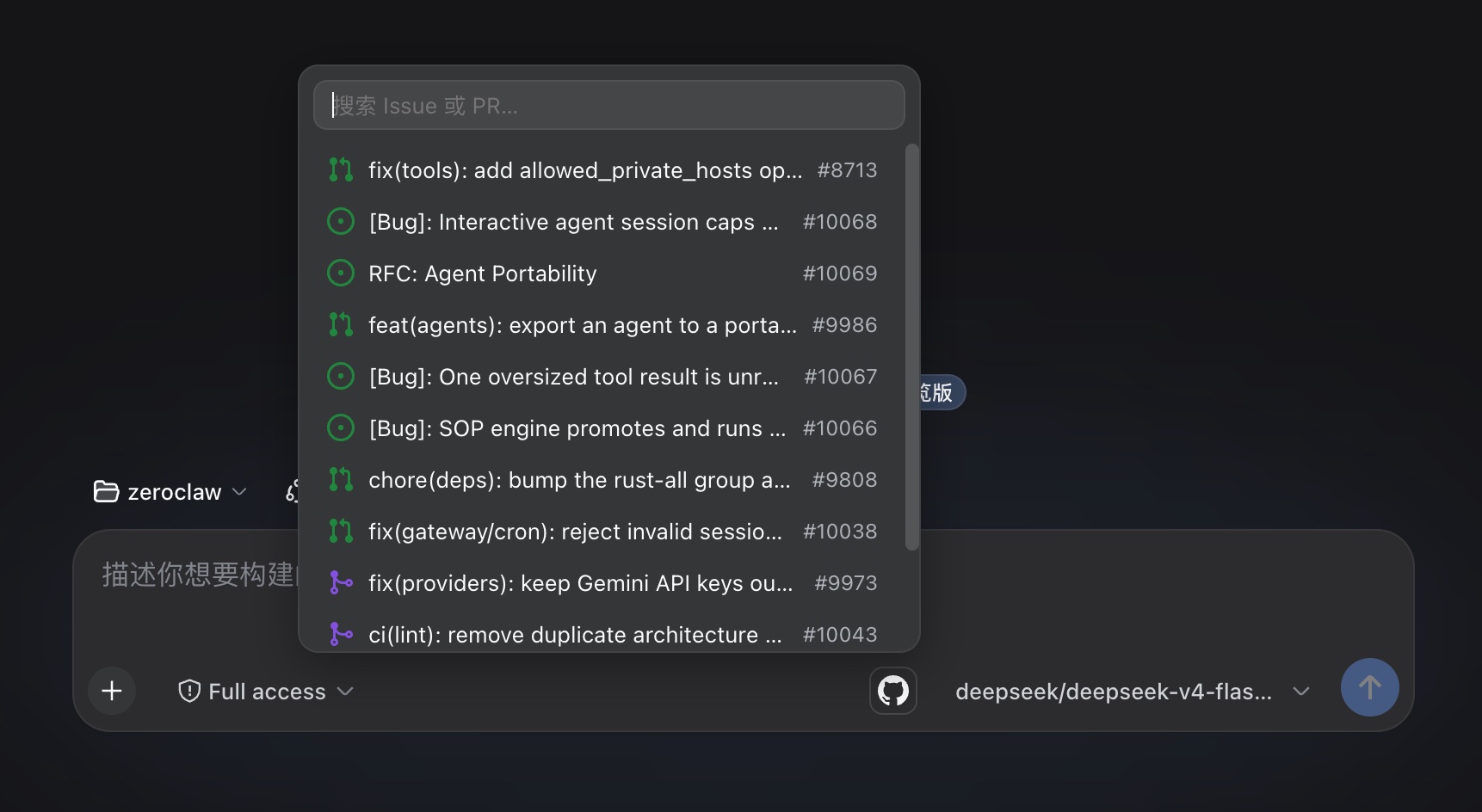
컴포저 GitHub 피커: 입력창 오른쪽 아래의 GitHub 아이콘을 클릭하면 gh CLI로 워크스페이스 저장소의 이슈와 풀 리퀘스트를 검색하고, 참조를 URL 또는 @owner/repo#number 멘션으로 삽입합니다.
설치
dsh plugin --profile web add github:bitxeno/dsh-github-pickerREADME
dsh-github-picker
English | 中文
GitHub issue and pull request references for the DeepSeek Harness web GUI. Click the GitHub icon next to the send button to search the current workspace repository's issues and PRs, and insert a reference — a GitHub URL or an @owner/repo#number mention.
Install
dsh plugin --profile web add dsh-github-picker
The same command updates an existing installation to the latest published version; append @<version> to pin one. Restart dsh web after installing.
Usage
Click the GitHub icon in the composer's tool row. The popup lists the repository's recent issues and PRs — 12 per page, loading the next page as you scroll to the bottom, no result cap — filtered locally as you type by number or title (a number prefix ranks first). Click a row to insert the reference; Escape or a click outside closes the popup. A search failure (gh CLI missing, not authenticated, rate limited, network error, unresolved repository) renders as one localized hint row instead of a silent close.
Each row shows GitHub's state icon, the title, and the #number tag:
| State | Icon |
|---|---|
| Open issue | issue-opened (green) |
| Closed issue | issue-closed (purple) |
| Open PR | git-pull-request (green) |
| Draft PR | git-pull-request-draft (gray) |
| Closed, unmerged PR | git-pull-request-closed (red) |
| Merged PR | git-merge (purple) |
Picking inserts the text chosen as insert format in Settings:
@owner/name#125                                 # ref (default)
https://github.com/owner/name/issues/125        # url
Before each step, the Host scans the draft for GitHub references — URLs, @owner/repo#number, and bare #number — and adds a short message per match:
<github-reference repo="owner/name" number="125" />
Only the repository and number are passed; issue bodies are never fetched.
Data Source
The gh CLI only: it reuses the local gh login and calls gh api search/issues (issues and PRs in one query). No device flow, OAuth app, or stored credential. The repository is resolved from the workspace's git remote get-url origin (https, ssh, git@ forms); without a resolvable remote, the popup shows a hint row on adding one.
Settings
The plugin card — titled "GitHub 引用" (or "GitHub Picker" in English) — lives in the official configurable-plugins tab. It shows the gh connection status (which accounts gh auth status reports) and the insert format (@owner/repo#number or GitHub URL). That is the only setting: there is no enable switch — the picker is always on — and no result limit.
Configuration
Host options go into the selected profile's cordis.patch.yml:
- id: dsh-github-picker
  config:
    searchTimeoutMs: 15000
    repoCacheTtl: 30000
searchTimeoutMsbounds provider calls (default 15000).repoCacheTtlcaches the resolved repository per workspace (default 30000 ms).
A Host config change needs a dsh web restart; a client-only change just needs a browser refresh.
Development
pnpm install
pnpm run check
The check ladder is typecheck + tests + build with 100% coverage per source file; lib/ is committed, so profile installs run without a build. For a local checkout, add the package to ~/.dsh/profiles/web/package.json (dependency + dsh.profile.bundles), pnpm install, restart dsh web. The plugin serves at /plugins/dsh-github-picker/client.js, the gateway routes /api/githubPicker/*.
License
MIT