dsh-cove
chengxiang-zhang/dsh-cove
The single runtime entity for the dsh-cove DSH Web GUI extension suite: one entity row hosting sidebar, settings, conversation and right-pane modules plus every host service domain.
설치
dsh plugin --profile web add github:chengxiang-zhang/dsh-coveREADME
dsh-cove · DeepSeek Harness (DSH) Web GUI extension suite
English | 中文




An integrated extension suite for the DeepSeek Harness (DSH) Web GUI
SSH operations · Memory panel · Git workbench · Browser automation · Feishu intake · Run notifications
What it is · Architecture · Features · Quick start · Documentation · Security · Community · Contributing
What it is
dsh-cove is an extension suite for the DeepSeek Harness (DSH) Web GUI. SSH operations, the memory panel, the Git workbench, Feishu intake, run-finished notifications and browser automation live in one runtime entity plugin, @dsh-cove/dsh-web-all. Browser code is organized by DSH injection position with exactly one module owning each position, and host capabilities are service domains under the same plugin lifecycle. A DSH profile mounts this single package and never patches DSH source.
The project is a developer preview: interfaces, configuration keys and internal contracts can change between releases. See Versioning and releases.
Architecture
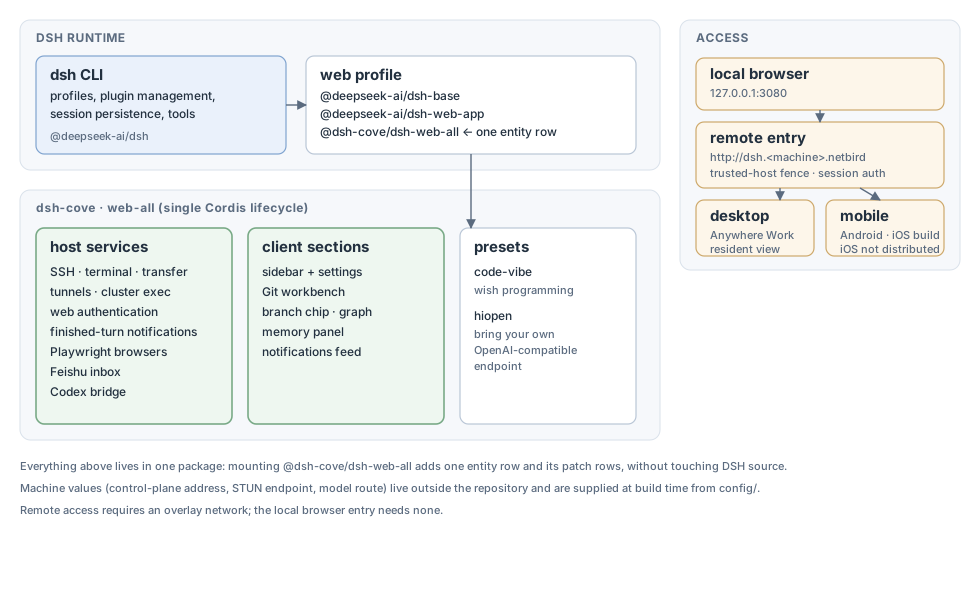
- DSH runtime: the
dshCLI manages profiles, plugins, session persistence and tools; the web profile is@deepseek-ai/dsh-base,@deepseek-ai/dsh-web-appand this repository's@dsh-cove/dsh-web-all. - One entity:
dsh-web-allcontributes a singleweb-allrow to the profile, and both host services and browser sections share that one Cordis lifecycle. - Access: the local browser reaches
127.0.0.1:3080directly; the remote entry needs an overlay network and the--trusted-hostfence; the desktop and mobile clients are resident shells over the same Web UI. - Machine values: control-plane addresses, STUN endpoints and model routes never enter the repository;
config/injects them at build time.
Features
SSH remote operations
The sidebar SSH entry opens a remote operations panel. Hosts support key or password authentication and one-click import from ~/.ssh/config; configuration lives in ~/.dsh/dsh-ssh.json. Configured hosts support real operations:
- Web terminal: xterm.js remote terminal with live output and auto-fit;
- File transfer: SFTP upload and download with progress and a remote directory browser;
- Port forwarding: local tunnels into remote private services such as databases, APIs and admin consoles, bound to
127.0.0.1only; - Cluster runs: one command across many hosts, filtered by alias, environment or tags;
- Agent access: the agent and the panel share one host configuration, so a request in chat can run a remote command.
Memory panel
The sidebar memory page reads and writes project-level memory entries: search by project and keyword, record and update entries, resolve similar-entry conflicts and inspect diagnostics. Memory is stored by the host-side memoir service domain, and the agent reaches the same data through the memoir_read, memoir_record and memoir_update tools.
Git workbench
The right-pane Source Control workbench and the composer branch picker share one Git service domain: switch branches, read the commit graph and inspect file changes and diffs. A branch directory (worktree) is selected when a conversation is created; its state and cleanup actions live on the lane chip in the conversation header, and there is no page of its own.
Feishu intake
The bot WebSocket inbox ships with the lark_inbox_peek, lark_inbox_pop and lark_inbox_ack tools, a credential wizard and a configuration page under Settings.
Run-finished notifications
Every finished turn is recorded in the read-only GET /api/dsh-notify/feed; the desktop and mobile machine lists read that feed, and a finished run can be pushed to Feishu once it has fully stopped.
Browser automation
Each session gets its own Playwright browser, exposed to the agent as the mcp__playwright__* tool namespace and managed from the right-pane Agent Browser tab.
Configuration details for every capability live in the dsh-web-all README.
Quick start
Requirements
- A working DeepSeek Harness installation with
dsh webstarting normally; - npm installs need no extra tooling; installing from source needs Node.js 22 or newer and pnpm 11.
Install with npm
For the DSH Web CLI (browser client):
- Add the entity plugin:
dsh plugin --profile web add @dsh-cove/dsh-web-all@latest - Restart the managed
dsh webprocess; every capability entry appears in the sidebar. - Open the Web GUI and confirm the single
web-allruntime entity is mounted.
For DSH Desktop:
- Add the entity plugin:
dsh plugin --profile desktop add @dsh-cove/dsh-web-all@latest - Verify the profile:
dsh --profile desktop --dump-config - Fully quit and reopen the desktop application.
Install from source
The package is published on npm; a source checkout is for development and debugging only:
git clone https://github.com/chengxiang-zhang/dsh-cove.git
cd dsh-cove
pnpm install
pnpm -r build
node scripts/link-profile.mjs
dsh plugin --profile web add link:$(pwd)/packages/dsh-web-all
dsh --profile web --dump-config
The profile directory is not a pnpm workspace, so workspace:* dependencies of web-all fall back to the published npm versions; run node scripts/link-profile.mjs first so the profile uses the repository build output.
Runtime and published packages
A profile runtime mounts @deepseek-ai/dsh-base, @deepseek-ai/dsh-web-app and @dsh-cove/dsh-web-all. The repository publishes one package:
| npm package | Shape |
|---|---|
| @dsh-cove/dsh-web-all | The only runtime entity; owns every host service domain and browser position module |
Verify and uninstall
After installation, restart dsh web and confirm the sidebar entries. dsh --profile web --dump-config shows whether the plugin configuration layer is mounted. A missing sidebar entry almost always means dsh web was not restarted. Uninstall with dsh plugin --profile web remove @dsh-cove/dsh-web-all and restart dsh web again.
Install troubleshooting
Expand for common pnpm problems
If the first install stops on
ERR_PNPM_IGNORED_BUILDS, add the printed keys (cpu-features,protobufjs,ssh2) to the profilepnpm-workspace.yamlallowBuildslist and run the command again. Remove the package before retrying after a failed attempt: that attempt already wrote the dependency, so a plain re-run writes only the dependency and never registers the bundle row. The mountedweb-allrow indsh --profile web --dump-configis the proof of registration.
The profile must stay on a hoisted pnpm layout: keep
packages: - .,nodeLinker: hoistedandautoInstallPeers: falsein itspnpm-workspace.yaml. Without these keys pnpm installs a whole nested@deepseek-ai/*tree, including an outdateddsh-tools, which shadows the SDK resolution of the DSH loader and fails the import withweb-all (@dsh-cove/dsh-web-all): failed to import. Restore the workspace file, delete the profilenode_modulesandpnpm-lock.yaml, and install again.
pnpm 11 enforces a release-age gate, so a version published in the last 24 hours can resolve to mismatched
@dsh-cove/*versions even with an explicit@latest. Exclude the scope in the profile before installing or updating:
minimumReleaseAgeExclude:
  - '@dsh-cove/*'
Documentation
Every long-lived document describes current behaviour, and generated facts stay with their generator. Start here:
| Document | Contents |
|---|---|
| docs/README.md | Documentation index: audience and language for every document |
| docs/architecture.md | Repository map, runtime model, injection positions, access fence and release model |
| docs/plugins.md | Adding a capability to the single runtime entity |
| docs/development.md | Local development, gates and verification |
| docs/remote-access.md | Remote-access contract for a self-hosted DSH instance |
| docs/publish-prep.md | Release checklist and registry boundaries |
| packages/dsh-web-all/README.md | Feature configuration, security model and known limitations |
Security
Report vulnerabilities privately through GitHub Security Advisories; never open a public issue for an unfixed vulnerability. SECURITY.md defines supported versions, response targets, scope, safe harbour and the hardening checklist.
The plugin exposes privileged local capabilities, so its security model is part of the product: the shared host access fence, the remote-entry invariants and the SSH, credential and account storage rules are documented in the dsh-web-all security model and the remote-access contract.
Community and support
- Questions, feature requests and reproducible bugs: use the issue forms; triage policy is in ISSUE_TRIAGE.md.
- Installation and usage help: read docs/README.md and SUPPORT.md first.
- Participation is governed by the Code of Conduct; decision making and maintainer roles are in GOVERNANCE.md.
Contributing
Read CONTRIBUTING.md before opening a pull request. In short:
- Every change starts as an issue so maintainers can keep the single-entity architecture coherent.
- Commit messages follow Conventional Commits; emoji are rejected across code, documentation and commit messages.
- README changes update both language versions and re-record the pairing file.
- Before a pull request, run at least
pnpm typecheck && pnpm test && pnpm docs:check.
Versioning and releases
A vX.Y.Z tag is the only version source. Tags are cut from main after dev has been integrated and tested. Every tag produces a GitHub Release carrying the gated package tarball and the desktop, Android and iOS installers; the runtime entity is published to npm only when the repository enables the NPM_PUBLISH variable and has a publisher configured. Release history and notes live in GitHub Releases; the repository does not keep a committed changelog. The process is defined by .github/workflows/release.yml and docs/publish-prep.md.
License and third-party notices
The repository is licensed under Apache-2.0. Retained third-party code keeps its original license and attribution, indexed by NOTICE and the per-directory third-party notices files. Contributions are accepted under the inbound license of the file they touch; see CONTRIBUTING.md.