dsh-cngtn-pond
cngtn/dsh-cngtn-pond
Paper-and-ink theme with warm surfaces, hairline strokes, near-square corners and a living ASCII koi pond behind the shell; the theme sets no font family, so the shell's own stacks (or your Settings choice) apply.
설치
dsh plugin --profile web add github:cngtn/dsh-cngtn-pondREADME
Dsh-Pond-Koi — a paper-and-ink theme for DeepSeek Harness
A theme bundle for the DSH Web GUI: warm paper, warm ink, hairline strokes, near-square corners — and a living ASCII koi pond behind the whole shell. The visual language is derived from a single-screen portfolio site; the analysis that produced it lives in cngtn-analysis.
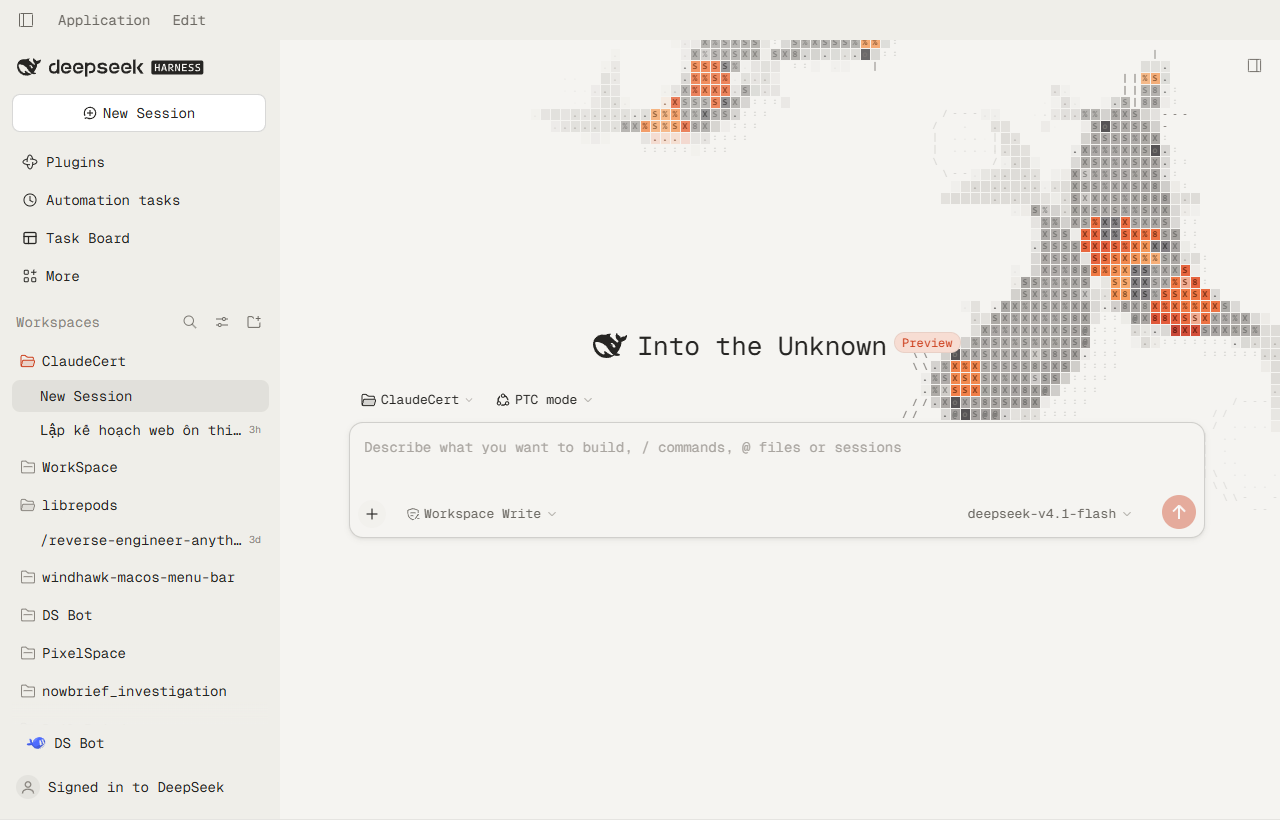
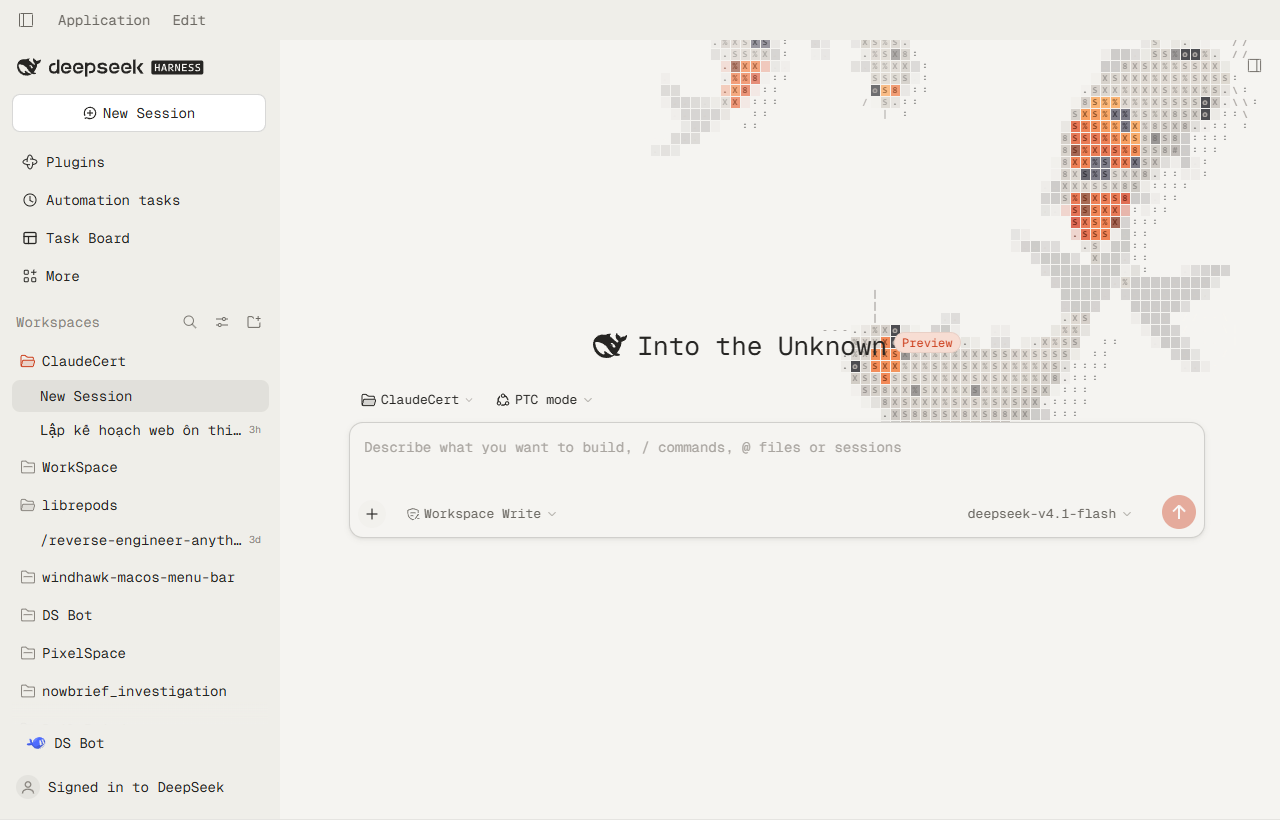
The reference screenshots the palette was measured against: light / dark. The transcript and the Task Board under the theme: transcript, taskboard.
What it is
Three layers, registered through the sanctioned third-party-theme extension point
(ctx.theme.overrideTokens) plus one stylesheet and one canvas:
| Layer | What it does |
|---|---|
| Tokens (230+ pairs) | Paper and ink surfaces, hairline strokes, a tighter radius ladder, true (non-squircle) corners, frosted menus instead of acrylic, and the koi vermilion as the only accent. No font family: Settings → Appearance → Font decides, and the stock stacks apply when nothing is chosen. |
| Stylesheet | The canvas layer and its paint order, the transparency chain that lets the water show through the shell's frame, the frosted panels and Trajectory cards, and the site's underline-only link treatment. |
| Canvas | The pond: koi with a 20-node spine, burst-and-coast tail beats, curiosity toward the pointer, food on click, startle on a fast swipe, depth dives, and an ASCII raster that etches every fish into the same glyph grid as the interface. |
Disabling the plugin removes all three and the GUI returns to its stock design.
Why it looks the way it does
The design system is four colours, one typeface and almost no decoration:
paper  #f5f4f1   ink    #262523      (light)
ink    #1a1917   cream  #fff7f0      (dark)
Everything else is derived: color-mix of ink over paper for strokes and muted
text, one typeface, 8px on cards and 6px on media, and a
single soft shadow reserved for the one elevated surface.
The one saturated colour is the koi. Its vermilion is step 3 of the pond's own
highlight ramp (#cc3e1c on paper, #e86038 on ink) and it becomes the accent,
the primary button and the business state — but deliberately not the error
colour, because "error" and "brand" must never be confusable.
The pond
The engine is a faithful port of the reference site's koi-pond/ component,
split the same way:
| File | Ported from | Lines |
|---|---|---|
src/world.js | world.ts | 440 |
src/shape.js | shape.ts | 79 |
src/renderer.js | renderer.ts | 672 |
src/engine.js | koi-pond.tsx | 205 |
Nothing was simplified: the seven steering forces, the burst-and-coast tail beats, the food-selection hysteresis, the startle threshold, the depth model, the five-point sub-sampled coverage test, the body-anchored glyph hash, the travelling sheen, the wake diffusion and both palettes are the original's. A pixel comparison of the darkest body colour against the reference agrees to within one unit per channel.
Three things did change, because a shell is not a landing page:
- Population. The site seeds 3–6 adults plus two young koi on a full-screen
canvas. The theme asks for
budget: 0.55, so a typical 1440×900 window gets three fish — enough to read as a pond, few enough to stay out of the way. - Steering targets. The site tags its own prose with
data-koi-avoid. A theme cannot edit the shell's markup, so it names the shell's published hooks instead ([data-slot="sidebar"],[data-composer-card], …). Panels that paint their own paper only steer the fish; the ones that do not also fade them to a watermark, exactly as the site fades its prose. - Re-seeding on resize. The site seeds once, because its canvas is always correctly sized on the first measurement. In a shell the canvas is inserted before its stylesheet lands, so the first rect can be the 300×150 default — and the fish would be trapped in that corner forever. The world therefore re-seeds whenever the box changes by more than a quarter.
Seven varieties
The school is stocked the way a real pond is: mostly white-and-red, a few patterned, and one or two metallic or blue fish for depth.
| Variety | Look |
|---|---|
| kohaku | white, accent head and two or three saddles |
| sanke | kohaku plus small black spots |
| tancho | white, a single accent disc on the crown |
| showa | black back, accent and white patches |
| ogon | one metallic colour, paler along the belly |
| asagi | slate back, accent along the belly |
| bekko | white, black spots only |
Each fish carries its own pigment, and the renderer derives a six-stop ramp from it — shadowed at the flanks, lit across the back — so a gold koi is shaded by the same logic as a red one instead of being a recoloured copy.
Layout
The sidebar floats. The frame is a three-column grid, and the sidebar keeps its 280px track; the cell gains 8px of padding so the card is drawn inside it (264px wide) rather than shrinking the track — the resize handle and the centre column stay exactly where the shell put them. The card has a 14px radius on all four corners, a hairline outline, the same frosted fill as the other panels, and a progressive shadow: seven stacked layers whose blur grows geometrically (1, 2, 4, 8, 16, 28, 44px) at low alpha, plus a 0.5px contact ring. One wide shadow has a single edge and reads as a band; the stack falls off the way a real occluder does. Paper and ink get separate alphas, because a black shadow on a dark page is nearly invisible.
The shadow needed the column to stop clipping: it had overflow: hidden, which
cut the shadow to a 12px band at the column edge. The column is now
overflow: visible and the rows are clipped by the inner root instead, whose
box is exactly the card's box.
Collapsed, the column is an 18px rail holding one button, so the card styling is dropped and the rail stays bare.
The right panel matches it. Its column is also a grid track, but the panel
is an absolutely positioned occupant that normally meets the window's right
edge. The panel is inset to the same 10/12/20/18px box as the sidebar, with the
same 14px radius, hairline and progressive shadow, while the track and resize
handle stay where the shell put them. Expanded, it is the same card stretched
over the conversation, frosted over the chat instead of clear: the sheet is a
58% paper tint under blur(26px), and the column is raised above the centre
column so nothing paints over the card. Closed, the card, the sheet and the
raised stacking all go away with it.
The titlebar is transparent, including the native buttons. No fill, no blur:
the pond runs to the top edge of the window and the caption floats over the
water. The three caption buttons follow because the desktop preload reads
--dsw-specific-sidebar-fill, converts it to rgba(), and hands it to
setTitleBarOverlay over IPC — so a transparent token makes a transparent
button block. That is why the token is transparent here while the sidebar's own
surfaces are painted from --dsw-alias-bg-base: one value drives both the panel
and the native chrome.
The one thing a theme cannot reach is the hover fill Electron paints behind a pressed button.
Install
dsh plugin --profile desktop add github:cngtn/dsh-cngtn-pond
That is the same command shape as any other DSH plugin: dsh plugin forwards to
pnpm inside the profile, so the package is installed, its dsh.bundle patch is
read, and the bundle is appended to dsh.profile.bundles automatically.
Once the package is on npm, the versioned form works too:
dsh plugin --profile desktop add @cngtn/dsh-cngtn-pond@latest
To pin an exact revision of the repository:
dsh plugin --profile desktop add github:cngtn/dsh-cngtn-pond#<commit>
Remove it the same way:
dsh plugin --profile desktop remove @cngtn/dsh-cngtn-pond
Then restart DeepSeek Harness. Only one theme at a time: token layers stack and the last one registered wins per token, so disable any other theme bundle first.
Settings on the plugin page
The pond's three settings are declared in the Host half (index.js, a
schemastery Config), which is what lets the Plugins page describe them, and the
Client half registers a form for the plugins.bundle.config slot under the
bundle's package name. Open Plugins → Dsh-Pond-Koi and the form sits between the
description and the component rows:
| Field | Range | Meaning |
|---|---|---|
| Fish | 3–12 | Total school size, young koi included |
| Colour | mixed / warm / cool / mono | Which pigments the fish draw from |
| Young koi | on / off | The two small fish that keep to the deep water |
Save writes through the Host config document; the running pond follows the same scope, so the change lands immediately without a restart. The same values can be set from the floating Pond panel or the console:
cngtnPond.open()
cngtnPond.set({ fish: 9, palette: 'warm' })
cngtnPond.get()
cngtnPond.list()
cngtnPond.diag()   // what the settings wiring reached
A profile can also ship a house style by setting the row's config in
cordis.patch.yml; the Host config, once saved, takes precedence over it.
Manual install
cd $env:USERPROFILE\.dsh\profiles\desktop
dsh plugin --profile desktop add "file:C:/path/to/dsh-cngtn-pond"
Build and test
The shell evaluates client.js through window.__ModuleLoader__ and cannot
compile anything, so the client half ships as one generated file. Edit src/,
then:
npm run build   # inlines src/ + the vendored fonts into client.js
npm test        # boot contract + a ten-minute headless simulation
npm run verify http://127.0.0.1:9333   # read the live page over CDP
npm test runs both checks in test/. npm run verify connects to a running
DSH (the desktop app needs --remote-debugging-port=9333; a web profile is
already an HTTP page) and prints the state table below, so any claim about the
theme can be re-checked rather than taken from a screenshot.
npm test runs two checks that a syntax pass cannot:
- boot.mjs — the factory registers, the module exports
apply+inject, every token is a{ light, dark }string pair (the rule the theme runtime enforces by throwing), and each effect returns a disposer. - smoke.mjs — 36 000 fixed steps with a moving pointer, repeated feeds and swipes, asserting that no spine node ever goes NaN, that a fed koi takes a pellet, that the pellet and ripple counts stay capped, and that a large resize re-seeds while a small one does not.
The Trajectory tab
Trajectory is a different surface from the transcript: a <table> of every
step, inside an overlay that paints the page colour. Left alone it is the one
view where the pond disappears and the list reads as one long striped block.
The theme turns the tab into a ledger of glass cards:
| Layer | What it becomes |
|---|---|
[data-conversation-composer-overlay] | transparent — this hook exists only in Trajectory, so the rule cannot touch Chat |
| the sticky filter bar | a 58 % tint over blur(16px), so Duration / Turns / Calls / Search stay readable while the ledger scrolls under it |
[data-trajectory-scroll] | an 18 % sheet over blur(14px) |
each tr[data-trajectory-row-key] | a card: 30 % tint, blur(14px), 10px corners, hairline outline, 6px gap to the next card |
A <tr> cannot carry a radius, so the card is drawn through its two cells —
first cell takes the left corners, last cell the right ones, both share one tint
and one filter. border-spacing: 0 6px supplies the gap. The table keeps
table-layout: fixed and the virtualiser keeps measuring rows; a row is simply
36px tall instead of 30px now, which it observes like any other size change.
What is deliberately not copied
| From the site | Why not |
|---|---|
One screen, overflow: hidden | The shell is a multi-panel application; locking scroll would break it |
px-[20vw] gutters | The shell has a sidebar; gutters must follow the container, not the viewport |
pond / projects / gallery / blog nav | The shell owns its navigation |
| Citation hover cards | There is no source data in the shell to cite |
defaultTheme="dark" hard-coded | The user's Light/Dark preference is theirs to set |
| Playfair 14vw mobile menu | The shell has no full-screen mobile menu |
The rule: copy the visual language, not the information architecture.
Licence
The theme sets no font family, so nothing is redistributed: typography comes
from DSH's own stacks and the user's Settings choice. The fonts/ directory is
kept only as the source of the original reference; it is no longer inlined into
client.js. Everything else in this bundle is original work.
Verified on this machine
Recorded on the DSH desktop app (0.2.1-rc.3, Windows 11) and the web profile,
after dsh plugin --profile … install and a restart.
| Check | Result |
|---|---|
| Bundle activates | @cngtn/dsh-cngtn-pond reaches active; no boot-audit entry |
| Canvas mounted | #cngtn-pond-canvas present, 1280×820 in the app, 1440×900 in the browser |
| Pond painting | 23k–66k non-transparent pixels, moving between frames |
| Tokens (light) | --dsw-alias-bg-base #f5f4f1, --dsw-alias-label-primary #262523, brand #cc3e1c |
| Tokens (dark) | --dsw-alias-bg-base #1a1917, --dsw-alias-label-primary #fff7f0, brand #e86038 |
| Shape | --dsw-radius-md 8px, --dsw-corner-shape round |
| Material | menus and panels frosted: --dsw-menu-backdrop-filter blur(26px) saturate(160%), fills color-mix(… 55%, transparent) |
| Fonts | the theme sets none: --dsh-font-family-text-default keeps the shell's stack (Segoe UI on this machine) and a font chosen in Settings wins |
| Frame transparency | frame and centre column compute to rgba(0, 0, 0, 0); every panel is a frosted sheet |
| Titlebar | the 40 px Windows caption strip computes to a 58 % tint over blur(22px), so Application / Edit floats on the same glass as the panels |
| Chat glass | only two blocks are frosted: the sent bubble (46 % tint + blur(14px)) and the code / command card (30 % + blur(14px)). The transcript column itself computes to backdrop-filter: none, so response prose stays crisp |
| Trajectory glass | the tab's overlay is transparent, the ledger scrolls on an 18 % sheet, and every row is a card: 30 % tint, blur(14px), 10px corners on all four sides, 6px gap between rows |
| Koi steering | the koi swim under the glass panels rather than around them |
| Text legibility | response prose sits on the open water; the two frosted blocks carry their own tint |
| Frame budget | 180 frames: p50 16.7 ms, p95 16.8 ms, max 16.9 ms (60 Hz, no dropped frame) |
| Other plugins | Task Board renders and scrolls normally under the theme |
| Fidelity | darkest koi body pixel rgb(114,28,14) vs the live site's rgb(113,26,14) |
Two things this machine cannot check, and which the user should confirm:
- Subjective feel. The pond's population is a judgement call (three adults
plus two young koi at 1280–1440 px wide);
budgetinsrc/apply.jsis the one number to change. - A real
prefers-reduced-transparencytoggle. The code path is implemented and the engine clears its canvas on it, but Windows exposes the flag through Settings → Accessibility → Visual effects, which was not toggled here.