dsh-routerai-balance
dev-cmde/dsh-routerai-balance
Shows the RouterAI credit balance in rubles and the spend since the session started in the sidebar footer (Web and Desktop, Russian-language labels). Requires a RouterAI API key stored in the harness credentials as ROUTERAI_API_KEY; without it the footer shows a "key not set" message instead of the balance.
설치
dsh plugin --profile web add github:dev-cmde/dsh-routerai-balanceREADME
dsh-routerai-balance
Русский
Плагин для DeepSeek Harness: баланс RouterAI и расход с начала сессии внизу боковой панели.
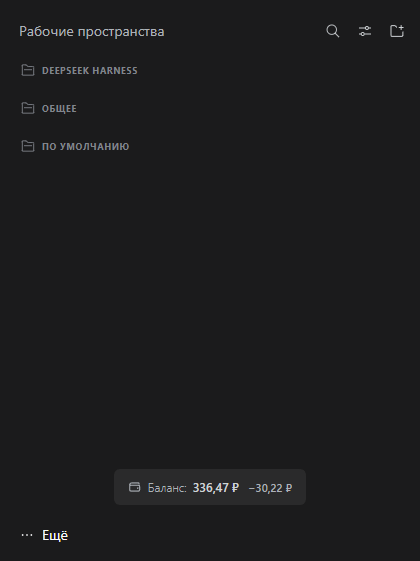
Что показывает
- Баланс — сколько средств осталось на счёте RouterAI.
- Расход — сколько списано с момента запуска сессии.
Настройка
На странице плагина (Плагины → Баланс RouterAI) есть поле «RouterAI · интервал обновления баланса»: от 5 до 300 секунд, по умолчанию 10. Баланс тратится постоянно, поэтому счёт здесь идёт на секунды.
Требования
- Ключ API RouterAI в учётных данных harness под именем
ROUTERAI_API_KEY.
Без него плагин молчит и показывает —.
Установка
Магазин. Плагины → Plugin Market → найдите dsh-routerai-balance.
Кнопка «Добавить плагин». Плагины → Добавить плагин:
github:dev-cmde/dsh-routerai-balance
Командная строка. Приложение использует профиль desktop, веб-версия — web:
# приложение
dsh plugin --profile desktop add github:dev-cmde/dsh-routerai-balance

# веб-версия
dsh plugin --profile web add github:dev-cmde/dsh-routerai-balance
Лицензия
MIT — см. LICENSE.
English
A DeepSeek Harness plugin: your RouterAI balance and the spend since the session started, in the sidebar footer.
What it shows
- Balance — how much credit is left on the RouterAI account.
- Spend — how much has been used since the session started.
Configuration
The plugin page (Plugins → RouterAI balance) has a RouterAI · balance refresh interval field: 5 to 300 seconds, 10 by default. Credit is spent continuously, so this one counts in seconds.
Requirements
- A RouterAI API key stored in the harness credentials as
ROUTERAI_API_KEY.
Without it the plugin stays silent and shows —.
Installation
Plugin market. Plugins → Plugin Market → search for dsh-routerai-balance.
The "Add plugin" button. Plugins → Add plugin:
github:dev-cmde/dsh-routerai-balance
Command line. The desktop app uses the desktop profile, the web version uses web:
# desktop app
dsh plugin --profile desktop add github:dev-cmde/dsh-routerai-balance

# web version
dsh plugin --profile web add github:dev-cmde/dsh-routerai-balance
License
MIT — see LICENSE.