dsh-plugin-fly-skins
ethanchen669/dsh-plugin-fly-skins
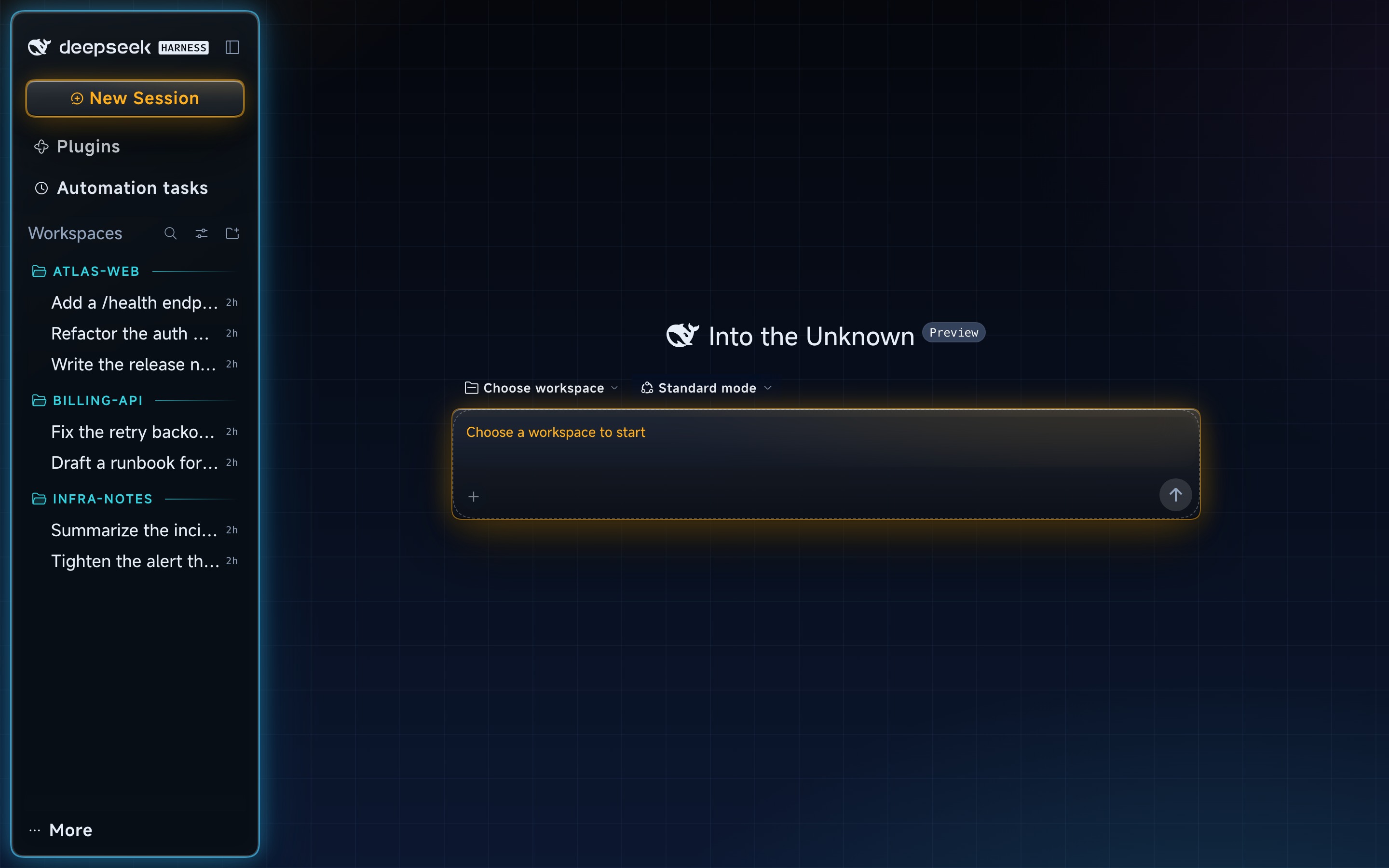
Four palettes for the DeepSeek Harness web UI — solid, glass, volume and neon — each with light and dark halves. Neon adds a scene light field with a 46px circuit grid, a laser scan that sweeps the conversation column only while a turn is running, HUD-style workspace labels in the sidebar, embedded MiSans Latin chrome type, and a 125% sidebar type scale that stays fixed while the conversation area zooms.
설치
dsh plugin --profile web add github:ethanchen669/dsh-plugin-fly-skinsREADME
Fly Skins — palettes for the DeepSeek Harness web UI
Four light/dark palettes for the official DeepSeek Harness web UI, a cyan scanline that runs only while the model works, and a HUD sidebar.
四套明暗配色、只在模型运行时出现的青色扫描线,以及 HUD 侧栏。
@dsh-fly/dsh-plugin-fly-skins · category theme · MIT
Preview data. The screenshots below are the official DeepSeek Harness UI with this skin installed — no Fly workbench, fresh profile. Workspaces and sessions are sample or blank-profile data (example names include
atlas-web,billing-api,infra-notes); the sidebar crop shows a blank default workspace. No real conversations appear.预览数据:下面的截图是官方 DeepSeek Harness UI + 本皮肤(没有 Fly 工作台、全新 profile)。 工作区/会话是示例或空白 profile 数据(示例名包括
atlas-web/billing-api/infra-notes), 侧栏截图显示的是空白默认工作区;不含任何真实会话。
Four palettes
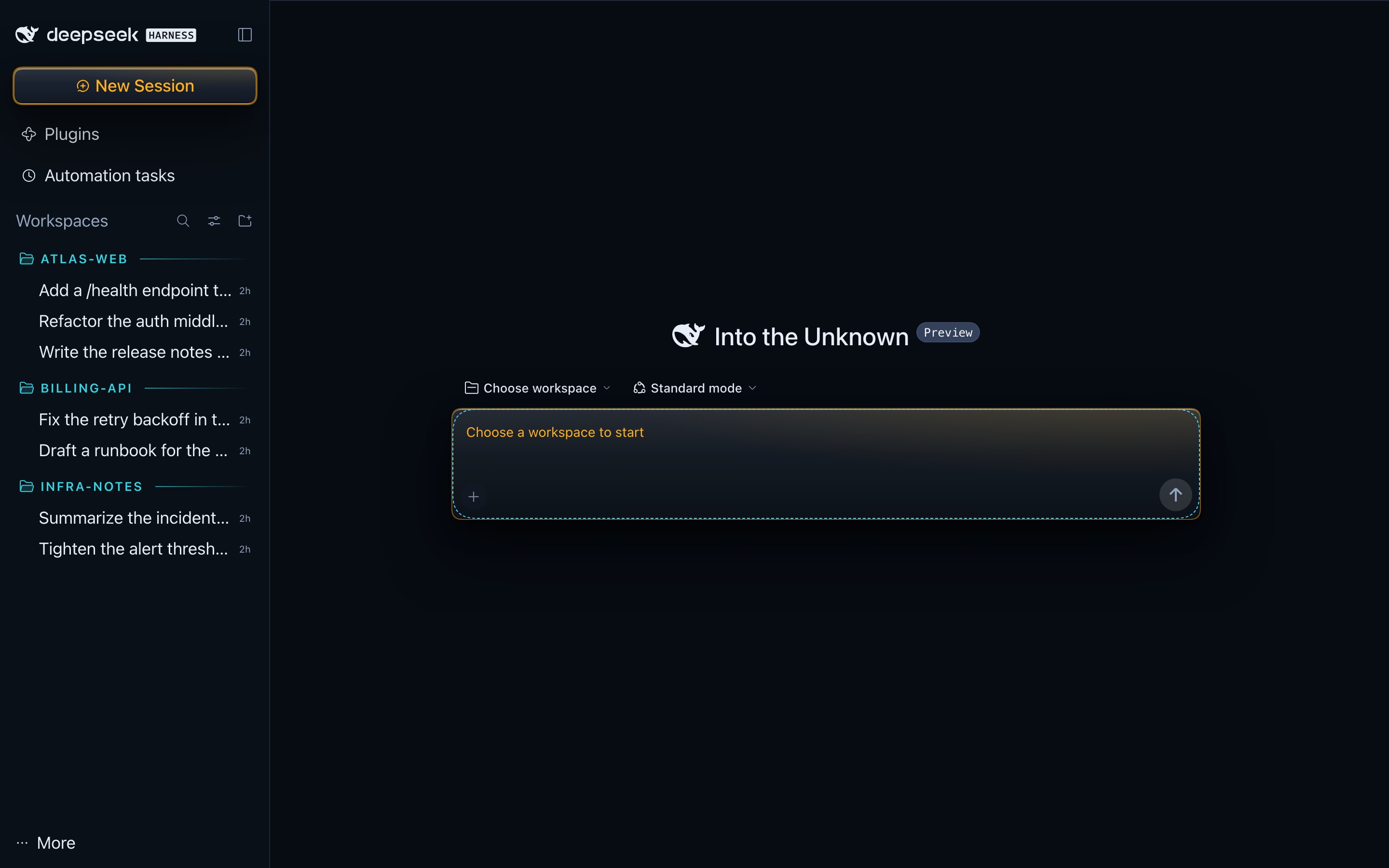
| Palette | id | Look | Pick it when |
|---|---|---|---|
| Solid | solid | Opaque panels, crisp borders | You want a flat, high-contrast room |
| Glass | glass | Translucent frosted surfaces, hairline edges | You want depth without colour |
| Volume | volume | Glass volume + state glow + text plates | You want the lit, sculpted read |
| Neon | neon | Scene light field + edge glow + text plates + dark-half running scan | You want the scene-light field (default in dsh-fly) |
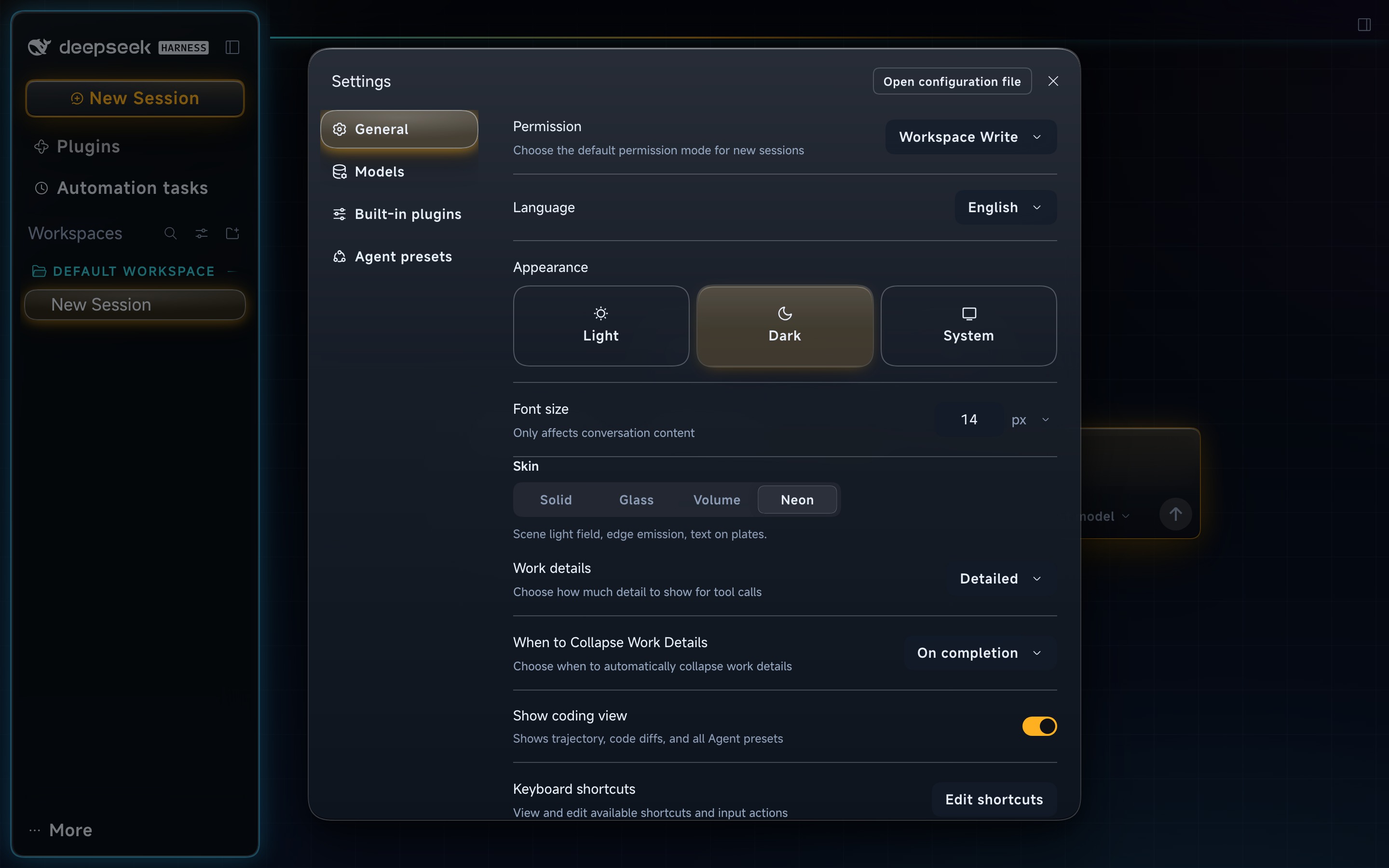
Every palette has a light and a dark half. The choice persists in the profile's patch layer
(field skin), so it survives restarts and profile switches.
四套配色各有明暗两半,选择写进 profile 的 patch 层(skin 字段),重启和切换 profile 后保留。
Install
dsh plugin --profile=<profile> add @dsh-fly/dsh-plugin-fly-skins
Or add it from Settings → Plugins in the harness UI, then restart the app — the engine caches client bundles in-process, so a page refresh is not enough.
Once installed, the palette picker appears as its own row in Settings → General:
It works standalone: install the skin without the Fly workbench and you get the official UI in Fly colours; install the workbench without the skin and you get the official look plus the workbench.
独立可用:不装 Fly 工作台也有官方 UI 的 Fly 配色;只装工作台不装皮肤则是官方外观 + 工作台。
Features
Scene light field
Neon paints a scene light field behind the whole window: deep navy canvas, a 46px circuit grid running edge to edge, cyan edge glow bleeding out of the rail card, and text sitting on its own plate so it stays sharp over the field. Dark and light are two halves of one recipe, not two themes.
霓虹在整窗画一张场景光场:深蓝画布 + 46px 电路网格、栏卡外溢青光、文字坐字座;明暗两半是同一套 配方的两个半区。
Running scanline
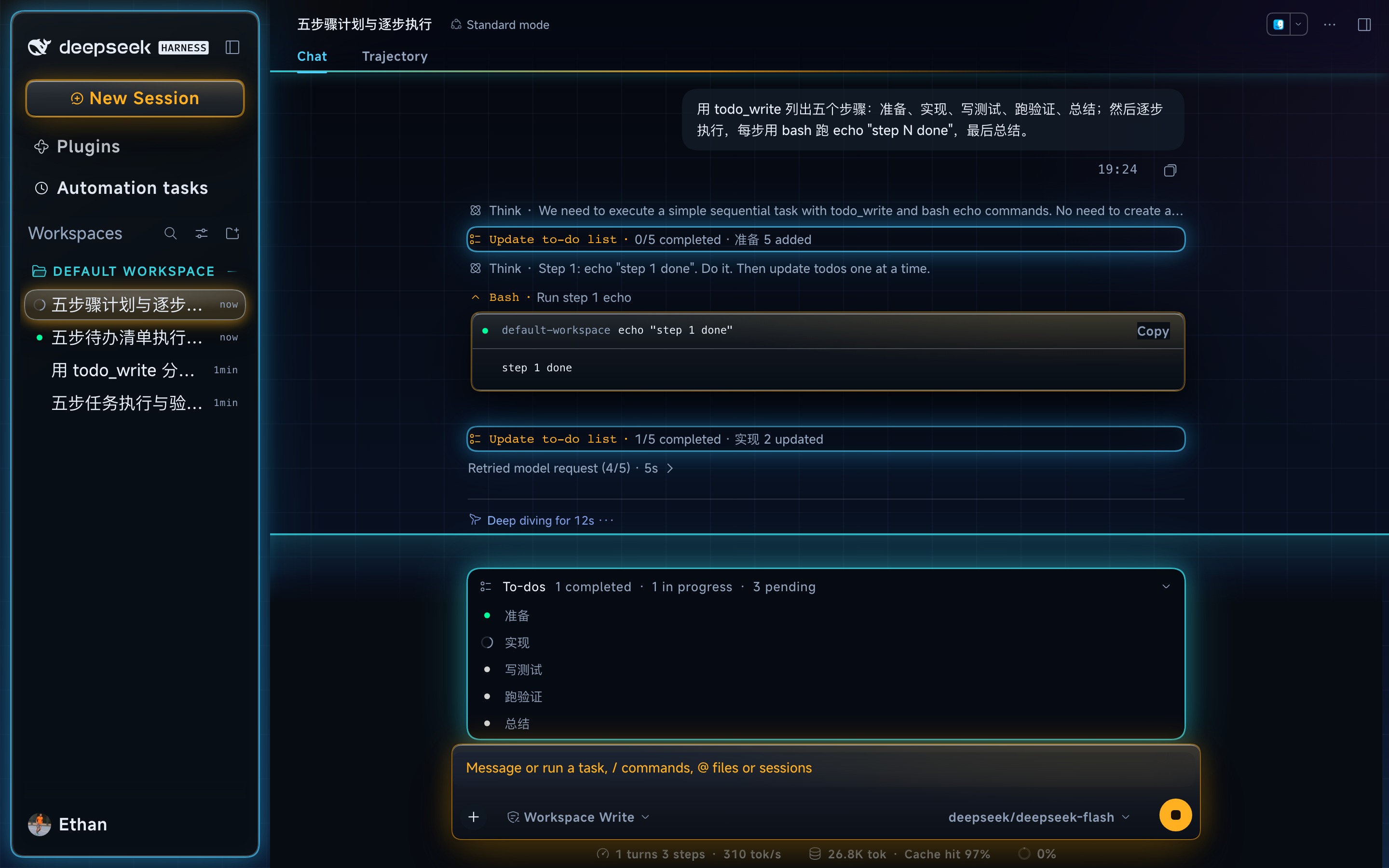
In the neon dark half, when a turn is running, a 2px cyan line sweeps bottom-to-top through
the conversation column, trailing a 48px glow in the same cyan as the todo panel's ring
(rgba(53, 211, 224, 0.78), T10). It is tied to the harness's own running marker
(data-chat-running): the line exists only while the model is working and is gone the moment the
turn settles. It is a background layer — it does not paint over glyphs — but it can show through
transparent gaps in text and surfaces; idle reading never gets a moving line. Off under
prefers-reduced-motion and at ≤768px.
模型工作时才扫:2px 青线自下而上扫过中列,尾迹 48px、与 Todo 任务列表卡 T10 同色
rgba(53,211,224,.78)。线挂在引擎自己的 data-chat-running 上,模型一停就消失;它画在背景层、
不盖字形,但会从文字/表面的透明缝隙透出来;静态翻阅不扫。prefers-reduced-motion 与 ≤768px
下关闭。
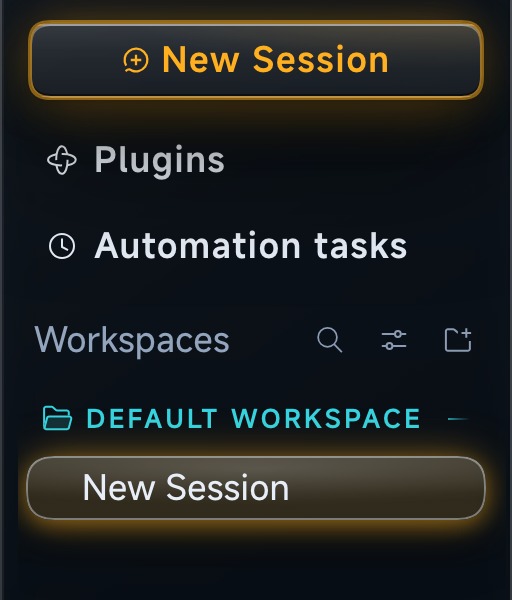
HUD sidebar
Workspace folders are a cyan HUD badge: pending cyan (#35d3e0 dark / #0f6f7d light),
13px, weight 600, 0.12em tracking, uppercase Latin, with the folder icon in the same cyan and
a 1px trailing gradient rule. The row keeps the upstream surface — no extra plate or bar. Session
rows are unchanged: 17.5px white 400 with the pill selection. 13px is deliberate: 14px clipped
DEFAULT WORKSPACE to DEFAULT WORKSP… in the 280px rail, so the badge keeps the full label one
step below the session type.
侧栏工作区文件夹是青色 HUD 标牌:pending 青(深色 #35d3e0 / 浅色 #0f6f7d)、13px、600、
0.12em 字距、英文大写,文件夹图标同色,右侧一条 1px 渐隐尾线;行本身没有额外底板/色条。会话行不动:
17.5px 白字 400 + 胶囊选中态。13px 是有意的:14px 会把 DEFAULT WORKSPACE 截成
DEFAULT WORKSP…(280px 轨道实测),所以保留完整标签,只比会话行低一档。
Type
Latin is MiSans Latin, embedded (~166KB, Apache-2.0, three weights) so the chrome keeps its HUD voice offline; Chinese falls back to your own font setting. Buttons and panel titles take 600 weight with 0.04em tracking, section labels 500, numerals are tabular, and timestamps/counts switch to the mono stack. Sidebar text is 125% (14→17.5px); the HUD workspace badge is the 13px exception above. MiSans Latin is scoped to neon; solid / glass / volume keep their shipped body type and pixels, apart from the shared 125% sidebar scale and the HUD workspace badge.
字体:拉丁用内置 MiSans Latin(~166KB,Apache-2.0,三档字重),中文回落用户字体;按钮/面板 标题 600 + 0.04em,section 500,数字等宽,时间戳/计数走等宽栈。侧栏文字 125%(14→17.5px),HUD 工作区标牌是上面的 13px 例外。MiSans Latin 只作用于霓虹;其余三套配色保留原身体字体与像素,共享的 只有 125% 侧栏字号和 HUD 工作区标牌。
Compatibility
| Item | Value |
|---|---|
| Harness engine | @deepseek-ai/dsh@0.2.x (verified on 0.2.0-rc.2 and 0.2.1-rc.2) |
| Node | ≥ 20 |
| Peer | @deepseek-ai/schemastery ^3.18.4 (the engine supplies the rest at load time) |
The package declares dsh.bundle + dsh.client: the host half contributes a loader row, a
boot-time palette marker and the flySkins service; the client half contributes the token
override layer, the stylesheet and the settings UI.
兼容性:引擎 0.2.x(在 0.2.0-rc.2 / 0.2.1-rc.2 验过);Node ≥20;peer 只有
@deepseek-ai/schemastery。包声明 dsh.bundle + dsh.client。
Data and network
The skin is tokens, CSS and an embedded font. It makes no external network requests, loads no CDN
fonts and collects no conversation data. MiSans Latin is shipped in the client bundle; the host
half publishes the loader row, the boot palette marker, the settings surface and the flySkins
service.
数据与网络:皮肤只包含 token、CSS 与内置字体;不向外部发网络请求、不拉 CDN 字体、不采集会话 内容。MiSans Latin 随客户端包内嵌;宿主半边发布 loader 行、启动配色标记和设置面。
Development & internals
Everything about building, the two contracts (boot marker and the flySkins service), the
directory layout, the upstream-hook rules, how dsh-fly consumes this repo, and the release
checklist lives in docs/maintainers.md.
pnpm install
pnpm run verify     # build + typecheck + tests
开发:构建、boot 标记与 flySkins 服务两条契约、目录、上游钩子规则、dsh-fly 如何消费本仓、
发布清单都在 docs/maintainers.md;pnpm run verify 跑构建 + 类型 + 测试。
Changelog
See CHANGELOG.md — 0.2.7 is the current README/marketplace release; 0.2.6 was the first npm-published 0.2.x release (B HUD sidebar, running-only scan, MiSans Latin).
License
MIT. MiSans Latin is Apache-2.0; see LICENSES/. First split out of the
dsh-fly monorepo (packages/dsh-plugin-fly-skins); scripts/build-client.mjs and
scripts/lib/client-src-hash.mjs are byte-identical copies, guarded by assertions on both sides.
许可:MIT;MiSans Latin 为 Apache-2.0,见 LICENSES/。