dsh-theme-liquid-glass
favktoxic/dsh-theme-liquid-glass
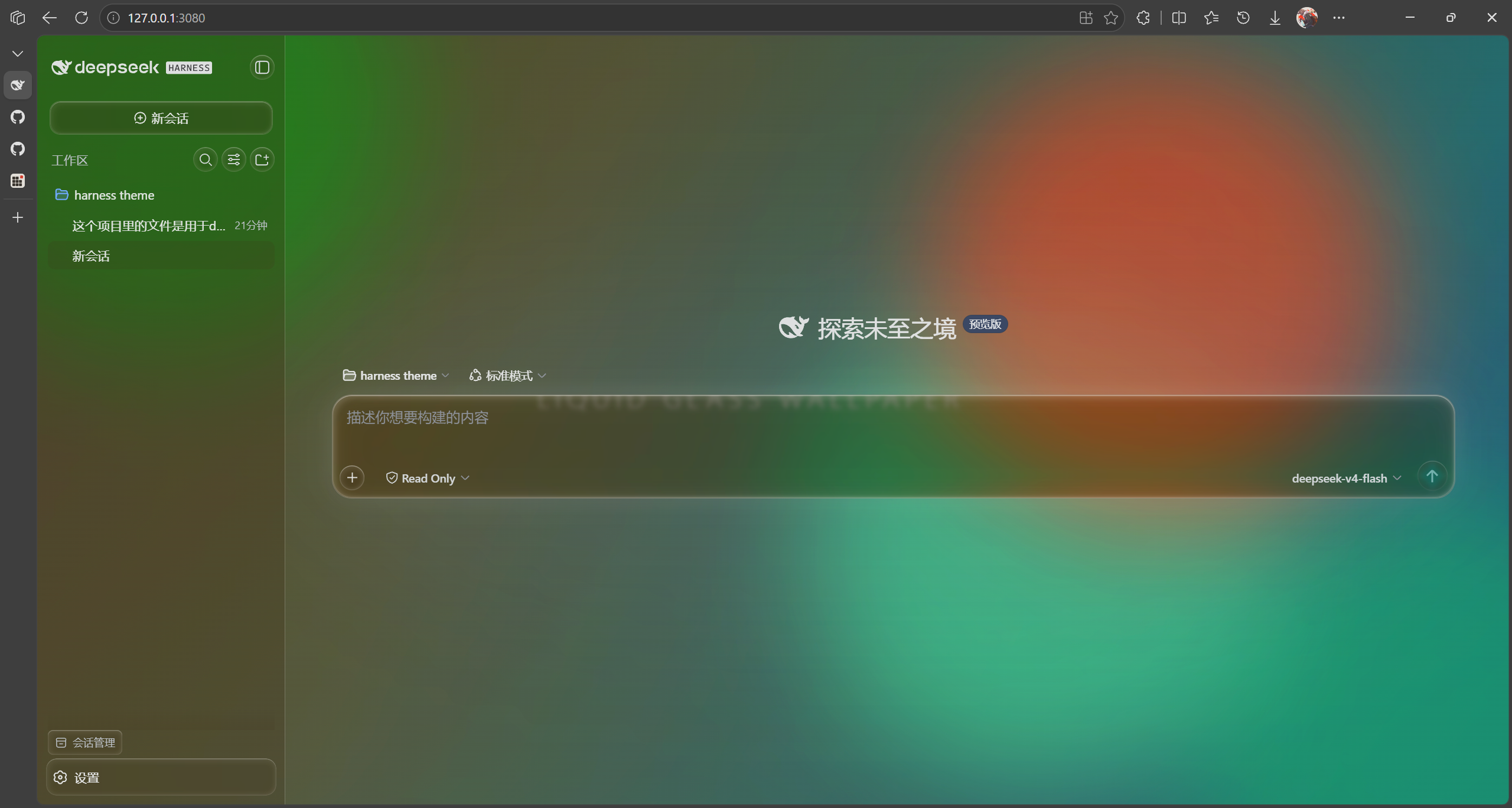
DSH Web UI를 위한 진정한 Liquid Glass 테마: 입력 카드, 전송 버튼, 말풍선, 뷰 탭, 큐 독, 사이드바에 SVG feDisplacementMap 엣지 굴절 효과 적용. 애니메이션 데모 배경화면 내장, 배경 흐림 및 밝기 커스터마이징 가능, 모델 선택기 팝업 재설계, 전체에 걸친 글래스 스타일 버튼, 그리고 독특한 물방울 모양 설정 아이콘 제공.
설치
dsh plugin --profile web add github:favktoxic/dsh-theme-liquid-glassREADME
dsh-theme-liquid-glass
Genuine Liquid Glass theme for DeepSeek Harness Web UI.
A complete frosted-glass skin: SVG edge refraction, a customizable animated wallpaper, glass-lens buttons, a redesigned full-screen model selector, and a dedicated water-drop settings icon.
v0.4.2 — Requires DeepSeek Harness ≥
0.1.2-rc.1. This release adapts to the harness client-package split: the store part of the removed@deepseek-ai/dsh-client-runtimenow lives in@deepseek-ai/dsh-client-store. See CHANGELOG.md.
Features
Liquid Glass UI
- SVG Edge Refraction ·
feDisplacementMaprefraction on the input card, send button, message bubbles, view tabs, queue dock, and sidebar buttons. Intensity is adjustable from a slider. - Frosted Glass · Token overrides (
ctx.theme.overrideTokens) swap the--dsw-alias-*semantic tokens for translucent glass values. Glass parameters are driven by--dsh-lg-*custom properties onbodyand apply instantly. - Glass-lens Buttons · Send, view tabs, sidebar actions, and the command
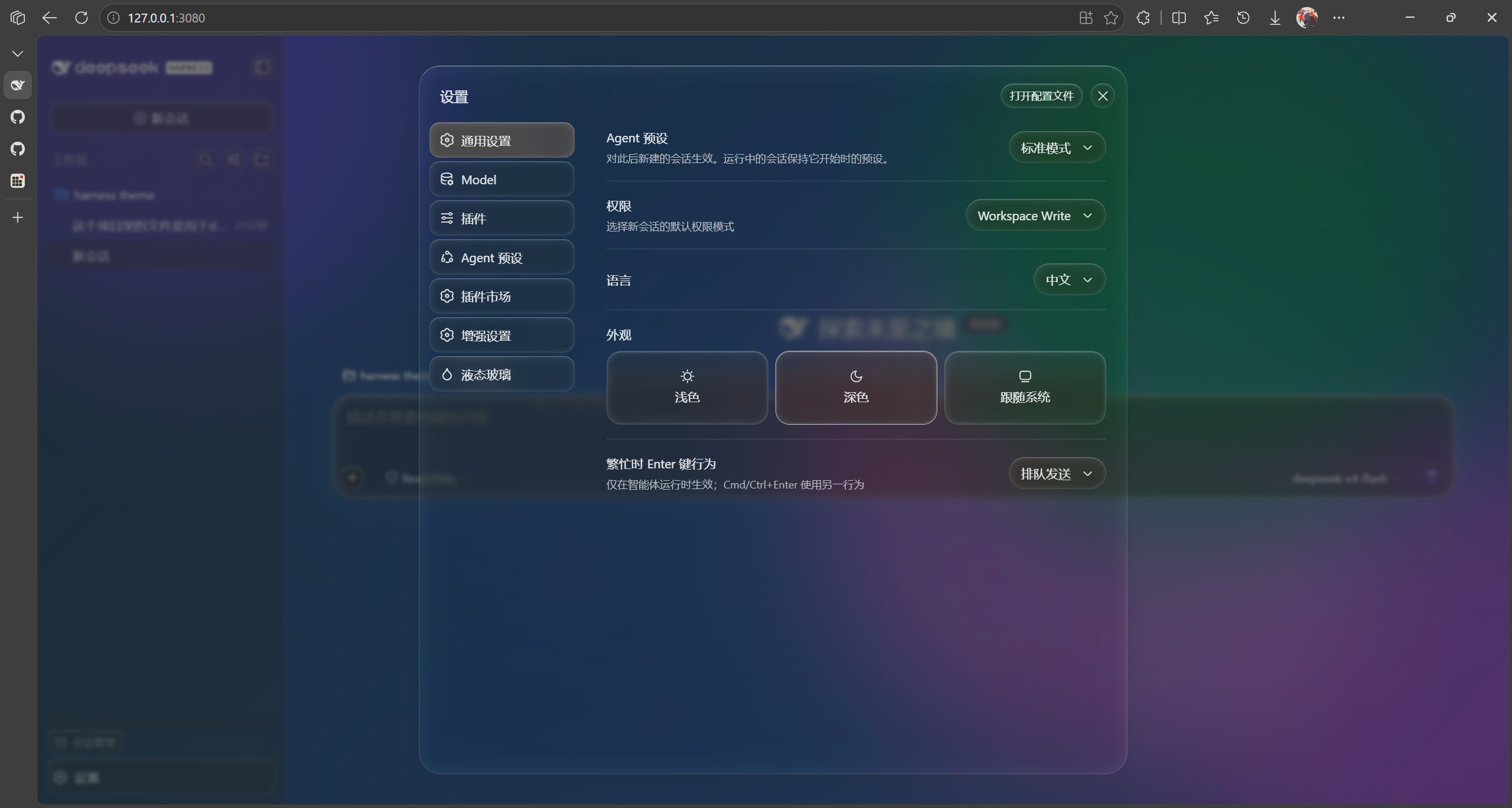
(+)button all use a glass material with edge refraction. - Water-drop Settings Icon · A droplet replaces the default gear in the settings nav.
- Hover Highlights · Interactive elements get a subtle glow and lift.
Wallpaper & Background
- Custom Background Blur & Brightness · Control wallpaper blur (
bgBlur) and brightness (brightness) independently so the background sits perfectly under the glass. - Built-in Animated Demo Wallpaper · A color-blob wallpaper that works out of the box, tunable via speed, blob count, color cycle, blur, and opacity.
- Dynamic Wallpaper Sources · Web URLs (iframe, optional host proxy), local HTML, local images, and local videos.
Model Selector
- Redesigned Model Selector · A full-screen frosted picker with provider-group grid layout and hover highlights — skip the intermediate root pane and jump straight to the model list.
Settings Page
- Dedicated top-level "Liquid Glass" page (
settings.section, beside General / Model / Plugins) with two groups: Page Background and Input Card · Frosted Glass. All changes apply in real time; Reset to defaults restores everything. - One-click Disable · The master toggle strips every token override,
removes the wallpaper, and disables all frosted/lens rules at once — every
visual is gated on the
body.dsh-lg-onclass, so disabling leaves zero residue.
Implementation Notes
- Frost is applied as
filter: blur()on a dedicated background layer (inset: -48pxfor bleed room), neverbackdrop-filteron#root— a non-none backdrop-filter makes#rootthe containing block for everyposition: fixeddescendant (menus, popups, toasts), re-anchoring them.
Structure
src/index.ts          Host half: wallpaper file routes, file upload, web proxy
src/client/index.ts   Browser half: token overrides, background layer, glass params, settings panel
src/shared.ts         Shared constants and settings types (zero runtime dependencies)
build.mjs             SWC build pipeline (lib/index.js + lib/client.js in loader format)
Install to a DSH Web Profile
Via npm (recommended)
dsh plugin add --profile web dsh-theme-liquid-glass
Refresh the browser.
Compatibility: requires DeepSeek Harness ≥
0.1.2-rc.1. Earlier harness versions use the removeddsh-client-runtimepackage and are not supported by v0.4.0.
Local Development Link
Link your source directory into the profile's node_modules with a Windows
junction (a plain dsh plugin add "<absolute-path>" can produce a broken
relative symlink and drop the plugin from the profile bundles list):
# 1) remove any stale entry
dsh plugin remove --profile web dsh-theme-liquid-glass

# 2) junction the source dir into the profile
New-Item -ItemType Junction -Path "$env:USERPROFILE\.dsh\profiles\web\node_modules\dsh-theme-liquid-glass" `
  -Target "<absolute-path-to-theme-source>" -Force

# 3) ensure the theme is listed in the profile bundles
dsh plugin add --profile web dsh-theme-liquid-glass
Refresh the browser.
After modifying code: rebuild, then refresh.
cd <theme-source-dir>
node build.mjs
Client changes (settings UI, glass params) take effect after a build + browser refresh. Host changes (routes, upload endpoint) require a
dsh webrestart to reload the host half.
Build
npm install
npm run build        # one-shot build (lib/index.js + lib/client.js)
npm run watch        # watch mode (works with client-hmr hot-reload)
npm run dev          # build + smoke test
npm test             # run the client smoke test
npm run typecheck    # tsc --noEmit
Client Injection
The client bundle exports an inject array of service names:
['slots','locale','theme'] (matching the shipped dsh-ui-appearance /
dsh-dream-skin plugins). The client loader builds the fiber injection table
from this array; missing it causes cannot get property X without inject and a
hard web-boot failure. The apply() function itself is wrapped in try/catch —
runtime errors degrade gracefully without crashing the GUI.
Persistence (Why localStorage)
Settings are stored in localStorage (key dsh-liquid-glass.settings), not
through the settings RPC. The harness settings gateway only exposes hard-coded
product namespaces to browser clients — a third-party namespace stays loading
forever even when the host half registered it. The shipped dsh-ui-appearance
and dsh-dream-skin plugins hit the same wall and both chose localStorage.
Trade-off: settings are per-browser — switching browsers or clearing site data loses them.
Settings Reference
| Field | Description |
|---|---|
enabled | Master switch |
wallpaper.kind | none / url / html / image / video / local |
wallpaper.value | Web URL or relative path under the wallpapers directory |
wallpaper.proxy | Route web URLs through the host proxy (bypasses X-Frame-Options) |
wallpaper.muted | Mute video wallpapers (default true; unmuting may be blocked by autoplay policy) |
demo.speed | Demo wallpaper animation speed multiplier 0.1–4 (step 0.1) |
demo.blobs | Demo wallpaper blob count 1–6 |
demo.colorCycle | Demo wallpaper color cycle 0–10 (0 = static) |
demo.blur | Demo wallpaper blob blur 10–140px |
demo.opacity | Demo wallpaper blob opacity 0.2–1 |
demo.wash | Demo wallpaper background gradient wash toggle |
glass.frosted | Frost toggle (input card / bubbles / dock backdrop blur) |
glass.blur | Input card frost blur radius 0–60px |
glass.bgBlur | Background wallpaper blur 0–60px (independent of card frost) |
glass.refraction | Edge refraction 0–1 |
glass.tint | Glass color |
glass.tintOpacity | Glass color opacity 0–1 |
glass.toolTextColor | Tool call text color (hex, empty = default) |
glass.codeBlockOpacity | Code block background opacity 0.2–1 (independent of tint opacity) |
glass.glassBrightness | Glass material brightness 0.2–1.6 (tint lightness scaling; >1 brighter, <1 darker) |
glass.brightness | Background brightness 0.2–1.6 |
First Launch
On first enable, the plugin checks whether demo.html exists under
<DSH_HOME>/wallpapers. If missing, it writes the built-in demo wallpaper
(existing files are never overwritten). The default path is
$DSH_HOME/wallpapers/demo.html; the directory can be changed via the
wallpaperDir config option.
Screenshots