dsh-plugin-airlock
gabrielbav/dsh-plugin-airlock
Pre-install security gate: quarantines each plugin, skill and subagent bundle with install scripts disabled, scans it with Cisco Skill Scanner, SkillScan, Cisco MCP Scanner, OSV-Scanner, Trivy, Gitleaks and optional SARIF tools or an LLM judge on a DSH model, then passes, asks for review or blocks it. Needs the install-gate hook proposed in deepseek-ai/deepseek-harness#12999.
설치
dsh plugin --profile web add github:gabrielbav/dsh-plugin-airlockREADME

Airlock
A security score before any plugin, skill or subagent reaches your DeepSeek Harness.


[!NOTE] New in 0.2.0: Airlock works on stock DeepSeek Harness. You no longer need a patched DSH. Without the install-gate hook, Airlock vets the agent's installs in the chat, adds its own Scan and install with Airlock option to the Plugins page, and switches off anything that installed some other way without a scan. With the hook it still vets every install before it happens. See Two levels of protection.
DeepSeek Harness plugins run with your permissions. They can use your shell, your files and your credentials. Third-party skills and subagent prompts can also carry prompt injection, credential theft or data exfiltration in plain text, so they never look like code.
Airlock puts every package in a quarantine first. It downloads it with install scripts disabled, runs six security scanners and an optional LLM judge, and then makes the call:
| Result | What happens | |
|---|---|---|
| 🟢 | Passed | Installs. |
| 🟡 | Review needed | You see the findings. Tick I reviewed these findings and press Install anyway, or approve the card in the chat. |
| 🔴 | High risk | Blocked. Nothing is installed, and there is no override. |
Wherever Airlock vets an install before it happens, these rules apply. Where it can't (see Two levels of protection), it finds the plugin afterwards and switches it off until you scan it.
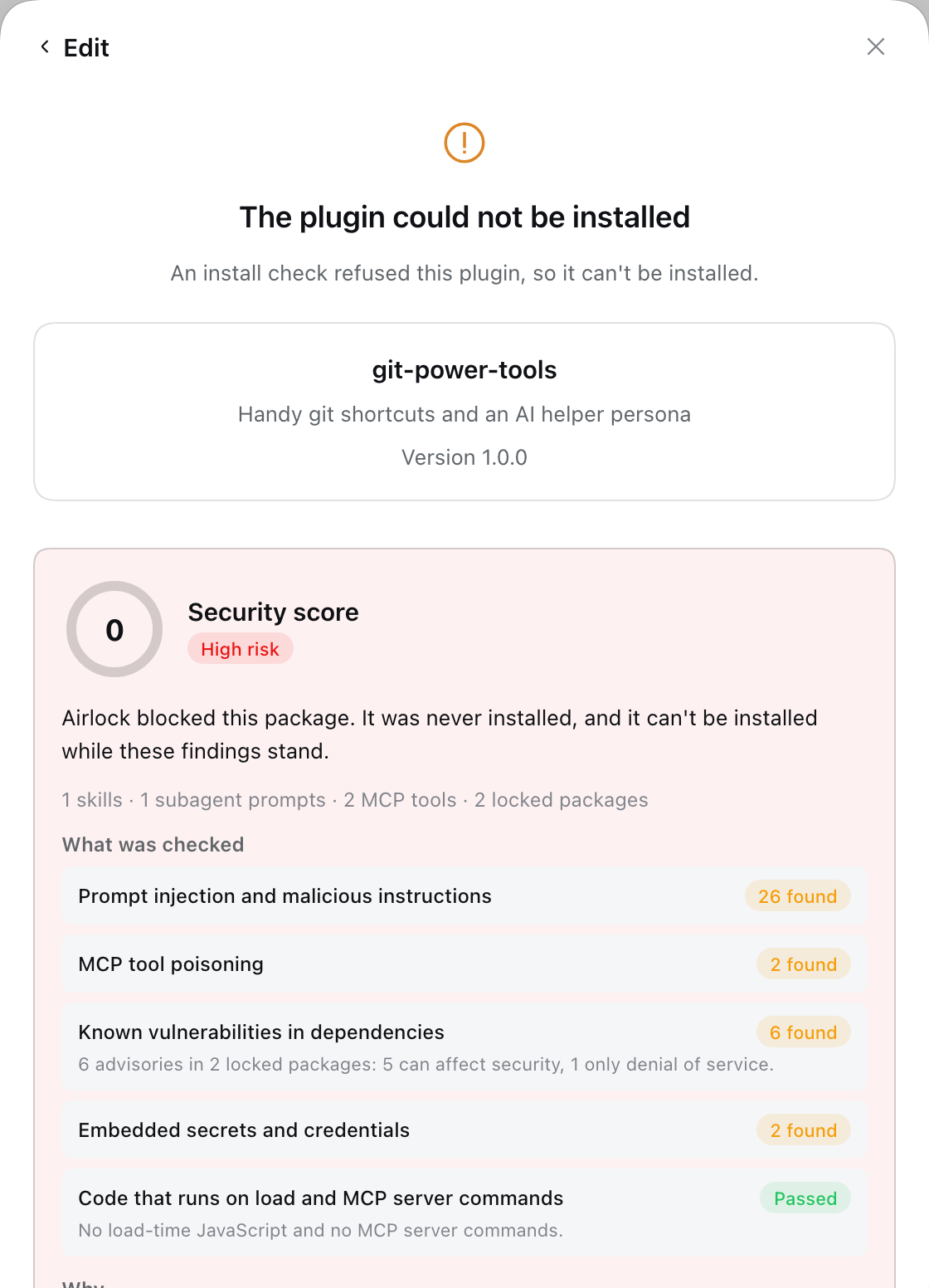 |
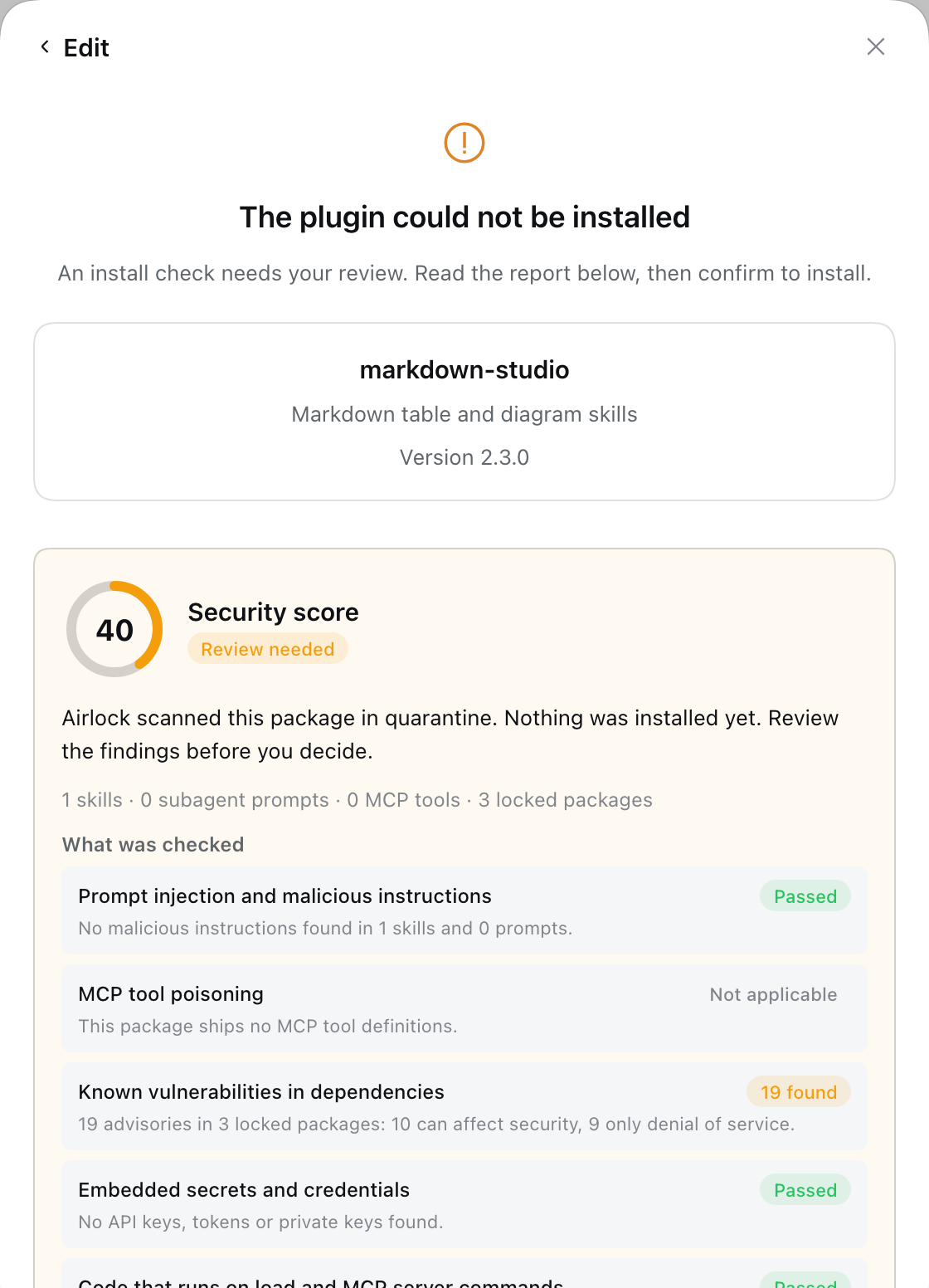 |
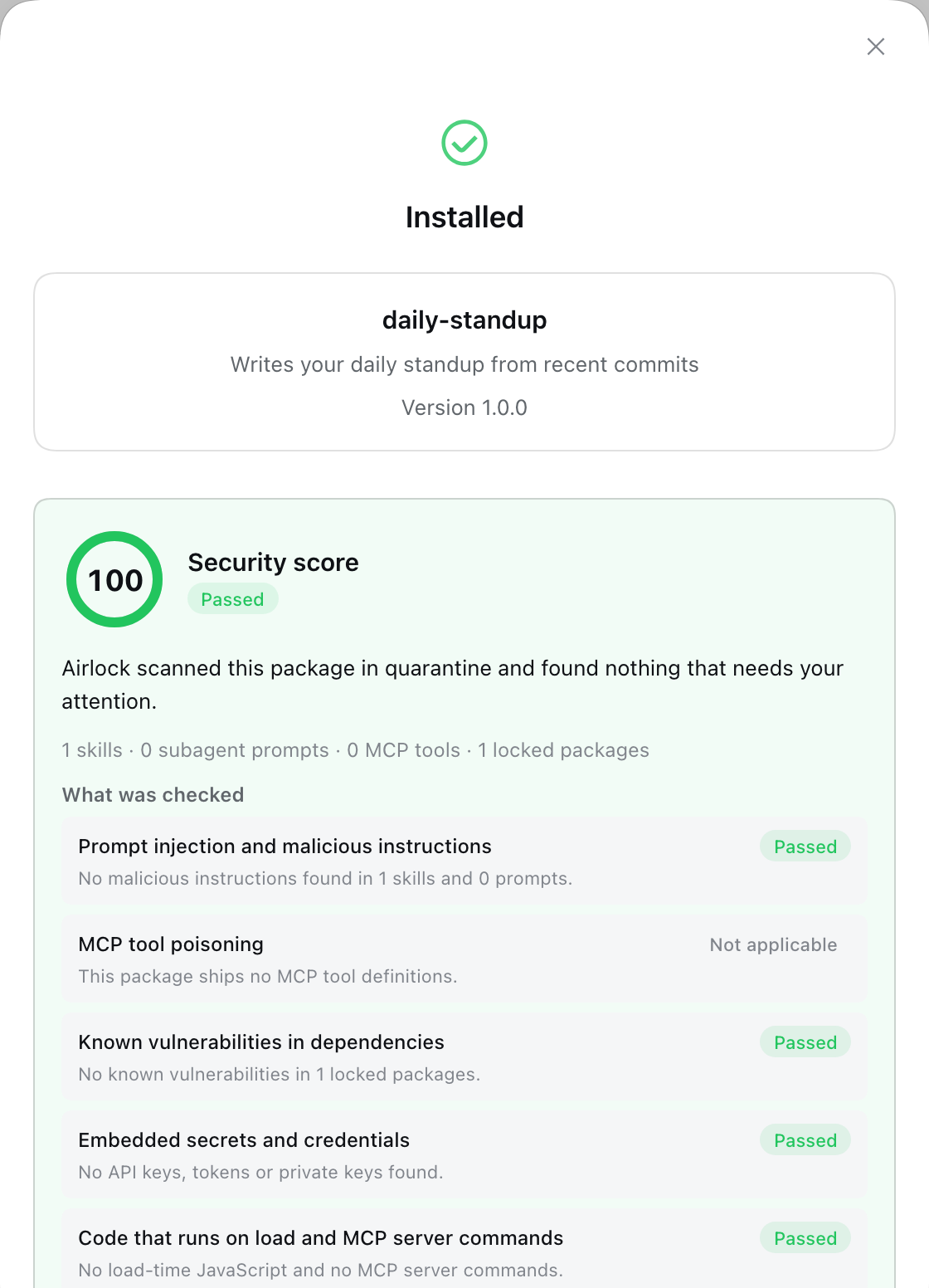 |
| Blocked: a skill that steals SSH keys | Review: outdated dependencies | Passed: a clean skill |
Why Airlock
- It looks where attacks hide. It scans
SKILL.mdfiles and the subagent personas and prompts inside a bundle's config, which ordinary dependency scanners never read. - One bad finding is enough. The result follows the worst finding, not an average, so one credential-stealing instruction blocks a package however clean the rest is.
- It fails closed. A scanner that is missing, crashes, times out or returns output Airlock can't read never counts as clean. The same goes for an LLM judge that doesn't answer.
- Nothing runs during the check. Install scripts are disabled, MCP servers are never started, and package code is never loaded.
- What it checked, not just what it found. Every report opens with a plain-language summary of each security area: passed, found, or not applicable, and why.
- Rated by impact, not just by severity. A denial-of-service bug in a dependency isn't a data breach. Airlock reads each advisory's CVSS vector and rates it by what it can actually do.
- Tamper-proof installs. After installing, Airlock checks that the installed files are exactly the ones it scanned. When Airlock installs the package itself it rolls back anything else; otherwise it switches the plugin off.
- Works with or without the hook. On stock DSH it covers the chat and its own install option and audits the rest. With the install-gate hook it covers every install: the Plugins page, Discover, updates and the chat.
What it checks
| Security area | Scanner | What it finds |
|---|---|---|
| Prompt injection and malicious instructions | Cisco Skill Scanner and SkillScan | Instruction overrides, hidden exfiltration, credential harvesting, obfuscated payloads, macOS keychain abuse, in skills and in subagent prompts |
| MCP tool poisoning | Cisco MCP Scanner | Poisoned tool descriptions in shipped MCP tool definitions, checked statically with no server started |
| Known vulnerabilities in dependencies | OSV-Scanner and Trivy | Advisories across every transitive dependency, labelled Data exposure, Integrity or code execution or Denial of service |
| Embedded secrets and credentials | Gitleaks and Trivy | API keys, tokens and private keys shipped in the package, redacted in the report |
| Code that runs on load and MCP server commands | Airlock | !!js expressions and the MCP server commands a bundle declares |
| Anything else | Your own tools | Any tool that writes SARIF (Semgrep, CodeQL, …), added from the settings page |
Optional LLM judge with your own models
Turn on the LLM judge and pick a model from the same list as the chat: DeepSeek, Claude, GPT, or whatever you've configured. The Cisco scanners then also ask that model to judge each skill and MCP tool. That catches attacks that rules miss, such as instructions that only become dangerous in context.
You don't paste an API key and there's no URL to set. Airlock forwards the scanners' requests to the chosen DSH model through a private, token-protected endpoint on 127.0.0.1, so subscription logins work too.

In the chat too
When the agent installs a plugin for you, green packages install, red ones are refused, and the agent never sees the findings text. With the hook, a package that needs review shows the same report as an approval card. On stock DSH the card shows the score, and the full report is under Plugins → Airlock → Recent scans.
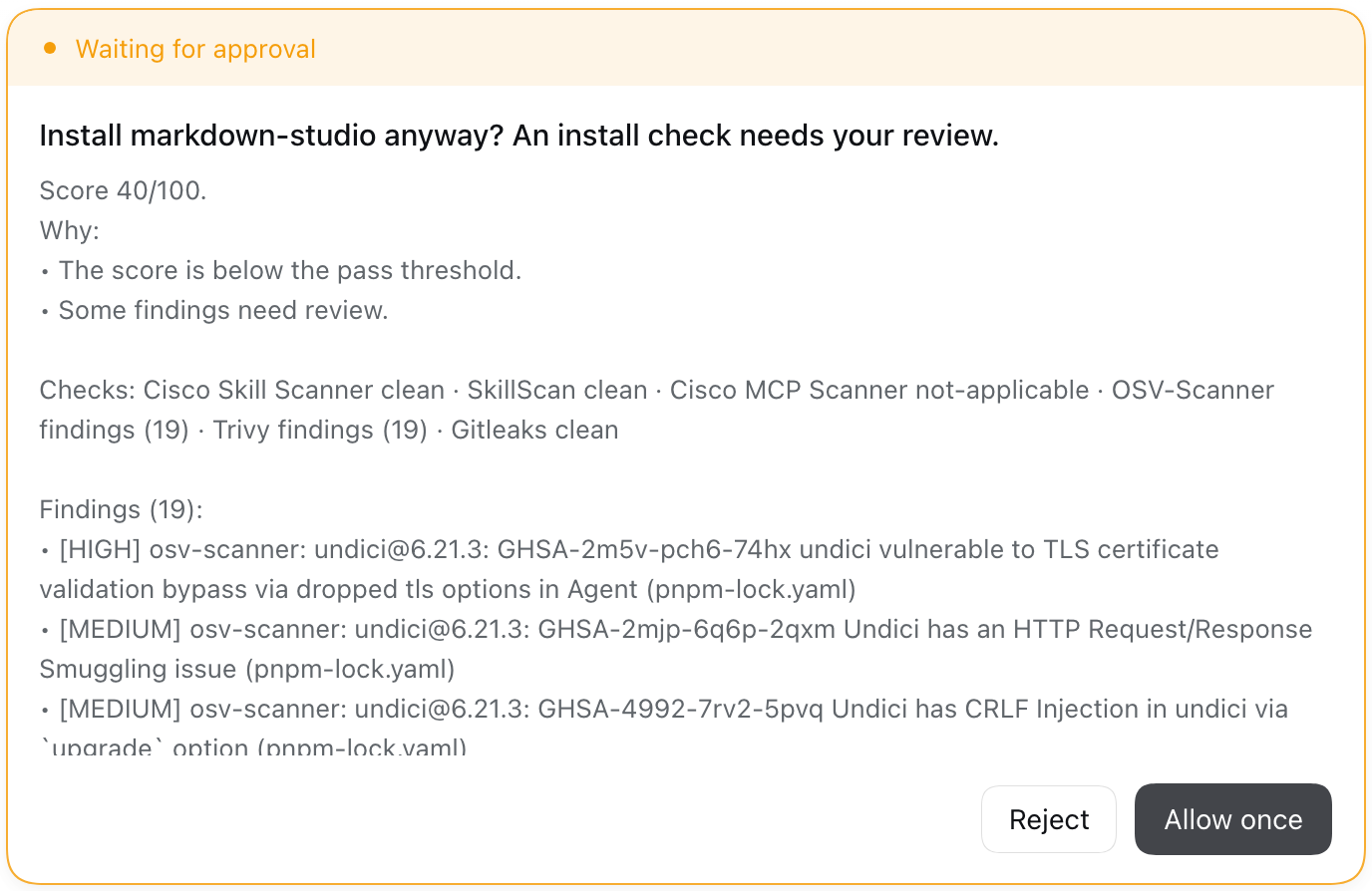
Two levels of protection
Airlock checks at startup whether your DSH has the install-gate hook, a small, generic extension point that lets any plugin vet installs. The hook is proposed upstream. Until it ships, you can get it from gabrielbav/deepseek-harness@feat/install-gate. Plugins → Airlock → Enforcement shows which level you're on.
| Where a plugin comes from | Stock DSH (Standard) | DSH with the hook (Full enforcement) |
|---|---|---|
The agent's plugin_manager tool in the chat | ✅ Vetted before it installs | ✅ Vetted before it installs |
| Add plugin → Scan and install with Airlock | ✅ Vetted before it installs, installed switched off, checked against the scan, then switched on | Not shown: the page's own button is vetted |
| Add plugin → Install a third-party plugin, Discover, updates | ⚠️ Found afterwards and switched off until you scan or trust it | ✅ Vetted before it installs |
dsh plugin add on the command line | ⚠️ Found afterwards and switched off | ⚠️ Found afterwards, or refused with requireInstallGate |
How the standard level works. In the chat, Airlock checks the agent's install_bundle calls before the tool runs. It asks for an exact version (name@1.2.3) so the files it scans are the files that install. A red package is refused, and a yellow one asks you with the score. Everything else is covered by an audit that runs at startup and after every plugin change. It compares each third-party plugin's files with the ones Airlock scanned. A plugin that doesn't match gets a Not scanned tag and a notice on its page with Scan now and Trust without scanning, and is switched off. If you switch it back on yourself, Airlock leaves it on. The audit notices after the fact, so the plugin's install has already run once by then. Only the hook stops a package before it installs, from every path.
Plugins that were already installed the first time Airlock runs are trusted as they are. Plugins linked to a local folder (link:) are trusted by name, because their files change every time you rebuild them. Official bundles and the ones DSH ships are never touched.
Install
1. Install the scanners you want. Any you skip show as Not installed, and the settings page can install them with one click.
uv tool install cisco-ai-skill-scanner
uv tool install --python 3.12 skillscan
uv tool install --python 3.13 cisco-ai-mcp-scanner
brew install osv-scanner trivy gitleaks
2. Add Airlock in DSH: Plugins → Add plugin → dsh-plugin-airlock.
3. Optional, with the hook: make it mandatory. Add this to ~/.dsh/profiles/<profile>/cordis.patch.yml, so nothing installs while Airlock isn't running. dsh plugin add on the command line is then refused too, because the CLI can't run the check.
- id: plugin-manager
  name: "@deepseek-ai/dsh-plugin-manager"
  config:
    requireInstallGate: true
To upgrade Airlock itself later, remove these lines, upgrade, and add them back.
Settings
Open Plugins → Airlock. Changes apply from the next scan.
| Section | What you can do |
|---|---|
| Scanners | Each scanner's status and path, an on/off switch, and Install for missing ones |
| Custom SARIF scanners | Add any tool that writes SARIF. In arguments, {target} is the scanned folder and {output} the report file. Example: semgrep with scan --sarif --output {output} {target}. |
| Policy | The score to pass, the score below which it blocks, which severity blocks package findings, which severity blocks dependency advisories, when to ask for review, how to rate denial-of-service-only advisories, and whether a pass needs the LLM judge |
| LLM judge | On/off, and a model chosen from your DSH model list |
| Enforcement | Which level you're on, a switch to stop using the hook, and what happens to plugins that install without a scan: switch them off and flag them, or only flag them |
| Recent scans | Every report Airlock saved, including the packages it blocked |
Settings are saved in <profile>/.airlock/settings.json, and the same fields work on the airlock row in cordis.yml. Reports are kept in <profile>/.airlock/reports/, and the audit's list of trusted plugins in <profile>/.airlock/ledger.json. Every scanned plugin shows a Security N tag and its full report on its Plugins page.
How the score works
The score starts at 100 and drops for every distinct finding: Critical 50, High 25, Medium 10, Low 3. Dependency advisories count half.
- 🔴 Blocked when a package finding is Critical, a dependency advisory is Critical, or package findings bring the score below 40.
- 🟡 Review when the score is below 85, any finding is Medium or worse, a scanner is missing or failed, or the package has skills or prompts but the LLM judge didn't run.
- 🟢 Passed otherwise.
The same advisory reported by OSV and Trivy counts once. Compiled CSS-module class names ("popKey": "d2hvtW_popKey") are recognized as such, not as secrets. Every threshold is configurable.
For plugin authors: add your own scanner
Airlock provides ctx.airlock to other plugins:
export const inject = ['airlock']
export function apply(ctx) {
  ctx.effect(() => ctx.airlock.registerScanner({
    id: 'house-rules',
    name: 'House rules',
    command: 'my-scanner',            // resolved before run; omit for in-process checks
    async run(scan) {                 // scan.subject, scan.fetchDir, scan.inventory, scan.executable, scan.signal
      return { id: 'house-rules', status: 'clean', findings: [], durationMs: 0, usedLlm: false }
    },
  }))
}
run must fail closed: return error for anything it doesn't recognize, never clean.
With the install-gate hook, Airlock is one gate on top of DSH's generic hook. Other gates, such as publisher allow-lists, license policies, signature checks or a company approval service, can run beside it, and the strictest ruling wins.
Privacy and safety
- The package's code stays on your machine. OSV-Scanner looks up dependency names and versions in the public OSV database, and Trivy downloads its vulnerability database. With the LLM judge on, the skill, prompt and MCP tool text goes to the model you chose.
- The agent never sees finding text. Findings can quote the scanned package, which might contain instructions aimed at an AI, so the model only learns the score and the result.
- Secrets stay redacted. Secrets found in a package are redacted in Gitleaks' report.
Limitations
- No scanner analyses what a plugin's JavaScript does at runtime. Add a SARIF scanner such as Semgrep for code rules.
- Skills copied into skill folders by hand, outside the plugin manager, are not scanned.
- Without the hook, the Plugins page's own install button, Discover and the update dialog aren't vetted before they install. Use Scan and install with Airlock, or get the hook.
- An update that needs review can't be confirmed from the update dialog yet. Uninstall the plugin, then install the new version from Add plugin.
- A git-hosted bundle that builds in a
preparescript installs different files than the ones scanned, so the tamper check refuses it. Publish such bundles to npm instead. - The settings page is in English, Portuguese and Chinese. The security report is in all eight DSH languages.
Develop
pnpm install
pnpm build   # lib/index.js (Host, self-contained) and lib/client.js (browser)
pnpm test