dsh-menubar (plugin)
gnaneshkunal/dsh-menubar/plugin
The menu bar app itself is a separate AppKit build from the repo's app/ directory (swift build -c release on macOS); the plugin only provides the host bridge.
설치
dsh plugin --profile web add github:gnaneshkunal/dsh-menubar이 플러그인은 저장소의 plugin 하위 디렉터리에 있습니다.
README
dsh-menubar
DeepSeek Harness, one keystroke away — a macOS menu bar client that talks to a running dsh web
host, so every question you ask becomes a real, tracked session instead of a side process writing logs
nobody indexes.
Two halves, one idea:
plugin/ | A DeepSeek Harness host plugin, published as @gnanesh/dsh-menubar. Mounts a token-authenticated WebSocket bridge and projects calls onto the host's own Typert Remotes. |
app/ | An AppKit menu bar app. A ⌃⌥Q hotkey and a whale in the status bar; the window runs the real dsh interface by default. |
What it looks like
The window, with the sidebar collapsed to its icon rail:
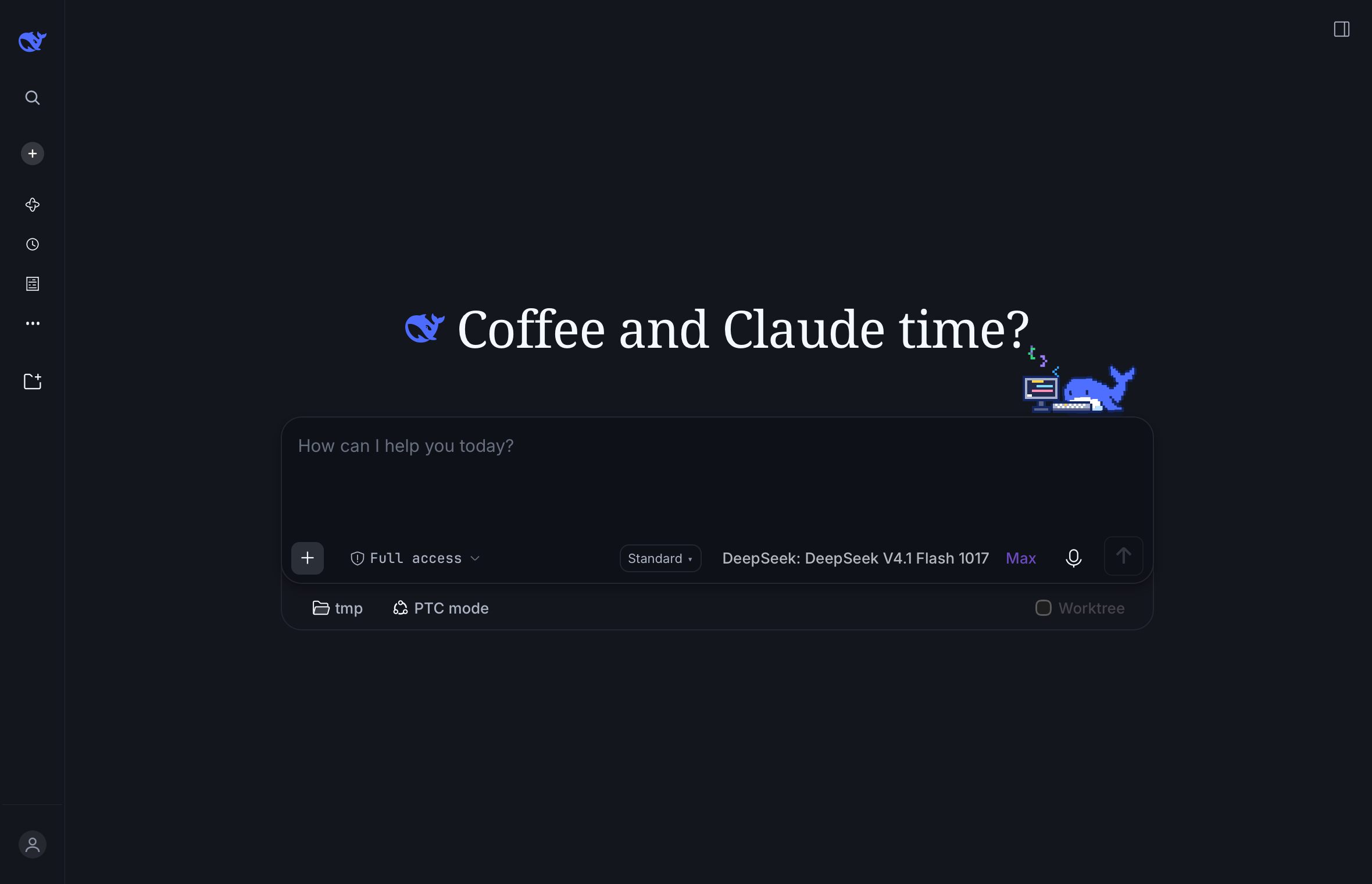
It is not a lookalike: that is the real dsh front end, booted inside the window through a pre-authenticated URL, so tool cards, approvals, tabs and theme tokens all come from the shell.
The status item is dsh's own whale mark, drawn as a template image so it follows light and dark menu bars — here in the menu bar, second from the left:

Why a plugin instead of a subprocess
The Host owns session state. A child process (dsh --profile headless "…") writes a durable log but
never registers it in ~/.dsh/storages/workspace.json, so the session stays invisible in the GUI.
Calling the Host's own session.create / session.prompt through the bridge means the Host creates
the session: it appears in the sidebar, resumes, forks and replays like any other.
app ──WS──▶ plugin (inside the dsh host) ──Typert Remotes──▶ session.create / prompt / follow
Install
# 1. the plugin, into the running profile
dsh plugin --profile web add @gnanesh/dsh-menubar
dsh web

# 2. the app
cd app && swift build -c release
Keep the app alive across logins with a LaunchAgent (~/Library/LaunchAgents/co.gnanesh.dshmenubar.plist):
<key>ProgramArguments</key>
<array><string>/path/to/dsh-menubar/app/.build/release/DSHMenubar</string></array>
<key>RunAtLoad</key><true/>
First boot mints ~/.dsh/menubar-token (0600) and reuses it, so the app reconnects with no
copy-paste and survives host restarts.
Usage
- ⌃⌥Q toggles the window; the whale in the menu bar does the same. Right-click the whale for status and quit.
- The default surface is the real dsh interface, so tool cards, approvals, tabs and themes come from the shell. A compact window — our own transcript and composer — is the alternative.
- Sessions land in a
menubar-sessionsworkspace, titled by the Host. - New session per open; pick an existing one to continue it.
- Live streaming through
session/follow, not polling; Stop issuessession.cancel. - Paste: text goes into the focused element on either surface; the compact window also accepts
images and text files, read from
NSPasteboardbecause afile://page gets no files through the DOM paste event. - The window is borderless, resizable, draggable, and does not close on outside clicks — ✕ or Escape closes it.
Configuration
Everything lives on the plugin's own row, which is where a bundle's configuration belongs:
Plugins → @gnanesh/dsh-menubar — the controls sit on the plugin page itself, between its
description and its rows.
Registered in plugins.bundle.config, keyed by the bundle's package name (the same seat
dsh-auto-continue, dsh-openrouter-plus and dsh-cost-meter use). The page carries:
- Window — Full dsh interface (default) or Menu bar window. Applies the next time the window opens; ⌃⌥Q reopens it.
- Workspace for new sessions.
- Menu bar app — state (Running with pid, or Stopped) plus Start, Restart, Quit.
Quit runs
launchctl bootout, so the app stays down; Start bootstraps the LaunchAgent first, which is why quitting is recoverable without a terminal. - Bridge — the WebSocket URL and the token file path.
Preferences live in ~/.dsh/menubar.json, written by the page and read by the app, so there is one
source of truth over two surfaces:
| Endpoint | Purpose |
|---|---|
GET/POST /menubar/prefs | read and write {ui, workspacePath} |
GET /menubar/app | {running, pid, loaded} from launchctl print |
POST /menubar/app | {"action": "start" | "stop" | "restart"} |
GET /menubar/bridge-config | discovery: wsUrl, pre-authenticated appUrl, workspace, token file, methods |
Two rules a client half must follow here, both learned the hard way:
- Declare the slot before registering into it —
ctx.slots.inject("plugins.bundle.config", () => ctx.slots.register(...)). Registering directly is rejected with "slot is not declared (a parent entry's children table must declare it)". - A failing entry blocks the whole boot ("Failed to load plugins"), and an inject edge naming a
non-entry — such as the shell-internal
dsh-client-ui-slotslibrary — leaves the entry inloadingforever. Depend only on real boot entries, and wrap the factory andapplyin try/catch: the worst case is then a missing page, never a dead GUI. The factoryidmust also equal the package name, or a stale page that still holds the previous bundle registers it twice ("duplicate factory registration").
Bridge protocol
client → host:  {t:"hello", token}         {t:"rpc", id, method, payload}   {t:"unfollow"}
host → client:  {t:"hello.ok", …}          {t:"rpc.result", id, ok, value|error}
                {t:"event", payload}       {t:"pong"}   {t:"error", code, message}
Methods: session.create, session.prompt, session.cancel, session.history, session.list,
session.models, session.selectModel, session.follow, workspace.list, workspace.create,
menubar.prefs.
session.follow starts a long-lived stream; the Host acknowledges immediately and then pushes
assistant-stream frames (text and reasoning deltas) plus durable event entries until turn/end.
Releasing and being listed
Pushing a v* tag is the release (.github/workflows/release.yml): the tag is checked against
plugin/package.json, every entry is syntax-checked, the package is published to npm over OIDC
trusted publishing with provenance, and the GitHub release is written from CHANGELOG.md. No token
and no OTP: the only setup is the trusted publisher (repo GnaneshKunal/dsh-menubar, workflow
release.yml, environment release) plus the repository variable NPM_PUBLISH=true.
scripts/submit-awesome.sh submits the plugin to
awesome-dsh-plugin — fork, one
data/plugins/<owner>__<repo>.yml, PR. That list requires the repository to be at least one day old
and enforces it in CI, so the submission is armed as a dsh schedule (a durable reminder that
reopens the session when due, visible under Automation tasks); the script is idempotent and stops if
the entry or the PR already exists.
Debug hooks
The app reads these from the environment, which is how the screenshots in assets/ are reproducible
instead of hand-cropped:
| Variable | Effect |
|---|---|
DSHBRIDGE_DEBUG=1 | stderr tracing (connections, paste, layout, snapshots) |
DSHBRIDGE_WINDOW_SIZE=1180x760 | initial window size |
DSHBRIDGE_SNAPSHOT=/path.png | write the webview exactly as rendered |
DSHBRIDGE_SNAPSHOT_DELAY=14 | wait before that snapshot |
DSHBRIDGE_EVAL='js' | run one snippet after load (e.g. collapse the sidebar) |
DSH_MENUBAR_UI=native|embedded | override the stored surface for one run |
Limits
- Binary file contents can't be attached on the embedded surface: the shell owns its own paste pipeline, and the bridge has no upload route yet.
- The model selector doesn't reflect a picked session's current model.
- Requires a loopback
dsh web; the bridge is authenticated but not transport-encrypted, so don't expose the port through a tunnel without TLS.
MIT licensed.