dsh-subtitle-studio
gu70619052/dsh-subtitle-studio
Subtitle Studio: transcribe, translate and burn subtitles for videos in local or SSH folders, scheduled or on demand. Its HTTP routes have no DSH access check, so a web page open in your browser could call them.
설치
dsh plugin --profile web add github:gu70619052/dsh-subtitle-studioREADME
Subtitle Studio(字幕工坊)
A DeepSeek Harness plugin that turns a folder of foreign-language video into subtitle-burned Chinese video, unattended, on your own machine.
Point it at a directory (local or an SSH-mounted NAS), tell it how to pick the next file, and it transcribes with Whisper, translates with the LLM you already configured in DSH, burns the subtitle with ffmpeg, and can do all of it again tomorrow at a fixed time.
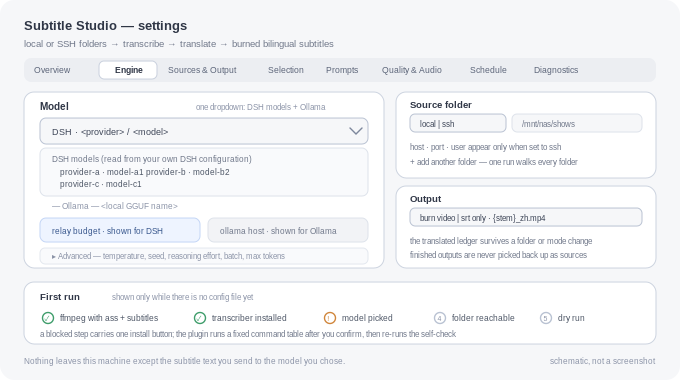
An annotated schematic of the panel, not a screenshot — the shipped UI follows your DSH locale and theme, and the real folder paths and model names are yours.
Platform: macOS only (
os: ["darwin"]), on both Apple Silicon and Intel. The transcriber defaults tomlx_whisperon Apple Silicon andfaster-whisperon an Intel Mac (picked from the same dropdown, and the self-check offers the matching install), and scheduling useslaunchd. Requires DeepSeek Harness>= 0.2.0and Node>= 20.
Why this shape
The whole pipeline runs locally. Nothing is uploaded anywhere except the subtitle text you explicitly send to a model, and the model is whichever one you configured in your own DSH installation. There is no account, no server, and no telemetry in this package.
Translation normally means "put an API key in this plugin's settings". Subtitle Studio avoids that: with the default
engine kind DSH, the plugin relays each translation back through the host, so the provider and the model are read
straight from your existing DSH model configuration. No second key to paste, and no second place for that key to leak
from.
Install
Install the Python transcriber once (Apple Silicon):
pip3 install --user -r <bundle>/engine/requirements.txt
On an Intel Mac, install faster-whisper instead and pick faster-whisper on the
Quality tab — the mlx build does not run there.
Then install the bundle in DeepSeek Harness and enable it. Three ways, depending on where you got it:
# 1. from the plugin market index, once listed
plugin_manager install_bundle  target: dsh-subtitle-studio

# 2. from the published release tarball — no npm account anywhere
plugin_manager install_bundle  target: https://github.com/gu70619052/dsh-subtitle-studio/releases/download/v1.4.1/dsh-subtitle-studio.tgz

# 3. from a clone: build the same tarball, or link the checkout
npm pack                                   # writes dsh-subtitle-studio-<version>.tgz
plugin_manager install_bundle  target: ./dsh-subtitle-studio-1.4.1.tgz
#    …or: cd dsh-subtitle-studio && npm link

plugin_manager set_plugin      target: include:subtitle-studio  enabled: true
Then open Settings → Subtitle Studio. Nothing is configured on first load, and nothing runs until you press Run now — the defaults are deliberately empty rather than guessed at a location on your disk.
Quick start
- Engine tab → pick a model from the single dropdown. Models you configured in DeepSeek Harness and models
installed in a local Ollama sit in the same list as peers; picking one sets the engine kind and provider for you.
Only Ollama needs an extra field (its address, default
http://127.0.0.1:11434), and it appears when you pick one. Everything else — MiniMax / DeepSeek / OpenAI-compatible, base URLs, keychain names — lives under Advanced. Press Test model for a one-token round trip. It should answer in a second. If the list is empty, DSH has no model configured yet — add one in DSH's own settings first. - Source and output tab → add a directory: a source path (the folder browser is built in) and an output path.
Add more rows to watch several folders — a local one and a NAS share, for example.
Output mode decides what comes out: Burn into video writes the translated subtitles back into the
picture, Subtitle file only leaves the picture alone and writes a
.srtnext to it (the name follows your template, with the extension swapped). - Selection tab → set how many files a round may consume (
maxPerRun), which ones to skip because they are already translated, and the size/age limits that stop it from picking a 40 GB remaster. "Already translated" follows the source file, not just the output folder, so changing the output folder or switching between burning and subtitle-only does not re-translate the library.
The very first time you open the panel (no config.json yet) the Overview tab shows a five-step checklist —
dependencies, model, folders, a dry run, the optional schedule — ticked against what is actually configured, with a
button on each unfinished step that opens the tab it belongs to.
4. Overview tab → press Plan only first. It lists what would be processed and what was skipped, and why,
without touching a file. Then Run now with dry run ticked, then untick it.
Diagnostics runs doctor on activation and shows what is missing (ffmpeg filters, whisper, an unreachable share) with
a fix hint for each row.
What you can configure
| Tab | |
|---|---|
| Overview | run / plan / selftest, dependency check, last run |
| Engine | kind (DSH / MiniMax / Ollama / DeepSeek / OpenAI-compatible), provider + model picker, reasoning mode, sampling, batch size |
| Source and output | a list of source→output directory pairs, each with its own include patterns, name template and overwrite policy, plus one global output mode (burn into the video, or subtitle file only) |
| Selection | per-round cap, skip already translated, size and age limits, ordering, exclude patterns |
| Prompts | a default system/context prompt plus profiles matched by filename glob |
| Quality and audio | bilingual subtitles, silence trimming, line length, subtitle style preset, burn settings, whisper model and language, plus the anti-hallucination knobs (carry the previous text as context — off by default, temperature fallback ceiling, confidence floor, keep/drop end cards and repeats) |
| Schedule | launchd at a fixed time, a pasteable DSH task prompt, or off |
| Diagnostics | every doctor check, engine status, log tailing |
Already-translated files are remembered
A finished file is recorded in state/translated.json the moment it is written: the
source name (tagged with its directory when you watch several folders), the file that
came out, the output mode and the time. The next round consults that record before it
looks in the output folder, which is what makes changing the output folder or switching
between Burn into video and Subtitle file only a safe thing to do.
A record is a claim, not a fact, so the folder is listed once more before it is trusted:
if the product was deleted, the file counts as untranslated and the plan says so. The
reason column distinguishes the two cases — translated-exists (the expected name is
right there) and translated-ledger (a record from an earlier round, product still
present) — and both carry the path they were verified against. Force re-translates
either way; the record list is capped at 5000 entries, oldest evicted first.
With source and output pointed at the same folder, a file that matches your name
template and already lives in the output folder is skipped as own-output instead of
being translated into X_zh_zh.mp4. Turn selection.skipOwnOutputs off if you really do
name your sources that way.
When a dependency is missing
doctor runs on activation and its rows are on the Overview tab. Rows with a known fix
get an Install · button: ffmpeg (via ffmpeg-full), mlx-whisper or
faster-whisper for the transcription engine you picked, and the MiniMax bridge. The
button runs exactly one command from a fixed table after a confirmation, then re-runs the
check and shows the result inline. Nothing else can be installed this way — the panel
sends an action id, never a command — and a scheduled round never installs anything.
A whisper model has no button on purpose: those weights are a multi-gigabyte download, so the row tells you the command and leaves the decision to you.
When a thinking model runs out of budget
A model that "thinks" spends the same maxTokens pool on reasoning before it writes
anything, so a batch that fits comfortably in a non-thinking model can be cut off
mid-answer. This build treats that as data, not as a failed call:
- the panel's Reasoning mode picker lists the levels the model itself declares (leave it on follow the model's default and the key is not sent at all);
- a level the model does not have is refused before the request is billed
(
422 unknown-effort), and a provider that is throttling says so (429 upstream-rate-limit) instead of arriving as a generic error; - the relay returns the text that was written before the cut, with
usage.reasoningTokenstelling you how much of the budget went to thinking; - the translator keeps every block it can match by timestamp and re-asks only the missing ones, in halves, with depth and call caps;
- what still cannot be translated keeps the source line, and each run writes
<output>.report.json(calls, split retries, truncated/failed batches, token split, untranslated ids) which the run result and the notification surface too.
Beyond a single batch, three round-level rules apply:
- A quota that is used up stops the round. "Usage ceiling reached" replies are
recognised in English and Chinese and answered as
429 upstream-rate-limit; the engine does not retry them and does not split the batch — waiting twenty seconds does not refresh a plan allowance, and the old behaviour spent 24 extra calls and almost six minutes against the same wall. Remaining blocks keep their source text and the run ends with a clear "quota exhausted" error. - Untranslated means untranslated. One ruler (
engine/lib/quality.py) is used by the translator and the pipeline: any kana in a line counts as not translated — Japanese is written largely in Chinese characters, so "the first line has no Chinese" once read a wholly untouched film as "2.5% untranslated ✅". A line with neither kana nor kanji is reported as a suspect but never fails a run, so a glossary term kept in Japanese is not a defect. - A bad round is not remembered as a good one. If the untranslated share is
still over
translation.rerunThresholdPctafter the per-block retry, the round fails before uploading and before thetranslated.jsonentry is written, so the next round tries that file again instead of skipping it forever.
Default sizing follows the measurement: engine.batchSize 20 and
engine.maxTokens 16000 — roughly 185 completion tokens per block, plus whatever a
thinking model spends on reasoning (6,000+ is normal), against a relay ceiling of
16,384. Both fields state that arithmetic in the panel.
Data and privacy
Everything lives under ~/.dsh/data/subtitle-studio/:
| Path | Contents |
|---|---|
config.json | your settings, as plain JSON you can read and edit |
logs/ | run-<id>.log per round, host.log for bridge-level failures |
series/ | glossary files you add; read-only for the engine, never uploaded anywhere |
state/ | run lock, last-run summary, schedule record, cached self-check, relay endpoint + token, translated.json (what has been produced) and skipped.json (files that failed) |
work/ | intermediate transcription and translation artifacts, per source file |
- Secrets are never stored by this plugin.
engine.apiKeyRefholds the name of a keychain entry or environment variable; the value is read at call time and discarded. With engine kindDSHyou do not need one at all — the host already holds the credential. - The relay's address and token are created on your machine when the plugin activates (
state/is0700, both files0600), are never part of the published package, are never returned to the panel, and never leave the machine: the host publishes a loopback address only, and the engine refuses to post subtitle text anywhere else. - Every bridge route sits behind a Host fence — the
Hostheader must be loopback or the exact address the plugin published, so a DNS-rebound web page cannot reach the settings or the relay. The relay additionally requires its token, clampsmaxTokensandtemperature, and is bounded by a per-minute budget. - The engine subprocess is started with an allow-listed environment, not the harness's whole one.
- The directory listing refuses system and credential folders (
~/.ssh,~/Library/Keychains, …). - No analytics, no update pings. The only outbound requests are the ones you switch on:
the model endpoint you configured, and — if you pick them — the notification channel
(
webhookposts to a URL you set, the QQ bot channel calls Tencent'sbots.qq.com). Nothing else in the plugin talks to the network. - Two settings are, by design, as powerful as a shell:
notify.commandruns the command line you type whenever a batch finishes, andpaths.enginechooses which program the plugin executes. They exist so the plugin can drive tooling its author never imagined. Anyone who can editconfig.jsonis already anyone who can run code as you, so these widen no boundary — but treat that file with the same care you would give a shell profile.
Optional terminology glossary
Proper nouns are the one thing a general translator cannot guess: ASR hands the model a mis-hearing of a name and the model happily translates it. If your material has that kind of vocabulary, drop a glossary file of your own into
~/.dsh/data/subtitle-studio/series/<name>.json
(SUBTITLE_STUDIO_SERIES_DIR overrides the directory.) Nothing in this plugin ships anyone
else's vocabulary — the package carries only the loader and
engine/vendor/series.example.json, which shows the shape:
{
  "title": "one line of background for the model",
  "mission": "what to do with the mis-heard names",
  "sections": [{ "heading": "Names (keep the original spelling)", "items": ["…"] }],
  "asrFixes": [["mis-heard", "correct", "default|context"]],
  "rules": ["- proper nouns stay untranslated"],
  "postFix": { "mis-heard": "correct" }
}
Then write that <name> into the Glossary field of a prompt profile (Prompts tab) whose
match patterns cover your files. The field is per profile, so different series can carry
different vocabularies in one configuration. A missing or malformed glossary never fails a
run: the engine logs one line and translates without it.
Requirements
- ffmpeg with libass — Homebrew's plain
ffmpegformula no longer carries it, and the formula that does (ffmpeg-full) is keg-only: it lands in<brew --prefix>/opt/ffmpeg-full/binand is never linked intoPATH. The engine searches both places and uses the first build that actually has theass/subtitlesfilters; setburn.ffmpegonly if you keep the binary somewhere unusual. - mlx_whisper (
pip3 install --user mlx-whisper) for Metal-accelerated transcription; a CPUfaster_whisperbuild works too, more slowly. - A model configured in DSH, if you use the default
DSHengine kind.
Documentation
docs/DETAIL.md— full behaviour: tabs, configuration rules, engine contract and exit codes, the relay protocol, multi-directory semantics, security model, troubleshooting, known limits.docs/DETAIL.zh.md— 中文同篇。engine/README.md— the standalone CLI the plugin wraps, usable without DSH.
Development
node --check index.js && node --check client.js   # syntax
python3 -m compileall -q engine                   # syntax
cd test
node e2e.mjs                                      # host bridge + relay + one-click installs, 182 checks
python3 multi_dir_test.py                         # multi-directory engine, 29 checks
python3 quality_test.py                           # line wrapping, audio, scheduler symmetry, 25 checks
python3 v14_test.py                               # timeline alignment, anti-hallucination, styles, output mode, ffmpeg resolution, 85 checks
python3 v15_test.py                               # reasoning effort, truncated batches, split retries, error classification, 36 checks
python3 v16_test.py                               # notification modes, translated ledger, own-output detection, 141 checks
node ui-smoke.mjs                                 # panel render, locale re-activation, hook-order guard, first-run checklist, 168 checks
node real-smoke.mjs                               # real engine against a fake HOME, 22 checks
bash release-gate.sh                              # publish checklist: privacy greps, syntax,
#   docs, then every suite above. Exit 0 means publishable.
e2e.mjs and ui-smoke.mjs run the real host and client modules against a sandboxed HOME, a mock engine and a
fake ctx.llm — no model calls, no files outside the sandbox. release-gate.sh is what has to be green before a
version is published; it also greps the package for machine-local paths, usernames, private service names and
key-looking strings.
License
MIT — see LICENSE.