dsh-quota-bar
guoruic/dsh-quota-bar
Persistent bottom bar showing remaining Codex and Gemini quota (weekly and 5-hour windows with reset countdown) and the DeepSeek platform wallet balance. Codex and Gemini values come from accounts already signed in through the dsh-codex-subscription and dsh-gemini-pool plugins; each source can be switched off, and a switched-off source makes no requests.
설치
dsh plugin --profile web add github:guoruic/dsh-quota-barREADME
dsh-quota-bar
DeepSeek Harness 底部常驻额度条:一抬眼就能看到 Codex、Gemini 的剩余额度与重置时间,以及 DeepSeek 平台账号的钱包余额。
每个来源都能单独关闭——关掉就不再发起任何请求。
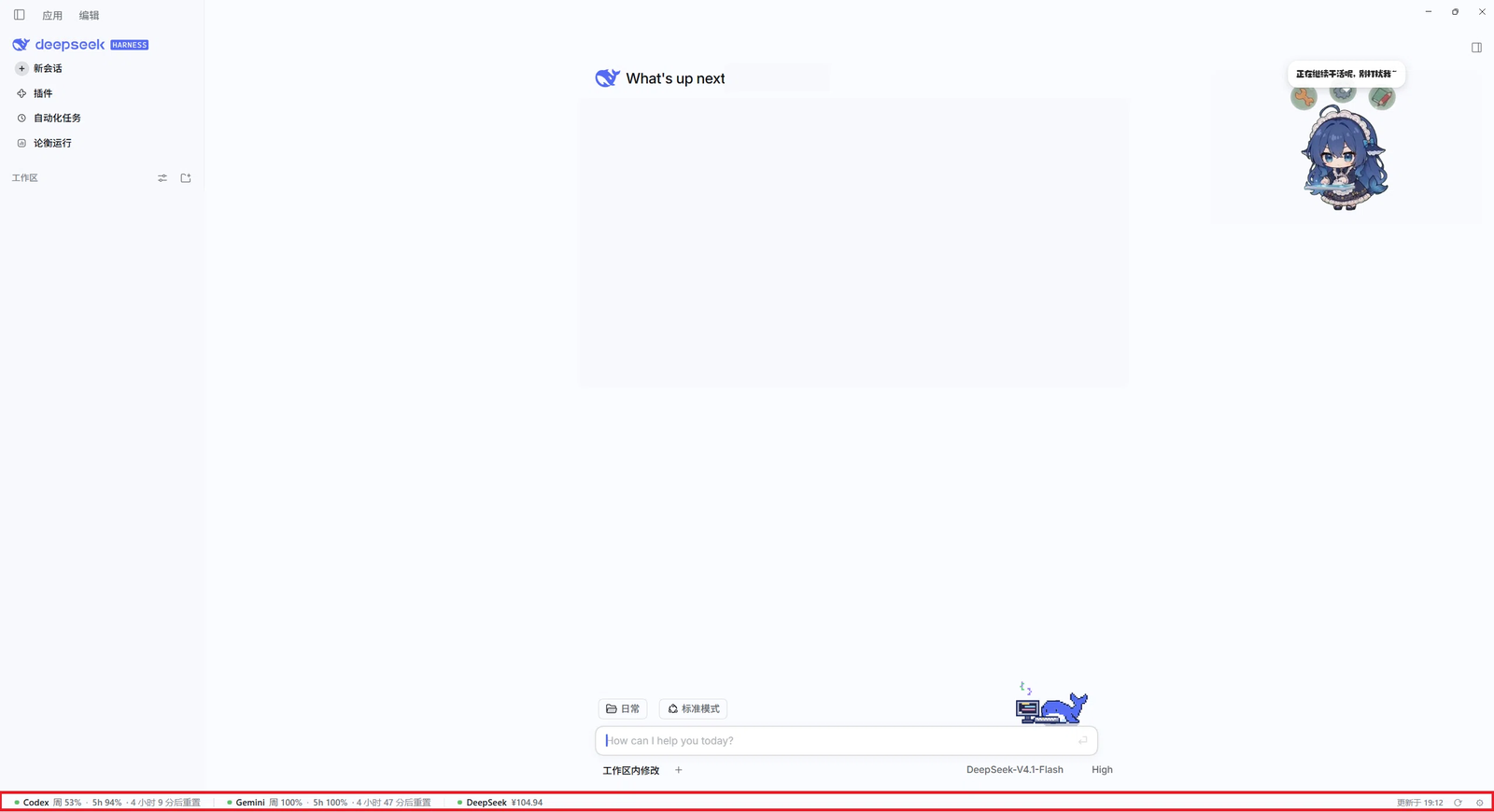
状态条贴在窗口最底部(图中红框处);截图里的侧栏会话名已打码。
● Codex 周 54% · 5h 97% · 4 小时 33 分后重置 │ ● Gemini 周 100% · 5h 100% · 4 小时 35 分后重置 │ ● DeepSeek ¥106.04 更新于 18:49 ⟳ ⚙
先说清楚:它不产生额度数据
这条状态条自己不查上游、不持有账号,它只是另外几个东西的「仪表」:
| 格子 | 数据真正来自 | 你需要先做的 |
|---|---|---|
| Codex | dsh-codex-subscription 插件里已登录的 ChatGPT / Codex 账号 | 在那个插件里登录 Codex 订阅账号 |
| Gemini | dsh-gemini-pool 插件账号池里已登录的 Google 账号 | 在那个插件里登录 Google 账号 |
| DeepSeek | DSH 平台账号的充值钱包(充值 + 赠金) | 在 DSH 里登录平台账号 |
没有装、没有登录、token 过期,对应格子只会显示「未登录 / 不可用」——这是如实反映,不是故障。 如果你不用 Codex 或 Gemini,把那一格关掉即可,不会产生任何请求。
安装
dsh plugin add github:GuoruiC/dsh-quota-bar
装完重启 DSH(bundle 在宿主启动时装配)。之后界面底部出现状态条。
也可以从市场安装:在 DSH 里打开 插件 → 发现,搜索 quota 或 dsh-quota-bar。
可选来源:不选就不访问
两个入口,同一份设置:
-
状态条右侧
⚙展开的开关条; -
设置 → 额度条。
-
关掉某个来源后,它既不显示,也不再发起任何请求——Codex 不调 RPC、Gemini 不
fetch、DeepSeek 不调账号服务。不是「请求了但藏起来」。 -
开关存在浏览器
localStorage(dsh.quota-bar.sources.v1),刷新与重启后保留。 -
三个全关时,状态条保留一行「额度来源已全部关闭」和
⚙,方便随时开回来。 -
首次运行自动探测一次:把返回「未登录」的来源自动关掉,避免给没账号的人每 60 秒打一次必然失败的接口。之后不会再自动改动。
显示什么

- 百分比:Codex / Gemini 各自有「周」与「5 小时」两个窗口(按
windowSeconds判断,不按位置), 每个窗口显示剩余百分比;重置倒计时取该来源最近的一个窗口。 - 颜色:取两个窗口里最低的那个——≥50% 绿、20–50% 琥珀、<20% 红。
余额按金额:
≤0红、<¥20琥珀、其余绿。 - DeepSeek:平台钱包合计(充值 + 赠金),有赠金时会额外标出「赠金 ¥x」。
- 悬停:完整明细(每个窗口的剩余与重置时刻;钱包拆分 充值 + 赠金 = 合计)。
- 刷新:
⟳立即强制刷新已开启的来源;平时 Codex / Gemini 每 60 秒、DeepSeek 每 10 分钟自动刷新一次。
隐私与权限
- 只读:不写你的任何数据,不改配置,不代替任何插件执行操作。
- 只请求三类地址:本机 DSH 的
/api/codex-subscription/usage、/antigravity/api/status, 以及 DSH 账号服务remote.account.getBalance(由宿主代为访问平台)。没有第三方上报、没有遥测。 - 不读文件、不读环境变量、不碰
~/.dsh下的凭据。 - 插件代码是明文可读的
lib/client.js,没有任何压缩或混淆。
数据来源与实现
| 提供方 | 接口 | 读取字段 |
|---|---|---|
| Codex | POST /api/codex-subscription/usage(经 connection.rpc) | usage.rateLimits(分组数组)→ id === 'codex' → windows[] 的 remainingPercent / windowSeconds / resetsAt |
| Gemini | GET /antigravity/api/status | 当前账号 quota.groups[].buckets[] 的 remainingFraction / window / resetTime |
| DeepSeek | ctx.remote.account.getBalance(client) | 快照 value(充值钱包)+ bonusWallets(赠金),同币种累加 |
三者都是各自插件在设置页里已经在用的公开接口,本插件不复制、不缓存它们的业务状态。
remote.account 是账号插件提供的命名空间,不写成硬依赖:每次轮询再取一次,账号服务晚就绪也能自己接上。
兼容性
- 需要带
shell.bottom槽位与客户端插件能力的 DSH(在 2026-11 的 DSH Desktop 构建上开发与验证)。 - 两个被观测插件都是可选的:装一个就显示一格,都不装就整条关掉。
- 纯浏览器侧实现,无原生依赖、无构建步骤、无运行时第三方依赖。
开发
node scripts/smoke.mjs     # 离线冒烟:假 module loader + 假 React,验证槽位注册与三条解析路径
node scripts/install.mjs   # 本机安装(复制到 $DSH_HOME/plugins + 注册进桌面 profile)
lib/client.js 是浏览器半侧(window.__ModuleLoader__.load 包装,DSH 按 package.json 的
dsh.client 挂到 /plugins/dsh-quota-bar/client.js);lib/index.js 是宿主半侧空壳。
已知限制
shell.bottom是 root 级单占位槽位,若别的插件也往这里挂会冲突。- 额度数值的刷新节奏最终由被观测插件决定;Codex 的
usage有内部缓存,⟳才会强制拉取。 - 开关是本机偏好(
localStorage),换机器 / 清缓存会回到默认(三个全开 + 重新探测)。
English
A persistent bottom strip for DeepSeek Harness showing remaining Codex / Gemini quota (weekly and 5-hour windows with reset countdown) and the DeepSeek platform wallet balance.
It is a read-only display: Codex and Gemini values come from accounts already signed in through
the dsh-codex-subscription and dsh-gemini-pool plugins — this plugin owns no accounts and cannot
sign in for you. Each source can be switched off from ⚙ on the bar or Settings → Quota Bar; a
switched-off source is not rendered and makes no request at all. The first run probes once and
turns off sources that report a signed-out state.
Install with dsh plugin add github:GuoruiC/dsh-quota-bar, then restart DSH. No telemetry, no
third-party endpoints: it only talks to the local DSH host.
License
MIT © GuoruiC