V-yovoice (tool-audio-transcription)
ictrektech/v-yovoice/integrations/v-harness/tool-audio-transcription
Transcribe session audio through V-yovoice and display a waveform player and transcript. Needs a reachable V-yovoice service (its root URL is set in the plugin's configuration); audio files are sent to that service.
설치
dsh plugin --profile web add github:ictrektech/v-yovoice이 플러그인은 저장소의 integrations/v-harness/tool-audio-transcription 하위 디렉터리에 있습니다.
README
V-Voice for VOS
Open V-Voice from the VOS app drawer to use platform models and inference.
The experimental make dev-browser local service workflow has been removed.
VOS uses sherpa-onnx / ONNX Runtime for speech and audio.cpp for GGUF speech, voice cloning and music, plus native soundfont score rendering. Runtime images do not install PyTorch, Transformers or Diffusers. CUDA libraries are copied into a clean runtime stage rather than inheriting the full GPU development image. AMD64 CUDA builds preserve cuDNN symbolic links and mount Sherpa installation wheels read-only during installation, avoiding duplicate libraries and archived installers in the shipped layers without changing runtime versions or features.
The PyTorch-only ACE-Step 1.5 Turbo (original weights), Stable Audio 3 Small-Music,
Stable Audio 3 Medium and MusicGen Small have been removed, along with their
separate Background music page and /v1/audio/music/generations /
/api/v1/music-models endpoints. The audio.cpp GGUF versions of ACE-Step
and YuE2 remain in Music generation; score arranging and every existing speech
API remain available. No installed weights, shared directories, projects or audio
are deleted. Rollback can reuse those files with the preceding release.
The upstream v0.5.0 integration uses audio.cpp v0.9.3 and retains 60 creation variants, including six new TTS families and Stable Audio 3 GGUF music/sound effects. Installed previous weights remain usable against a fixed, verified file manifest; administrators can update them through the shared model repository. Story tracks can import generated audio, and Stable Audio can remix a confirmed version. VOS only accepts the current user's Scheduler-confirmed source audio. New weights and the new runtime still need target-device approval; desktop CUDA performance settings are not exposed as uncalibrated VOS user preferences. Database v3 upgrades keep an automatic v2 backup; rollback must restore that database snapshot. Runtime changes require a complete image rebuild, including audio.cpp v0.9.3; application/assets overlays alone do not upgrade the bundled engine.
The post-v0.5.0 upstream sync adds optional Qwen3 ASR reference transcription, audio transcription and speech subtitle export on desktop, plus download retries, backup recovery and clearer operation errors. VOS keeps its existing scheduled speech service; these new desktop tool actions remain unavailable in VOS until they are integrated with Scheduler approval and result confirmation. The shared catalog retains the optional ASR package without exposing it as a TTS model.
Desktop model downloads now resume in separate package directories; cancellation preserves installed and imported files. Changing the model directory verifies recoverable packages in the background. Desktop synthesis also supports engine-advertised runtime controls and live playback; VOS continues to enforce Scheduler-approved settings. Database v4 records pending downloads and backs up a v3 database before upgrading; restore that backup when rolling back to v3-only code. See model management.
Each feature page has a Prepare models button. It opens only the relevant
speech, creator or soundfont models in a dialog on the current page, with download,
pause, resume and verification states using V-Scheduler / ModelScope. Closing it
returns to the same page and leaves downloads running. Model administrators are
still required for shared downloads. The full model manager remains available.
The optional export-seaco development extra uses Torch only for offline model
export and is never installed in service images; SeACo inference remains ONNX-only.
VVOICE_CPU_MODELS applies consistently to ASR, TTS and speaker models. Explicit
unload and LRU eviction collect unreachable objects and attempt to return free
CPU heap pages; this is best effort, not proof that GPU/native execution stopped.
The isolated scripts/calibrate-cpu-voice-worker.py requires an outer Scheduler
permit and records three rounds of unchanged 512-character TTS / 20-second ASR,
RSS and host available memory; never run it by disabling production admission.
Model management expands in the VOS sidebar into speech models and creator models/soundfonts;
there is no second, easily missed category tab bar. VOS settings scroll independently.
The settings model-management action stays inside the workbench; the standalone
compatibility console also provides an explicit return-to-workbench link.
Embedded service forms inherit the workbench theme. API documentation includes the private
music/score RPC contract, job polling/cancellation and authenticated result download;
these are explicitly distinguished from the public OpenAI-compatible speech endpoints.
Import-only variants do not offer a remote download in either manager; stopping a
download only cancels active tasks whose file selection overlaps the chosen model.
The v0.3.0 integration adds 12 workbench languages, grouped precision choices,
YuE2 melody planning and SheetSage2 song transcription. Melody planning,
transcription and soundfont previews require approved V-Scheduler model mappings;
results remain private until Scheduler confirms success. The desktop Ocho assistant,
including its file and command tools, is unavailable in VOS. See the
integration record for validation limits.
The VOS sidebar provides dedicated Model management, ASR, original TTS, Speaker recognition,
and Hotword management pages inside the workbench. They retain the original
model cards, download/unload controls, transcription, speaker enrollment,
identification and verification forms and existing API paths; the creative
editor stays mounted when opening them. VOS userinfo uses integer enable: 1;
disabled or malformed identities are rejected rather than treated as signed in.
LAN HTTP uses secure random UUIDs and S256 PKCE without requiring WebCrypto.
Automatic scheduling uses a VOS-authenticated, versioned server-to-server binding;
credentials stay in this app's private storage and reload without restarting.
New node approvals declare input-limit protocol v1 and enforce their measured text,
speed, encoded-audio size, source sample rate and duration before native model loading.
Audio decoding is bounded; oversized direct and gateway requests do not acquire a compute permit.
The ASR page reads /api/v1/models/{key}/input-limits before submitting calibrated
models. It uses the upstream browser audio helpers to resample to 16 kHz, mix down
to mono PCM WAV, and send consecutive parts within both duration and byte limits.
Each part uses the existing public endpoint and its own scheduling permit; progress
and cancellation are available. Original files must fit VVOICE_MAX_UPLOAD_MB
(default 200 MiB), and their format must be supported by the browser. Legacy
approvals keep the original upload path. Service callers can instead send one
original file to POST /v1/audio/transcriptions/full: V-Voice probes and decodes
it with the image's ffmpeg, mixes to mono 16 kHz, applies VAD and model-derived
byte/duration splitting, then validates and admits every part separately before
merging the ordered text. The endpoint is limited to calibrated ASR models,
defaults to 30 minutes, uses VVOICE_MAX_UPLOAD_MB for encoded size, and returns
complete: true only after every part succeeds. Errors carry a stable error.code
and any completed text under an explicitly complete: false partial block.
/api/v1/models/{key}/input-limits publishes the exact full-file limits and a
processing version. The strict single-part endpoint remains unchanged. The
request-body cap now follows approved encoded-audio sizes, bounded by the
configured upload cap. See
the complete-file contract and v-harness integration notes.
The installable v-harness plugin is maintained in
integrations/v-harness/tool-audio-transcription
and is released as a prebuilt .tgz rather than bundled into the VOS service image.
The stable plugin download
tracks the latest plugin release; check host compatibility before upgrading.
Qwen3-ASR 0.6B and 1.7B accept their own approved duration, source sample-rate,
encoded-byte and hotword limits; they do not inherit SenseVoice approval. The ASR
selector distinguishes downloaded files from inference approval on this device
and disables models missing approval or a valid input calibration. Resource
availability is still checked for every request. Calibration values must come
from measurements on the matching device and runtime, including confirmed stop.
Image preparation also builds the service console into artifacts/frontend;
application and asset overlays copy it along with artifacts/web, so console
fixes reach installed apps without retaining an older frontend from the base image.
See the Scheduler-side handoff and actual-node acceptance gates.
This fork is the successor to com.ictrek.v-voice. It preserves the existing
V-Voice model catalog and APIs and adds the yovoice creation workbench/audio.cpp
models. Model support is additive, not a replacement by a curated subset.
All upstream downloadable model variants remain in the creation catalog;
upstream import-only entries retain their source requirements. Models are shared
through V-Scheduler's built-in model repository from ModelScope, not downloaded separately per user.
The VOS workbench and its dedicated API documentation page support English,
Simplified Chinese and Traditional Chinese, following VOS or an app-local override.
See integration, public APIs, scheduling and rollback and retained speech-service documentation. The VOS package requires the unified V-Scheduler app, which includes the gateway and model repository; separate V-Router and Model Hub installations are unnecessary. The sections below describe the original upstream desktop app; they do not imply that VOS images or releases have passed their release gates. Fork source and merge baseline are recorded in UPSTREM.
VOS packaging verifies current published dependency versions. Private GitHub repositories are checked through the existing approved App Store SSH tunnel, including the published archive, without copying a broad GitHub token into CI. The manual Actions trigger checks dependency access only; it does not package, publish or install an application. See the VOS release guide.

V-Voice
Give your words a voice. Compose your ideas into songs.









English · 简体中文
Website · CLI & Agent Skill · API / MCP Deployment · Development
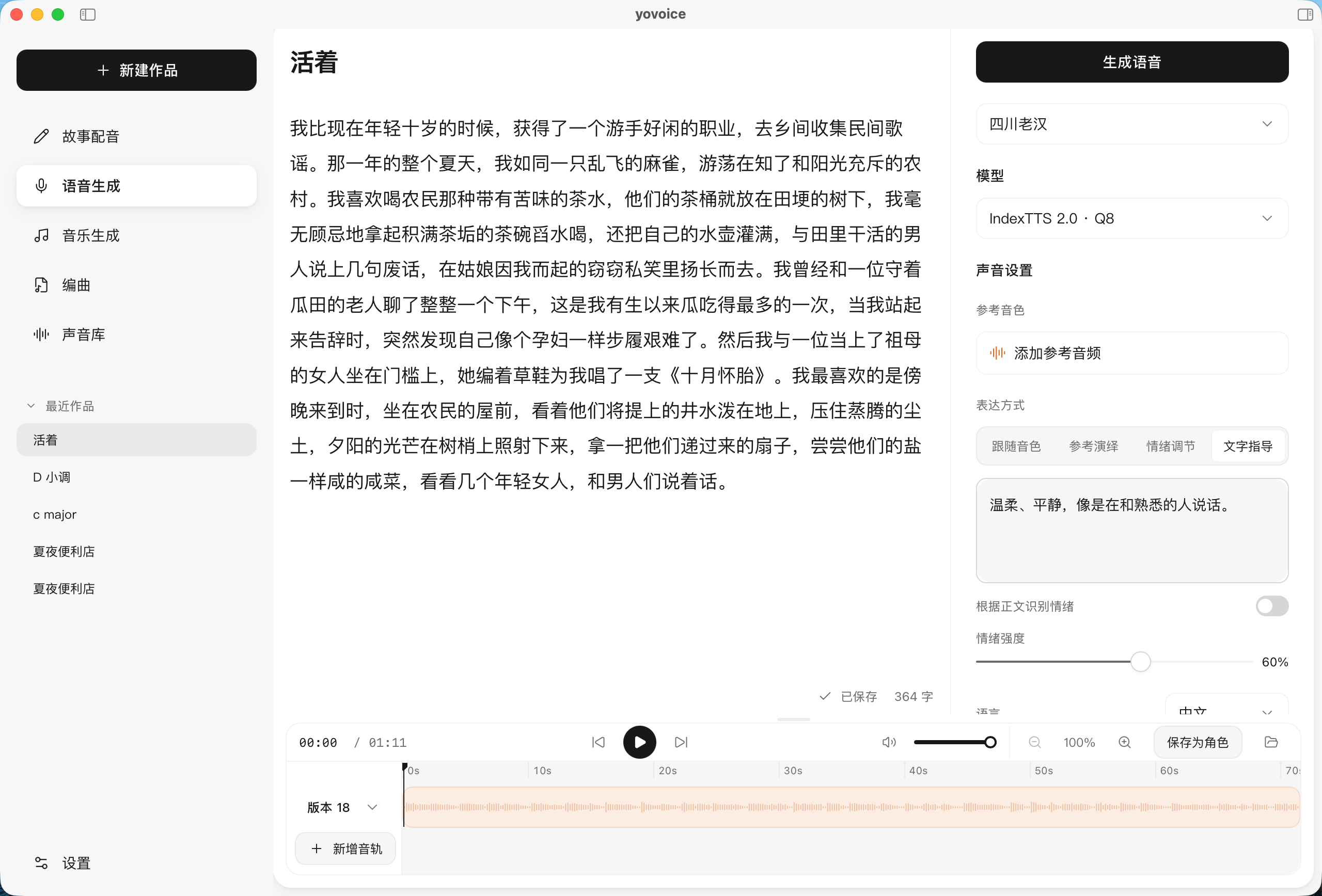
yovoice is an open-source, local-first audio and music creation studio for macOS, Windows and Linux.
Turn text into expressive speech, natural cloned voices, complete vocal songs, and multi-track scores right on your machine. Featuring zero-shot voice cloning, emotional performance controls, AI music generation with lyrics, and General MIDI score arranging—all running 100% locally with zero cloud API calls, zero per-character fees, and zero Python environment headaches.
Why yovoice?
- 🔒 100% Local Privacy: Runs entirely on your local GPU/CPU. Your manuscripts, reference voices, and creations never leave your computer.
- 💸 Zero Recurring Fees: Say goodbye to per-character/per-minute meters and expensive cloud voice/music subscriptions.
- ⚡ Native C++ Performance (No Python Hell): Powered by audio.cpp v0.9.3. Ships with bundled Windows CUDA 12.4/13.3 runtimes and native macOS Metal support. Double-click and create—no Conda or PyTorch conflicts.
- 🎛️ Creator Workstation: Multi-take versioning for side-by-side comparison, waveform trimming, timeline scrolling, and clean stems/MIDI export.
- 🤖 MCP & AI Agent Ecosystem: Chat with DeepSeek, Qwen, Claude, OpenAI, or local Ollama to create and edit works end to end. Includes a native Model Context Protocol (MCP) server for Cursor and Claude Code.
Features
- Speech, voice design and cloning — clone a reference voice, design a voice from a description, adjust emotion and delivery, and edit takes on a timeline.
- Story dubbing — import text or subtitle files, assign a character to each line, and generate line by line.
- Music — write a style and lyrics with section markers, then generate songs or instrumentals with ACE-Step 1.5, or songs and score-based instrumentals with YuE2, or instrumental music and sound effects from an English description with Stable Audio 3; the playback page syncs lyrics to the vocals.
- Score — write parts by bar and beat, import MIDI or let an Agent compose, render with a General MIDI sound font, and export MIDI and stems. See Score.
- Optional AI service — the built-in assistant panel chats with DeepSeek, Qwen, Kimi, OpenAI, Anthropic, Ollama or any compatible API and acts on your works: it writes arrangements and lyrics, edits text, assigns voices and starts generation; keys stay on this computer. See AI service.
- 12 interface languages — English, 简体中文, 繁體中文, 日本語, 한국어, Español, Français, Deutsch, Português (Brasil), Русский, Italiano and Tiếng Việt; switch anytime in Settings, no restart needed.
Supported Models
| Use | Models |
|---|---|
| Voice cloning and emotion | IndexTTS 2.0 / 2.5, Qwen3-TTS Base |
| Voice design and cloning | VoxCPM2, OmniVoice, Qwen3-TTS VoiceDesign, Breeze TTS 2 |
| Built-in voices | Kokoro-82M, Qwen3-TTS CustomVoice |
| Songs and instrumentals | ACE-Step 1.5 Turbo / XL Turbo, YuE2 3B |
| Instrumentals and sound effects | Stable Audio 3 Small Music / Small SFX / Medium |
All models are downloaded inside the App or with the CLI. See model selection for file sizes, hardware requirements, inputs and examples. OmniVoice, YuE2 and Breeze TTS 2 weights are restricted to non-commercial use; Stable Audio 3 is free below USD 1M annual revenue under the Stability AI Community License.
Installation
Choose the package for your platform from the repository’s Releases tab or visit the official website.
| Platform | Package | Install |
|---|---|---|
| macOS 14+ · Apple Silicon | .dmg | Open the disk image and drag yovoice to Applications |
| Windows 10/11 · x64 | -setup.exe | Run the installer, then open yovoice from the Start menu |
| Windows 10/11 · x64 · NVIDIA GPU | -cuda12.4-setup.exe | Bundles the CUDA 12.4 runtime; works with older GPUs and drivers and uses the GPU from first launch |
| Windows 10/11 · x64 · NVIDIA GPU | -cuda13.3-setup.exe | Bundles the CUDA 13.3 runtime; needs a newer driver, smaller download |
| Linux · x64 (Debian/Ubuntu) | -linux-x64.deb | sudo apt install ./yovoice-<version>-linux-x64.deb, then open yovoice from the application menu |
| Linux · x64 (other distributions) | -linux-x64.tar.gz | Extract and run ./install.sh to add yovoice to the application menu for the current user |
The Windows installer downloads and installs WebView2 Runtime if needed. Models are downloaded inside the app; uninstalling preserves user data in ~/.yovoice.
On Linux the app needs WebKitGTK 4.1 (libwebkit2gtk-4.1-0 on Debian/Ubuntu, webkit2gtk4.1 on Fedora, webkit2gtk-4.1 on Arch); the .deb installs it automatically. Linux runs on the CPU out of the box, and a Vulkan GPU runtime can be downloaded in Settings → Inference engine. The Linux app doesn't update itself yet; download new versions from Releases.
Check for updates from the app menu on macOS or Windows. Updates are also checked and downloaded in the background; restart to install when ready. Windows updates download only the app (-update.exe) and keep the installed runtime; when a release recommends a newer runtime you can upgrade it in Settings → Inference engine.
Quick Start
- Set up a model. Download a model in Settings (e.g. Kokoro-82M for fast narration, or VoxCPM2 for cloning).
- Create a project. Choose Story dubbing, Speech generation, Music, or Score.
- Add content. Enter text, lyrics, or notes, then pick a character and adjust style.
- Generate audio. Select Generate, then preview, compare takes, edit, and export.
CLI & Agent Skill
Give your agent the yovoice Skill link and ask it to install the Skill and set up the local CLI, engine, and model:
Install this Skill and set up yovoice for local speech generation: https://github.com/leemysw/yovoice/tree/main/skills/yovoice
Then describe what you want:
Read narration.txt using voice.wav as the reference voice, with a calm delivery, and save it as narration.wav.
The agent runs the standalone CLI without opening the desktop app. See the CLI guide for details.
Run yovoice serve to provide an authenticated HTTP API and MCP inference service for other machines. See the API / MCP deployment guide for deployment and client examples.

Development
make install
make app-run
See the development guide for prerequisites. It also covers browser preview, tests, and project structure. For how the processes and packages fit together, see Architecture.
Community
Scan the QR code with WeChat to join the yovoice user group. If the code has expired, open an issue and we will post a new one.
Contributing
Bug reports, feature suggestions, and pull requests are welcome. Include your platform, model, and steps to reproduce when reporting a problem. Run make check before submitting code changes.
Acknowledgements
- audio.cpp by ShugoAI — the local audio inference engine.
- VoxCPM — voice design and cloning models, licensed under Apache-2.0.
- IndexTTS — the speech synthesis models behind yovoice.
- OmniVoice — voice design and cloning models.
- Qwen3-TTS — voice cloning, built-in voices, and text-guided voice design.
- ACE-Step — music generation from style prompts and lyrics.
- YuE — full vocal song generation from lyrics.
- Stable Audio 3 by Stability AI — instrumental music and sound effects from text. Powered by Stability AI.
- Breeze TTS 2 — Chinese and English voice design and cloning.
- go-meltysynth, MuseScore General, GeneralUser GS and SGM-V2.01 by David Shan — the SoundFont synthesizer and sound fonts behind score rendering.
- Kokoro — lightweight speech synthesis with built-in voices: Kokoro-82M and Kokoro-82M-v1.1-zh.
Star History
License
Apache-2.0. Dependencies retain their original licenses; IndexTTS models are covered separately by their model license.
V-Scheduler 接入
新旧审批共存时,服务发现声明 mixed_input_limits_version: 1;调度绑定必须同时携带同版本及明确的 legacy_unbounded_models。旧模型名单与 model_limits 不得重叠,两者必须恰好覆盖已批准的 models。四个原生配乐模型始终要求独立的有界输入校准,不能进入旧模型名单。无效绑定被拒绝并保留上一份审批;输入校验和许可获取期间绑定变化时要求重试,避免跨版本使用预算。旧创作模型的目录别名仅用于输入校验,不授予额外同步执行器或改变原有异步任务类型。
VOS 安装依赖统一应用 com.ictrek.v-scheduler,打包时从已发布的 GitHub Release 或应用商店解析依赖版本,查询失败则停止打包。模型管理默认地址为 http://v-scheduler-model-hub:6005;保留 MODEL_HUB_API_URL 配置键供现有安装升级使用,已有安装需将该参数切换到新地址。
V-Scheduler 已内置模型仓库,无需独立安装 Model Hub。共享模型目录继续使用兼容配置键 MODEL_HUB_SHARED_MODELS_PATH(默认 /data/vos_workspace/model_hub),保留现有模型、导出路径和下载记录;这些历史命名不代表仍依赖旧应用。统一模型网关为 http://v-scheduler-gateway:8080/v1;资源调度接口为 http://v-scheduler:38120/api/v1。接入及资源授权契约见 V-Scheduler 接入指南。模型目录可见不代表本地推理已获调度授权。
应用生命周期与资源停止
VOS 安装后,应用通过 Scheduler 的可信绑定获得 lifecycle_protocol_version=1,自动登记已批准的执行器并定时上报应用心跳;节点遥测仍由 V-Scheduler 的内置组件采集,不需要用户安装 Agent。正式入口为 http://v-scheduler:38120/api/v1,兼容别名继续可用。模型目录、原有安装参数和模型下载方式不变。
在 V-Scheduler「节点管理 → 应用统一接入」可查看实际节点、批准预算和运行中的执行。同步计算使用「停止并卸载」,异步任务使用「取消」;停止请求本身不释放预算。应用确认原生调用/子进程退出并卸载权重后才提交原执行的停止证明。未知执行或确认失败继续保留预约,避免把仍在运行的计算当成空闲;确认回执保存在应用私有目录,可在重启后重试。阻塞式原生调用须等待其实际返回,不能承诺立即中断。
完整流程、身份和接口见 V-Scheduler 统一接入指南。
发布纯应用层改动时,可在对应架构构建机上使用 VVOICE_STUDIO_BASE_IMAGE=<已核验的同 profile 发布镜像> bash docker/build_image.sh --sheet <sheet> --version <版本> --application-only,复用已校准的原生环境,仅更新当前 vvoice/、预先编译的 Go 程序和网页资产。随后用相同版本执行 --publish-only --version <版本> 推送并记录飞书。改变原生依赖、内核或目录契约时仍须完整构建。
构建机已有同架构编译工具链时,可用 VVOICE_AUDIOCPP_BUILD_BASE_IMAGE=<编译镜像> 复用 audio.cpp 的编译环境。该参数仅影响多阶段构建的编译阶段,不改变所选 profile 的运行基础镜像或 CPU/CUDA 后端;成品仍检查不得包含 PyTorch。
Task priority and cooperative preemption
Inference requests optionally accept X-VScheduler-Priority: background|interactive|high,
X-VScheduler-Preemptible: true|false, X-VScheduler-Allow-Preemption: true|false, and
X-VScheduler-Force-Admission: true|false. The default is background priority with all
three flags off. Preemption requires consent from both requests. Resources remain
reserved until native exit and model unload are confirmed. Synchronous requests are
never automatically replayed. Force admission requires a current administrator Bearer
identity verified by V-Scheduler; hard budgets, stop barriers and at least 1 GiB RAM
headroom remain enforced. Operator credentials are never persisted in tasks.
See the unified integration guide.
VOS 界面默认跟随平台语言,兼容旧版平台语言存储和新版语言广播;显式选择的语言仍优先。尚无就绪语音模型时,页面提示先下载模型,模型就绪后自动重试 V-Scheduler 接入,不要求用户部署 Agent。
自动接入同时兼容新版 VOS 身份接口和旧版 VOS 的 user/check 应用身份核验;只接受 V-Scheduler 的精确已启用服务身份,普通用户及其他应用不能交接授权。用户无需手工配置服务令牌,既有共享目录和兼容地址继续保留。
组合语音调用由 V-Scheduler 校准主任务的总预算;次模型可以使用不同执行器,但全部模型映射均须通过同一应用的执行器审批。
V-Scheduler 请求排队
原生执行端通过 POST /scheduler/api/v1/permits/wait 申请准入,JSON 为 {"request":原 permits 请求,"wait_seconds":30};默认等待 30 秒,X-VScheduler-Queue-Wait-Seconds 可设为 0..300,0 表示立即尝试。等待只保存身份与顺序,不预约模型权重,不启动或重放推理;超时返回 429 QUEUE_TIMEOUT。V-Voice、Desensitize、V-Sub 在本地执行锁之前进入统一队列,同一已批准原生进程只保留一条执行通道;不同进程的实际副本分别预算。授权强制请求先行,其后按本次任务优先级、等待老化和到达顺序执行。其他应用申请资源不会无条件卸载空闲 Ollama,只有内存不足才请求卸载,确认停止后才释放预算。
Native executors acquire admission with POST /scheduler/api/v1/permits/wait and {"request":the existing permits request,"wait_seconds":30}. X-VScheduler-Queue-Wait-Seconds accepts 0..300; the default is 30 and 0 attempts immediate admission. Waiters retain identity and ordering only, reserve no model weights, and never start or replay inference. A deadline returns 429 QUEUE_TIMEOUT. V-Voice, Desensitize and V-Sub enter the central queue before their local execution locks. One approved native process uses one execution lane; actual copies in different processes are budgeted separately. Authorized forced requests run first, followed by request priority, aging and arrival order. Other applications no longer unconditionally unload idle Ollama models: unloading requires memory pressure and confirmed native stop before releasing the budget.
VOS retains Kokoro 1.0 multilingual and 1.1-zh as administrator-provided import-only models; existing IDs, history and speech APIs remain supported.
Complete VOS API reference
The in-app API page links to /api-guide (Chinese/English workflows and native fields), /docs and the active /openapi.json. VOS speech/shared management, private user workbench and Scheduler application binding use distinct identity contracts. The independent desktop/CLI HTTP and MCP guide remains in docs/api.md. Documentation source changes ship with the next app release; no new app/image is published in this documentation task.