dsh-market-gist-autosync
jacket-sikaha/dsh-market-gist-autosync
DSH 프로필 설정을 일정에 따라 비공개 GitHub Gist에 백업하고 병합 복원합니다.
설치
dsh plugin --profile web add github:jacket-sikaha/dsh-market-gist-autosyncREADME
dsh-market-gist-autosync




把 DSH 配置备份到 GitHub Gist 的插件:手动 / 定时备份 + 合并恢复,备份格式与插件市场(dshmarket)完全兼容、可互相恢复。
功能
- 备份:把当前 profile 的配置打包为私有 Gist(自动识别 desktop / web,见下文「多 profile 支持」)
- 定时备份:分钟 / 小时粒度,自持调度,随配置保存即时生效。仅 DSH 运行期间执行——DSH 关闭、退出或电脑休眠时不备份,也不补跑错过的周期(进程内
setInterval,非系统级 cron)。失败会写一条failed记录进上传历史(红色徽章),不再静默丢失 - 备份互斥:同一进程内定时 tick 与手动备份不会并发——撞上时定时跳过本次、手动 toast 提示,消除并发建双 gist / 孤儿 / config 竞态
- 恢复:合并语义 ——
package.json与现有插件合并(不删除已装插件),其他配置文件覆盖;恢复后自动pnpm install缺失依赖并显示实时进度;依赖全部安装失败时自动回滚文件写入 - 启动预检:恢复结束前按 dsh 启动加载器的真实解析顺序检查每个 bundle 能否解析,把本机装不上的(典型情况:
link:依赖来自另一台机器)从 profile 移除并明确报告 —— 避免恢复后重启直接进恢复模式 - 上传记录:最近 20 条,存 dsh-storage 域(不可用时回退
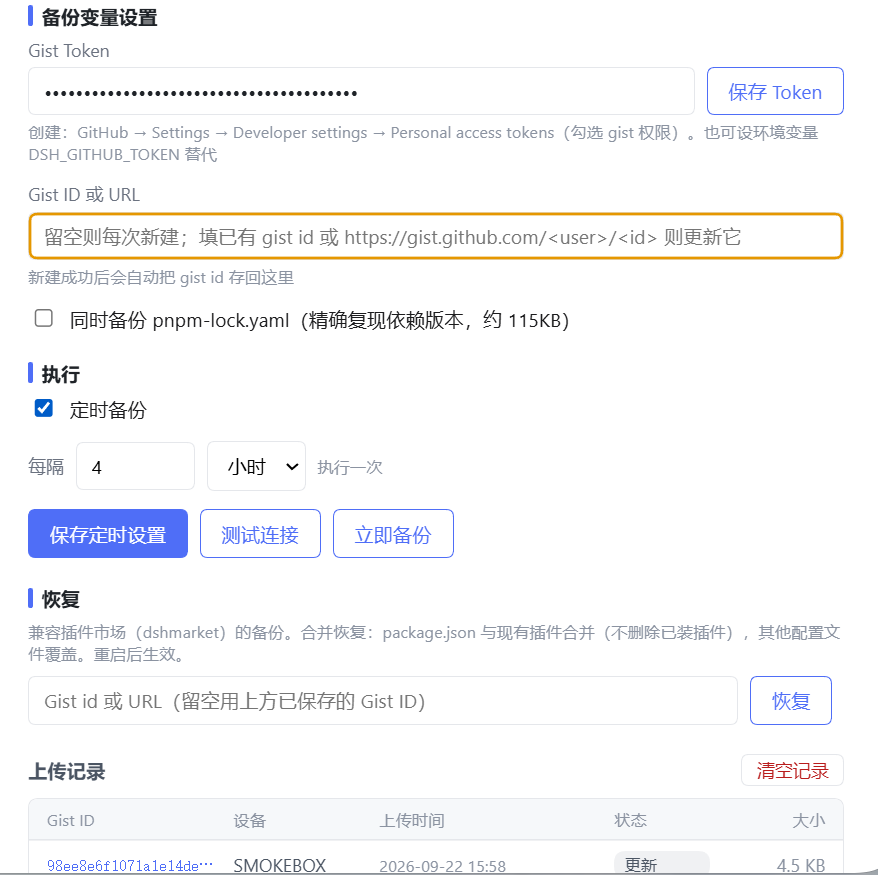
config.json),支持一键清空。记录含new/update/failed三种状态,失败行红色徽章 + 悬停显示错误原因。存储层声明invalidRecords: 'backup-and-skip',单条脏记录(schema 演进 / 手编辑 / 写损坏)会被移走而非让整表丢失;key 带 4 字节随机后缀,同毫秒两次写入不再覆盖 - 设置页 UI:Token 独立保存按钮、测试连接、立即备份、恢复进度实时显示、右上角浮动 toast 提示
- 明确的中文失败原因:未配置 token / token 无效 / gist id 无效 / 备份超 1MB 等。错误按
auth(401) /not_found(404) /rate_limit(403) /invalid(422) /timeout/network分类返回,前端可按 code 精确映射文案,区别「GitHub 不可达」与「请求超时」 - 请求防卡死:每次 GitHub 请求带
AbortSignal.any([调用方 signal, 30s 硬上限])双保险,路由级超时优先触发、30s 兜底保证永不挂起;GET 响应在content-length头预判 + 流式累计双重把关下限制在 1MB+16KB,防止超大响应撑爆内存 - Gist id 容错:支持粘贴 gist URL;gist 主页 URL 会被明确拒绝并提示
安装
dsh plugin --profile desktop add dsh-market-gist-autosync   # 桌面端
dsh plugin --profile web add dsh-market-gist-autosync       # 网页版(dsh web)
安装后在 设置 → Gist 备份 中配置。
兼容的 DSH 版本
宿主包的 peer 范围覆盖 0.1.5-rc.1 起的全部版本,含 0.2.0-rc 与 0.2.1-rc 两条线;开发与联调跑在 0.2.1-rc.2(cordis 4.0.5、dsh-host-webserver / dsh-settings / dsh-storage-domain 均 0.2.1-rc.2、schemastery 3.18.5、zod 4.6.7)。
scripts/itest-host-compat.mjs 会用真宿主跑一遍:起真 cordis Context、真 dsh-host-webserver(port: 0,端口由系统分配),把插件按 DSH 的方式挂上去,再用真实 HTTP 打自己的 RPC —— 宿主契约一变,这里先红,而不是等用户装上去才发现。
多 profile 支持
插件自动识别自己运行在哪个 profile(desktop / web),备份内容与恢复目标始终是当前 profile。识别顺序与 dshmarket 一致:
- DSH Desktop 的
desktopProfiles服务(桌面端权威来源) - 启动参数
--profile <名字>(dsh web --profile web) - 环境变量
DSH_PROFILE(测试/手动覆盖用,运行时本身不设置) - 兜底默认
desktop
注意:两个 profile 的插件配置共享同一份 $DSH_HOME/gist-autosync/config.json(同一个 token / gistId)。如果桌面端和网页版同时运行且都开了定时备份,两边会按各自的计时器上传到同一个 Gist——备份内容以各自 profile 为准(envelope 里有 profile 字段区分来源),上传记录会交错出现。进程内互斥锁只挡同一进程的并发(定时 tick + 手动备份),跨进程(桌面端 + 网页版同跑)仍会并发上传,两边各自 create/update 同一 gist 时后写者覆盖前写者。不想双份上传的话,只在一端开启定时即可。
备份内容
当前 profile 目录下的配置文件,排除三类:
- 隐藏目录:所有以
.开头的目录都不进备份 ——.plugin-manager(宿主的 pnpm 安装日志与进程记录)、.dsh-market(缓存)、.git等等。隐藏文件(.env、.npmrc)照常备份,它们是真正的配置 - 按名字:
node_modules、pnpm-lock.yaml - 按形态:
*.bak、符号链接
排除清单不可配置:dshmarket 1.70.1+ 的遍历规则就是这样(上游为 issue #972 改成跳过隐藏目录),两边对齐后产出的备份才能互相恢复。
pnpm-lock.yaml 不备份:lockfile 钉死的是某一台机器解析出来的依赖树,恢复时 pnpm install 会按 package.json 重新生成它,把它搬到对端只会和安装过程打架。早期版本有一个「同时备份 lockfile」开关,已随此次对齐移除。
为什么不备份 .plugin-manager
logs/operation-*/pnpm.log 存着一次 pnpm 的完整 stdout + stderr(界面只显示最后 16 KB),宿主自己不清理。一台装了二十来个插件的机器实测:141 份日志共 792.6 KB,而配置本身只有 46.4 KB —— 备份体积被撑到 19 倍,887 KB 的备份距 Gist 单文件 1 MB 上限只剩 137 KB,再加一个插件就撞线。
所以隐藏目录整体不进备份(早期版本有过一个「附带安装日志」开关,已随规则对齐移除)。两条硬规则:
run.json永不写回:它记的是写备份那台机器上的进程号,写回来会让本机下次装插件报「process N is still running」。现在它连备份都不会进,但恢复旧备份时仍会跳过并报告- 读侧比写侧宽松:备份里若带着
.plugin-manager/...(旧版本或 dshmarket 写的),这边照原样写回,不会拒收。dshmarket 1.70.1+ 的读侧会静默丢弃这类条目 —— 恢复"成功"但日志不落地,也不报错
设置页
「备份设置」一屏管住所有可写项,底部一个「保存设置」同时保存 Token、Gist ID 与定时设置。saveConfig 是部分合并,所以这个请求会把需要落盘的字段一次带全 —— 少带一个,那一项就只停留在界面上。
「查看备份内容」打开「备份内容展示」弹窗,分三部分:
- 主要:
package.json、cordis.patch.yml、cordis.yml、pnpm-workspace.yaml—— 决定装哪些插件、怎么加载;缺一项,恢复出来的 profile 就不是原样 - 备份插件列表:备份里记着的每个插件,左边插件名、右边
package.json声明的版本约束(如^1.70.1)。插件集合取dsh.profile.bundles,版本取dependencies—— 恢复时pnpm install解析的就是这个约束,所以显示原文而不转成实际安装版本。宿主自带的 bundle(@deepseek-ai/dsh-base之类)没有依赖行,版本显示— - 次要:其余配置,写回也不改变行为。多数 profile 里没有这类文件,此时这一组不渲染
底部给出文件数、合计体积、1 MB 上限与剩余余量。数据来自 previewProfileBackup() —— 与真正备份同一条收集路径,所以看到的数字就是上传时的数字。
「测试连接」按界面上当前的 Token 工作,不看是否已保存:刚粘贴的 Token 可以直接测。
package.json以 JSON 对象形式存储,其余文件以行数组形式存储- 打包为
dsh-profile-backup.json(format: "dsh-profile-backup",version: 0.2),上传前做与 dshmarket 对齐的严格结构校验 - 上限:256 个文件 / 1MB(GitHub Gist 限制)。上传前会拦住超限备份并点名最大贡献者;读取时还会检查 GitHub 返回的
truncated标记 —— 超过 1 MB 的文件只会拿到前一部分,那种情况直接报「备份过大」,而不是让人以为 JSON 坏了
备份端剥离机器本地依赖
link:C:/Users/... 这样的依赖描述的是某一台机器的磁盘布局,而一个 Gist 会被家里、公司等多台机器读取。把它留在备份里,等于让对端恢复出一个「本机永远装不上」的依赖,对端只剩两条路:安装失败,或者剔除该依赖并连带删掉对应的 bundle 记录 —— 把一台机器的局部限制写进共享状态,再被下一次备份带回来。
所以剥离发生在备份端(stripMachineLocalDeps):上传前把绝对路径依赖从 package.json 里去掉,连同引用它们的 bundle 记录(包永远装不上,留着必然让下次启动失败)。Gist 因此始终只是「可移植的插件组合」的描述。
- 判定范围与 dshmarket 的
unportableDeps一致:POSIX 绝对路径、Windows 盘符路径、UNC 路径;file:./vendor/x这类相对路径可移植,保留 - 只影响备份副本,不改写本机 profile:本机继续正常使用这些本地插件
- 剥离内容会在备份结果里明确列出,不会静默消失
- 本机不会因此丢东西:恢复时清单按并集合并(依赖以备份为准覆盖冲突项,
bundles取并集),所以对端上传的「已剥离」备份无法删掉本机仍然声明的依赖或 bundle 记录
对端恢复旧版本(或其它工具)写下的、仍带绝对路径的备份时,恢复端照旧处理:路径在本机不存在就剔除并报告。
启动预检
恢复流程的最后一步,也是「恢复后能正常重启」的保证。
dsh 启动加载器按 dsh.profile.bundles 的顺序加载插件,遇到第一个无法解析的包名就整个 profile 启动失败。此时错误发生在下一次重启、且信息里没有任何线索指向导致它的那次恢复。因此恢复完成前会逐个检查 bundle 的可解析性:
- 先查 DSH 安装侧 ——
@deepseek-ai/dsh-base/dsh-web-app/dsh-headless这类 in-box bundle 由 DSH 安装本身提供,profile 的node_modules里没有它们是正常的,绝不判为缺失 - 再按 Node 的模块查找路径从 profile 目录向上查找 —— 覆盖社区插件与 pnpm 的 workspace 提升(
profiles/node_modules) - 解析成功也不等于能启动:加载器随后还要读取该包的
dsh.bundle.patch并解析它指名的文件,以下三种情况同样让整个 profile 启动失败 —— 未声明dsh.bundle.patch、声明的补丁文件不存在、补丁不是合法的顶层条目数组。补丁按加载器的方言解析(js-yaml 的 JSON schema +!!js标量标签;社区补丁确实在用!!js,用普通 YAML/JSON 解析器会把它们误判为损坏并删除) - 判定为致命的 bundle 从
package.json移除,并在界面报告名称
判定严格区分两种情况:「确实不存在」判为致命并移除;「探测失败」(锚点不可读)与**「本进程无法解析补丁」(解析器不可用)一律按未知**处理,绝不参与移除 —— 把「我看不到」当成「它不存在」会误判所有 bundle 缺失并全部删除。
配置
配置持久化在 $DSH_HOME/gist-autosync/config.json(原子写:临时文件 + rename,崩溃不截断);上传记录存 dsh-storage 域,不写入配置文件。
| 字段 | 默认 | 说明 |
|---|---|---|
gistToken | "" | GitHub token(明文存本地文件);环境变量 DSH_GITHUB_TOKEN 优先于此字段 |
gistId | "" | 已有 Gist id 或 URL;空 = 每次新建 Gist,成功后自动回写 |
deviceName | "" | 设备名(空则自动探测 COMPUTERNAME / HOSTNAME) |
scheduleEnabled | false | 是否定时备份(仅 DSH 运行期间执行) |
scheduleIntervalValue | 24 | 周期间隔数值(≥1) |
scheduleIntervalUnit | "hour" | 周期单位:"hour" / "minute" |
备份内容的排除清单不可配置:隐藏目录、node_modules、pnpm-lock.yaml、*.bak、符号链接都不进备份。旧版本 config.json 里残留的 includeLock / includePluginLogs 字段会在读取时被丢弃。
恢复
设置页「恢复」区输入 Gist id 或 URL(留空用已保存的 gistId):
- 下载并严格校验备份结构:
format必须是dsh-profile-backup、version必须是0.2、必须含package.json、路径安全(非绝对、无..、不含排除目录、无重复)、总大小 ≤ 2 MB - 原子写回:先写临时文件再替换,任一文件失败则回滚全部。中间目录逐段创建,每段都必须是真实目录 —— 父目录是符号链接/目录联接时拒绝写入,避免文件被引到 profile 之外。备份里若带
.plugin-manager/logs日志会照原样写回,唯独run.json一律跳过(记的是来源机器的进程号),跳过项会在结果里列出 - 合并
package.json依赖(保留已装插件;bundles取并集) - 剔除指向本机不存在路径的
link:/file:本地依赖(无法安装,留着会连累引用它的 bundle) - 自动
pnpm install缺失依赖;全部失败则回滚恢复。安装显式带--no-frozen-lockfile:备份不包含pnpm-lock.yaml,profile 里旧 lockfile 与新package.json必然对不上,而宿主用CI=true启动子进程,pnpm 在 CI 下默认冻结 lockfile,不加这个参数会在装任何东西之前就报ERR_PNPM_OUTDATED_LOCKFILE - 启动预检:仍无法解析、或补丁缺失/损坏的 bundle 从 profile 移除并在界面报告
- 重启 DSH 后生效
恢复过程中设置页会显示阶段视图,不必盯着空白等:读取备份 → 格式校验 → 写入文件 → 依赖比对 → 安装依赖 → 启动自检,每段带状态、耗时与一句明细(读到多少字节、核对了多少个文件、写回多少、缺哪些插件、pnpm 解析了多少包)。耗时最长的装依赖阶段有不确定进度条和已用时间;同一插件的安装行原地替换而不是一直往下堆;日志自动滚到底。结束后收敛成一行汇总,需要细节点「查看详情」看每段耗时、完整日志与 pnpm 的报错尾部。刷新页面后进度会自己接回来 —— 进度状态存在宿主,不是浏览器里的临时变量。
恢复完成后会弹窗提示重启 DSH:新装的插件与被覆盖的配置都在下次启动时加载,重启前跑的还是恢复前的代码。
为什么第 1 步要卡这么死:备份来自另一台机器、也可能来自别的工具。少了
package.json的备份能「恢复成功」,但插件一个都装不回来;而不是本插件的 JSON 被当成合法备份写进 profile,问题会拖到重启才以别的形式爆出来。宁可现在报错,也不要把坏数据落到磁盘上。
为什么需要第 4、6 步:dsh 启动加载器读取
dsh.profile.bundles时,遇到第一个无法解析的包名就会整个 profile 启动失败,而且要到下一次重启才暴露 —— 错误信息与导致它的恢复操作毫无关联,用户只能进恢复模式自救。备份来自另一台机器时(link:依赖指向对方磁盘路径)这种情况很常见,所以恢复流程必须主动清理,而不是「恢复成功、重启崩溃」。
第 4 步现在只是对旧备份的兜底:新版本写出的备份已在备份端剥离这些依赖(见上文「备份端剥离机器本地依赖」),从源头避免了对端需要做这种破坏性清理。
开发
pnpm build # Vite 8 (rolldown) 把 host 半打包为单文件 ESM 到 lib/
测试脚本(scripts/):
| 脚本 | 覆盖点 |
|---|---|
smoke-apply.mjs | 真实 cordis apply + RPC handler 级端到端验证 |
itest-host-compat.mjs | 真宿主联调:真 cordis + 真 dsh-host-webserver 挂载插件,真实 HTTP 验证 RPC 姿态(200 / 跨源 403 / GET 405 / dispose 释放端口) |
itest-compat.mjs | 备份格式与 dshmarket 恢复完全兼容 |
itest-restore.mjs | 合并恢复语义(现有插件被保留) |
itest-restore-safety.mjs | 恢复不穿过符号链接/目录联接写到 profile 之外;.. 逃逸、目录占在文件位被拒 |
itest-install-safety.mjs | 恢复后已安装插件不丢失 |
itest-module-resolution.mjs | 打包产物模块解析 |
itest-strict-validation.mjs | 严格校验拒绝非法备份:格式名、版本、缺 package.json、2 MB 上限等 19 个用例 |
itest-storage.mjs | 上传记录 dsh-storage 域读写/迁移 |
itest-profile-detect.mjs | 当前 profile 识别(desktopProfiles / argv / env / 兜底) |
itest-boot-check.mjs | 启动预检:无法解析、补丁缺失/损坏的 bundle 被捕获并移除;!!js 补丁不被误判;「未知」不被当成「缺失」 |
itest-backup-strip.mjs | 备份端剥离机器本地依赖;本机 profile 不被改写;并集合并保证本机不丢东西 |
itest-hidden-dirs.mjs | 隐藏目录整体不进备份(.plugin-manager / 缓存 / .git),隐藏文件(.env)保留;*.bak、pnpm-lock.yaml、node_modules 跳过;旧 config.json 的 includePluginLogs / includeLock 被丢弃;恢复仍接受带日志的旧备份、但跳过 run.json |
itest-restore-report.mjs | 恢复报告不自相矛盾(被剔除的依赖不再被要求手动重装) |
diff-gists.mjs | 开发工具:对比两个 Gist 备份的文件树与内容差异 |
安全说明
- Token 明文保存在本地
config.json;更推荐设置环境变量DSH_GITHUB_TOKEN(优先于配置文件) - 备份内容可能包含
settings.yaml等含 API key 的文件 —— Gist 为私有,但请勿改为公开