mcp-hub
jiale-cheng-ning/mcp-hub
DeepSeek Harness tools to discover MCP configurations across clients, audit static security rules and probe a named server, using a separately installed mcp-hub Rust binary.
설치
dsh plugin --profile web add github:jiale-cheng-ning/mcp-hubREADME
mcp-hub
One TUI to manage all your MCP servers.
doctor and bench support modern MCP 2026-07-28 and legacy stdio/Streamable HTTP
servers, with JSON and request-scoped SSE replies. Configuration migration preserves
transport fields and redacts exported credentials. See the
compatibility guide for supported formats, limits and tests.
sync and import refuse unreadable or malformed destination configs. Writes
use a temporary file and atomic replacement, with a uniquely named
<config>.<process>.<id>.bak backup of each existing destination. Backups can
contain credentials; keep them private and remove older copies when no longer needed.


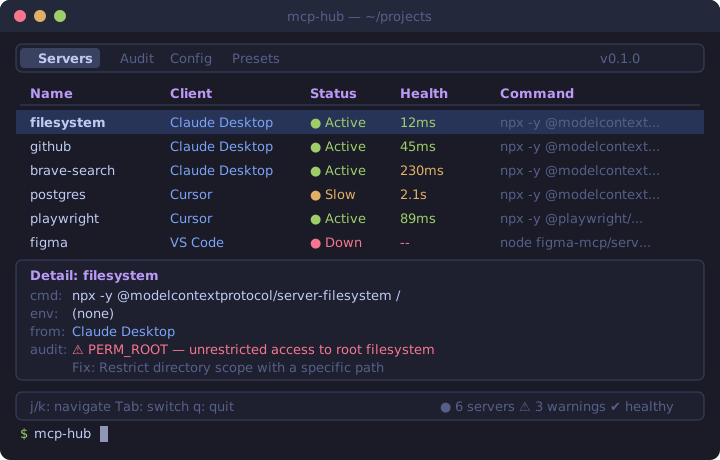
You installed MCP servers in Claude Desktop, Cursor, VS Code, and Claude Code. They're scattered across different config files. Some are broken. Some have security issues. You can't see them all at once.
mcp-hub fixes that. One terminal dashboard. All your servers. 15 security rules. Zero dependencies.
What it does
| Feature | Description |
|---|---|
| TUI Dashboard | Browse, inspect and filter MCP servers; switch Dark / Light themes with t |
| Auto-Discovery | Scans Claude Desktop, Claude Code, Cursor, Windsurf, and DeepSeek Harness ($DSH_HOME/cordis.patch.yml + profiles) configs automatically |
| Security Audit | 15 rules — typosquatting, CVE detection, postinstall scripts, shell injection, secrets, and more |
| MCP Doctor | Real MCP protocol health checks — spawns servers, validates handshake, counts tools |
| Benchmark | Performance testing — spawn time, init latency, tools/list response time per server |
| Registry Search | Search the official MCP Registry and install servers with one command |
| Export/Import | Export configs to Git-friendly JSON, import to any client. Secrets auto-redacted. |
| Single Binary | One Rust binary. No runtime. No dependencies. cargo install and go. |
Install
DeepSeek Harness plugin
The repository also provides three DSH conversation tools: mcp_hub_scan,
mcp_hub_audit, and mcp_hub_doctor. They use a separately installed Rust binary
from this checkout and display bounded reports without raw configuration values.
See DSH plugin installation and usage.
One-line install (recommended)
# Linux / macOS
curl -fsSL https://raw.githubusercontent.com/jiale-cheng-ning/mcp-hub/master/install.sh | sh

# Windows (PowerShell)
iwr -useb https://raw.githubusercontent.com/jiale-cheng-ning/mcp-hub/master/install.ps1 | iex
Download from GitHub Releases
Prebuilt binaries for Linux, macOS (Intel + Apple Silicon), and Windows:
From source (requires Rust)
cargo install --git https://github.com/jiale-cheng-ning/mcp-hub
Usage
mcp-hub              # Launch TUI dashboard
mcp-hub scan         # List all servers in a table
mcp-hub scan --json  # JSON output for scripting
mcp-hub audit        # Run security audit
mcp-hub audit --json # JSON output for CI pipelines
mcp-hub doctor       # Check real MCP protocol connectivity
mcp-hub doctor --json # JSON output for monitoring
mcp-hub bench        # Benchmark server performance (3 rounds)
mcp-hub bench --rounds 5 --server github  # Custom benchmark
mcp-hub search postgres                  # Search the MCP Registry
mcp-hub search postgres --install --target cursor  # Search and install
mcp-hub export       # Export all configs to mcp-hub.json (secrets redacted)
mcp-hub import mcp-hub.json --target cursor  # Import configs to a client
mcp-hub preset list                  # Show available preset bundles
mcp-hub preset install web-dev --target cursor  # Install a preset to a client
mcp-hub preset install web-dev --target dsh     # Install a preset to DeepSeek Harness
mcp-hub sync --from claude-desktop --to cursor  # Sync configs between clients
mcp-hub sync --from cursor --to dsh             # Sync into DeepSeek Harness
TUI keybindings
Press t on either tab to switch between Dark and Light. Text,
backgrounds, selected rows, borders and severity badges use the same theme.
The choice is remembered on normal exit in the OS config directory under
mcp-hub/theme. Missing or invalid preferences default to Dark.
Use mcp-hub --theme light or mcp-hub --theme dark to override the saved
theme for one session. While searching, t is entered as normal search text.
Servers tab:
| Key | Action |
|---|---|
j / ↓ | Move down |
k / ↑ | Move up |
Tab | Switch to Audit tab |
t | Switch Dark / Light theme |
q / Esc | Quit |
Audit tab:
| Key | Action |
|---|---|
j / ↓ | Next finding |
k / ↑ | Previous finding |
1 | Toggle Critical severity |
2 | Toggle Warning severity |
3 | Toggle Info severity |
g | Jump to first finding |
G | Jump to last finding |
Tab | Switch to Servers tab |
t | Switch Dark / Light theme |
q / Esc | Quit |
Audit rules (15)
Critical
| Rule | What it catches |
|---|---|
TYPOSQUATTING | Package name suspiciously similar to a known MCP server (e.g., postgress vs postgres) |
POSTINSTALL_SCRIPT | npm package may run postinstall/preinstall scripts during installation |
KNOWN_CVE | Package matches a known CVE (e.g., CVE-2025-6514 in mcp-remote) |
DANGEROUS_COMMAND | Server args contain curl|bash, rm -rf, eval, or other dangerous patterns |
WORLD_READABLE_SECRET | Config file containing secrets has overly permissive file permissions |
Warning
| Rule | What it catches |
|---|---|
ENV_PLAINTEXT_SECRET | API keys / tokens stored as plaintext in config |
PERM_ROOT / PERM_HOME | Filesystem servers with unrestricted access |
DEPRECATED_SERVER | Using a deprecated MCP server or package |
SHELL_INJECTION | Args contain $(), backticks, &&, ` |
Info
| Rule | What it catches |
|---|---|
NO_VERSION_PIN | npm packages without pinned versions |
LATEST_VERSION | Pinned version is 0.x — may be outdated or unstable |
DUPLICATE_SERVER | Same server configured in multiple clients |
CONFIG_FILE_PERMS | Config file permissions are not restricted to owner-only |
LICENSE_RISK | Package uses a copyleft license (AGPL/GPL) |
Example: mcp-hub audit
🔴 CRITICAL (1)
  ├─ pg: Package '@modelcontextprotocol/server-postgress' looks like a typosquat of '@modelcontextprotocol/server-postgres'
  │  Fix: Verify this is the intended package. Did you mean '@modelcontextprotocol/server-postgres'?

🟡 WARNING (2)
  ├─ filesystem: Server 'filesystem' has unrestricted access to root filesystem
  │  Fix: Restrict directory scope with a specific path
  ├─ github: Potential secret 'GITHUB_PERSONAL_ACCESS_TOKEN' stored in plaintext config
  │  Fix: Use environment variable reference or secret manager

ℹ️  INFO (2)
  ├─ filesystem: Unpinned package version: '@modelcontextprotocol/server-filesystem'
  │  Fix: Pin to a specific version (e.g., @scope/pkg@1.2.0)
  ├─ github: Server 'github' duplicates 'github-cursor' (same command in Claude Desktop and Cursor)
  │  Fix: Consider using a shared configuration or removing the duplicate

Total findings: 5
Preset bundles
mcp-hub preset list                           # See all presets
mcp-hub preset install web-dev --target cursor # Install to Cursor
| Preset | Description | Servers |
|---|---|---|
minimal | Starter pack | filesystem, github |
web-dev | Web development | filesystem, github, playwright, brave-search |
backend | Backend / API | filesystem, github, postgres |
fullstack | Everything | all of the above |
GitHub Action
Audit MCP configs in CI — fail the build on security issues:
# .github/workflows/mcp-audit.yml
name: MCP Security Audit
on: [push, pull_request]

jobs:
  audit:
    runs-on: ubuntu-latest
    steps:
      - uses: actions/checkout@v4
      - uses: jiale-cheng-ning/mcp-hub@v0.1.0
        with:
          fail-on-critical: true
| Input | Default | Description |
|---|---|---|
fail-on-critical | true | Fail if critical findings detected |
fail-on-warning | false | Fail if warnings detected |
config-path | auto | Custom config file path |
version | latest | mcp-hub version to use |
Supported clients
| Client | Config location |
|---|---|
| Claude Desktop | %APPDATA%\Claude\claude_desktop_config.json |
| Claude Code | ~/.claude.json and project .mcp.json |
| VS Code | OS config directory Code/User/mcp.json and project .vscode/mcp.json |
| Cursor | ~/.cursor/mcp.json |
| Windsurf | ~/.codeium/windsurf/mcp_config.json |
| DeepSeek Harness | $DSH_HOME/cordis.patch.yml and profile patch files (default home ~/.dsh) |
Roadmap
- Auto-discovery of MCP configs across 4 clients
- TUI dashboard with server list and detail panel
- Security audit with 15 rules (typosquatting, CVE, shell injection, secrets, ...)
- Health checks (process detection)
- Severity-based filtering in TUI
- JSON output for CI integration
- Export/import configurations (Git-friendly, secrets auto-redacted)
- Real MCP protocol health checks (
mcp-hub doctor) - MCP Registry search and one-click install (
mcp-hub search) - Server performance benchmarks (
mcp-hub bench) - Preset server bundles (
mcp-hub preset install web-dev) - Config sync between clients (
mcp-hub sync --from claude-desktop --to cursor) - Real-time log viewer
- Resource monitoring (CPU/memory)
Contributing
Contributions welcome. Open an issue first to discuss what you'd like to change.
License
MIT — see LICENSE.