dsh-jenkins
jsoncode/dsh-jenkins
여러 Jenkins 서버를 관리하고 설정 페이지, 모델 도구 또는 작업 공간별 "Run Jenkins Job" 항목에서 작업을 트리거하며, 이중 언어 호스트 + 브라우저 UI를 제공합니다.
설치
dsh plugin --profile web add github:jsoncode/dsh-jenkinsREADME
dsh-jenkins
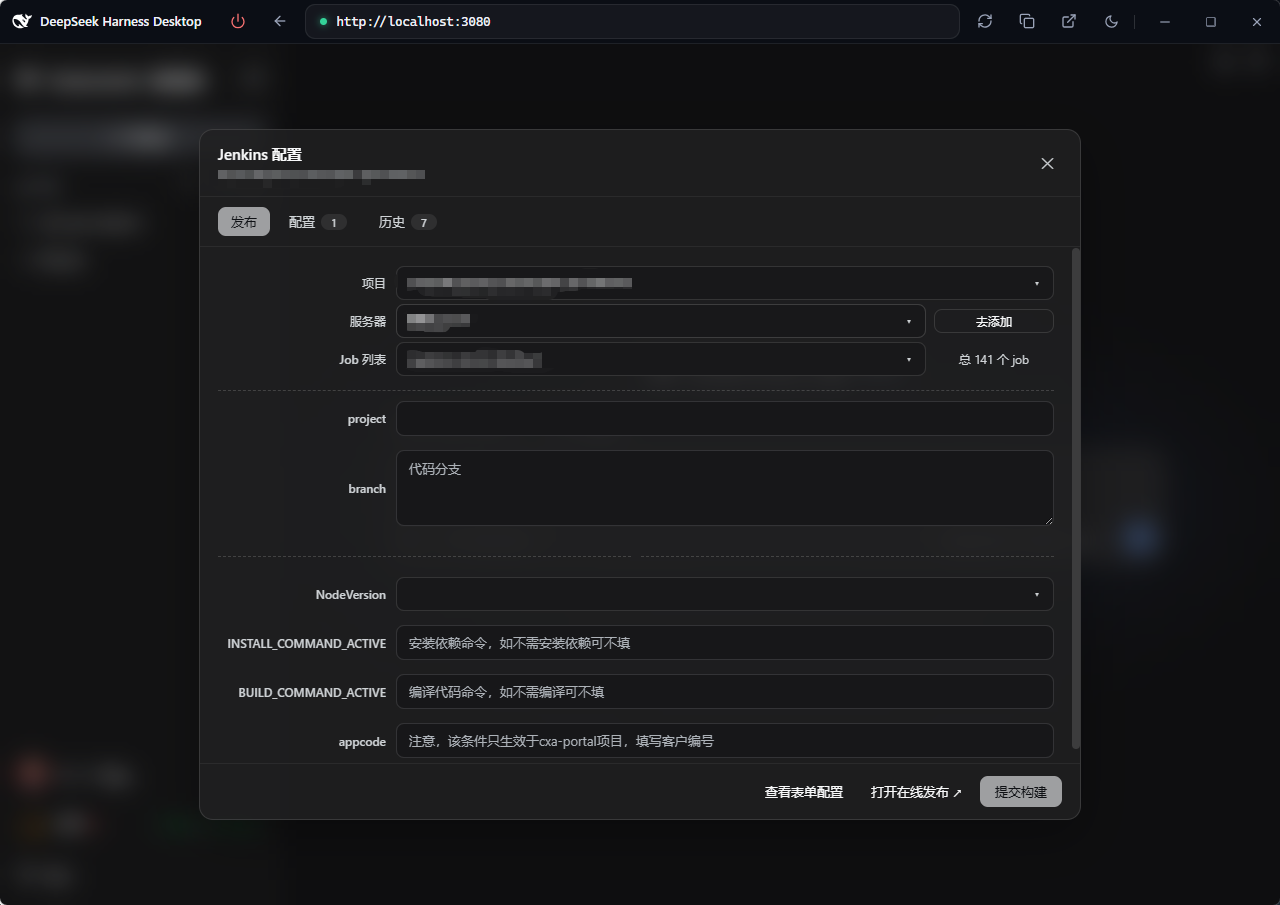
dsh-jenkins is a Jenkins management plugin built on the DeepSeek Harness (DSH) host, centralizing multiple servers and jobs for fast build publishing.
- Multi-server / multi-job management — configure and manage multiple Jenkins servers and jobs in one place
- One-click publishing — trigger parameterized builds, track queue → building → result in real time
- Logs & operations — view build logs, stop or cancel builds at any time
- Bilingual UI — follows the host interface language (中文 / English)
Available from the Settings page, a per-workspace entry, and model tools.
Preview
Screenshots of the Settings page, workspace entry and run/history modals: see preview.md.
Features
- Settings → Jenkins Config page (
settings.section): add / edit / delete multiple servers (URL, username, Token), test connections, skip TLS verification. Only Server URL and Token are required (username defaults toadmin). - Project Config (
$DSH_HOME/dsh-jenkins-map.json): every project's publish targets in one file — project name → target array, with elements identical to a workspace config file ({ name?, job, server, environments }). Each env can carry anamedisplay label (e.g.uat环境/prod灰度/prod环境) and the number of envs is unlimited (an empty name falls back to UAT / Prod / Env N). Adsh-jenkins.json/js/tsin a project root is discovered automatically (folder name as the project name, missing-only — nothing you edited is overwritten), so there is usually nothing to maintain by hand; to edit, click Edit map on the Project Config row of the Config tab (form / JSON). See Project config. - Workspace entry (
sidebar.footer.action): a footer group with the Jenkins logo button (opens the unified modal) and a History button (clock icon, publish history of the last 50 runs across all workspaces, filterable by workspace — defaults to All). The Publish tab has just three rows — project → server → job — then the parameter form, build triggering and status polling (queued → building → result, 10-minute timeout). The env has no row of its own: each env in a project config is a server, so env selection lives in the Server dropdown — whose labels show only the plugin's server name (never a mix of the config's env name and the server name), and picking one switches the job / params to that env. Configserverrefs are matched against configured servers by name → id → full URL → domain (the domain level ignores scheme, port and context path). The dropdown shows the intersection of the servers referenced by the project config and the servers configured in the plugin; the last parameters are remembered per project and auto-echoed next time. - Entry visibility: the sidebar entry follows a Show in menu preference (default on), toggled from Settings → Jenkins Config or the top of the modal's Config tab. When off the entry renders nothing; the host settings page keeps an Open Jenkins Config button so the modal stays reachable (both places share one preference source and stay in sync).
- Model tools (docs/develop/basic/tool):
dsh_jenkins_build,dsh_jenkins_status. - Config (docs/develop/basic/config): Schemastery
Config+ a plugin data file$DSH_HOME/dsh-jenkins.json(server tokens encrypted with the machine-bound key$DSH_HOME/dsh-jenkins.key, cache in plaintext); the project config is its own file$DSH_HOME/dsh-jenkins-map.json(plaintext, hand-editable). On first run any legacydsh-jenkinsnamespace insettings.yamlis migrated once and cleared; a legacyprojectsfield insidedsh-jenkins.jsonis migrated into the new file (missing-only). - Packaging (docs/develop/basic/publish):
dsh.bundle+dsh.client(web) manifests.
Structure
├── src/host/*.ts       # Host half: index.ts (entry), jenkins.ts (curl core), ops.ts (op dispatch), project-map.ts (project config file), projects.ts (normalize/merge), workspace-config.ts, types.ts
├── src/client/*.tsx    # Browser half (React TSX): settings page, footer entry, publish modal, project config modal, history modal
├── lib/index.js        # Host half build artifact (tsdown, ESM), committed for git installs
├── lib/client.js       # Browser half build artifact (tsdown → __ModuleLoader__ factory), committed
├── lib/types/          # Type declarations (generated by tsc -b)
├── scripts/            # verify-client.mjs (host-seed simulation check) + isolated tests
├── examples/           # sample configs: dsh-jenkins.json (workspace array), dsh-jenkins-map.json (central map)
├── tsdown.config.ts    # tsdown build config (node half + client bundle banner wrapper)
├── tsconfig.json       # solution: references tsconfig.host.json / tsconfig.client.json
├── cordis.patch.yml    # Bundle patch: plugin row referenced by package name (no paths)
├── package.json        # dsh.bundle + dsh.client(web) manifests + peerDependencies
├── README.md           # This file (English)
├── README.zh.md        # 中文文档
└── preview.md          # Screenshot preview (references assets/preview/*.png)
Workspace config file (dsh-jenkins.json / .js / .ts)
Place it in the workspace root. It is an array; each element is one deploy
target (job + server + environments params). .json is parsed directly; .js / .ts
are evaluated with node (CJS module.exports or ESM export default):
[
  {
    "job": "build-app",
    "server": "http://uat.example.com",
    "environments": { "BRANCH": "main", "DEPLOY": false }
  },
  {
    "job": "build-app",
    "server": "http://prod.example.com",
    "environments": { "BRANCH": "release-1.0", "DEPLOY": true }
  }
]
- Every element requires
job(Jenkins job path, e.g.build-apporfolder/build-app) andserver(the server name / id / URL as configured in Settings → Jenkins). environments(optional): the parameter map for this target (booleans render as checkboxes, everything else as text fields).- Such a file is now a discovery source: the plugin reads it into Project Config under the workspace folder name (missing-only — existing projects are never overwritten). Just pick the project on the Publish tab; server / job / params come from the current env.
Project config (dsh-jenkins-map.json)
One config for every project: project name → target array. Each env may carry a
name display label (e.g. uat环境 / prod灰度 / prod环境) and the number of
envs is unlimited (env 1 is the default, usually UAT); when the name is empty the
UI falls back to UAT / Prod / Env N. Elements are identical to a workspace config
file, so they can be moved back and forth:
{
  "health-check-ui": [
    {
      "name": "uat环境",
      "job": "system3_Front_docker3",
      "server": "https://dev-jenkins-tx.whale-plus.com",
      "environments": {
        "project": "health-check-ui",
        "branch": "uat5",
        "NodeVersion": "v24.12.0",
        "INSTALL_COMMAND_ACTIVE": "pnpm i --registry=https://repo.huaweicloud.com/repository/npm/",
        "BUILD_COMMAND_ACTIVE": "pnpm build:uat"
      }
    },
    {
      "name": "prod灰度",
      "job": "pro_system3_Front_docker3_gray",
      "server": "https://jenkins-tx.whale-plus.com",
      "environments": {
        "project": "health-check-ui",
        "branch": "release/gray",
        "NodeVersion": "v24.12.0",
        "BUILD_COMMAND_ACTIVE": "pnpm build:gray"
      }
    },
    {
      "name": "prod环境",
      "job": "pro_system3_Front_docker3",
      "server": "https://jenkins-tx.whale-plus.com",
      "environments": {
        "project": "health-check-ui",
        "branch": "master5",
        "NodeVersion": "v24.12.0",
        "BUILD_COMMAND_ACTIVE": "pnpm build:prod"
      }
    }
  ]
}
- Where it lives: its own file
$DSH_HOME/dsh-jenkins-map.json(a bare map, no wrapper, plaintext; a missing file loads as{}, a corrupt one is backed up to.bakand treated as empty). A legacyprojectsfield insidedsh-jenkins.jsonis migrated into this file on first startup (missing-only). name(env display label): optional; an empty string is dropped (no"name": ""is written). It shows up in the Server dropdown label and in Local Records, so a build's env is obvious at a glance.- Unlimited envs: a project may have any number of targets (UAT / gray / prod / overseas…); array order is display order and item 1 is the default.
- Discovery: opening the Config / Publish tab scans every open workspace root
for
dsh-jenkins.json/js/tsand merges it under the folder name — missing-only by default, so hand-edited projects are never clobbered. To pull in updated workspace configs, tick Overwrite same-name projects and hit Rediscover in the modal footer. - Editing: on the Config tab, the Project Config row
(
dsh-jenkins-map.json · N projects) → Edit map:- Form: project list; each env row is env name (optional, placeholder shows the fallback) + job + server + N params (expands that env's key/value editor, values text / number / boolean) + a per-row remove button; Add env has no cap, and projects / envs / params can all be added or removed;
- JSON: the whole map as JSON — paste your own config wholesale, then Apply JSON to write it back into the form.
serverrefs may be a server name / id / full URL / bare domain; they are matched against configured servers by name → id → full URL (trailing slash ignored) → domain, where the domain level ignores scheme, port and context path (http://jenkins-tx.example.com:8080/jenkinsequals the configuredhttps://jenkins-tx.example.com). When nothing matches, the Publish tab shows a hint under the server row and the dropdown falls back to all servers.- One-click publish: the Project dropdown on the Publish tab lists the map's projects; the env is switched straight from the Server dropdown (its labels are just the plugin's server names — the config's env name is not mixed in), which brings that env's job and params with it — then hit Submit. Records are grouped as "Project Config: " on the Local Records tab (filterable / clearable per project, and each record shows the env name).
- Hand editing: the file is the map — edit it in any editor; the next read picks it up (the file is re-parsed on every load).
Installation
# Local development
dsh plugin --profile web add ./dsh-jenkins

# Published: npm / tarball / GitHub
dsh plugin --profile web add dsh-jenkins
dsh plugin --profile web add ./dsh-jenkins-0.1.4.tgz
dsh plugin --profile web add github:you/dsh-jenkins#<sha>

dsh --profile web --dump-config   # verify the layer
dsh --profile web                 # start (restart required for the host half to reload)
Local development dependencies: the host loads
index.jsthrough native Node ESM, so@deepseek-ai/schemastery,@deepseek-ai/dsh-toolsand@deepseek-ai/dsh-settingsmust be resolvable from the plugin directory (node_modulesis gitignored). Either:
- run
pnpm installinside the plugin directory (these three are declared as devDependencies); or- junction the host's flat fallback copies, e.g.:
New-Item -ItemType Directory "$PWD\node_modules\@deepseek-ai" -Force
foreach ($p in 'schemastery','dsh-tools','dsh-settings') {
  New-Item -ItemType Junction "$PWD\node_modules\@deepseek-ai\$p" -Target "$env:DSH_HOME\profiles\node_modules\@deepseek-ai\$p"
}
Static server defaults can also be set in the profile's cordis.patch.yml:
- insert:
    - id: dsh-jenkins
      name: dsh-jenkins
      config:
        servers:
          - id: prod
            name: 生产环境
            baseUrl: https://jenkins.example.com
            username: admin
            token: <API Token or password>
            insecure: false
Publish
The build toolchain is tsc + tsdown (same as @lemcae/dsh-balance and other
similar plugins — no vite): tsc -b type-checks and emits declarations, while
tsdown (Rolldown core) bundles the host half (lib/index.js, ESM) and the
browser half (lib/client.js, single-file CJS __ModuleLoader__ factory with
auto banner wrapping). Dependency management uses pnpm 10 (Node 26; the
pnpm-lock.yaml is committed and CI installs with --frozen-lockfile):
pnpm install     # install per pnpm-lock.yaml
pnpm run build   # clean lib → tsc -b (types + declarations) → tsdown (both halves)
pnpm run verify  # simulate the host module table to check lib/client.js (optional)
pnpm publish     # or pnpm pack / git push origin main (lib/ is committed; git installs need no build)
Automated publishing (GitHub Actions)
Pushing a v* tag (pnpm run release bumps the patch version, rebuilds the
artifact, and tags it automatically) triggers
.github/workflows/publish.yml:
- release job: Setup Node 26 →
pnpm install --frozen-lockfile→pnpm run check(tsc -b) →pnpm run build(tsc -b && tsdown) →pnpm pack→ creates a GitHub Release (auto-generated changelog, tarball attached); - publish-npm job: publishes to npm — requires the
NPM_TOKENrepository secret (Settings → Secrets and variables → Actions); fails fast with a hint when it is missing.
Development
Requirements: Node ≥ 26 + pnpm 10 (the packageManager field in
package.json pins the pnpm version).
pnpm install           # devDependencies: typescript, tsdown, @types/react, @deepseek-ai/* type packages, etc.
pnpm run check         # whole-tree TypeScript type check (tsc -b)
pnpm run build         # rebuild both halves after editing source (tsc -b && tsdown)
pnpm run watch         # tsdown watch mode (rebuild on src/client changes)
pnpm run verify        # simulate the host seed table to check lib/client.js loads
pnpm run test          # isolated tests: curl dump parsing + failure log + param parsing + centralized project config
pnpm run test:params   # param parsing: built-in types / uno-choice / Extended Choice / build-page fallback
pnpm run test:store    # data-file round-trip: token encryption / migration / keep-token semantics
- Host half lives in
src/host/; browser half insrc/client/(build entrysrc/client/index.ts, exporting{ name, inject, apply }directly); - The
window.__ModuleLoader__.loadfactory wrapper oflib/client.jsis generated by tsdown's banner/intro/footer options (no hand-written wrap script); - External dependencies in the artifact (
react,@deepseek-ai/dsh-client-ui-primitives, ...) stay external and resolve from the host module table (seed) at runtime.
Job parameter recognition
The Publish tab renders its parameter form from the server-side definitions:
| Server-side type | Control |
|---|---|
StringParameterDefinition / uno-choice dynamic reference | single-line text |
TextParameterDefinition | textarea |
BooleanParameterDefinition | checkbox |
PasswordParameterDefinition / CredentialsParameterDefinition / FileParameterDefinition | password / text field |
ChoiceParameterDefinition, uno-choice ChoiceParameter / CascadeChoiceParameter, Extended Choice single | searchable dropdown |
Extended Choice multi-select / uno-choice MultiSelectParameter | checkbox list (submitted joined by the delimiter) |
- Script-generated options (Active Choices / uno-choice
ChoiceParameter,CascadeChoiceParameter) expose only_class+ default in REST/api/json— the option list is computed by Groovy at render time. Those params automatically fall back to the build page HTML (job/<path>/build) and are parsed from its<select>options, so aprojectdropdown lists every project. When it still cannot be resolved the field degrades to a text input with an inline hint instead of showing an empty dropdown. - Defaults come from either
defaultValue(built-ins) ordefaultParameterValue.value(plugin types such as uno-choice), soproject=boss_backendis pre-filled correctly. - Separator rows: uno-choice
DynamicReferenceParameterentries (emptyname) never become empty fields — dash-only ones are dropped, ones with text render as a dashed divider note. - Duplicate parameter names keep the first definition; unknown types fall back to text.
Troubleshooting (failure log)
Every failed request (job list / job detail / build history / trigger / status / build log /
connection test …) is appended to $DSH_HOME/dsh-jenkins.log (same directory as
dsh-jenkins.json; on Windows C:\Users\<you>\.dsh\dsh-jenkins.log) as JSONL — one line per
failure:
{"time":"2026-09-14T07:02:19.949Z","level":"error","op":"jobs","code":"http-401",
 "message":"auth failed (HTTP 401)","server":"UAT <https://jenkins.example.com>","user":"jason",
 "request":"GET /api/json?tree=jobs[...]","httpStatus":401,"httpStatuses":[200,401],
 "curlExit":0,"curlStderr":"","bodySnippet":"<html>...Error 401 Unauthorized...</html>"}
- Fields: op, error code, message, server (name + URL), request line, HTTP status, all response block statuses, curl exit code and stderr, response body snippet, session id;
httpStatuseslike[200, 401]means curl went through an HTTP proxy: the proxy's CONNECT tunnel block (200 Connection Established) is printed first, then the real response block — the last entry is the real status;- Redaction: no token, no Basic credentials, no credentials embedded in a URL, no Jenkins crumb; body snippets are flattened and capped at 600 characters;
- The file rotates to
dsh-jenkins.log.1above 2MB (one generation kept); logging never breaks the main flow.
Common causes of "Failed to load jobs"
| Symptom (log field / UI text) | Cause |
|---|---|
code=parse-failed with a bodySnippet starting with HTTP/1.1 | HTTPS through an HTTP proxy (https_proxy): curl's -D - prints the proxy's 200 Connection Established tunnel block first; the old code split at the first blank line and swallowed the real headers into the body. Fixed by block-aware parsing (parseCurlDump) |
code=auth-failed (HTTP 401) | Wrong or expired username/Token (re-run Test connection in settings) |
code=forbidden (HTTP 403) | Token lacks permission / CSRF missing / reverse proxy blocking |
code=network-failed with curlExit=7/28/35/60 | DNS, connection refused (7), timeout (28, 40s cap), TLS handshake (35), self-signed cert (60 — enable "ignore certificate") |
code=redirect | URL is not the final one (http:// → https://, missing context path); redirects are not followed, the log carries Location |
code=response-too-large | Response exceeded the host's 8MB collection cap (tail kept); narrow the request |
code=empty-response | No response header block: proxy ate the response, connection cut, or output truncated |
code=server-missing | The client's cached server id no longer exists in the config (pick a server again) |
code=curl-unavailable | Host subprocess service unavailable / curl cannot start |
stage=route-guard | Request was rejected by the /dsh-jenkins/api trust fence (non-loopback Host, cross-site marker) — it never reached plugin logic |
| Empty job list but no failure | Folders deeper than the 3-level tree are returned as folder placeholders and filtered out by the UI; the instance nests jobs too deeply |
Implementation notes
- Jenkins REST via
curl.exespawned directly through the hostsubprocessservice: Basic auth- CSRF crumb +
--data-binary @-(form body over stdin, UTF-8 without BOM); the-D -output is parsed per response block (parseCurlDump: skip the proxy CONNECT / 1xx blocks, take the last real block for status andLocation), so a tunnel block's 200 no longer masks the real status.
- CSRF crumb +
- Failures are logged to
$DSH_HOME/dsh-jenkins.log(see above):jenkins.tsrecords the HTTP / curl evidence,index.tsrecords op-level failures at all three entry points (route, command, model tool). - Browser ↔ host transport: by default the
/dsh-jenkins/apiroute registered onwebServer(fetch POST JSON →{ ok, value }envelope, behind a trust fence); older hosts fall back to the command channelctx.remote.commands.execute(sessionId, '/dsh-jenkins <json>'). Host errors carry acodethat the client localizes (fallback to the raw message). - Peer dependencies (
@deepseek-ai/cordis,dsh-tools,schemastery,dsh-settings,dsh-commands,dsh-session,dsh-api-remotes, client runtime/ui-slots/ui-settings/ cordis-client-runner,react) are resolved by the host at install time. - The official
deepseek-harnessproject is not modified; all features use existing slots (sidebar.footer.action,settings.section,shell.overlay) and the command transport. - Style isolation: every rule in the injected stylesheet is scoped to
.dshj-*with one deliberate exception —:where(div:has(> [data-slot="sidebar.footer.action"] > .dshj-footer-group)){flex-direction:column}, which stacks the host footer container (the host lays it out as a flex row, so several plugin entries would squeeze onto one line). It can only match a container that already holds this plugin's own entry, and:where()drops its specificity to 0 so the host can always override it. Keyframe names aredshj--prefixed and the style tag is markeddata-plugin-css="dsh-jenkins/settings.css"; no other global selector, no:root/body/*rule, no body-style mutation. - Dialog palette: the modals follow dsh-get-balance — a
rgba(0,0,0,.32)scrim withblur(12px) saturate(1.2), acolor-mix(bg-layer-1 78%)glass panel with aborder-l2hairline and 14px radius,border-l1header/footer dividers, solidbutton-primary-fillprimary buttons and active tabs (translucent fills washed the host's monochrome#0f1115/#f9fafbprimary into grey),bg-baseinputs and dropdown panels,bg-layer-2cards, andstate-*tokens for status colours.