ARK (dsh)
kaust-ark/ark/integrations/dsh
영속 DSH 세션 하나에서 실험·논문 작성을 실행하며 별도 검토자가 렌더링 원고를 출처·측정치와 대조합니다.
설치
dsh plugin --profile web add github:kaust-ark/ark이 플러그인은 저장소의 integrations/dsh 하위 디렉터리에 있습니다.
README

idea2paper
Offload the labour. Steer the science.


Website • Quick Start • Requirements • Pipeline • Agents • Cloud • CLI
idea2paper orchestrates 6 specialized AI agents to turn a research idea into a paper — proposal analysis, literature search, Slurm experiments, LaTeX drafting, and iterative peer review — while you stay in control via CLI, Dashboard, or Telegram.
Give it an idea and a venue. idea2paper handles the rest.
The fastest way to try it is the hosted instance at idea2paper.org — sign in with your email, add one OpenRouter API key, and launch. A full paper with a budget model like DeepSeek typically bills $10–25 of your own API credit, depending on length — the dashboard shows the actual billed total per run. Self-hosting is a one-line install (below).
Papers Written by idea2paper
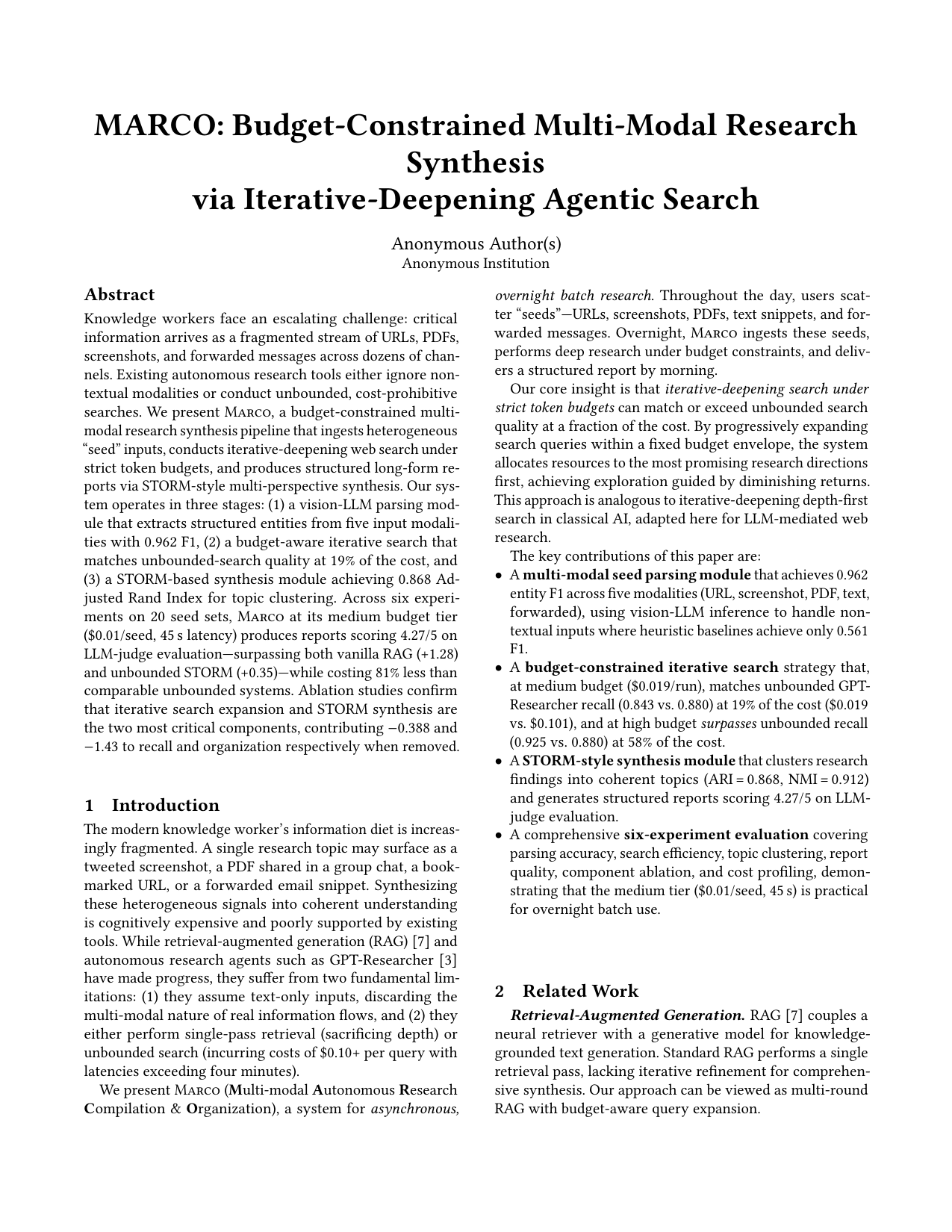
Budget-Constrained Multi-Modal Research Synthesis via Iterative-Deepening Agentic Search Template: EuroMLSys |
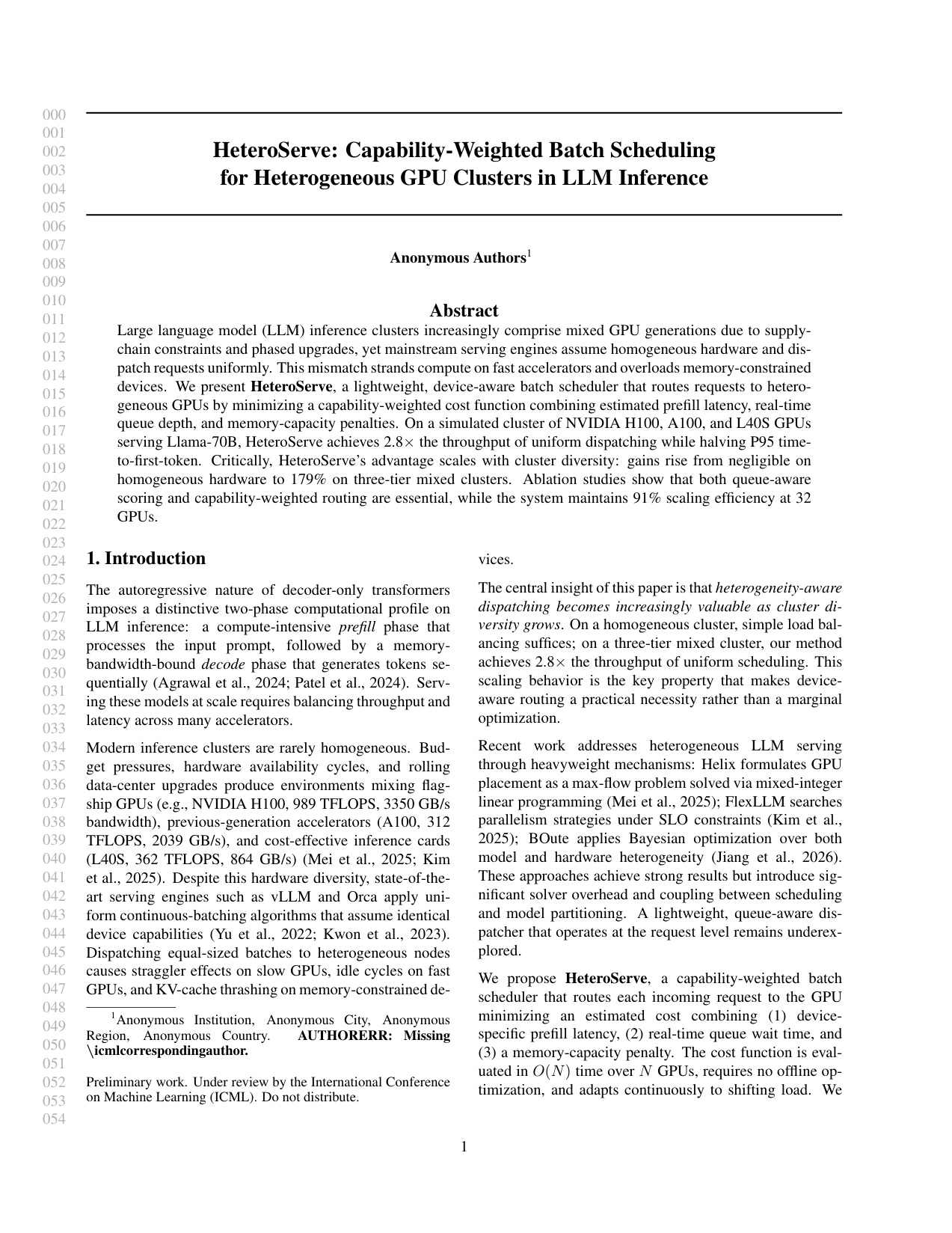
HeteroServe: Capability-Weighted Batch Scheduling for Heterogeneous GPU Clusters in LLM Inference Template: ICML |
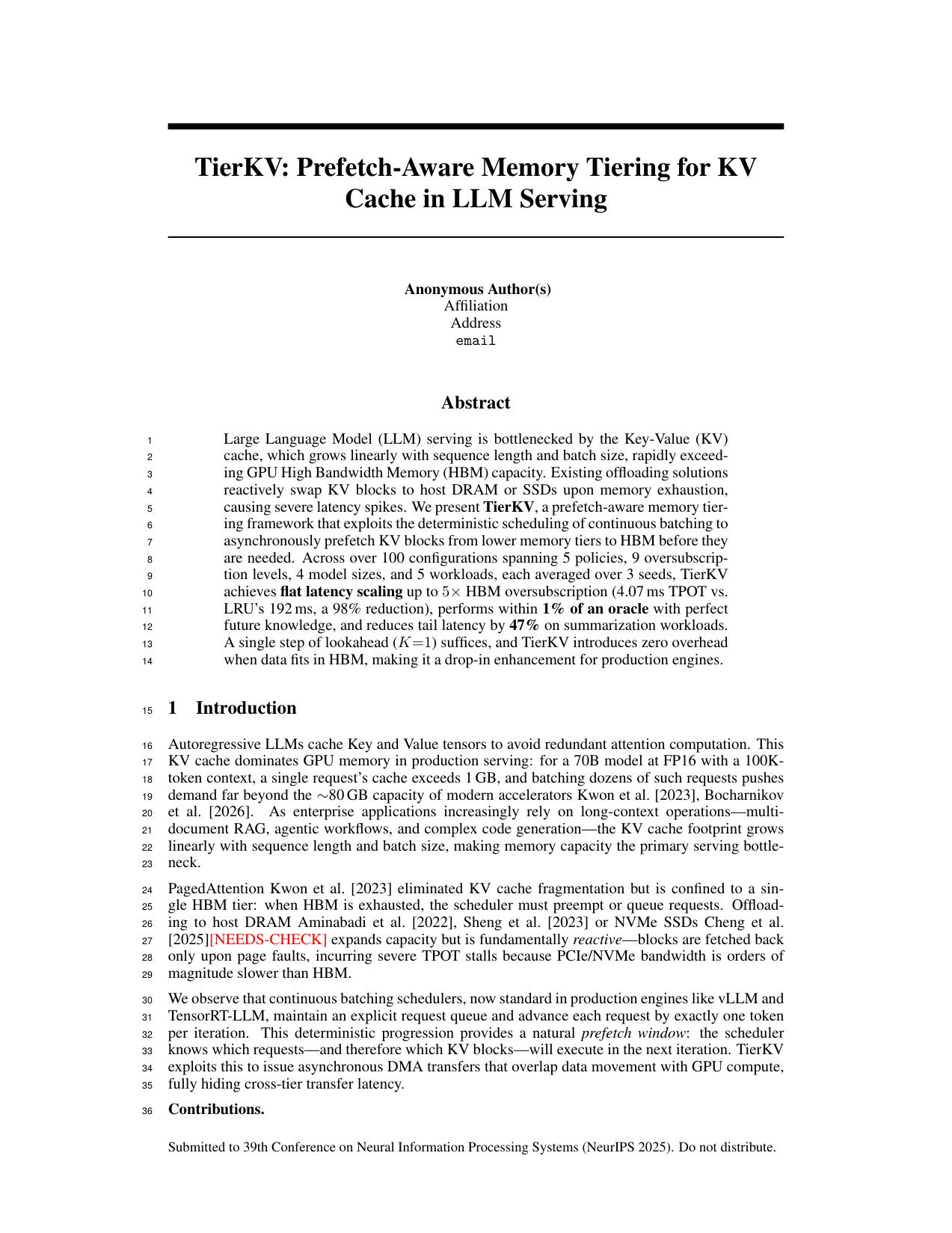
TierKV: Prefetch-Aware Memory Tiering for KV Cache in LLM Serving Template: NeurIPS |
Run inside DeepSeek Harness
Install the Idea2Paper DSH bundle into a dedicated profile. Each project keeps one research session across experiments, writing and revisions. The independent reviewer can inspect measured rows, original papers and rendered PDF pages. The guide includes the install command, prerequisites, and how to resume a project.
Watch a reviewer finding arrive, open its source data, and inspect the exact PDF page under review. Eight-second dashboard replay · Subscribe in DSH Discover · Reviewer results and limitations
Quick Start
curl -fsSL https://idea2paper.org/install.sh | bash
The script:
- Detects your OS, installs miniforge if missing, builds the
ark-baseandarkconda envs, and installs idea2paper editable into~/ARKwith the pinned DSH SDK. - Asks for your API keys and an email for dashboard login. One OpenRouter key is the recommended setup — it unlocks every model plus deep research and figure generation; direct Anthropic / OpenAI / Gemini / DeepSeek keys also work. Press Enter to skip any.
- Installs the dashboard as a
systemd --userservice on port9527(use--no-webappto opt out). - Prints a one-time magic-link URL for your email — click it once and you're logged into the local dashboard. No SMTP, no Google OAuth.
After that the dashboard at http://localhost:9527 is the primary UX — create projects, set the model, run, monitor. The CLI also works:
ark doctor          # verify install
ark new myproject   # interactive project wizard
ark run  myproject
ark monitor myproject
Re-run ark webapp login <email> anytime for a fresh sign-in link. Full installer flags: website/homepage/install.sh --help.
Start from an Existing PDF
ark new myproject --from-pdf proposal.pdf
idea2paper parses the PDF with PyMuPDF + Claude Haiku, pre-fills the wizard, and kicks off from the extracted spec.
Requirements
- Python 3.10+ with
pyyamlandPyMuPDF - Agent runtime runs on DeepSeek Harness (DSH) by default. Set
ARK_AGENT_RUNTIME=clito use the OpenHands CLI. Apptainer requiresARK_AGENT_RUNTIME=sdk. - API key: one OpenRouter key covers every model, deep research (Perplexity), and AI figures; single-vendor keys (Anthropic / OpenAI / Gemini / DeepSeek / …) work too but lose the pieces their vendor doesn't serve
- Optional: LaTeX (
pdflatex+bibtex), Slurm
Manual Installation
The fastest path is the one-line installer in Quick Start. It runs the steps below for you and prints onboarding hints. To do it by hand:
# 1. Create the project research-stack template (no idea2paper code in here —
#    each new project clones this env, so it must stay clean).
conda env create -f environment.yml         # Linux (creates "ark-base")
# OR for macOS:
conda env create -f environment-macos.yml   # macOS (creates "ark-base")

# 2. Install idea2paper itself into a SEPARATE env (not ark-base).
conda create -n ark python=3.11 -y
conda activate ark
pip install -e .                    # Core
pip install -e ".[research]"       # + Gemini Deep Research & Nano Banana
pip install -e ".[webapp]"         # + dashboard / systemd service support

# 3. Optional OpenHands rollback runtime.
pip install uv && uv tool install --python 3.12 openhands

# 4. Verify the selected runtime and API keys.
ark doctor
Framework
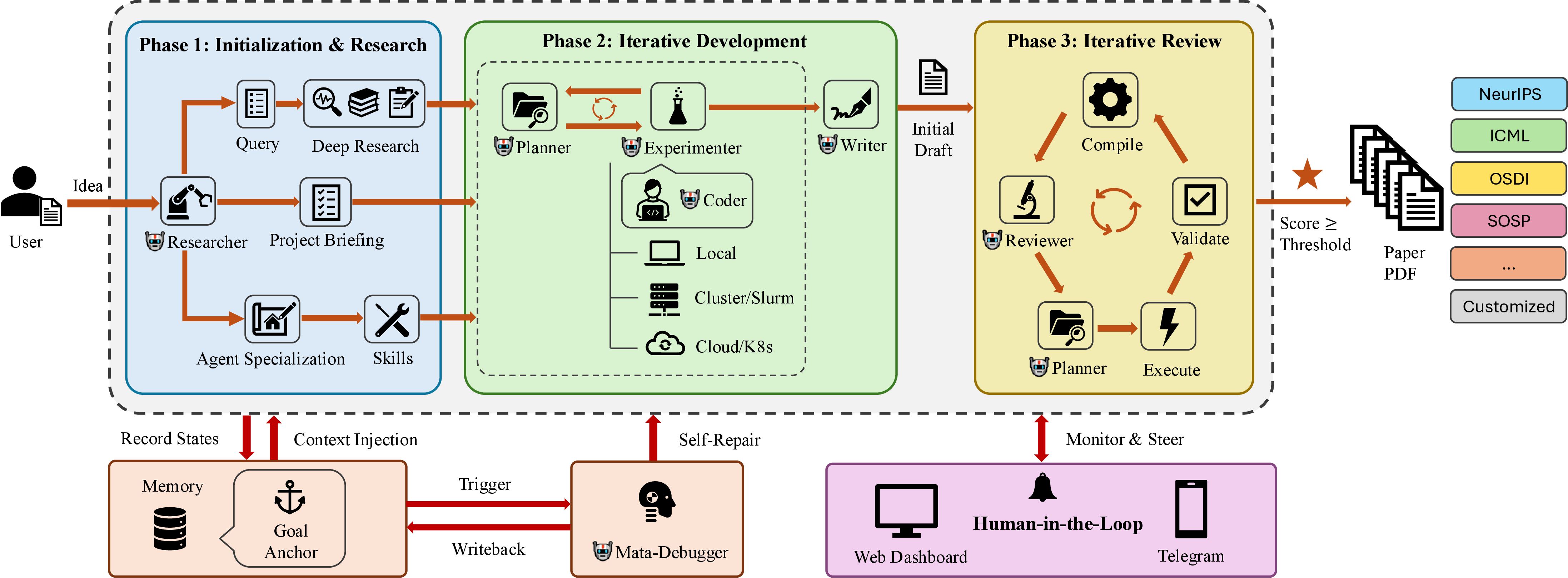
idea2paper orchestrates three phases — Initialization & Research, Iterative Development, and Iterative Review — coordinated through shared memory, a persistent Goal Anchor re-injected into every agent call to prevent drift, and human-in-the-loop steering via the web dashboard or Telegram.
Pipeline
idea2paper runs three phases in sequence. The Review phase loops until the paper reaches the target score.
| Phase | What Happens |
|---|---|
| Research | 5-step pipeline: Setup (conda env) → Analyze Proposal (researcher) → Deep Research (Perplexity via OpenRouter, or Gemini) → Specialization (researcher) → Bootstrap (skills & citations) |
| Dev | Iterative experiment cycle: Plan Experiments → Run Experiments (Slurm or local) → Analyze Results → Evaluate Completeness |
| Review | Compile → Review → Plan → Execute → Validate, repeating until score ≥ threshold |
Review Loop details
Each iteration of the Review phase runs 5 steps:
| Step | Description |
|---|---|
| Compile | LaTeX → PDF, page count, page images |
| Review | AI reviewer scores 1–10, lists Major & Minor issues |
| Plan | Planner creates a prioritized action plan |
| Execute | Researcher + Experimenter run in parallel; Writer revises LaTeX |
| Validate | Verify changes compile; recompile PDF |
The loop repeats until the score reaches the acceptance threshold — or you intervene via Telegram.
Agents
| Agent | Role |
|---|---|
| Researcher | Analyzes the proposal, runs the deep-research literature survey, and specializes agent prompts for the project |
| Reviewer | Scores the paper against venue standards, generates improvement tasks |
| Planner | Turns review feedback into a prioritized action plan; analyzes Dev-phase results |
| Writer | Drafts and refines LaTeX sections with DBLP-verified references |
| Experimenter | Designs experiments, submits Slurm jobs, analyzes results |
| Coder | Writes and debugs experiment code and analysis scripts |
Guardrails & Step Log
An autonomous run is watched and gated, not a black box.
- Live step log. Every agent's actions — each bash command, file edit, and
result — stream into the log as they happen (no more 30-minute blank), and into
a structured
agent_steps.jsonl. Secret values are redacted automatically. Tune detail withlog_verbosity: quiet|normal|verbose|debug. - Pause-and-ask before the risky stuff. Before deleting files, launching a burst of jobs, provisioning a paid cloud instance, handling credentials, pushing/exfiltrating data, or crossing a spend cap, idea2paper asks you on Telegram and waits for approval (Approve / Deny / remember-this). It remembers your answer so it doesn't re-ask, denies on timeout, and fails open (auto-allows + logs) when no Telegram is configured — so nothing ever hangs.
- Idea gatekeeper (Gate A / Gate B). Every submitted idea passes a pre-launch ethics-and-soundness review (Gate A); after the literature survey a novelty/scope check (Gate B) flags overlap with existing work and folds honest scoping into the paper instead of overclaiming.
- Delivery checks. Before a paper is delivered it is verified against an
explicit contract — disclosure present, every citation resolved, references
non-empty, generated figures actually used, page budget respected. The same
checks run standalone via
ark audit <project> [--repair]. - AI-use disclosure. Every paper carries an acknowledgment that it was produced with Idea2Paper and reviewed by the authors — inserted automatically, for every venue.
- Two enforcement layers. Shadow-PATH wrappers gate risky commands before
they run; a circuit breaker backstops anything that bypasses them. The
orchestrator's own autonomous cloud-provision / git-push / spend actions are
gated too — but commands you trigger yourself (
ark clear, delete, stop) are not.
Configure it all under the intervention: block in
config.example.yaml; the default autonomy level
(standard) only interrupts you for genuinely high-stakes actions.
What Sets idea2paper Apart
| Other Tools | idea2paper | |
|---|---|---|
| Control | Fully autonomous — drifts from intent, no mid-run correction | Human-in-the-loop: pause at key decisions, steer via Telegram or web |
| Formatting | Broken layouts, LaTeX errors, manual cleanup | Venue templates + sub-page length control to hit page limits exactly |
| Citations | LLMs fabricate plausible-looking references | API-first BibTeX (DBLP / CrossRef / arXiv) with content–claim alignment |
| Review | Text-only review of the LaTeX source | Visual-grounded: page images and source, scored against venue standards |
| Figures | Default styles, wrong sizes, no page awareness | AI concept figures (PaperBanana) + venue-aware sizing: figures are saved at print size and never upscaled |
| Isolation | Shared env — projects interfere with each other | Per-project conda env, sandboxed HOME, full multi-tenant isolation |
| Integrity | LLMs simulate results instead of running real experiments | Anti-simulation prompts + builtin skills enforce real execution |
Environment Isolation
Each project runs in its own per-project conda environment, cloned from a base env at project creation. This ensures full multi-tenant isolation:
- Sandboxed Python — per-project
.env/directory with its own packages - Isolated HOME — each orchestrator runs with
HOMEset to the project directory - No cross-contamination —
PYTHONNOUSERSITE=1prevents leaking user-site packages - Automatic provisioning —
ark runand the Web Portal detect and use the project conda env; the pipeline bootstraps it if missing
# The conda env is created automatically on first run.
# ark run will detect and use it:
ark run myproject
#   Conda env: /path/to/projects/myproject/.env
Skills System
idea2paper ships with builtin skills — modular instruction sets that agents load at runtime to enforce best practices:
| Skill | Purpose |
|---|---|
| research-integrity | Anti-simulation prompts: agents must run real experiments, not fabricate outputs |
| human-intervention | Escalation protocol: agents pause and ask via Telegram before irreversible actions |
| env-isolation | Enforces per-project environment boundaries |
| runtime-sandbox | Locks each project to its own conda env, HOME, and tmp dir at runtime |
| figure-integrity | Validates figure content matches data; prevents placeholder or hallucinated plots |
| page-adjustment | Maintains page limits by adjusting content density, not deleting sections |
Skills live in skills/builtin/ and are auto-installed during pipeline bootstrap. Domain skills (e.g., HPC) live in skills/library/ and are pulled in by the Researcher when relevant.
CLI Reference
| Command | Description |
|---|---|
ark new <name> | Create project via interactive wizard |
ark run <name> | Launch the pipeline (auto-detects per-project conda env) |
ark status [name] | Score, iteration, phase, cost |
ark monitor <name> | Live dashboard: agent activity, score trend |
ark update <name> | Inject a mid-run instruction |
ark stop <name> | Gracefully stop |
ark restart <name> | Stop + restart |
ark research <name> | Run Gemini Deep Research standalone |
ark config <name> [key] [val] | View or edit config |
ark clear <name> | Reset state for a fresh start |
ark delete <name> | Remove project entirely |
ark setup-bot | Configure Telegram bot |
ark list | List all projects with status |
ark doctor | Diagnose a self-host install (envs, API keys, webapp) |
ark cite-check <name> | Verify project citations against DBLP / CrossRef |
ark cite-search <query> | Search academic databases for papers |
ark audit <dir> [--repair] | Verify delivered papers against the delivery contract |
ark share create <name> | Generate a share URL for a project |
ark webapp install | Install web dashboard service |
ark access … | Manage the (optional) Cloudflare Access allowlist |
Dashboard
idea2paper includes a web dashboard for managing projects, viewing scores, and steering agents — served from a single FastAPI process that also hosts the homepage (one port, one systemd unit). Beyond live phase badges and logs it gives you:
- Fair queueing — every launch is capped at 2 dev + 2 review iterations; when the lanes are full, new projects queue with a position and an estimated finish time, and you get an email when the paper is done.
- Honest budgets — the cost card shows the provider-billed total (the actual OpenRouter invoice, including deep research and figures) when available, and clearly labels estimates otherwise.
- Key-aware model picker — only models you hold a key for are selectable; one OpenRouter key unlocks the whole list.
- Chat with your paper — ask questions about a finished project, request targeted edits, or re-run a single experiment without a full iteration.
- Page-fit modes — Relaxed / Balanced / Strict control how aggressively the paper is fitted to the venue page limit.
Configuration
Configured via .ark/webapp.env (auto-created on first ark webapp run). Set SMTP_* for magic-link login, ALLOWED_EMAILS / EMAIL_DOMAINS to restrict access, and optionally GOOGLE_CLIENT_ID / GOOGLE_CLIENT_SECRET for Google OAuth.
Management Commands
| Command | Description |
|---|---|
ark webapp | Start the dashboard in the foreground (useful for debugging). |
ark webapp release | Tag the current code and deploy to the production worktree. |
ark webapp install [--dev] | Install and start as a systemd user service. |
ark webapp status | Show status of the systemd service. |
ark webapp restart | Restart the dashboard service. |
ark webapp logs [-f] | View or tail service logs. |
ark webapp login <email> | Print a fresh magic-link sign-in URL. |
ark webapp publish | Tag origin/main as the next release (tag-driven deploy). |
Service Details (Prod vs. Dev)
| Prod | Dev | |
|---|---|---|
| Port | 9527 | 1027 |
| Service Name | ark-webapp | ark-webapp-dev |
| Conda Env | ark-prod | ark-dev |
| Code Source | ~/.ark/prod/ (pinned) | Current repository (live) |
Hosting Idea2Paper for others?
Standing up a hosted, multi-tenant Idea2Paper instance — host + web app setup, shared-prod team releases, and the GCP/AWS launcher setup that lets clients run cloud compute in their own accounts — is covered end-to-end in the operator runbook:
Direct orchestrator invocation
python -m ark.orchestrator --project myproject --mode paper --max-iterations 20
python -m ark.orchestrator --project myproject --mode dev
Docker Usage
[!IMPORTANT] The idea2paper research runtime depends on scientific libraries that are most stable on x86_64. If you are building on an Apple Silicon (M1/M2/M3) Mac, you must build for the
linux/amd64platform.All idea2paper Dockerfiles and the
docker-compose.ymlare configured to forcelinux/amd64by default.
Running with Docker Compose
# Start the web portal (builds the image automatically for amd64)
docker compose -f docker/docker-compose.yml up --build -d
The web portal will be accessible at http://localhost:9527. All databases, configurations, and project data are persisted in a Docker named volume (ark_data).
docker compose -f docker/docker-compose.yml logs -f webapp
Configuration
cp .ark/webapp.env.example .ark/webapp.env
# Edit .ark/webapp.env with your credentials
Then uncomment the environment volume mapping in docker/docker-compose.yml under the webapp service:
- ../.ark/webapp.env:/data/.ark/webapp.env:ro
Running Individual Jobs
Uncomment the job service in docker/docker-compose.yml, then run:
docker compose -f docker/docker-compose.yml run --rm job \
  --project myproject \
  --project-dir /data/projects/<user-id>/myproject \
  --mode research \
  --iterations 10
Pass required API keys (e.g., ANTHROPIC_API_KEY, GEMINI_API_KEY) as environment variables.
Running Standalone Containers
# Build images (force amd64)
docker build --platform linux/amd64 -f docker/Dockerfile.webapp -t ark-webapp .
docker build --platform linux/amd64 -f docker/Dockerfile.job -t ark-job .

# Run the Web Portal
docker run -d --name ark-webapp \
  --platform linux/amd64 \
  -p 9527:9527 \
  -v ark_data:/data \
  ark-webapp

# Run a Research Job
docker run --rm -it \
  --platform linux/amd64 \
  -v ark_data:/data \
  -e ANTHROPIC_API_KEY="sk-ant-..." \
  ark-job \
  --project myproject \
  --project-dir /data/projects/myproject \
  --mode research
Pushing to GCP
# Push to Artifact Registry (recommended)
./docker/push-gcp.sh --project [PROJECT_ID] --region [REGION] --repo [REPO] --build

# Push to Legacy Container Registry (gcr.io)
./docker/push-gcp.sh --project [PROJECT_ID] --legacy --build
The --build flag automatically builds the images for linux/amd64 even when running on macOS.
Cloud Compute
idea2paper's v2 cloud architecture decouples the Control Plane from the Execution Plane, enabling the full orchestrator to run on a SkyPilot-provisioned cluster while you interact with a lightweight local webapp. SkyPilot is now the only cloud compute path — it provisions across AWS/GCP/Azure/Kubernetes from one abstraction, with spot instances, retries, and autostop teardown built in.
How it works:
- The local webapp (or CLI) acts as a lightweight launcher — it runs
sky launchto provision a remote Orchestrator cluster, syncs your project code (via SkyPilotworkdir/file_mounts) and API keys, and triggers the orchestrator process. - The Orchestrator cluster runs all high-level logic (Researcher, Planner, Writer, LaTeX, figures) remotely in a detached session.
- Experiments can run on the same orchestrator cluster or on a separate SkyPilot-provisioned GPU cluster (configurable independently).
- The orchestrator reports state home over the
/v1control-plane API; the webapp streams logs and refreshes the Dashboard. The cluster self-terminates via autostop when the run completes (or after an idle window).
[!TIP] Cloud credentials are encrypted at rest using your
SECRET_KEY. Your keys are never logged or transmitted to third parties.
Configuration Hierarchy
idea2paper uses a three-tier configuration model for cloud compute:
- System Defaults: Set in
webapp.env— for GCP the centralCLOUD_GCP_PROJECTholding the baked ARK image, plusCLOUD_LAUNCHER_SA,CLOUD_LAUNCHER_SA_KEY; for AWSCLOUD_LAUNCHER_ROLE_ARN+CLOUD_LAUNCHER_AWS_PROFILE; plus the sharedCLOUD_CONDA_ENV. - Global User Defaults: Set in the Settings panel (⚙️). These apply to all your projects.
- Project Overrides: Set during project creation or restart. These have the highest priority.
This hierarchy lets you define standard defaults once, while easily swapping to a powerful GPU instance (accelerators, spot) for a specific experiment.
Enabling Cloud Compute via the Dashboard
- Open the Settings panel (⚙️ icon in the top navigation bar).
- Open the Compute tab.
- Enter your GCP Project ID, grant the shown
ark-launcherservice account the required roles on your project, then click Verify access. (No service-account key is uploaded — you delegate access to your own project via IAM. Operators: seedocs/DEPLOYMENT.md§4.) - Click Save.
When creating a new project you can now independently select:
- Orchestrator Backend —
skypilotto run the control plane on a SkyPilot-provisioned cluster, orlocalto run it on the same machine as the webapp. - Experiment Backend —
skypilotfor GPU experiments, orlocalto run them on the Orchestrator cluster itself.
Creating a Project
Once cloud compute is configured, launch a project through the dashboard:
- Click New Project from the dashboard home.
- Fill in the research goal, target venue, and any additional instructions.
- Click Submit — the webapp generates a
config.yaml, provisions the Orchestrator cluster via SkyPilot, syncs your project, and starts the run.
The generated config.yaml is stored at:
~/.ark/data/projects/<user_id>/<project_id>/config.yaml
You can inspect or hand-edit this file at any time (e.g., to tune instance type or add setup_commands). Changes take effect on the next run or restart.
[!NOTE] If
PROJECTS_ROOTis set in your.ark/webapp.env, the path above is replaced by$PROJECTS_ROOT/<user_id>/<project_id>/config.yaml.
Cloud Provider Setup
Configuring the GCP / AWS / SkyPilot launcher — building the baked image,
creating the central ark-launcher identity, and wiring webapp.env — is an
operator task done once per hosted instance. It's documented step-by-step,
per cloud, in the deployment guide:
→ docs/DEPLOYMENT.md — §4 GCP · §5 AWS · §6 client onboarding · §8.4 config.yaml reference.
If you're using a hosted instance, you don't run any of that — just open Settings → Compute, enter your GCP project / AWS account, and click Verify access (above). Running on Azure or Kubernetes? SkyPilot handles those too; configure that cloud's credentials per the SkyPilot docs.
Log Streaming & Re-attachment
- Log Streaming — the Orchestrator cluster streams logs home over the
/v1control-plane API; the webapp polls it periodically to show live progress. - State Sync — the orchestrator checkpoints its
auto_research/state to the control plane periodically, so the Dashboard UI stays current and the run survives VM loss. - Re-attachment — if you restart your local webapp, idea2paper detects the persisted SkyPilot cluster and re-attaches to the running process without re-provisioning.
Cost Control
[!WARNING] Cloud clusters are billed by the hour. idea2paper leans on SkyPilot's built-in teardown to prevent runaway costs:
- Autostop-down — every cluster is launched with an autostop-down window; if it sits idle past that window it terminates itself. Experiment clusters always autostop-down (it can only be tuned, not disabled); orchestrator clusters default to a window as a crash safety-net (tunable via
idle_minutes_to_autostop).- Manual Stop — clicking Stop in the dashboard flushes results and tears the cluster down (
sky down).If the webapp process is killed unexpectedly, the autostop-down window still terminates the cluster on its own. Always verify no stray clusters remain (
sky status) after unexpected shutdowns.
Telegram Integration
ark setup-bot # one-time: paste BotFather token, auto-detect chat ID
What you get:
- Rich notifications — formatted score changes, phase transitions, agent activity, and errors
- Send instructions — steer the current iteration in real time
- Request PDFs — latest compiled paper sent to chat
- Human intervention — agents escalate decisions to you before irreversible actions
- HPC-friendly — handles self-signed SSL certificates on enterprise/HPC networks
Supported Venues
LaTeX templates ship for NeurIPS, ICML, ICLR, AAAI, MLSys, the ACL family (ACL / EMNLP / NAACL / EACL / AACL / COLING), the CVF family (CVPR / ICCV / WACV), the ACM acmart family (SOSP / EuroSys / ASPLOS / EuroMLSys), the USENIX family (OSDI / NSDI / ATC / FAST / Security), and IEEE / IEEEtran (INFOCOM and other IEEE venues) — all from official 2026 style files (MLSys reuses its unchanged 2025 kit) — plus a generic article fallback for TMLR, workshops, and technical reports. Custom templates are still accepted: idea2paper scans .tex / .aux / .sty to learn the layout, fixes compile errors, and enforces the venue page limit.
Community
微信交流群 / Join our WeChat group
The WeChat group QR refreshes periodically — open an issue if it has expired.