dsh-pstack
l246804/dsh-pstack
pstack for DeepSeek Harness: rigorous agent workflows ported from cursor/plugins.
설치
dsh plugin --profile web add github:l246804/dsh-pstackREADME

dsh-pstack
Bring pstack's rigorous agent workflows to DeepSeek Harness
English · 中文







| 58 pstack skills |
23 playbooks |
4 native tools |
2 agent presets |
5 bundled scripts |
Quick start · Capabilities · Skills directory · Optional DSH plugins · Compatibility
dsh-pstack ports pstack to DeepSeek Harness (DSH). It keeps the upstream pstack skills, playbooks, and reference documents. Four native tools replace the interfaces that DSH lacks, while an adaptation layer maps Cursor's tool names, subagent fields, model slugs, and paths to DSH.
Most upstream pstack skills declare disable-model-invocation: true. poteto-mode routes to those hidden skills by name, but DSH's skill tool only exposes the model-visible catalog. DSH also has no equivalents for Cursor's model slugs, subagent_type, readonly, and Bun scripts. dsh-pstack handles those differences in the plugin layer. You can start with /poteto-mode after installation.
See pstack/README.md for the full capability map, gaps, and acceptance status.
[!IMPORTANT] Requires DSH
>=0.2.1-rc.5and Node.js>=24.21.1. Newer DSH versions remain supported by default; only confirmed incompatibilities are listed in Compatibility.
Quick start
-
Install the plugin:
dsh plugin --profile web add dsh-pstackYou can also install it from the Plugins page in Web or Desktop.
-
Restart the profile or open a new Session.
-
Before first use, run:
/setup-pstackThis command reads the providers, models, and reasoning efforts available in the current deployment. It writes them to
$DSH_HOME/pstack-models.mdc. Without this file, every role inherits the parent's routing. After setup, the same values can be viewed and edited on Plugins → Installed plugins → dsh-pstack.
Common entry points
| Command | Purpose |
|---|---|
/poteto-mode | Main workflow entry: matches a playbook to the task and maintains todos and evidence. |
/setup-pstack | Configures role models and initializes the pstack environment. |
/how, /why, /teach | Architecture walkthrough, evidence investigation, and progressive explanation. |
/architect, /arena, /swarm | Multi-option design, parallel candidates, and slice-parallel implementation. |
/create-verification-skill | Generates a verification skill for a real project. |
/statechart | Checks state models with TLA+ and TLC, and outputs a Mermaid state diagram. |
/show-me-your-work | Maintains a TSV decision log and audits the current work. |
/retro | Reviews a coding session's environment. |
/docs-drift | Audits project-discovered documentation; report is read-only, while fix repairs approved findings. |
Capabilities
Native tools
| Tool | Purpose |
|---|---|
pstack_skill | Loads a hidden skill registered by this plugin by name, and reads relative resources inside the skill directory. |
pstack_models | Read-only list of the providers, models, and efforts DSH actually offers, used by /setup-pstack. |
pstack_subagent | Reads $DSH_HOME/pstack-models.mdc per role, parses provider/model [effort], selects a preset by agent, and can start several subagents at once. |
pstack_script | Runs bundled Node scripts by fixed id without Bun or shell scripts. |
The poteto-agent and comment-sicko presets handle implementation delegation and read-only comment review. pstack_script can run five bundled scripts: check-plan, watch-pr, worktree-audit, log, and statechart. The script ids form a closed enum and cannot be used to build arbitrary paths.
Plugin configuration entry
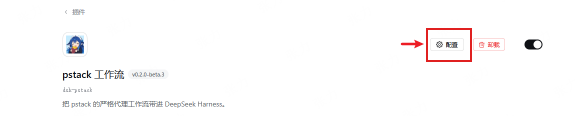
Open Plugins → Installed plugins → dsh-pstack and click Configure in the bundle page header to open the configuration dialog.
Skills directory
skills/ is not an upstream pstack directory. It contains skills that pstack does not provide but real projects need. The source directories are skills/authored/ and skills/.agents/skills/. The build publishes them to dist/skills/authored/ and dist/skills/vendored/. vendored preserves open-source upstreams verbatim, while this repository maintains authored. References from pstack skills do not change these inclusion criteria.
| Source | Skill | Purpose | Engineering capability added |
|---|---|---|---|
vendored | writing-for-agents | Writes skills, AGENTS.md, CLAUDE.md, and documents referenced by pointers, covering context pointers, information hierarchy, and progressive disclosure. | Makes an agent document's trigger words, load order, and context cost predictable, and adds the writing path that Cursor's create-skill provides. |
vendored | retro | Reviews a coding session's environment, checking navigation, automation, coding conventions, tool economy, and information access. | Adds the environment check that pstack /reflect and /correct do not cover; it only reports and does not modify the repository. |
authored | decision-write | Writes, lands, and supersedes decision records in Draft and Land modes, requiring Status and Implemented-by to appear together. | Adds the decision lifecycle that real projects often lack. |
authored | decision-audit | Read-only audit of decision-record routing, status, scope, anchors, and supersession relationships. | Keeps decision records searchable and reviewable over time. |
authored | setup-project-docs | Sets up architecture, glossary, decisions, and the root AGENTS.md pointers, and can be run repeatedly to fill gaps. | Gives a new project a sustainable documentation entry point. |
authored | docs-drift | Discovers maintained documents through project pointers, checks implementation drift, contradictions, terminology, links, redundancy, and unsupported elaboration, and repairs approved findings. | Adds periodic documentation inspection and controlled cleanup without assuming a fixed document layout. |
vendored skills come from mattpocock/skills@59db609eb1e18aaf59b63284d0e52255aff0c63c. skills/skills-lock.json records their sources, paths, and hashes. Both skill trees ship with the package, but they do not correspond to upstream pstack versions.
Optional DSH plugins
DSH ships with the following plugins, which are disabled by default. dsh-pstack does not require them during installation. Some pstack flows need these plugins to run end to end. To enable a plugin, enter its package name in Add plugin on the Plugins page. Alternatively, run dsh plugin --profile <profile> add <package>, then restart the profile. Except for @deepseek-ai/dsh-mcp-client, the bundles and providers here are experimental.
[!NOTE] Without an optional plugin, the pstack skills still load. Steps that need the plugin print
Skipped in DeepSeek Harness: <step>. <reason>.and continue. Missinggh, Java/TLC, or video tools also cause the corresponding steps to report blocked or degrade to screenshots. dsh-pstack never marks an unrun step as passed.
Sessions and isolation
| Plugin | Capability when enabled | Boundaries and conflicts |
|---|---|---|
@deepseek-ai/dsh-experimental-session-search | Five read-only tools search and trace historical Sessions for /recall, /reflect, and /show-me-your-work: session_search, session_event_search, session_trace, session_event_trace, and session_event_read. | Matches only Sessions with the same cwd; use session_event_search for the current Session; there is no Cursor .jsonl transcript path. |
@deepseek-ai/dsh-experimental-worktree@deepseek-ai/dsh-experimental-tool-worktree | create_worktree creates a local branch and worktree and switches the current Session directory, isolating parallel candidates for /arena, /swarm, and /architect. | from reads only local refs and does not fetch; there is no cloud VM; creating worktrees repeatedly changes cwd; it does not automatically give each subagent its own tree. |
@deepseek-ai/dsh-experimental-forge-bundle | PR panel, checks, review, mark ready, merge, and Session binding, plus starting a Session from the composer with a new worktree, serving /babysit, /shipping, and /autopilot-*. | GitHub only, requires gh login; there is no take tool on the model side; there is no stack verdict or origin CLI; it can coexist with the worktree bundle. |
Verification and evidence
Choose one of three browser providers: @deepseek-ai/dsh-experimental-browser-use-stagehand-native, @deepseek-ai/dsh-experimental-browser-use-playwright-mcp, or @deepseek-ai/dsh-experimental-browser-use-chrome-devtools-mcp.
| Plugin | Capability when enabled | Boundaries and conflicts |
|---|---|---|
@deepseek-ai/dsh-browser-use + one provider | Navigation, clicking, typing, screenshots, and ARIA snapshots; Stagehand also provides act, find, and extract, for verification skills and UI reproduction. | The base package does nothing without a provider; one provider per Session; screenshots need an image model; no video; Stagehand needs Chromium and a non-DeepSeek model. |
@deepseek-ai/dsh-cua-bundle | macOS app clicking, typing, screenshots, and permission pages, for desktop app verification. | macOS PTC only; Windows is incomplete; no video. |
@deepseek-ai/dsh-experimental-terminal-bundle | Six global terminal tools that keep a shell or REPL alive across calls and support background send, for CLI and TUI verification. | Terminal only; added to every Agent; persistent state must be cleaned up; switching invalidates the KV cache. |
@deepseek-ai/dsh-mcp-client | Mounts MCP servers; tools appear as mcp__<server>__<tool>, and mcp-resources lists servers with resources, serving evidence investigation for /why and /teach. | No default server; configuration is per server; no automatic category discovery. |
Multi-agent
| Plugin | Capability when enabled | Boundaries and conflicts |
|---|---|---|
@deepseek-ai/dsh-experimental-agent-team-profile | Lead and teammate roles, a shared task board, nine team tools, and a Web roster, serving /orchestrate and /autopilot-*. | Disables subagent and subagent_fork. Conflicts with pstack_subagent. See the warning below. |
@deepseek-ai/dsh-experimental-ralph-bundle | Global ralph, a foreground loop with a fresh child each round, serving /autonomous-run. | Not a persistent loop in the same Session; no event watcher; does not replace goals, heartbeats, or the decision log. |
[!WARNING] Do not enable
@deepseek-ai/dsh-experimental-agent-team-profileandpstack_subagentin the same profile. The agent team plugin disablessubagentandsubagent_fork, and provides a second delegation entry point. Use only one subagent system per profile.
Compatibility
| Item | Version | Notes |
|---|---|---|
| DSH | >=0.2.1-rc.5 | Minimum supported version; verified through the 0.2.2-alpha.2 baseline |
| pstack | 0.15.36 | Upstream baseline commit 4dd1d05 |
| Node.js | >=24.21.1 | Runtime requirement |
| Cordis | ~4.0.6-alpha.1 | Peer dependency |
[!NOTE] DSH version support:
engines.dshaccepts every version>=0.2.1-rc.5, including newer prereleases. Routine DSH upgrades require no changes here. Add an entry only when a specific version is confirmed unsupported; raise the minimum only when a port fix requires it.Known incompatible DSH versions: None.
Before upgrading DSH, verify experimental plugin package names, tool names, and configuration in a test profile. Upgrading upstream pstack requires regenerating the tree and rechecking the adaptation table.
[!CAUTION]
pstack_scriptruns on the Host's Node and bypasses bash approval and the filesystem sandbox. Treat it as a trusted entry point.
A worktree Session has a different cwd from the original Session. The session-search plugin only matches the exact cwd, so search for old Sessions from their original directory.
How it works
Upstream pstack adapts Claude Code with docs/harness/claude-code.md. It preserves the skill bodies. A separate host adaptation table maps Task, AskQuestion, todo, model slugs, and paths to the target host. The generator adds a one-line Claude Code adaptation note to skills that use Cursor names. Unsupported capabilities report Skipped in Claude Code: <step>. <reason>.
dsh-pstack follows the same approach. The main adaptation document is pstack/harness/docs/harness/dsh.md. It covers Tools, Subagent fields, Models, setup-pstack, Paths, and Cursor-only features. The pstack_* tools, agent presets, and Node scripts replace fields that DSH lacks. At build time, upstream pstack and the local adaptation tree are rendered into pstack/pstack/, then packaged with src/*.ts and skills/ into dist/.
Credits
- pstack was designed and open-sourced by Lauren Tan and the Cursor team.
poteto-mode, the 23 playbooks, and the 24 principles all come from upstream. - DeepSeek Harness is provided by the DeepSeek team. DSH's plugin, bundle, agent preset, subagent, and tool host interfaces let this port land as native tools.
- mattpocock/skills provides the vendored
writing-for-agentsandretroskills.
This project is a community port, not an official Cursor or DeepSeek release. Upstream pstack and DSH are both MIT licensed.