dsh-vscode-shell
lonebone/dsh-vscode-shell
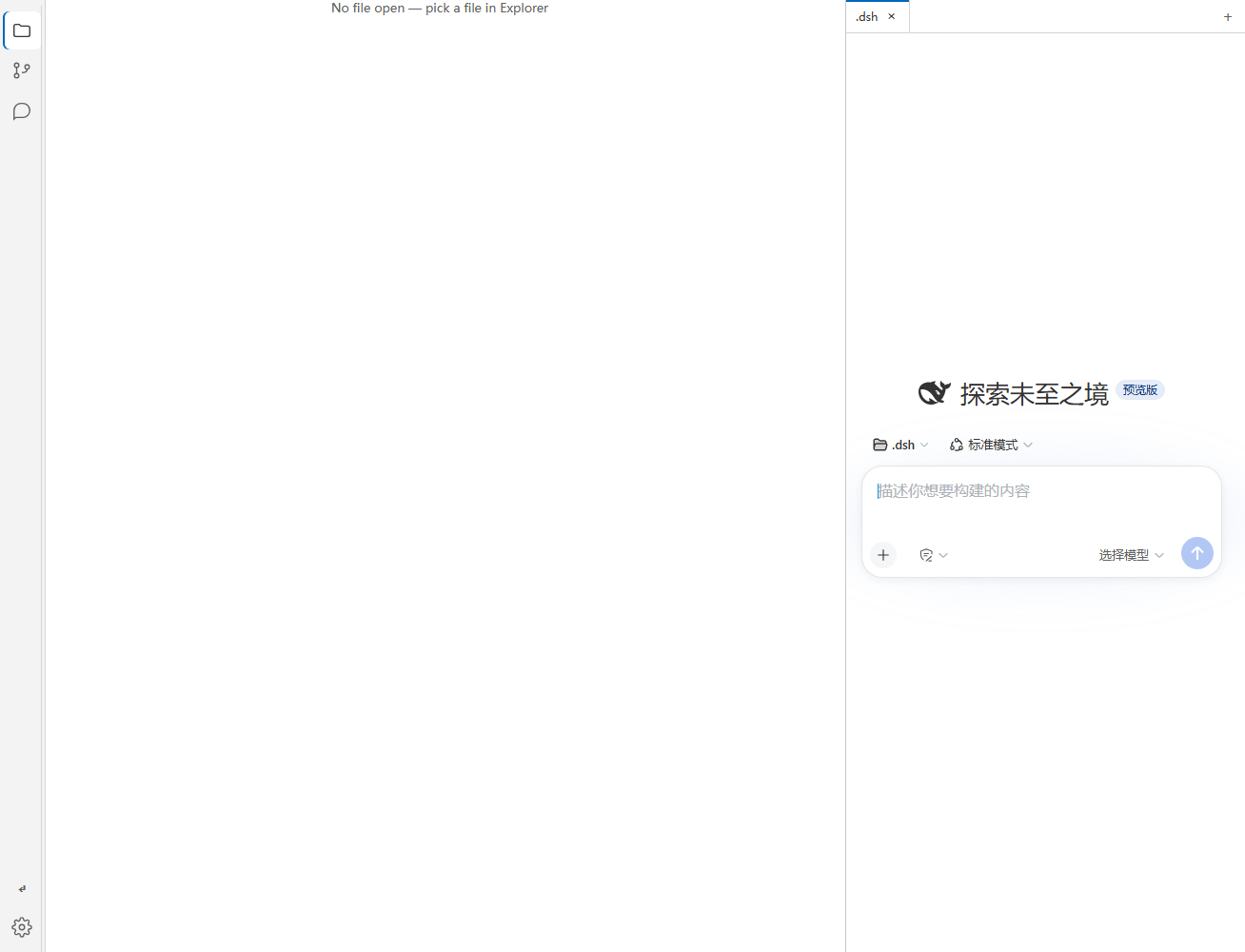
VS Code-style workbench inside DeepSeek Harness Web: activity bar, explorer file tree, source-control (Git) panel and editor tabs — backed by real filesystem & Git routes.
설치
dsh plugin --profile web add github:lonebone/dsh-vscode-shellREADME
dsh-vscode-shell
把 DeepSeek Harness Web 界面改造成 VS Code 风格的工作台:活动栏 + 文件浏览器 + 源代码管理(Git)面板 + 编辑器标签页,由真实的文件系统与 Git 接口驱动。
A VS Code-style workbench for DeepSeek Harness Web — activity bar, explorer file tree, source-control (Git) panel and editor tabs, backed by real filesystem & Git routes.
中文
这是什么
一个 DSH(DeepSeek Harness)插件,把默认的 Web 界面替换成 VS Code 风格的工作台布局:
- 活动栏(Activity Bar):Explorer / Source Control / Sessions 三个视图切换,可折叠侧边栏
- 文件浏览器(Explorer):浏览工作区目录树;选中文件可 复制相对路径(F5)、复制绝对路径(F6)、在系统资源管理器中定位
- 源代码管理(Source Control):完整 Git 面板——查看分支、文件变更分组、逐文件/全部 暂存 / 取消暂存 / 放弃更改 / 添加到 .gitignore、提交消息框(Ctrl+Enter 提交)、最近提交历史与单文件 diff
- 编辑器标签页(Tabs):多会话以 VS Code 风格标签页展示,可切换/关闭/新建
- VS Code 观感:深色工作台配色、可拖拽调整的侧边栏/面板宽度,跟随 DSH 亮/暗色 token
- 多语言:界面提示与文案跟随 DSH 的语言设置(中文 / English)
安装
# 方式一:从 npm 安装(发布后)
dsh plugin --profile web add dsh-vscode-shell

# 方式二:从 GitHub 安装
dsh plugin --profile web add github:lonebone/dsh-vscode-shell

# 方式三:本地开发(file: 直链)
dsh plugin --profile web add file:/绝对/路径/dsh-vscode-shell
安装完成后重启 dsh web 并刷新页面。插件注册为 dsh.profile.bundles 层,重启后自动生效。
使用
- 左侧活动栏点击 Explorer 浏览文件;Source Control 查看 Git 状态并操作;Sessions 切换会话
- 文件树行内按钮:复制相对路径(F5)/ 绝对路径(F6)/ 在资源管理器中定位
- Git 面板:提交消息输入框按 Ctrl+Enter 提交;行内
+暂存、−取消暂存、↶放弃、#加入 .gitignore - 无会话时 Source Control 面板提供 初始化仓库 按钮
要求
- DSH
0.1.0-rc.6或更新版本 - 使用 Git 面板需要系统 PATH 中有
git命令行 - 文件浏览面板只能访问 dsh web 进程所在机器上的本地路径
安全边界
插件不注册任何模型工具、不读写用户文件;它只挂载两个 HTTP 接口供前端面板使用:
/vscode-fs— 列目录 / 读文件 / 资源管理器定位/vscode-git— git status / diff / commit / 暂存等操作(会真实执行 git 命令)
接口参数为绝对路径。默认仅本机部署时使用;若把 DSH Web 暴露到公网,请自行加鉴权。
与其他 VS Code 主题插件的区别
GitHub 上另有 Sim-xia/dsh-vscode-theme:它导入 VS Code 的 .vsix 配色文件并映射成 DSH 的 UI token(只换颜色)。本插件则把整个界面外壳改造成 VS Code 布局并内置文件/Git 面板(换布局 + 功能),两者互补不冲突。
开发
git clone https://github.com/lonebone/dsh-vscode-shell.git
dsh plugin --profile web add file:./dsh-vscode-shell   # 本地链接安装
# 修改 lib/*.js 后重启 dsh web 生效
许可
MIT © lonebone
English
What it is
A DSH (DeepSeek Harness) plugin that replaces the default web UI with a VS Code-style workbench:
- Activity Bar — Explorer / Source Control / Sessions views with collapsible sidebar
- Explorer — browse the workspace directory tree; copy relative path (F5) / absolute path (F6) / reveal in OS file manager
- Source Control — a full Git panel: branch, grouped file changes, per-file or bulk stage / unstage / discard / add to .gitignore, commit message box (Ctrl+Enter to commit), recent commit history and per-file diffs
- Tabs — multiple sessions as VS Code-style editor tabs (switch / close / new)
- VS Code look — dark workbench chrome, draggable sidebar/panel widths, follows DSH light/dark tokens
- i18n — UI labels and hints follow DSH's language setting (中文 / English)
Install
# from npm (after publish)
dsh plugin --profile web add dsh-vscode-shell

# from GitHub
dsh plugin --profile web add github:lonebone/dsh-vscode-shell

# local development (file: link)
dsh plugin --profile web add file:/absolute/path/dsh-vscode-shell
Then restart dsh web and refresh the page. The plugin registers itself as a dsh.profile.bundles layer and activates on boot.
Usage
- Use the activity bar: Explorer to browse files, Source Control for Git, Sessions to switch sessions
- File-tree row actions: copy relative path (F5) / absolute path (F6) / reveal in Explorer
- Git panel: type a commit message and press Ctrl+Enter; row actions
+stage,−unstage,↶discard,#add to .gitignore - With no repository, the Source Control panel offers an Initialize Repository button
Requirements
- DSH
0.1.0-rc.6or newer gitCLI on PATH for the Source Control panel- File browsing works on local paths of the machine running the dsh web process
Security boundary
The plugin registers no model tools and never reads/writes user files on its own; it only mounts two HTTP routes for the frontend panels:
/vscode-fs— list directory / read file / reveal in file manager/vscode-git— git status / diff / commit / staging ops (executes real git commands)
Route parameters are absolute paths. It is designed for local deployments; add your own auth if you expose DSH Web publicly.
Difference from other VS Code theme plugins
There is another Sim-xia/dsh-vscode-theme: it imports VS Code .vsix color themes and maps them onto DSH's UI tokens (colors only). This plugin restyles the whole shell into a VS Code layout and adds real file/Git panels (layout + functionality). They complement each other.
Development
git clone https://github.com/lonebone/dsh-vscode-shell.git
dsh plugin --profile web add file:./dsh-vscode-shell   # local link install
# edit lib/*.js, then restart dsh web
License
MIT © lonebone