dsh-rust-anything
lonyness/dsh-rust-anything
Records a program's behavior and replays it against an incremental Rust port, as 22 MCP tools backed by the bundled Windows x64 rust-anything engine.
설치
dsh plugin --profile web add github:lonyness/dsh-rust-anythingREADME
rust-anything for DeepSeek Harness
Download plugin 3.3.5 · Changelog · Upstream project
English · 简体中文
Migrate one function to Rust, then replay the original program’s inputs against it. The agent writes the Rust code; the native engine records behavior and reports differences. A passing replay covers the recorded cases, not every possible input.
What you get: the engine, not the agent, decides whether the port matches — it records the original once, replays the same cases against the Rust build, and names each difference per case. Until a unit passes, the original keeps serving it and the front door counts every fallback, so a half-finished migration is still a working program. Measured on this repository's CI fixture: a JavaScript CLI that counts Unicode scalar values matches 2/2 recorded cases as Rust, while a byte-counting variant matches 1/2 (the original prints 2, the variant 6) and the replay names that case.
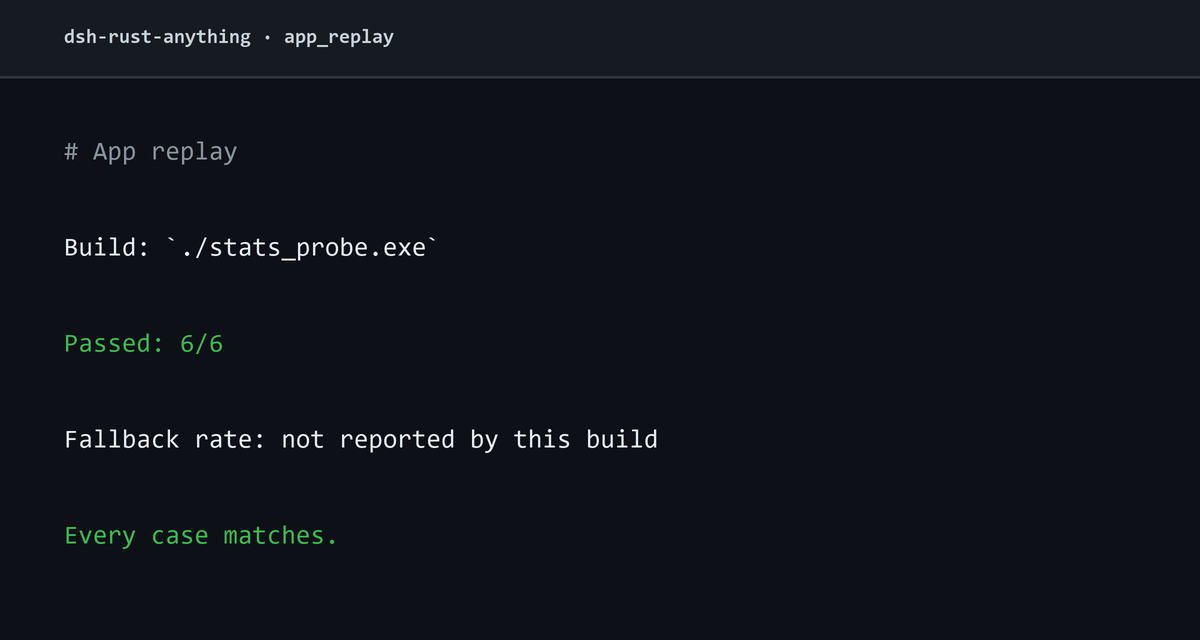
The engine's own report from a real DSH session against a Rust build, rendered from the saved file (source and hash). That build reported no fallback rate, so none is shown.
This is an unofficial DSH integration based on erkamyaman/rust-anything v3.3.0. The native engine and migration guides are the work of Erkam Yaman and the upstream contributors. This repository packages them for DeepSeek Harness; it does not reimplement the migration engine.
Install the bundle
Stable plugin: 3.3.5 · native engine: 3.3.0. The declared DSH range is >=0.2.2-rc.5 <0.3.0-0, not a claim that every build has been tested. Install the .tgz from the release above. To verify a local build or an existing archive, use the release checker.
-
Plugins page: Extract the archive. Install a local bundle using the absolute path of the directory containing
package.json. -
DSH CLI: Install the downloaded archive directly. Replace the profile and absolute path in this Windows example:
dsh plugin --profile "my-profile" add "file:C:/Downloads/dsh-rust-anything-3.3.5.tgz"
Select and enable the bundle in Plugins. If the profile does not reload it, restart DSH and open a new session in the target project. There is no need to run rust-anything setup or replace a CLI on your PATH.
| Platform | Native engine |
|---|---|
| Windows x64 | Included at runtime/win32-x64/rust-anything.exe. The bundle ignores DSH_RUST_ANYTHING_BIN here. |
| macOS or GNU/Linux (x64 / arm64) | Not included. Download the matching archive from upstream v3.3.0, verify it against SHA256SUMS, then set DSH_RUST_ANYTHING_BIN to the absolute path of the trusted executable in the environment that launches DSH. Do not point it at a project-supplied script. |
On macOS/Linux, hash the extracted executable once, before use, and compare it with executableSha256 for your platform in the source manifest (shasum -a 256 on macOS, sha256sum on Linux). The host checks the reported version and MCP identity/protocol for compatibility; a matching version string does not verify official bytes. The plugin neither downloads an engine nor rehashes it per call. To check the Windows CLI separately, use its absolute path; --version should print rust-anything 3.3.0. Builds, recordings, and benchmarks still require the target project’s own toolchain and dependencies.
Do not also add an official MCP server named rust-anything: it would publish the same mcp__rust-anything__* tool names and the mcp:rust-anything prompt section, and the duplicate registration fails.
Try a read-only analysis
Use rust-anything to analyze this project and suggest one function to migrate first. Do not change any files.
Once you agree on the scope, record the original behavior, implement that unit in Rust, and replay the same cases. If the outputs differ, keep the original implementation active. See the function and hotspot guide or the whole-app guide for CLIs, HTTP services, and libraries, and the migration playbook for compile errors after a port, FFI and unsafe review, and crate/feature fit.
Languages. The pinned engine detects nine: TypeScript/JavaScript, Python, C, Go, Ruby, Java, Kotlin, PHP and C#. Analyze and bridge are verified here for all nine; PHP takes top-level functions only, and --batch is unavailable for PHP and C#. Replaying PHP, C# or Kotlin needs that language's own toolchain, so a green bridge is not a replayed port.
Approvals. DSH exposes native tools as mcp__rust-anything__<upstream_name>. Only the engine tools analyze and map can skip approval, and only with all three annotations: readOnlyHint=true, destructiveHint=false, openWorldHint=false. Other names (including unknown tools), missing hints and conflicting hints require a fresh grant; this includes the other 20 native tools today. Fetching the two prompt templates via rust_anything_prompt is read-only, not an engine tool execution. Under never, calls requiring approval are denied, not auto-approved. Do not retry them through the CLI. Recording and replay execute application code: only run them on projects you trust. SDK clients should use a normal session/prompt turn with host approval/request handling, not call mutating tool definitions directly outside a turn. Use upstream go for one hot-path migration pass or gate for a combined readiness check. A grant never carries over to another call.
Replaying the intended build
app_record.run is an argv array (["python", "cli.py"]); app_replay.build is a command-line string ("./correct.exe"). Omit both to reuse the last recording: run is taken from the saved command, and app_replay without build runs the recorded original command — if nothing was recorded it fails instead of guessing. A library is the one case where build must be omitted: the cases replay through each unit's bindings and a build string is rejected.
Read the result, not the transport. The engine returns build, passed, total, skipped, failures and fallback, plus a report path; a completed tool request alone is not evidence of a Rust port. fallback (cases, total, rate, names) lists the cases the build handed back to the original, so 2/2 passed at 100% fallback means both cases were answered by the original program, not by Rust. fallback: null means the build reported no rate at all — say that, do not report it as zero.
Malformed values now fail before approval: a misspelled or mistyped argument, an empty run, a port outside 1–65535, a negative timeout or pace. The engine reads those through u64/u16 and silently drops what does not fit, which turned HTTP recording into CLI recording and a negative timeout into the 30 s default.
On Windows use Workspace Write (/permission workspace-write) to get approval prompts; the default Full access preset disables them. Unit operations that build in Workspace Write use a per-crate Cargo target at <crate>/.rust-anything/target (composite operations use <project>/rust/.rust-anything/target). This does not install a compiler or populate the Cargo registry. If crates.io fails with SEC_E_NO_CREDENTIALS, use dependencies already available offline or restore trusted registry/TLS access; do not disable TLS verification.
For Python unit operations, the pinned engine tries python3 then python. If the launcher exposes only Windows Store aliases (9009), start DSH from an environment with a working Python, e.g. an activated project virtual environment. app_record.run[0] and the Python profiler workload can instead name an absolute interpreter. This is not an interpreter override for unit record, go or fuzz; the adapter does not change the global PATH.
Limits for large projects
Set these in the DSH host environment and reload the plugin. Values must be positive decimal integers without leading zeroes. Byte limits apply to process output, not recordings on disk.
| Setting | Default | Accepted range |
|---|---|---|
DSH_RUST_ANYTHING_STARTUP_TIMEOUT_MS | 15000 | 1–120000 |
DSH_RUST_ANYTHING_REQUEST_TIMEOUT_MS | 600000 | 1–3600000 |
DSH_RUST_ANYTHING_STDOUT_MAX_BYTES | 16777216 | 1–67108864 |
DSH_RUST_ANYTHING_STDERR_MAX_BYTES | 8192 | 1–65536 |
A timeout, cancellation or truncated response does not roll back project files. Inspect the recording, build or report before increasing a limit or retrying.
Upgrading from an earlier 3.3.x? Use the same install command above with the new archive and the same profile name, then reload the plugin. Upgrading replaces the bundle without duplicating it and does not change any system CLI.
Verify
Run the following in a writable checkout or extracted bundle. Tests need Node.js 22.14+, a Rust toolchain (cargo, rustc and a linker), and on macOS/Linux the original binary selected by DSH_RUST_ANYTHING_BIN as above.
npm test
The suite checks the names and parameters of all 22 upstream tools, three calls to the two native prompts, and success and error handling. It also records a JavaScript CLI and replays its inputs against two Rust builds. Counting Unicode scalar values matches 2/2 cases; counting UTF-8 bytes matches only 1/2 (for é🦀, the original prints 2 and the byte counter prints 6).
The adapter tests exercise DSH registration, prompts and approval outcomes; the runtime tests cover deadlines, cancellation, truncation and concurrent workspaces. The record/replay test also compiles the generated front-door fallback and replays both recorded cases. The skill itself is checked by five Chinese acceptance scenarios: what DSH must recognize and conclude for a PHP unit, an ownership error, an FFI buffer review, and a replay that passes at 100% fallback. See CI runs for each platform; a green job is not a full desktop-host test.
Provenance lists the upstream commit, original files, and SHA-256 checksums. The upstream code and guides are distributed under the MIT license.
To remove the integration, disable or remove the bundle in Plugins. This does not uninstall a system CLI or delete migrated projects or recordings.