dsh-cabinet-mode
luodaoyi/dsh-cabinet-mode
DeepSeek Harness용 Cabinet Mode(内阁模式)입니다. 선언형 DSH 번들로 대명 연구국 내각 팀에 이중 정체성의 Lead/teammate 에이전트 preset을 추가합니다.
설치
dsh plugin --profile web add github:luodaoyi/dsh-cabinet-modeREADME
Cabinet Mode (内阁模式) for DeepSeek Harness
Version compatibility (0.5.4): Targets DSH 0.2.2-rc.1. This patch corrects dependency flow and opens teammate sessions from task titles and member cards; it retains the per-office model selection fix before the host freezes each step; 0.5.1/0.5.2 only repaired preset loading and display metadata. Verified with official host components and isolated profiles, without real model calls; see the model regression scope below. Earlier rc.3/rc.5 UI and installation results are historical evidence for earlier packages. On DSH 0.2.1-rc.3/rc.5 retain the previously verified package, including 0.5.0: the current preset omits the separate list_agents entry required on rc.5. Select the compatible version in the market.
中文 | English
Install: Use the plugin market (recommended).
Website: luodaoyi.github.io/dsh-cabinet-mode (bilingual intro page, served from site/ in this repository).
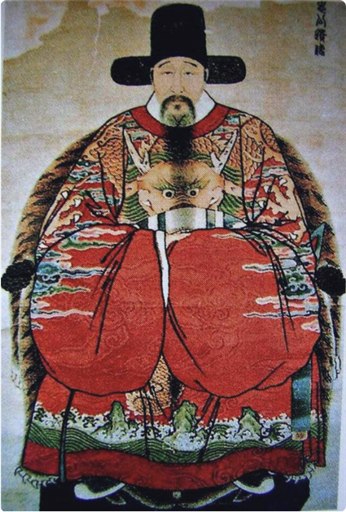
Icon: Ming-dynasty grand-secretary portrait provided by the project owner (shipped as icon.svg).
A small DSH bundle that adds Cabinet Mode (内阁模式) to
DeepSeek Harness. Install the
bundle, restart DSH, and pick 内阁模式 when starting a new session. The mode is
a research-team preset modeled on the Great Ming Research Bureau cabinet
(大明科研司·内阁): a Lead (内阁首辅) directs members (阁臣) of four bureaus, defaults
to research before touching code, and must never fabricate sources.
The package ships a host half (index.js, the member schema and Cabinet-only prompt provider) and a browser half
(client.js, the right-Sidebar Cabinet panel) with five role portraits and an unranked fallback portrait
embedded as 128px data URLs (square sources in docs/images/avatars/,
downscaled by src/build_avatars.py); it also keeps the optional Node.js
fallback scripts (scripts/*.mjs). It uses @deepseek-ai/schemastery for the host settings schema. React and friends come from the DSH client module table, with no
bundled duplicate and no CDN.
It declares two rows — preset-cabinet (one @deepseek-ai/dsh-agent-preset
declaration) and cabinet-ui (the Loader row that loads this package's
JavaScript) — and reuses the plugin list shipped with DSH Standard Mode, so
the mode has the same tools as Standard Mode; what differs is the persona, plus
the right-Sidebar Cabinet panel. Team tools (spawn_teammate, team_task_*,
and the rest) come from the profile-level
@deepseek-ai/dsh-experimental-agent-team-profile bundle; this preset does not
ship them.
This bundle declares no hard DSH version gate: no engines.dsh, no DSH
peerDependencies, no install-time version check. Earlier package releases were tested on DSH 0.2.1-rc.3; use the compatibility guidance above for 0.5.4 (see DSH-side constraints).
Cabinet member settings
After a bundle install, open Settings → Cabinet members (内阁成员). The five office groups have a display name (40 characters), portrait and prompt (4000 characters). Names remain accompanied by the original member ID in Cabinet cards and Owner labels. Task ownership and native roster names never change.
Edit, then click Save. Cancel and reload discards edits and reads the latest saved values; leaving the page discards unsaved edits. Save writes all five members atomically using the revision that was loaded. If another page changes settings, cancel/reload before editing again; a stale draft cannot overwrite it. Editing is disabled until settings have loaded. Changes apply to the next prompt assembly.
Each office has a Model picker populated by the official runtime
session.modelCatalog. Use Refresh model catalog after changing providers.
Saved choices absent from the current catalog remain visible; partial provider
failures do not erase them. If the catalog is unavailable, a manual
provider/id field is offered. IDs may contain +, @, spaces and further slashes;
only the first slash separates the provider. Invalid input blocks Save.
In Cabinet mode, an explicit member model takes precedence; an empty teammate selection follows the configured Lead model. On rc.1, a session with no configured Cabinet override keeps its native selection. Clearing a previously owned override restores the current DSH deployment default (not another session's last model). A newer native manual selection is preserved when clearing or unloading the policy.
On rc.1, the plugin calls the public AgentModel.select() before step preparation; the host's frozen selection supplies tools, prompt variables and the request together. Saving uses the owning entry's committed loader/volatile-update notification, so it applies to the next step even with an empty inbox and no remount; an already prepared step keeps its selection. Unsignaled in-memory config mutations are only sampled at attachment, a real status change or a claimed inbox message. Deployment defaults are sampled when clearing an owned override; later default edits do not silently rewrite a native selection. Actual team roles and the current preset gate the policy: a teammate named lead cannot gain Lead policy. Different routes use the new adapter's reasoning default; matching routes retain native effort. Exiting Cabinet restores the pre-policy native selection, including its effort. Unloading cancels the active managed turn and retains queued input, then restores a still-owned selection.
A host-only Session projection tracks minimal route ownership through public plugin records. An intent is recorded before selection; restoration happens before ownership is cleared. Interrupted writes can be recovered on reopening, without overwriting a later native choice. No credentials or complete configuration are recorded. Missing host record APIs reject configured overrides before a model request. Historical versions did not record ownership: if an old override is already persisted, select the desired native model once before enabling the new policy; its origin cannot be inferred safely from a request header.
Regression scope: 120 rc.1 cases use official Cordis, Session, AgentModel, projections, SystemPrompt and the unchanged preStep/prepareRequest implementations. The inbox and volatile Loader updates are real; team identity and model adapters are fixtures; there are no paid/real model calls and this is not a full team/browser end-to-end test. The 41 legacy rc.5 model cases remain covered, but do not certify the current rc.1 preset for older hosts.
Upload PNG/JPEG/WebP up to 2 MB; the browser crops it to a 96×96 PNG (at most 48 KB data URL). Saved portraits apply to Cabinet cards and native team avatars. Restore default resets that office's name, portrait and factory prompt; Reset all resets all five in the draft. Both require Save. Clearing a prompt disables that office's added block; an empty custom prompt also stays empty. Factory mode restores the Lead's 御下术 and the four office duty prompts. These extra sections apply only to agents actually composed with the cabinet preset; other modes are unchanged. Version 0.3.1 adds a dispatch-budget policy to the Cabinet static persona: one deliverable and one write scope per subtask; up to 30 tool calls for simple single-file tasks, up to 100 for multi-file merges/conflict resolution/integration, and up to two retries of the same failure. Task briefs must name the budget and stop conditions; at the limit report failed/unverified, never fabricate completion. This is prompt-level guidance, not a runtime counter or guaranteed enforcement. The static persona is shared with teammates; its Lead-only heading is a semantic instruction, not programmatic removal from teammate prompts. Customizing or turning off a member prompt does not remove this static policy. It is a new policy in 0.3.1; 0.3.0 deliberately kept the static persona unchanged.
Settings live in the DSH_HOME/profile configuration (the cabinet-ui namespace), not a browser account. Browsers connected to the same profile share settings and all Cabinet sessions in it use them; use separate profiles/DSH_HOME for isolation. Invalid fields fall back to defaults. The preset-only fallback installation does not install this settings UI or runtime prompt section; use the market bundle.
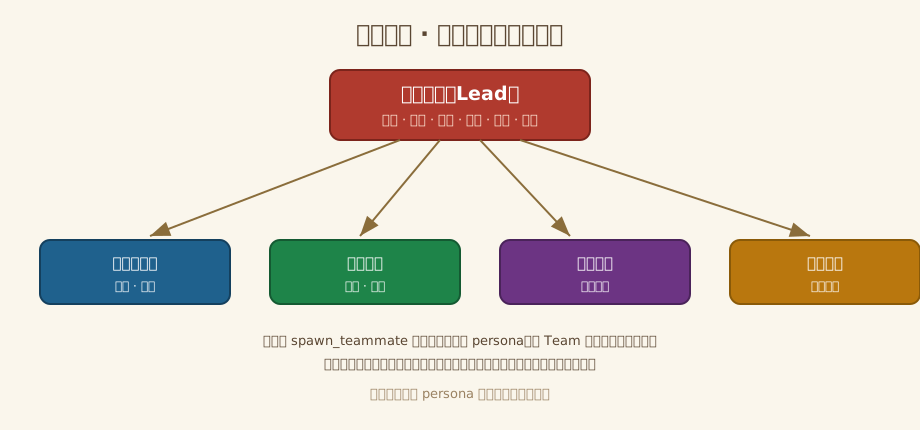
The cabinet at a glance
Screenshots
The following runtime screenshots were provided by the project owner. They show the Cabinet panel's Lead/member hierarchy, who is working, task ownership and progress, and dependency chips. The image above is a persona layout diagram; the images below are captures of actual sessions.
Light theme
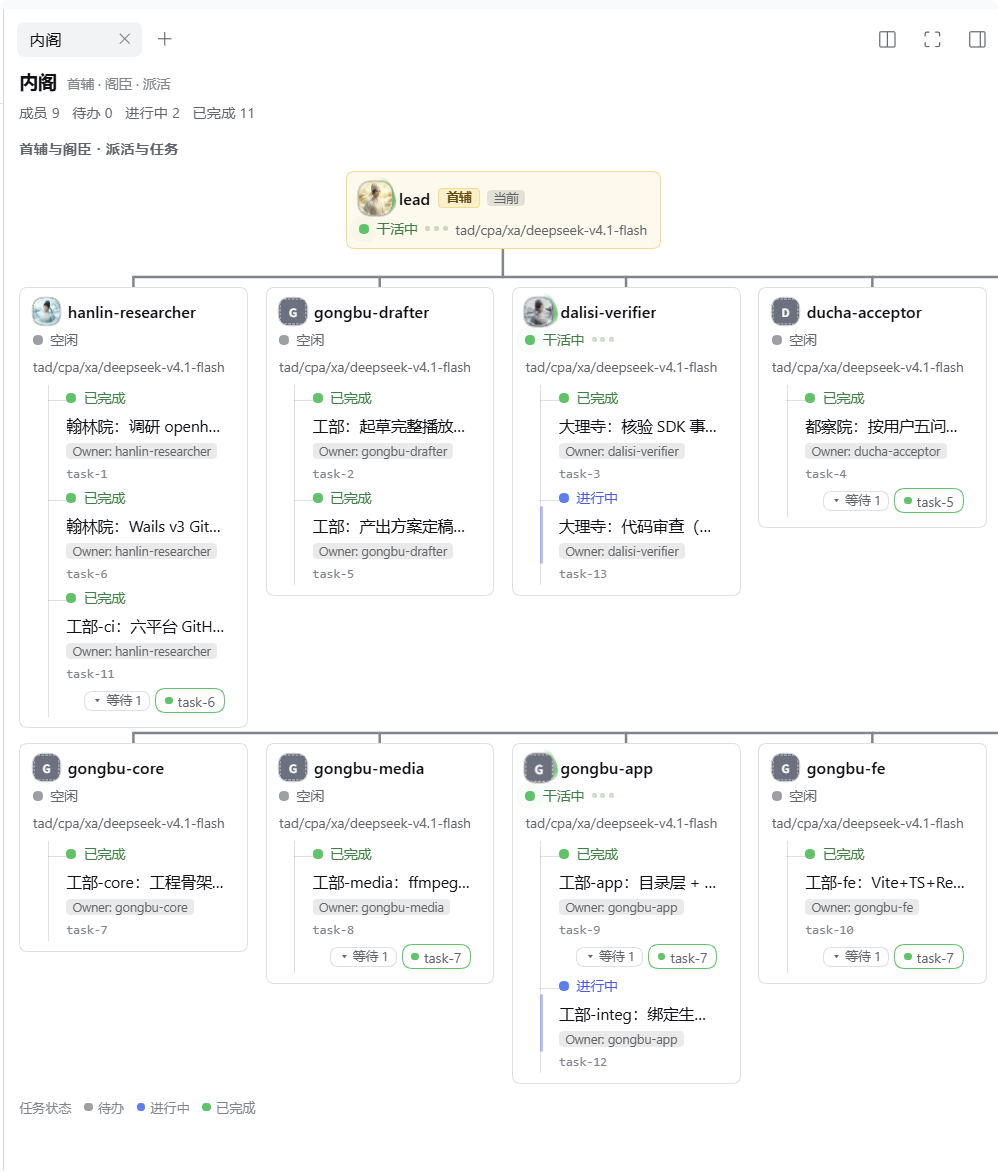
The light-theme session shows multiple members and their assigned tasks, with green running indicators and separate in-progress/completed task markers.
Dark theme
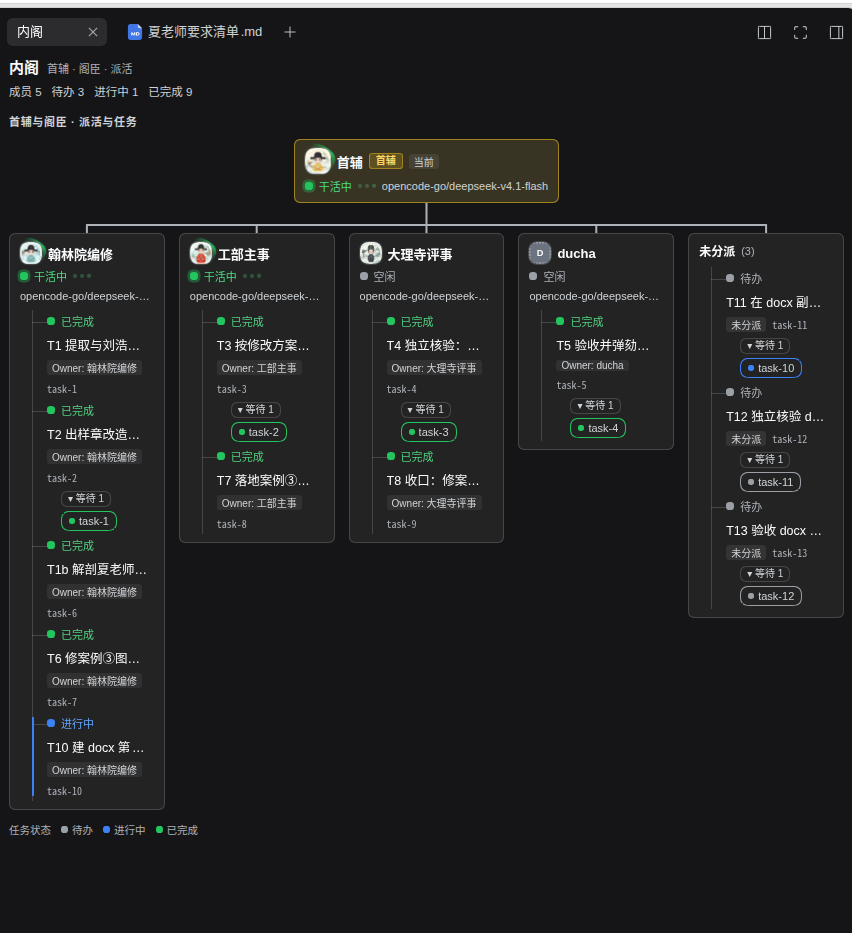
The dark-theme session shows the same task hierarchy with pending, in-progress and completed states, including an unassigned task group and task dependencies.
These captures document what was visible in those sessions. They do not verify compatibility across DSH versions, the mode picker/preset card, or teammate persona inheritance.
Cabinet panel and member avatars
A new right-Sidebar 「Cabinet」 tab, registered by this package's browser half
(client.js) through its second Loader row cabinet-ui, independent of the
preset declaration:
- Dispatch tree — the Lead sits on top; every task hangs under the member
named by its
ownerName, withblockedBydependencies shown as chips beneath the task: who was assigned what, and what blocks it, at a glance. - Who is working — a running member's row is tinted green and its status dot pulses; idle / starting / failed use gray / amber / red dots, and the Lead's row highlights the same way.
- Task colours — pending gray, in progress blue, completed green (legend at the bottom of the panel).
- Member look — each row carries a circular avatar (22px, 24px for the Lead), the Chinese role and original member name, a status label and the current model. Aliases share a bureau avatar, while original names keep members distinguishable in cards, Owner tags and off-roster groups. Truncated labels have full tooltips; unmatched names retain their original identity and use a light, unranked portrait. Supported names and naming convention cover composite pinyin names, Chinese titles, separators and numeric suffixes.
Task dependency edges
Cross-member dependencies (blockedBy) are wired up inside the cabinet panel:
a hand-written SVG overlay draws one cubic curve per dependency, from the
blocked task row to the blocker task row, ending in a small dot on the blocker
side — a workflow line linking, for example, the Hanlin research task to the
Works task it gates. Three states, mirrored from the blocker's status:
- completed — solid green: the dependency is cleared;
- in_progress — dashes flowing toward the blocker ("the dependency is progressing"), faster and brighter while the blocker's owner is actually running;
- pending — static grey dashes: still waiting.
A missing or deleted blocker draws no line. The edges are a panel-only
visualization of the existing team.tasks.blockedBy data — no new data channel
or protocol — and the flow animation stands still under prefers-reduced-motion
while the static line stays.
Curves are masked behind card content so they do not cross task text; endpoint dots remain visible. Same-column links use the right gutter. Colours adapt to light and dark themes. The existing dependency chips remain the textual reference when curves overlap or are partially hidden by another card.
The five original chibi portraits use Ming-style black winged hats, round-collar robes and square rank badges. The Lead wears burgundy with a crane badge (an artistic setting of a grand secretary with an additional first-rank title); Hanlin editor wears a seventh-rank duck badge, the Minister of Works a second-rank golden pheasant, the Chief Minister of the Court of Judicial Review a third-rank peacock, and the Left Censor-in-Chief a second-rank censor’s xiezhi badge. Robe colours distinguish roles and are not presented as mandatory rank colours.
See costume references, role settings and generation prompts. The 1254px square sources are downscaled by src/build_avatars.py to 128px PNGs embedded in client.js. At the panel's 22–24px display size, role labels remain the primary identification.
| 内阁首辅 | 翰林院编修 | 工部尚书 | 大理寺卿 | 左都御史 |
|---|---|---|---|---|
 |  |  |  |  |
The panel reads two existing data channels only — per-session running status
(api-session/status) and the agentTeam session projection (roster and task
board). It adds no service and no protocol.
How it takes effect
- Fully quit and restart DSH after installing or updating: the preset declaration and the client plugin are only assembled at startup, so nothing takes effect before the restart.
- After the restart, start a new session and pick 内阁模式 (
cabinet) in the mode picker. - Opening the right-Sidebar Cabinet tab: the + on the tab strip, then the Cabinet entry on the guide page.
- The panel renders in the browser (
client.js): exercise it in a real session after a restart. See the runtime screenshots for examples of the panel in light and dark themes.
Install from the plugin market (recommended)
For users and AI assistants, prefer the DSH plugin market. It installs the published npm bundle into the active profile; you do not need a checkout, a manually edited patch or a tarball URL.
Copy this raw JSON index URL:
https://raw.githubusercontent.com/luodaoyi/dsh-cabinet-mode/market-index/marketplace.json
- Open Plugins → Experimental plugins → More if needed, then enable Custom plugin market (自定义插件市场).
- Return to Plugins → Discover (发现), open Index sources (索引源), paste the raw URL above and click Add.
- Wait for Cabinet Mode / 内阁模式 to appear. Click Install, check the package
dsh-cabinet-mode@<version>and registryhttps://registry.npmjs.org/, then confirm installation. - Check that DSH reports Installed and displays the version. Click Enable now (立即启用), or turn on the plugin switch on Installed. Installation can leave a plugin disabled; restarting alone does not enable it. Then fully quit and restart DSH, create a new session, and select 内阁模式 (
cabinet). Open the Cabinet tab with + in the right sidebar if needed.
Do not paste a GitHub blob or tree webpage URL. DSH does not convert those pages into an index: $.format must be 1 was reproduced with a blob URL. Remove the invalid source and add the raw URL instead. This rule applies to Respire and other markets too.
Verification scope: the raw source loaded and installed version 0.2.0 through the real DSH 0.2.1-rc.5 web client on Windows in an isolated profile (2026-11-05). Uninstalling the old version, refreshing the source and installing 0.2.2 were also exercised, including the separate enable step. Other DSH versions and Linux/macOS market UI flows are unverified. The index format is also tested with the official rc.5 parser. Live agent-team behavior is a separate test.
Install with an AI agent (copy this prompt)
Install the Cabinet Mode (内阁模式) DSH bundle for me, preferably through its plugin market index:
https://raw.githubusercontent.com/luodaoyi/dsh-cabinet-mode/market-index/marketplace.json

1. Identify my DSH version and intended profile. Use the existing UI to enable Custom plugin market, then Plugins → Discover → Index sources.
2. Add the exact raw JSON URL above. Do not use GitHub blob/tree URLs, edit the index, or invent a command to add a market source.
3. Install Cabinet Mode from that source. Verify the confirmation shows dsh-cabinet-mode@<version> from https://registry.npmjs.org/, then verify the Installed result and version. Click Enable now or turn on the plugin switch on Installed, and verify it is enabled.
4. If browser/UI control is unavailable, give me those short UI steps. Use the release tarball or local-directory fallback only when the market is unavailable or I choose it; explain the specific reason first.
5. Do not also append cordis.patch.yml to my profile: installing both ways duplicates the preset. Preserve my existing profile and plugins.
6. Tell me to fully quit and restart DSH, create a new session and choose 内阁模式 (preset id cabinet). Do not claim success until the installed version is verified; do not claim untested team behavior works.

On failure, show the exact error. For $.format must be 1, replace the webpage source with the raw JSON URL. Do not repeatedly reinstall or silently switch methods.
Fallback: release tarball or local checkout
Use this only when the market is unavailable or for local development. Fully quit desktop DSH first to release the profile lock, then install the release bundle:
dsh plugin --profile desktop add https://github.com/luodaoyi/dsh-cabinet-mode/releases/download/v0.5.4/dsh-cabinet-mode-0.5.4.tgz
dsh plugin --profile desktop list
Check the installed version, restart DSH and select Cabinet Mode in a new session. For a local checkout, replace the URL with its absolute path. If the CLI is unavailable, use Plugins → Add plugin and select the tarball URL or local directory. Use the intended profile; desktop is the desktop app profile. Neither method should be combined with the manual preset patch. The optional installer scripts provide only the preset fallback, not the Cabinet UI.
Upgrade
Installed through the plugin market? Refresh the market, uninstall the old version
on the Installed page, install the newer version from Plugin market, and
restart — there is no tarball URL to change and no one-click update. Otherwise run
the same install command with the new version URL (or pick the new .tgz in the
plugin page), then fully quit and restart DeepSeek Harness:
dsh plugin --profile desktop add https://github.com/luodaoyi/dsh-cabinet-mode/releases/download/v0.5.4/dsh-cabinet-mode-0.5.4.tgz
dsh plugin --profile desktop list should report the new version. Upgrades were
performed and verified on Windows: v0.1.0 → v0.1.1 via the plugin CLI on DSH
0.2.1-rc.3, then v0.1.1 → v0.1.2 and v0.1.2 → v0.1.3 via the embedded-pnpm route
on DSH 0.2.1-rc.5.
What you get
| Mode name | 内阁模式 (Cabinet Mode), preset id cabinet, order 5 |
| Identity | One persona shared by the Lead and every teammate. The Lead (内阁首辅) reads the request, splits it, assigns work, adjudicates, summarizes and closes the loop; members (翰林院编修 / 工部尚书 / 大理寺卿 / 左都御史) execute bureau-scoped work and must never claim to be the Lead. |
| Default posture | Research first, change code only when explicitly authorized; every conclusion must cite a path, line, command output or source; unverified items must be marked as such. |
| Tools | Same 22 plugin rows as the tested DSH Standard Mode (shell, filesystem, jobs, schedule, skills, goals, plan mode, compaction, delegation/workflow, ask-user, todo, web, present). |
| Platform | Cross-platform: tool-bash is enabled on Linux/macOS, tool-pwsh on Windows, exactly like Standard Mode. No absolute paths, no shell-specific install step, no build step. |
| Team tools | The nine Agent Team tools come from the @deepseek-ai/dsh-experimental-agent-team-profile profile bundle, not from this preset. If that bundle is not enabled in your DSH profile, the cabinet runs without teammate tools. |
Requirements
- DeepSeek Harness with declarative agent presets. The preset declaration is a
0.2.1-rc.3 composition reference. Real installs and upgrades were tested on a
Windows desktop with DSH 0.2.1-rc.3 and 0.2.1-rc.5 (local directory, GitHub
Release asset URL, embedded-pnpm route; 2026-10-29 and 2026-10-31). The bundle
declares no DSH version dependency and no hard DSH version gate
(
engines.dsh/ DSHpeerDependenciesare absent), so other DSH versions that ship the declarative preset mechanism can try it — but they are not verified. Still untested: the post-restart UI (mode picker / preset card / icon display) and non-Windows hosts. - Other DSH versions may ship a different built-in Standard Mode plugin set. If a
declaration fails to load on your version, adapt the plugin rows to your version's
shipped
presets/standard.patch.yml(see DSH-side constraints); keep thepersonarow and its config intact. - Node.js >= 20 only for the optional fallback scripts (
scripts/*.mjs). The recommended plugin install path does not use Node directly. - Optional: enable Agent Teams for the full Lead/teammate workflow.
Installation matrix
| Method | Windows | Linux | macOS | Notes |
|---|---|---|---|---|
| Plugin market (index source): see Install from the plugin market | ✅ Windows rc.5 web client install verified (isolated profile, 2026-11-05) | ❌ not tested | ❌ not tested | Same npm bundle install through DSH's plugin market; the npm publish and the market-index branch now exist. |
A. DSH plugin manager (fallback): plugin page "Add plugin -> local directory/package", or dsh plugin --profile <profile> add <absolute path / .tgz / release URL> | ✅ tested locally on 2026-10-29: local-directory install and GitHub Release asset URL install; dsh plugin --profile desktop list = 3 packages; composition check passed | ⚙️ code-level inference, not tested on this machine | ⚙️ code-level inference, not tested on this machine | Declarative preset plus host/browser JavaScript: no build step. See docs/cross-platform.md. |
B. Fallback node scripts (no plugin manager): node scripts/install.mjs --profile <profile> then --apply; writes the profile cordis.patch.yml | ✅ scripts tested on Windows (dry-run + temp copies) | ⚙️ code-level inference, not tested | ⚙️ code-level inference, not tested | Same file layout on all platforms: <DSH_HOME>/profiles/<profile>/cordis.patch.yml. |
Method A and Method B are mutually exclusive. Both create the preset
declaration config.id: cabinet. Installing both makes the preset id appear
twice, and the preset declaration then fails to load. Uninstall one method before
switching to the other. The plugin-market route installs the same bundle as
Method A, so the same exclusivity applies to it.
A. Fallback: install a bundle directly
- Install the bundle into the profile you use:
- Plugin page: Settings → Plugins → Add plugin → local directory / package,
then select this repository (or its
.tgz). - CLI:
dsh plugin --profile desktop add <absolute path to this repo, .tgz, or release URL>
- Plugin page: Settings → Plugins → Add plugin → local directory / package,
then select this repository (or its
- Confirm:
dsh plugin --profile desktop listshowsdsh-cabinet-mode. - Fully quit and restart DeepSeek Harness.
- Create a new session and pick 内阁模式 in the mode picker.
Both a local-directory install and a GitHub Release asset URL install were tested
on Windows with DSH 0.2.1-rc.3 (2026-10-29); the URL install completed in about
2.4 s and dsh plugin --profile desktop list reported 3 packages.
B. Fallback: write the profile patch layer (no plugin manager)
This installs the persona preset only. The Cabinet panel and member avatars require Method A, which installs the runtime package into the profile.
Requires Node.js >= 20. The scripts are cross-platform and dry-run by default.
node scripts/install.mjs --profile desktop          # dry run: prints the plan only
node scripts/install.mjs --profile desktop --apply  # backs up, writes, self-checks
node scripts/verify.mjs                             # repository + dsh composition check
# fully quit and restart DeepSeek Harness
The script writes <DSH_HOME>/profiles/<profile>/cordis.patch.yml (default
%USERPROFILE%\.dsh on Windows, ~/.dsh on Linux/macOS). It refuses when the
bundle is already installed in the profile, refuses when preset-cabinet already
exists, keeps a unique timestamped backup (YYYYMMDD-HHMMSS + random suffix),
verifies the backup SHA-256, wraps the insert in BEGIN/END markers, replaces the
whole file when the target is empty/[]/comments-only (appending in that case
would produce invalid YAML), and restores the backup if the post-write check fails.
Enable and verify
- Restart is required. Preset declarations load eagerly; changes only affect sessions created afterwards.
- New session → mode picker → 内阁模式 (
cabinet). The mode is fixed for the session once it has produced any output. - Check the mode is present: Settings → Agent presets should show the 内阁模式 card; its configuration view is read-only.
- Repository check:
node scripts/verify.mjs— it asserts the package fields, absence of a DSH version gate, the preset declaration, the 22-row plugin list, the dual-identity persona, cross-platform guards, README/docs consistency, and (whendshis on PATH) runsdsh --profile web --patch ./cordis.patch.yml --dump-config, expecting exit 0 with exactly onepreset-cabinetand the four shipped presets intact. The DSH version is reported informationally only and never fails the run.
DSH-side constraints
The mode is a DSH preset; DSH itself still imposes its own limits. The facts below were verified on this machine's DSH 0.2.1-rc.3; they describe DSH behavior, not restrictions added by this bundle.
- No hard DSH version limit. This package declares no
engines.dshand no DSHpeerDependencies(a product decision recorded in CHANGELOG 0.1.1), and does no version check at install time. Tested on DSH 0.2.1-rc.3 (composition reference) and 0.2.1-rc.5 (real install + upgrade, Windows desktop, 2026-10-31); other versions remain unverified. The 22 plugin rows are copied from the 0.2.1-rc.3 shipped Standard Mode and matched the rc.5 shipped Standard Mode row-for-row. If your DSH version ships a different built-in plugin set (more or fewer rows) and the declaration fails to load, adaptcordis.patch.ymlto your version's shippedpresets/standard.patch.yml: keep thepersonarow (and its config) and add/remove tool rows so the list matches your DSH version. - Agent Team limits come from the
@deepseek-ai/dsh-experimental-agent-team-profilebundle enabled in the DSH profile (verified defaults in the desktop profile's configuration):maxMembers: 8,maxTasks: 256,maxMessageBytes: 65536,disposalTimeoutMs: 5000. The deployment default ismaxMembers: 16; this desktop profile sets 8.maxMembersincludes teammates that failed; a single Team message is at most 64 KiB. - Team tools require that profile bundle. The nine Agent Team tools
(
spawn_teammate,send_message,list_agents,interrupt_agent,wait_agent,team_task_*, …) exist only when the profile includes@deepseek-ai/dsh-experimental-agent-team-profile. Without it the cabinet mode has no team tools; the persona rules still apply, with no Lead/teammate split achievable. - Permissions and sandboxing belong to DSH. The sandbox and approval behavior
is decided by the DSH permission preset (on this machine the desktop profile's
user layer is set to
danger-full-access). This mode adds no sandbox restrictions of its own and does not widen the DSH policy either. - A preset is trusted configuration. Its plugins can execute host code; only install presets from sources you trust.
- No OS restriction, no plugin allowlist, no npm account. The bundle is platform-neutral YAML and is distributed as a GitHub Release tarball and a public npm package; installing either way needs no npm account and no plugin allowlist entry.
- Restart, session lock, Web read-only. Install and uninstall require a DSH restart; after a session has produced output its mode is locked for the session lifetime; in the Web UI the mode can be selected and its configuration viewed read-only, not edited.
Rollback
| Installed with | Remove with | Then |
|---|---|---|
| Method A (bundle) | dsh plugin --profile desktop remove dsh-cabinet-mode | Fully restart DSH |
| Method B (node script) | node scripts/uninstall.mjs --profile desktop --apply | Fully restart DSH |
The fallback uninstaller only removes its own BEGIN/END block. It refuses to
touch a preset-cabinet entry it did not write (bundle or manual install); remove
that through the plugin page instead. Both commands are dry-run by default; add
--apply to write.
Releasing (maintainers)
Pushing a version tag runs .github/workflows/release.yml, which verifies the tree,
packs the tarball, publishes it to npm with Trusted Publishing (OIDC) — no
long-lived npm token — creates the GitHub Release, and then refreshes the
market-index branch that the plugin market reads.
# package.json version and the matching CHANGELOG section must both be 0.2.0
git tag v0.2.0
git push origin v0.2.0
One-time setup on npmjs.com (a maintainer action; it cannot be done from this repository). Add a GitHub Actions trusted publisher for the package with:
- Organization or user:
luodaoyi - Repository:
dsh-cabinet-mode - Workflow filename:
release.yml(file name only, including the extension; the file must stay at.github/workflows/release.ymland keep the publish step) - Environment name: leave empty unless the publish job later gets a GitHub environment
- Allowed actions: select
npm publish. Trusted publishers created after 2026-09-03 default tonpm stage publishonly, and a plainnpm publishis rejected unless it is explicitly allowed.
A newly created trusted-publisher configuration must complete its first successful
publish within 2 days, otherwise it expires and must be deleted and recreated.
repository.url in package.json must exactly match the GitHub repository, which
it does (git+https://github.com/luodaoyi/dsh-cabinet-mode.git).
The first version needs a one-time bootstrap. npm refuses to configure a trusted
publisher for a package that does not exist yet (npm trust requires "Package must
exist"; npm/cli#8544 is still open). dsh-cabinet-mode was bootstrapped on
2026-11-03 with npm stage publish (npm >= 11.15.0): it published the public
placeholder version 0.0.0-stage and left the real version staged for approval. The
placeholder is a prerelease, so the market index never lists it. Later versions need
no bootstrap: push a tag and the workflow publishes with OIDC.
These npm-side facts come from the npm documentation page "Trusted publishing for
npm packages" (https://docs.npmjs.com/trusted-publishers); the current npmjs.com
page layout was not verified from this repository. Trusted publishing requires
npm CLI >= 11.5.1 and Node >= 22.14.0 — the workflow runs Node 24. npm whoami does
not check trusted-publishing permissions (the npm documentation says so), so the
workflow does not use it as a pre-flight check.
If the npm publish succeeds but the index job fails, run the Market index workflow manually to refresh the branch.
The branch publisher is scripts/publish-market-index.sh (also wired to
npm run market:publish); it needs bash, which ships with Git for Windows. It
checks out an orphan branch and rewrites the working tree, so run it only in a
disposable clone with no uncommitted work — it refuses when a tracked file is
modified or staged, but untracked files are not protected.
Unverified items
These were not tested on this machine and must not be presented as verified:
- Multi-version compatibility. Tested on DSH 0.2.1-rc.3 (composition check, plugin-page/CLI install) and 0.2.1-rc.5 (real install + upgrade, Windows desktop, 2026-10-31). Other DSH versions and upgrade paths remain unverified.
- Post-restart UI and icon display. The mode picker, the Agent-preset card and the bundle icon have not been verified after a restart on any machine yet.
- Real bundle installation and the post-restart mode picker on Linux and macOS (code-level inference only; Windows was tested locally, including the Release asset URL install).
- Live teammate behavior: whether a spawned teammate inherits this persona and actually follows the member identity instead of claiming to be the Lead.
- Whether the installed bundle or the fallback patch survives DSH app upgrades.
- Whether
config.idsyntax rules reject unusual ids (this id iscabinet). - HMR behavior for preset declarations, and private-registry/proxied tarball installs.
- Market updates and other clients. Raw-source addition, installation of 0.2.0, and uninstalling/reinstalling through the market to 0.2.2 were verified in the Windows rc.5 web client. Other DSH versions/platforms remain unverified.
Known limitations
- A preset is not a sandbox: declarations are trusted configuration and can execute host code. Review bundles before installing them.
- A user override of this preset replaces the whole plugin list; it does not merge future upstream changes.
- Other DSH versions may ship a different Standard Mode plugin set; the 22 rows here are the 0.2.1-rc.3 reference and may need adaptation (see DSH-side constraints).
- The persona is shared by the Lead and every teammate, so it must decide identity
from the Agent Team runtime context (exact phrases
You are the Team Lead named "lead".,You are teammate "<name>".,Your Team Lead is named "lead".); teammates are forbidden from claiming to be the Lead. - The persona must not contain
{{cwd}}or other unregistered prompt variables; DSH 0.2.1-rc.3 fails prompt assembly before the first model request. - Team workflow depends on the Agent Teams profile bundle being enabled.
Cross-platform notes
See docs/cross-platform.md for the code-level analysis
of the install chain, the !!js process.platform guards, the fallback patch path,
and the Windows-tested vs Linux/macOS-inferred split. Sections:
- Conclusion matrix (结论矩阵) — platform × 13 items, with a tested-vs-inferred column
- Item-by-item analysis (逐项论证)
- Not tested on this machine (未在本机实测清单)
- Evidence index (依据索引)