DSH-Claude-Style-Reasoning-Slider
memz-jzy/dsh-claude-style-reasoning-slider
기본 DSH 모델 선택기를 대체하는 애니메이션 Claude 스타일 추론 노력 슬라이더 및 모델 선택기.
설치
dsh plugin --profile web add github:memz-jzy/dsh-claude-style-reasoning-sliderREADME
DSH Claude Style Reasoning Slider
An animated reasoning-effort slider and model picker for DeepSeek Harness (DSH).
It replaces the native model selector's conversation.input.model slot with a
compatible selector whose reasoning pane is a Claude-style animated slider.
🇨🇳 中文版说明请见 README.zh.md
Preview
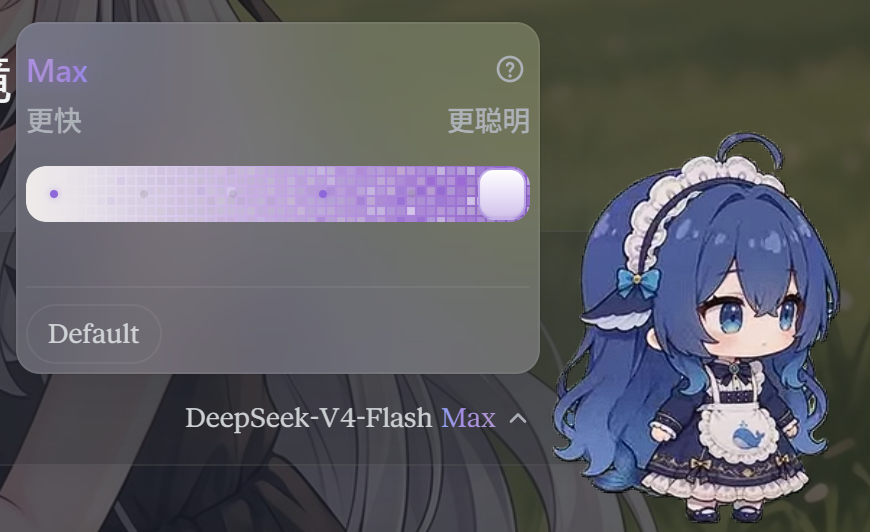
Features
- Drop-in model selector — replaces only the
conversation.input.modelslot; the rest of the chat input stays untouched. - Canonical effort slider — always shows
Off | Low | Medium | High | Extra | Maxpositions, regardless of how the provider names its levels. - Tolerant name matching — aliases such as
off,none,disabled,ultracode→max,med→medium,extreme→extra, and similar display names are mapped to canonical slider positions. - Unsupported levels stay visible — a level the current model does not support is dimmed but remains clickable. Clicking it keeps the thumb on the chosen slot and applies the nearest supported level below it, with a toast explaining the downgrade.
- Model switching preserves effort — when you switch models, the current effort is kept when possible, or automatically downgraded to the nearest supported level below it (with a toast).
- Default and adapter-specific strengths —
Defaultis offered as a pill below the slider and submits withoutreasoningEffort(the provider's own default applies). Other provider strengths that do not map to a canonical slider position are also shown as selectable pills. - Models without reasoning metadata stay manageable — when DSH does not
expose
reasoning/effortsfor the selected model (for example some OpenRouter or hand-declared custom entries), the Effort menu still appears: it shows a short “no effort levels” notice plus the safeDefaultpill, instead of hiding every thinking-strength control. - Liang Calibrator (滑动变祖器) — optional, off by default. Binds the six
canonical levels to stage names:
Off → 小难梁,Low → 牢梁,Medium → 梁子,High → 梁圣,Extra → 梁神,Max → 梁祖. When enabled, a 31-frame portrait (frame-00…frame-30) appears above the slider and follows the thumb continuously while dragging, then snaps to the segment's first frame on release. Labels and the trigger showMax 梁祖-style suffixes. The setting persists inlocalStorage. - Big Fat Fish thumb — optional, off by default. Replaces the slider thumb
with an 8-frame running chibi fish sprite. The idle animation loops at
720ms, speeds up to420mswhile dragging, and freezes underprefers-reduced-motion. Toggle it in DSH Settings → General → Big Fat Fish slider; changes apply immediately and persist inlocalStorage. - High / Extra ripple field —
HighandExtranow show a sparse blue / purple dot-matrix field with random flicker and radial water ripples around the thumb, as a lighter prelude to theMaxpixel field. - Max / Ultracode treatment — the model's
max/ultracodelevel turns the slider into an animated purple pixel field, and theMaxlabel becomes a flowing multi-color gradient text. - Localized and theme-aware — ships with English and Simplified Chinese dictionaries and follows DSH light/dark design tokens.
- Accessible — keyboard-operable slider (arrows, Home/End, PageUp/PageDown),
ARIA labels, focus management, and
prefers-reduced-motionsupport.
Install
Install the bundle from the Git repository:
dsh plugin --profile web add github:MEMZ-JZY/DSH-Claude-Style-Reasoning-Slider
dsh --profile web
Or use a local checkout:
dsh plugin --profile web add ./dsh-client-ui-effort-slider
Restart the web profile after installing or removing the bundle.
Usage
- Click the model/effort trigger chip in the conversation input.
- In the popup menu, choose Model to switch models, or Effort to adjust the reasoning level of the current model.
- In the effort pane:
- Drag or click the slider to pick
Off,Low,Medium,High,Extra, orMax. - If a position is unsupported, the thumb stays where you clicked and the nearest supported level below is applied; a toast tells you what happened.
- Click Default to remove
reasoningEffortand let the provider decide. - Click any extra pill to apply a provider-specific strength that does not map to a slider position.
- If the model has no declared reasoning levels, the pane shows a notice
and only the Default pill. For providers that do support effort but
are configured without
reasoningEfforts(common with custom OpenRouter routes), add the levels in DSH'sllm-pi-aisettings to get the full slider back.
- Drag or click the slider to pick
- When switching models, the plugin preserves the current effort level where
supported; otherwise it downgrades to the nearest supported level below or
falls back to
Default, always with a toast. - To enable the Liang Calibrator, click the
滑动变祖器switch below the track. The portrait and stage-name suffixes turn on immediately; the state is remembered across sessions. - To enable the Big Fat Fish thumb, open DSH Settings → General and turn on Big Fat Fish slider. The thumb changes immediately without a restart.
UI effects
- Trigger chip — shows the current model and effort label, six rising
signal bars that fill with the current level, and a chevron. At
Maxthe effort label flows as a purple gradient. With the Liang Calibrator enabled it also shows stage suffixes such asMax 梁祖. - Two-level popup menu — a compact menu with a model list (grouped by provider) and an effort pane; loading/error/retry states are included.
- Glass track — inner bevel shadows and a subtle fractal-noise layer break up flat-color banding.
- Light field — the track responds to the pointer like a light source: an
interior light pool and a glass-edge highlight follow the cursor, brightening
as the pointer approaches and fading with distance. The light is suppressed
at
Maxso the pixel field stays clean. - Level labels — faint tick labels; the current level is always shown, hovering near a slot highlights it, and others stay barely visible.
- Liang portrait — when the Liang Calibrator is enabled, a
224pxsquare portrait appears above the track. It uses 31 WebP frames (frame-00…frame-30) that change continuously while dragging and keep the original scanline + light-spot texture. - Liang toggle indicator — the
滑动变祖器switch below the track uses a dot indicator: a gray dot when off, a glowing purple dot when on. - High / Extra dot-matrix ripple —
High(blue) andExtra(purple) show a sparse particle field that expands from the thumb, flickers randomly, and animates bright/dark water ripples radiating outward. - Max pixel field — at
Maxthe track becomes an animated purple pixel field with a reveal sweep and flowing cell flicker; theMaxlabel uses a flowing multi-color gradient. - Big Fat Fish thumb — when enabled, the thumb becomes an 8-frame running
chibi fish sprite. It loops at
720mswhen idle,420mswhile dragging, and freezes under reduced motion. The left edge stays aligned and the right edge is clamped so the fish never overflows. - Motion safety — effects use CSS transitions/animations or lightweight
event handlers, and
prefers-reduced-motionis respected.
Development
Build the client bundle from source:
npm install
npm run build
lib/client.js is generated from src/client.js plus src/ds-effort-slider.js
by scripts/build-client.mjs.
Run the standalone component demo:
# open demo/index.html in a browser
The demo page exercises panel mode, inline mode, supported-level combinations, theme switching, the Max pixel field, the Liang Calibrator, and the Big Fat Fish thumb.
Package contract
This is a DSH bundle, not a dynamic cordis_define snippet. The package uses:
dsh.bundle.patch(cordis.patch.yml) for self-registration.dsh.client.platform: webfor the browser half.lib/client.jsas a prebuilt ModuleLoader artifact, generated fromsrc/.index.jsas the host half: it mounts an/effort-slider-assets/static route that servesassets/liang-frames/*.webpandassets/chibi-runner-strip.pngto the browser half.
Files
index.js— host half; serves the Liang portrait frames and chibi sprite.src/ds-effort-slider.js— standalone Web Component (shadow DOM, no framework).src/client.js— React wrapper + forked model selector plugin logic.scripts/build-client.mjs— bundle generator.demo/index.html— standalone UI demo.assets/—liang-frames/(31 WebP frames) andchibi-runner-strip.png.