dsh-cost-dashboard
mike-lee0120/dsh-cost-dashboard
DeepSeek Harness용 비용 대시보드: 모든 로컬 세션의 모델 입력/출력/캐시 토큰을 집계하고, 내장 테이블(DeepSeek 피크/오프 피크 포함)로 가격을 매긴 후 일일 추세와 모델별 및 세션별 테이블을 표시합니다.
설치
dsh plugin --profile web add github:mike-lee0120/dsh-cost-dashboardREADME
dsh-cost-dashboard
English | 中文
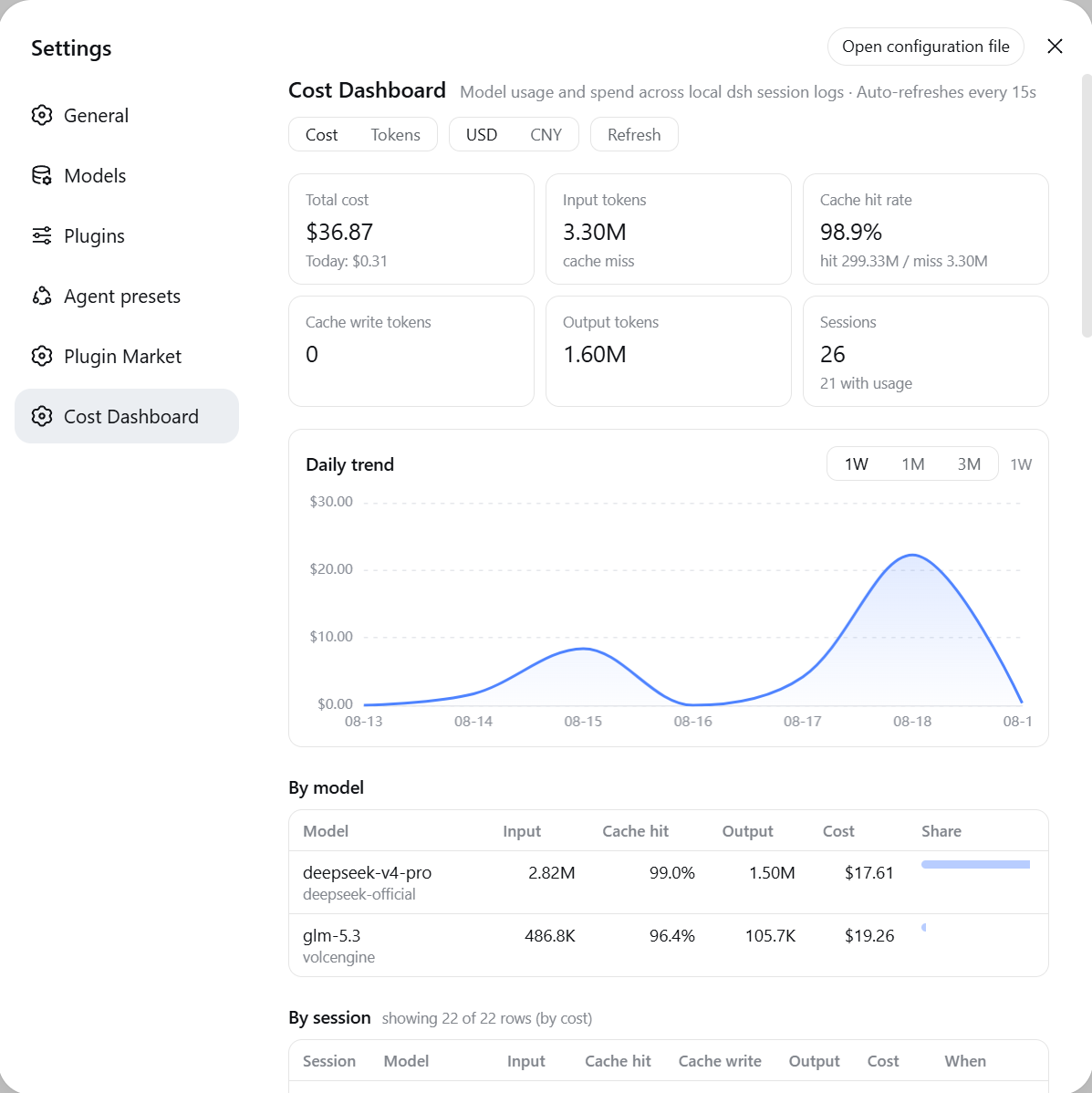
A cost-dashboard plugin for DeepSeek Harness (dsh): aggregates model input / output / cache token usage across all local sessions, prices it with a built-in table (including DeepSeek peak/off-peak time-of-day pricing), and renders a dashboard under Settings -> Cost Dashboard.
What you get
- Two entry points: Settings -> Cost Dashboard (the settings nav icons are hardcoded by the dsh settings shell, so plugins cannot customize them), plus a sidebar footer icon button (data-grid style) that opens the same dashboard in an anchored panel
- CNY only: every amount is shown in CNY (¥); entries listed in USD (imported catalogs, foreign models) convert at the configurable
fx.cnyPerUsdrate (default 6.79) - Summary cards: total cost, today's cost, input (cache-miss) / cache-read rate / output tokens, and the session count of sessions you started (subagent logs are folded in, not counted)
- Daily trend chart: ECharts smooth line charts (gradient area fill and hover tooltips); cost mode is a single CNY series, tokens mode splits into "input / output" and "cache read" charts on independent scales; selectable 1W / 1M / 3M ranges (default 1W)
- By-model table: tokens, cost, share per model
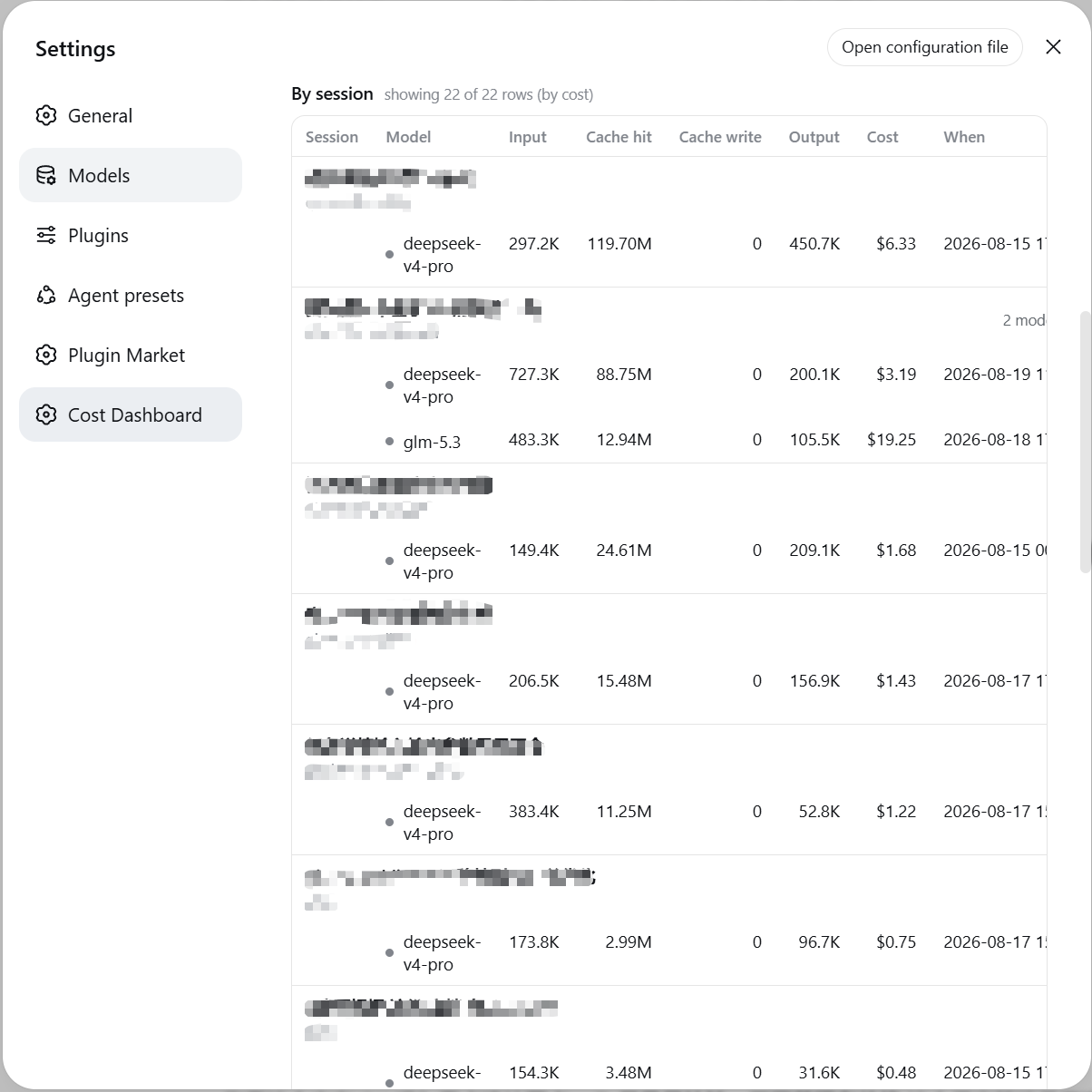
- By-session table: one row per session-model pair (a session that used several models appears on several rows, each with its own model, tokens and cost), with title, project directory, subagent badge for a session that spawned delegates. Sortable by cost or last-active time - click the Cost / When header, click again to reverse; the cap is applied per session, so a listed session never loses rows
- Pricing editor: edit the pricing JSON (including the FX rate) in-page; saves to
~/.dsh/cost-dashboard.json, effective immediately - Auto-synced catalog: fills in models missing from builtin/overrides from the LiteLLM price JSON (24h TTL + disk cache, degrades on network failure); never overrides builtin or hand-written prices
- Actual billing (optional): with read-only provider keys configured, shows DeepSeek/OpenRouter real balances and OpenAI/Anthropic real spend next to the estimate; domestic cloud vendors (Volcengine/Alibaba/Tencent) are not integrated - prices come from the config file
- Auto refresh: polls every 15s while open; the host re-reads only changed log files (mtime + size validated)
Install
dsh plugin --profile web add <spec>
<spec> may be a local path, an npm name, or a GitHub repo:
dsh plugin --profile web add /path/to/dsh-cost-dashboard
dsh plugin --profile web add github:mike-lee0120/dsh-cost-dashboard
dsh plugin add runs pnpm in the profile directory and automatically appends any dsh.bundle-declaring package to dsh.profile.bundles. Restart dsh web and refresh the page, then open Settings -> Cost Dashboard.
Remove with dsh plugin --profile web remove dsh-cost-dashboard.
Requires dsh 0.1.0-rc.7+ and Node >= 22.15 (the node:zlib zstd API the host itself relies on for session logs).
Data source and accounting
- Read-only scan of the current log generation inside
$DSH_HOME/sessions/*/*/(session.jsonl.zstd,session.vN.jsonl.zstd, or plaintext.jsonl); the numerically highest published generation wins, exactly as the runtime reads it, so a migrated session is never billed from its frozen older generation. Nothing is written, no projection touched. - Accounting mirrors the official
@deepseek-ai/dsh-token-metertokenUsageprojection:assistant/chunk {type:'usage'}is an early sample that survives a later request failure;assistant/messageusage (or the lastusagechunk of itsdata.stream) is the final sample for the same(turn, step)and replaces it instead of double counting, andllm/retry-startedcloses that slot so a retried attempt adds on top;assistant/attemptsettlements are billed even when no message followed;- four disjoint buckets: uncached input (DeepSeek
prompt_tokenswith cache hits subtracted), cache read, cache write, output. Cache write is still folded and still pricescacheWriterates, but no DeepSeek model produces that bucket, so the dashboard and its tables do not display it.
- Model attribution:
assistant/messagecarriesmessage.source.provider/model; a bare usage chunk (failed request) is attributed to the latestrequest/headermodel. - Session attribution: a subagent's log names the session that spawned it in its header (
parentSession), so its usage is folded into that session - the session table lists real sessions, each marked with how many subagents it absorbed. A log whose parent is missing keeps its own row and is badged as a subagent. - Mid-session model switches are split correctly.
- Run
node scripts/verify-totals.mjs: it reconciles against the officialsession_projcache.json(a point-in-time snapshot, so newer logs are skipped and said so), folds every selected log with the token meter's semantics, checks that a migrated session resolves to its highest format generation, and pins DeepSeek's official CNY rates plus the Beijing-time weekday peak window (an actively-writing session may drift by a live-write race, which is expected).
Pricing
Built-in pricing for 24 entries - 21 models plus three retired DeepSeek names - per 1M tokens, checked 2026-09-24; "hit" = cache-read rate, "write" = cache-write rate, defaults to the cache-miss input rate when unset. DeepSeek rates are the official CNY list prices (模型 & 价格); every other entry is shown in CNY after conversion:
CNY-listed models
| Model | Input (miss) | Input (hit) | Output | Notes |
|---|---|---|---|---|
| deepseek-v4-pro | 4.5 | 0.15 | 13.5 | peak doubles: 9 / 0.30 / 27 |
| deepseek-flash | 1 | 0.02 | 4 | peak doubles: 2 / 0.04 / 8 |
| deepseek-v4-flash | 1 | 0.02 | 4 | retired name, served by DeepSeek-V4.1-Flash |
| deepseek-v4-flash-vision-exp | 1 | 0.02 | 4 | retired name, same Flash rates |
| deepseek-v4.1-flash-expires-on-0910 | 1 | 0.02 | 4 | expired experimental id, same Flash rates |
| kimi-k3 | 20 | 2 | 100 | Moonshot China list price |
| qwen3.8-max | 12 | 1.5 | 36 | Alibaba Bailian China price |
| doubao-seed-2.1-pro | 6 | - | 30 | Volcengine Ark |
| hy3 | 1 | 0.25 | 4 | Tencent Hunyuan |
| minimax-m3 | 3.15 | 0.63 | 12.6 | ≤512K input, half-price list rate |
USD-listed models (converted to CNY for display)
| Model | Input (miss) | Input (hit) | Cache write | Output | Notes |
|---|---|---|---|---|---|
| gpt-5.6-sol | 5 | 0.5 | - | 30 | |
| gpt-5.6-terra | 2 | 0.2 | - | 12 | |
| gpt-5.6-luna | 0.20 | 0.02 | - | 1.20 | |
| gpt-5.5 | 5 | 0.5 | - | 30 | |
| gpt-5.4 | 2.5 | 0.25 | - | 15 | |
| gpt-5.1 | 1.25 | 0.125 | - | 10 | |
| claude-opus-5 | 5 | 0.5 | 6.25 | 25 | |
| claude-sonnet-5 | 2 | 0.2 | 2.5 | 10 | temporary rate through 2026-08-31, then $3/$15 |
| claude-fable-5 | 10 | 1 | 12.5 | 50 | |
| gemini-3.6-flash | 1.5 | - | - | 7.5 | |
| gemini-3.5-flash-lite | 0.3 | - | - | 2.5 | |
| grok-4.6 | 2 | - | - | 6 | |
| grok-4.6-fast | 4 | 1 | - | 12 | |
| glm-5.3 | 1.40 | - | - | 4.40 | Z.ai list price; override for the volcengine route |
- DeepSeek V4 peak/off-peak pricing effective 2026-08-17 (off-peak is half of peak; peak hours 09:00-12:00 and 14:00-18:00). Every usage record is timestamped, so the dashboard prices each sample by the host-local clock hour.
- Unpriced models count tokens only.
Overrides
The in-dashboard Pricing config editor saves ~/.dsh/cost-dashboard.json (per-model whole-entry overrides plus the FX rate):
{
  "fx": { "cnyPerUsd": 6.79 },
  "models": {
    "glm-5.3": { "currency": "USD", "input": 1.4, "inputHit": 0.14, "output": 4.4 },
    "my-local-model": { "currency": "CNY", "input": 2, "output": 6,
                        "peak": { "input": 4, "output": 12 }, "peakHours": [[9, 12], [14, 18]] }
  }
}
Fields: fx.cnyPerUsd (USD->CNY, default 6.79, used to display USD-listed entries in CNY); per model currency (CNY|USD), input (cache-miss), inputHit (defaults to input), cacheWrite (defaults to input), output; optional peak with its window peakHours (Beijing-time hours), peakWeekdays (0 = Sunday, weekdays by default) and peakExcludeDates (Beijing-time YYYY-MM-DD, e.g. statutory holidays). Peak hours use peak rates and unset peak fields fall back to flat; weekends and excluded dates are off-peak all day.
Auto-synced catalog
- Beyond the builtin table, the dashboard fills missing models from the LiteLLM price JSON (USD rates, converted to CNY for display via
fx). - Priority: user override > builtin > catalog — the catalog only fills gaps and never overrides builtin peak pricing or your hand-written config.
- Refreshed every 24h and cached at
~/.dsh/storages/cost-dashboard-catalog.json; on network failure it degrades to the cache, the status is visible in the dashboard footer, and a "Refresh prices" button retries manually.
Actual billing (optional)
- Expand the Actual billing section and configure read-only provider keys to show real balances and spend alongside the estimate.
- Supported: DeepSeek
/user/balance(balance), OpenRouter/api/v1/key(credits), OpenAI Cost API (daily spend), Anthropic Cost Report (daily spend). - Credentials are stored at
~/.dsh/cost-dashboard-credentials.json(mode 0600):
{
  "providers": {
    "deepseek": { "apiKey": "sk-..." },
    "openrouter": { "apiKey": "sk-or-..." },
    "openai": { "adminKey": "sk-admin-..." },
    "anthropic": { "adminKey": "sk-ant-admin-..." }
  }
}
- Use read-only/billing-scoped keys only; remove an entry to stop fetching it. Domestic cloud vendors (Volcengine/Alibaba/Tencent) are not integrated - their prices live in the pricing config.
Development
Plain .mjs, zero build step (host uses only Node builtins; the client is a hand-written module-loader bundle; charts use the vendored ECharts 5 build, Apache-2.0, served locally from /cost-dashboard/vendor/echarts - no CDN). Restart dsh web and refresh the page after any change.
Security
- GET routes expose the same surface as other plugins' own routes (local data, no credentials).
- The pricing write (POST) accepts same-origin requests only (Origin==Host).
- Nothing is uploaded; the scan is read-only.
Known limitations
- Costs are list-price estimates; no plans, discounts, or vouchers; peak hours use the host-local clock.
- Deleting session logs removes their history (statistics are entirely log-derived).
- Very large log corpora slow the cold scan; incremental caching keeps everyday refreshes fast.