dsh-edex-jarvis-ui (bundle)
ph4310822/dsh-edex-jarvis-ui/packages/bundle
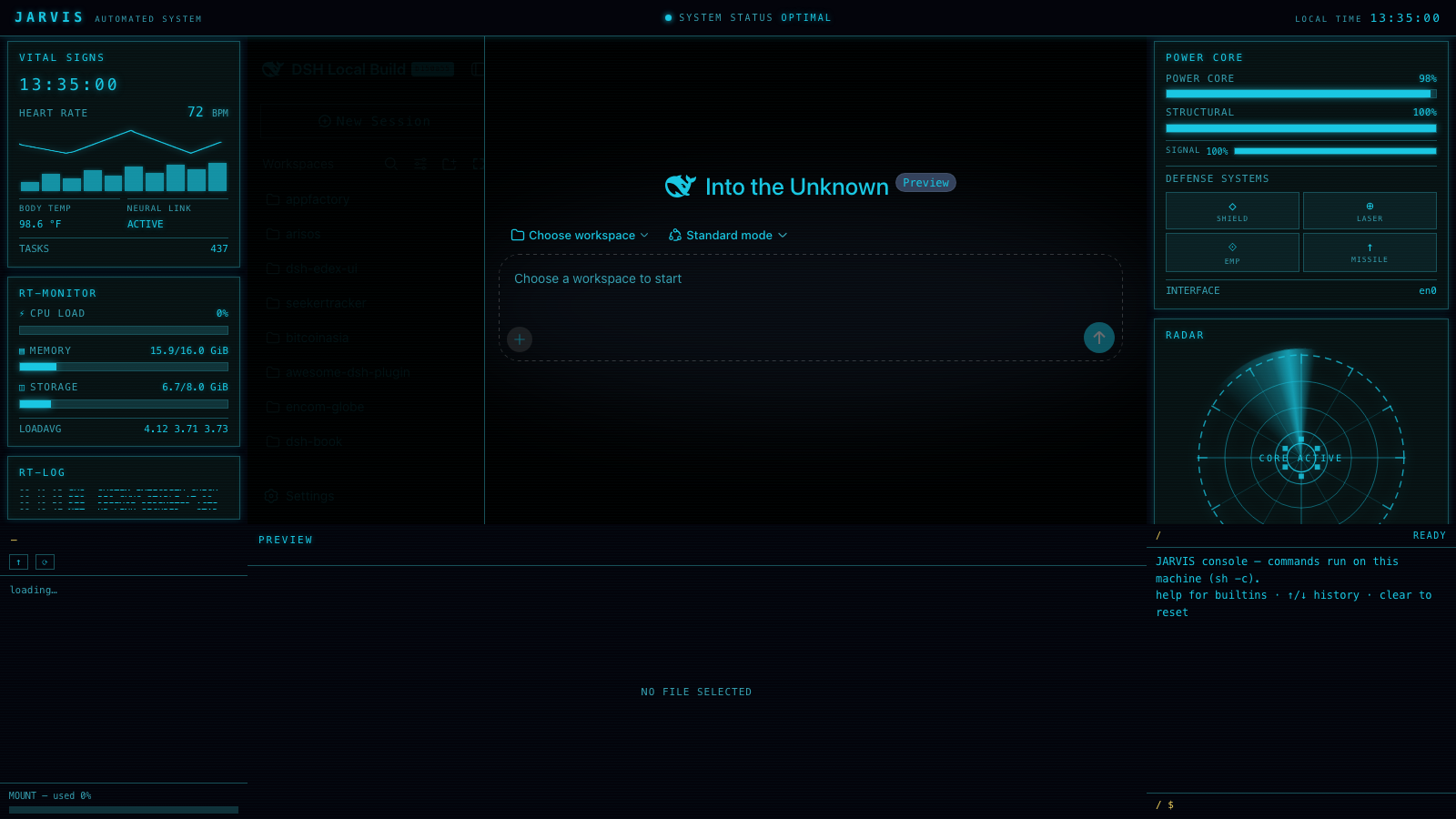
DSH 웹 GUI 위의 JARVIS 스타일 SF HUD 셸: 왼쪽의 일렉트릭 시안 VITAL SIGNS / RT-MONITOR / RT-LOG 바, 오른쪽의 POWER CORE 게이지와 회전하는 RADAR 스캔 디스크 및 업/다운 트래픽 차트, 파일 미리보기가 있는 파일 시스템 브라우저, 활성 작업 공간을 따르는 JARVIS 헤더 스트립이 있는 터미널 스타일 작성기.
설치
dsh plugin --profile web add github:ph4310822/dsh-edex-jarvis-ui이 플러그인은 저장소의 packages/bundle 하위 디렉터리에 있습니다.
README
dsh-edex-jarvis-ui
DeepSeek Harness eDEX-UI shell plugin — JARVIS variant — a sci-fi HUD shell
for the DSH web GUI themed after a JARVIS dashboard reference: electric cyan
(#1ac7e2) on near-black, thin 1px cyan card rectangles with subtle glow, and
a JARVIS header strip. The original UI stays centered and fully interactive.
Features
- JARVIS header strip —
JARVISbrand,SYSTEM STATUS: OPTIMALwith a glowing status dot, and a liveLOCAL TIMEreadout - Left bar — three floating cards:
- VITAL SIGNS — live clock, heart rate
72 BPMwith an animated ECG pulse line, activity bars,BODY TEMP/NEURAL LINK: ACTIVE - RT-MONITOR — glowing
CPU LOAD/MEMORY/STORAGEprogress rows with live host telemetry - RT-LOG — rolling timestamped event log (
SYSTEM INTEGRITY CHECK,BIO-SYNC STABLE,DEFENSE PERIMETER ACTIVE)
- VITAL SIGNS — live clock, heart rate
- Right bar — three floating cards:
- POWER CORE —
POWER CORE 98%/STRUCTURAL 100%gauges, liveSIGNALbar, and aDEFENSE SYSTEMSgrid of 4 toggleable buttons (SHIELD / LASER / EMP / MISSILE) - RADAR — the featured widget (replaces the WORLD VIEW globe): a
circular scan disc with dashed outer ring, concentric rings, crosshair,
diagonal radial guides,
CORE ACTIVEcore module, and a rotating conic sweep - TRAFFIC — dual up/down throughput chart
- POWER CORE —
- Bottom panel — filesystem browser (DIR), file preview/editor, and a
JARVIS console terminal (
jarviswelcome banner, real host shell viasystemMetrics.runCommand) - Card language — every widget card is a full 1px cyan rectangle with sharp corners and a subtle glow, floating with gaps over the near-black canvas; panels themselves recede into the background
- Cyan-on-black skin — token overrides recolor the entire original UI to the JARVIS electric cyan, without touching the user's theme preference
- Workspace preserved — the DSH sidebar, conversation, and composer render in the center region; the card chrome never occludes them
Installation
The plugin is published to npm as @danielng23/dsh-edex-jarvis-ui. From the
harness checkout:
pnpm dsh plugin --profile web add @danielng23/dsh-edex-jarvis-ui
pnpm dsh web   # serves the eDEX shell over the default GUI
To run the local checkout instead of the npm release (for development), add
the bundle with a file: path:
pnpm dsh plugin --profile web add file:/path/to/dsh-edex-jarvis-ui/packages/bundle
Development
See LOCAL_DEVELOPMENT.md for the build, install, and iteration workflow. The widget architecture for the shell bars is documented in WIDGETS.md; the theme derivation and widget reconciliation are recorded in analysis.md.
Packages
| Package | Host/Client | Description |
|---|---|---|
packages/bundle | — | Installable bundle (cordis.patch.yml) |
packages/ui-edex | client | The eDEX shell frame and all panels |
packages/ui-theme-terminal | client | Appearance → Terminal theme row |
packages/host/system-metrics | host | System telemetry RPC + file read/write + runCommand shell execution |
License
MIT