S
dsh-usage-rings
sevenqcx/dsh-usage-rings
Replaces composer dock stats with context, cache-hit, Tok/s, and per-model usage panels, plus Codex, Gemini, and multi-provider quota gauges read from a local Magpie gateway (127.0.0.1:3425).
설치
dsh plugin --profile web add github:sevenqcx/dsh-usage-ringsREADME
dsh-usage-rings
Composer dock statistics and Magpie subscription quota gauges for DeepSeek Harness.
Screenshots

Features
- Composer dock controls (left to right):
- Context (
上下文): ring gauge of projected context window usage, with a breakdown popover for system prompt, tools, and messages. - Cache (
缓存): session prompt cache-hit percentage with read/uncached/write breakdown and top-4 per-model hit rates. - Tok/s: output speed, turn/step counts, LLM vs. tool time share, TTFT average, live/next model route (resolving
group/*smart routes to concrete upstream models), and per-model token usage (usageByModelprojection).
- Context (
- Subscription quota gauges (right-aligned in the composer dock):
- Codex & Gemini rings: remaining quota percentages following the active Magpie account (
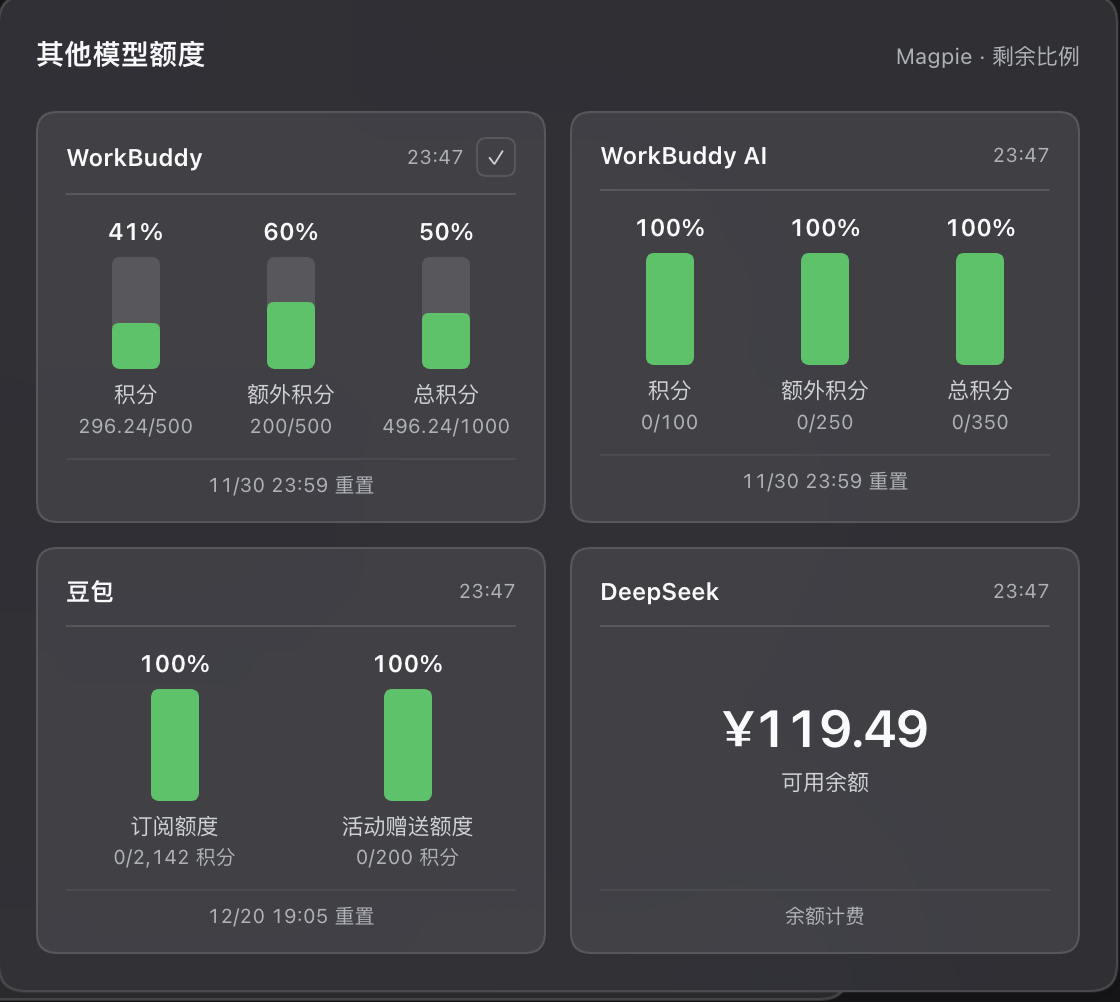
~/.config/magpie/usage.jsonl), plus per-window details and Codex reset-card management. - Other model quotas: multi-platform popup arranged as per-platform vertical bar chart cards (subscription pools) and balance cards (e.g. DeepSeek balance), with WorkBuddy CLI check-in action.
- Codex & Gemini rings: remaining quota percentages following the active Magpie account (
Requirements & Scope
- DSH >= 0.2.0 (declares
dsh.bundle+dsh.clientforconversation.composer.dock). - Magpie local gateway: quota rings, reset cards, WorkBuddy check-in, and
group/*route attribution read fromhttp://127.0.0.1:3425/v1/magpie/*and~/.config/magpie/usage.jsonl. Without Magpie running, the left-side dock controls (Context, Cache, Tok/s) continue to work from DSH session projections while quota rings display unavailable state (—). - Replaces the host's built-in
activityandusageentries inconversation.composer.dock.
Installation
dsh plugin add https://github.com/sevenqcx/dsh-usage-rings
Restart DeepSeek Harness after installation so the host loads the usageByModel session projection and client bundle snapshot.
Testing
npm test
(real-session.test.js automatically skips when no local ~/.dsh/sessions projection cache is present.)
License
MIT