dsh-shelfry
shelfry/dsh-shelfry
逛一逛,点一下,装好。浏览和搜索 DeepSeek Harness 社区插件,看详情、一键安装,收藏和更新都在一处。
설치
dsh plugin --profile web add github:shelfry/dsh-shelfryREADME

dsh-crate
English | 中文
Plugin Crate: a plugin market that lives inside DeepSeek Harness. No more digging through GitHub topics, guessing which repos actually install, and copy-pasting commands into a terminal — open the Plugins page, browse, read, and install in one click.
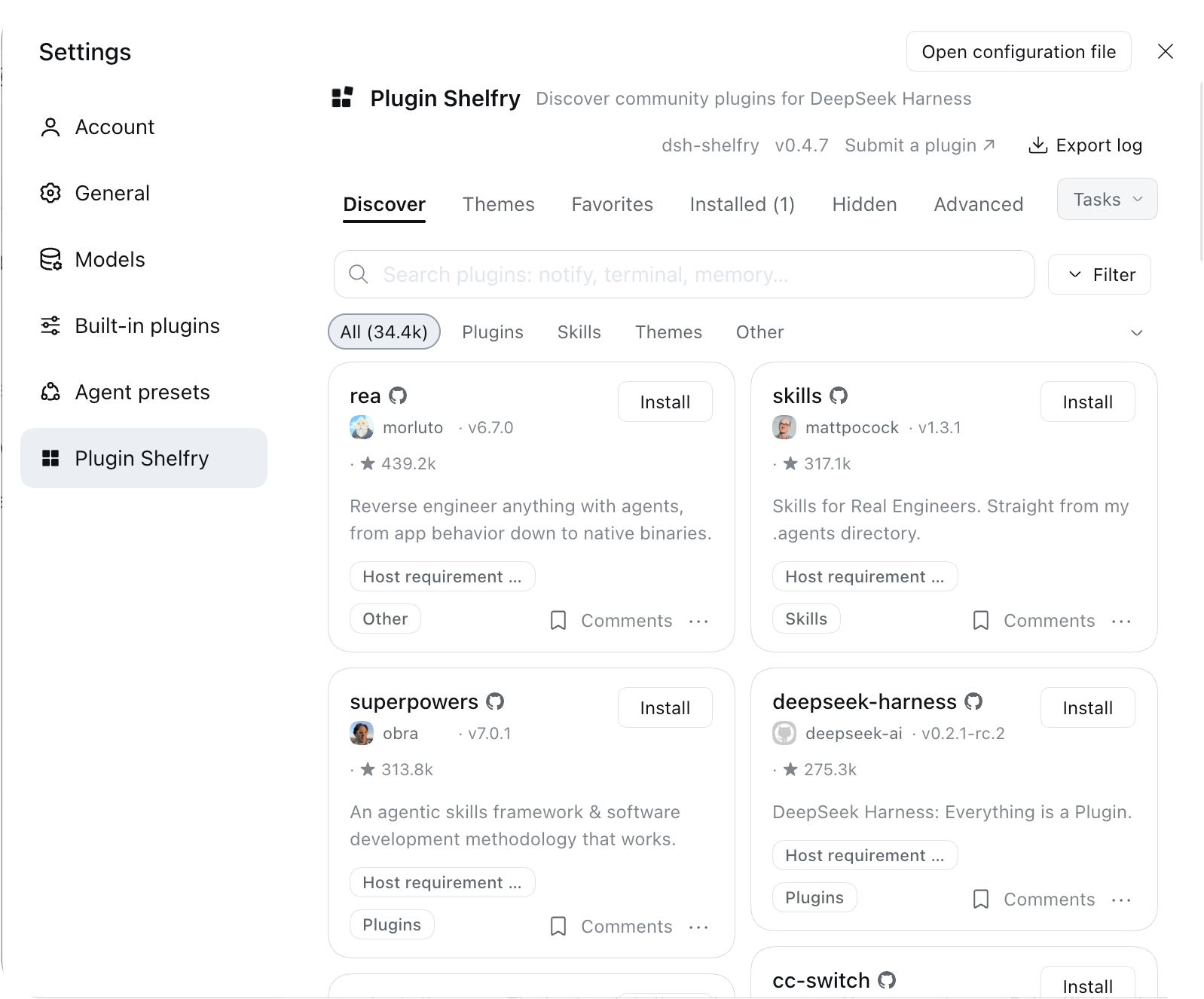
On dsh 0.2.1+ it is a tab on the Plugins page next to Installed; older hosts reach it from Settings → Crate Market.
Prefer not to install another plugin? Add https://dshcrate.com/data/index.json
under Plugins → Discover → Index sources and the same catalog shows up in the
official Discover tab; just want to look around? Open
dshcrate.com.
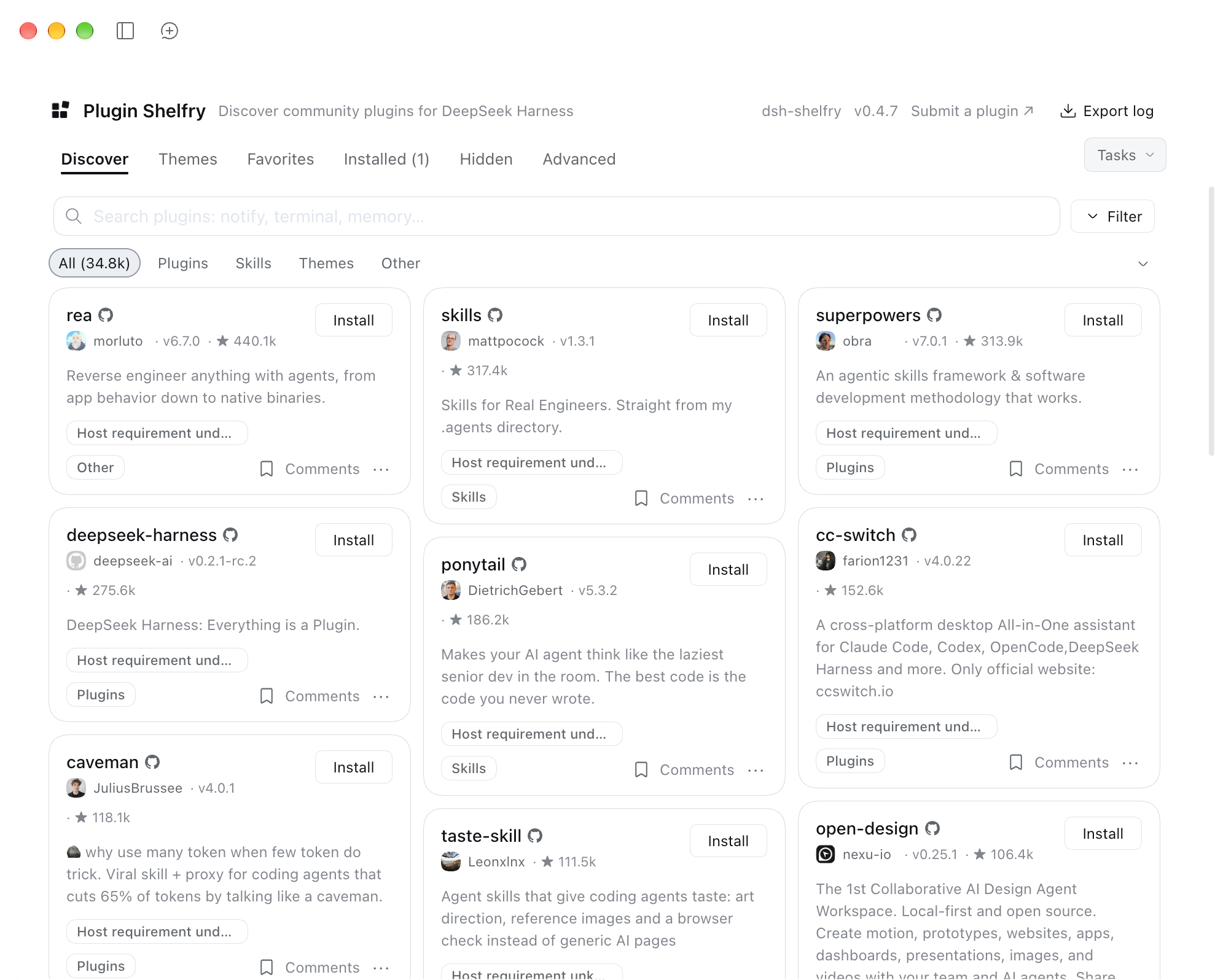
Why install it
The DSH plugin ecosystem grows fast, but finding plugins still means "search a repo, read the README, copy the command". Plugin Crate folds that into one screen:
- One place to browse: 30k+ entries covering plugins, skills, themes and standalone tools;
- Understand before installing: every entry has a description, stars, last-updated date and install method, with screenshots and comments on the card;
- Manage it where you install it: install, update, uninstall, enable/disable and group plugins on the same page, without bouncing back to a terminal.
Features
Browse and search
- Full-catalog search with category filters and star sorting
- Descriptions follow your UI language (Chinese or English)
- Cards carry screenshots and comments; theme entries show what they look like
Install and manage
- One-click install with live download and build progress
- Per-plugin update checks with a "What changed" link
- Favorites, groups, and a one-line note per plugin; groups switch as a unit
- Uninstall, hot enable/disable, and a one-click restart when a change cannot hot-load
Stability and recovery
- Selectable GitHub download routes for the China region
- An "Adjust plugins" recovery page when a bad config keeps the UI from booting
- A diagnostics page for load order and conflicts, plus sanitized log export
- Backup and restore: local JSON, WebDAV, or a private GitHub Gist
Settings
- Download region, GitHub acceleration, release channel, entry point and build environment are all editable in the UI
- A dedicated settings card manages the market itself;
allowRestartandbuildEnvcan also live in the profile config
Inside Settings
The market also opens from Settings: pick Plugin Crate on the left and the full Discover page shows up on the right. Plugins, skills and themes all live in the same catalog, and installed themes apply without a restart.
Upstream and attribution
This project is not original work. It is a modified derivative of dsh-market by fkysly and its contributors. The catalog is maintained independently by dshcrate; its size and coverage are not the same data as upstream.
What we changed on top of upstream:
- The catalog now comes from dshcrate: more entries (30k+, refreshed daily), plus categories, themes, scores, and bilingual descriptions;
- Catalog parsing and mapping were rewritten for dshcrate's own data shape, with matching UI and interaction adjustments;
- Theme entries and score/category fields were added;
- Everything else largely follows upstream.
Upstream is released under the MIT license, and its original copyright notice is retained in LICENSE as the license requires. Thanks to the upstream author and contributors — without their work this plugin would not exist. If the upstream author objects to this derivative use, please open an issue and we will sort it out.
Three ways to use it
| Way | Best for | What you do | What you get |
|---|---|---|---|
| Install the plugin (recommended) | The full market experience | Install dsh-crate, restart dsh web | Details, screenshots, favorites and groups, update checks, one-click install |
| Add the index source | Not adding another plugin | Add this catalog under Discover → Index sources | Search, inspect and install in the official Discover tab (npm-installable entries only) |
| Use the website | Browsing first | Open dshcrate.com | Browse, search and read details; installs still happen inside DSH |
Install
Option 1: npm (recommended)
dsh plugin --profile web add dsh-crate
Package page: npmjs.com/package/dsh-crate.
Option 2: from the repository
Changes that have not been released yet land here first:
dsh plugin --profile web add github:dshcrate/dsh-crate
Installing from a git source makes pnpm ask before running build scripts. The
client/client.js bundle is committed, so the market itself needs no build
step; a prebuilt tarball can be attached to a release if you prefer that route.
For a profile other than web, swap the name — the same applies to both
commands:
dsh plugin --profile <profile> add dsh-crate
dsh plugin --profile <profile> add github:dshcrate/dsh-crate
Verify the install
Restart dsh web. A Crate tab appears next to Installed on the Plugins
page, or a Crate Market card shows up in Settings.
Uninstall
dsh plugin --profile web remove dsh-crate
Desktop note
On a machine with DSH Desktop, dsh plugin --profile web installs into
profiles/web, not the profile the desktop app uses. Install through the
app's Settings → Plugins instead.
Install order
A repo-verified npm package first, then a prebuilt GitHub Release tarball, then the full repository source. Build scripts stay blocked by default (pnpm ≥10); allowing one is an explicit per-package choice.
Use Crate in the official Discover tab
Since DSH 0.2.1, the built-in Plugins → Discover page accepts third-party index sources. If you would rather not install another plugin, add Crate's official index and Discover reads the same catalog directly.
Add the index source
-
Check the host version:
dsh --versionVersions below 0.2.1 have no Discover page; install this plugin instead.
-
Open DSH and go to Plugins → Discover.
-
With no sources yet, click Add index source. With sources already listed, open the market menu and choose Manage index sources….
-
Paste this address and confirm:
https://dshcrate.com/data/index.json -
Back on Discover, the catalog appears — search it, open an entry, and click Install.
What success looks like
- The index-source list shows Crate with the exact URL above.
- Discover renders entry cards with category, tag and sort controls.
- Opening a card shows the detail page with version, author and publish time.
How it differs from installing the plugin
| Capability | Plugin | Index source only |
|---|---|---|
| Browse, search, filter by category | ✓ | ✓ |
| Open details and install | ✓ | ✓ |
| Screenshots and comments | ✓ | — |
| Favorites, groups, per-entry notes | ✓ | — |
| Update checks and release notes | ✓ | — |
| Theme previews | ✓ | — |
| Diagnostics page and log export | ✓ | — |
| Restore and backup | ✓ | — |
Why the two catalogs differ in size
The official index only accepts entries with an npm package, a version and a publish time — about 5,000 today. The plugin shows the full catalog, including entries installable only from GitHub source. Different inclusion rules, not missing data.
FAQ
An index source is rejected?
The URL must be a complete http/https address, with no # fragment and no
credentials. Copy https://dshcrate.com/data/index.json verbatim.
The Discover page is still empty after adding it?
Check that dsh --version is 0.2.1 or newer, hit refresh, and reopen DSH if it
stays empty. A failed fetch shows a reason under that row in the index-source
list.
Installed the plugin on Desktop but cannot find the entry?
dsh plugin --profile web targets profiles/web, not the profile the desktop
app runs. Install from Settings → Plugins inside the app.
Nothing happened after installing from npm?
Restart dsh web. client/client.js ships with the package; you do not need
to build it yourself.
How often does the catalog update? Once a day. The client caches for about 10 minutes, so give it a moment or refresh.
Does adding the index source upload my data? No. It only fetches a public read-only JSON file.
Configuration
All settings live under config: in the profile's cordis.patch.yml — the
loader passes only that sub-object to a plugin, so a top-level key is silently
ignored:
- id: dsh-crate
  name: 'dsh-crate'
  config:
    allowRestart: false   # hide the restart button (systemd/pm2/launchd)
    buildEnv:
      CC: /usr/bin/gcc-11
      CXX: /usr/bin/g++-11
allowRestart— one-click restart is hidden automatically when this process is systemd's own service process; pm2 and launchd are not detected, so those deployments set this by hand.buildEnv— environment for the processes the market spawns (installs, compiles, git).PATHandCIstay managed by the market.DSHM_GITHUB_PROXY— operator-owned GitHub acceleration prefix; disables the matching field in the UI when set.
Most of the rest is edited in the UI: download region, GitHub acceleration, release channel, entries (sidebar / Settings / Plugins tab), build environment, favorites, groups and per-plugin notes.
Development
npm install
npm run typecheck   # host, client, tests
npm test            # vitest, 3000+ specs
npm run build       # lib/ + client/client.js
client/client.js is a committed artifact: rebuild it and commit the result
with the source change. scripts/preflight.mjs (run by prepack) checks that
the loader id in that file matches package.json, that
cordis.patch.yml inserts by the same name, and that the declared icon ships.
The browser bundle registers itself as window.__ModuleLoader__.load({ id }),
where the id must equal the package name — a mismatch loads no UI at all.
See TESTING.md for code conventions and SECURITY.md for the security boundary.
License
MIT. This is a derivative of dsh-market; the original copyright notice is retained in LICENSE.