S
dsh-client-ui-quote
skyhancloud/dsh-client-ui-quote
AI 응답에서 선택한 텍스트를 다음 메시지에 포함할 수 있도록 웹 채팅 작성기 위에 삭제 가능한 인용 배너를 추가합니다.
설치
dsh plugin --profile web add github:skyhancloud/dsh-client-ui-quoteREADME

dsh-client-ui-quote
English | 中文
A selection-quoting plugin for the DeepSeek Harness web GUI: select text inside an AI reply and attach it to your next message as a quote banner.






Table of Contents
Features
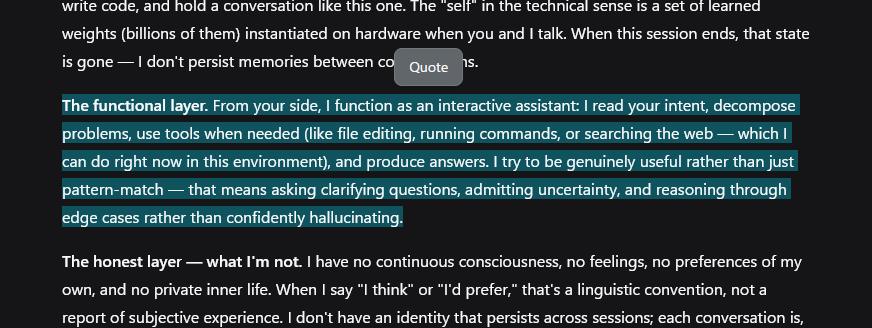
- Selection toolbar — one 引用 (Quote) button appears above the selection after a 50ms debounce, so it never flashes mid-drag. It hides on Escape, scroll-away, or when the selection collapses.
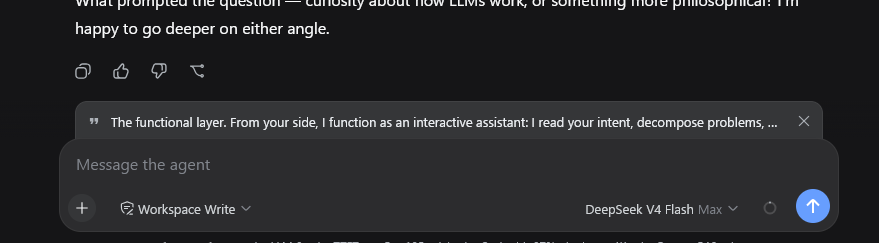
- Quote banner — a removable strip above the composer with a quote glyph, the quoted text, and a × button. The quote is consumed by the next send: the banner clears when the message goes out. Escape while the composer is focused clears it too.
- Clean draft — the quote is a pending-send attachment, not text in your input. Focus returns to the composer so typing follows.
- Localized — toolbar labels and the quote attribution follow the UI language (中文 / English).
- Fallback for older harnesses — on versions without the input-machine quote attachment, the button inserts the quote block at the end of the draft instead.
Preview
Installation
Prerequisites
- DeepSeek Harness with the web GUI (
dsh web) - Full banner behavior needs
@deepseek-ai/dsh-client-ui-conversationwith the input-machine quote attachment (InputActions.setQuote). Older versions fall back to inserting the quote into the draft.
Install
dsh plugin --profile web add https://github.com/skyhancloud/dsh-client-ui-quote
Then restart dsh web and refresh the browser.
Usage
- Select any text inside an AI reply.
- Click 引用 (Quote) above the selection — the quote appears as a banner above the composer.
- Type your message and send — the quote is prepended to the outgoing message:
> 引用 AI 回复:
> <selected lines>

<your message>
- Click × on the banner when you no longer need the quote.
Development
pnpm install
pnpm run bundle   # emits lib/index.js and lib/client.js
Pull requests are welcome.
License
MIT — see LICENSE.