dsh-mise
sovlookup/dsh-mise
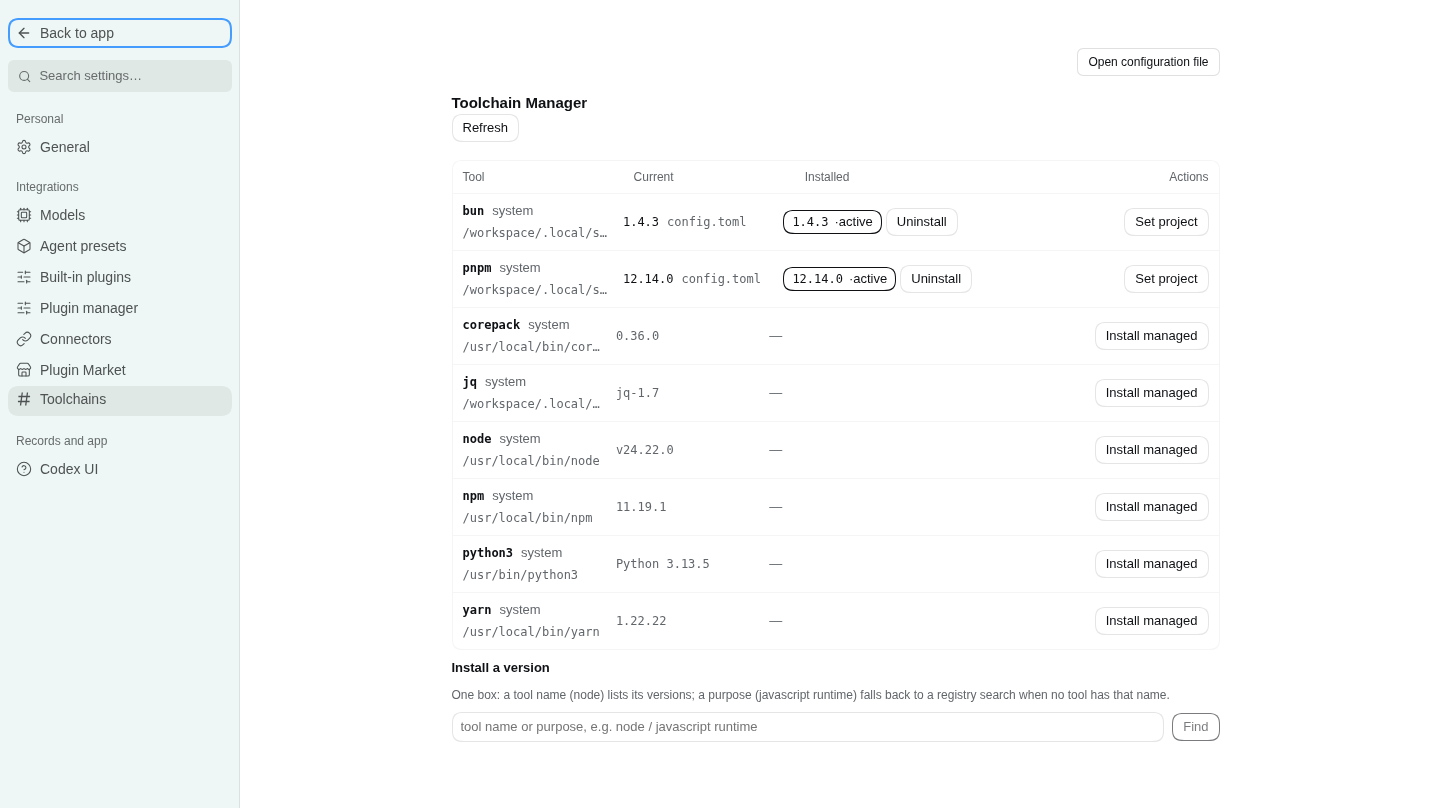
Requires mise installed on the host. A mise-backed toolchain manager for the host machine — a settings page listing the active, installed and available versions, with .mise.toml-driven install, use, uninstall and prune, mise shims prepended to the host PATH on load, and nine agent tools for the same work (status, versions, PATH scan, install, use, prune, uninstall, activate, progress).
설치
dsh plugin --profile web add github:sovlookup/dsh-miseREADME
dsh-mise
Toolchain manager for DeepSeek Harness (dsh), backed by mise. One settings page shows what is installed and what is available, and installs, pins, uninstalls and prunes by directory (.mise.toml-driven). Nine agent tools expose the same surface to the model, so an agent can see the machine, pick a version, install it, pin it and clean up afterwards without guessing.
English | 中文
- Host half (
src/index.ts+src/mise.ts, built todist/): everymiseinvocation, JSON parsing, the write gate, and a set of endpoints on the plugin's own/miseRPC channel. - Client half (
src/client.ts, built todist/client.js): asettings.sectionpage (order 48) that talks only to that channel — it serves no HTTP route of its own and never touches a binary.
No @deepseek-ai/* package is imported at runtime: the host half is plain ESM, the browser half is one self-contained bundle whose React comes from the harness module table.
Install
dsh plugin --profile web add github:SOVLOOKUP/dsh-mise
Requires dsh >= 0.2.0-rc.2 and a mise binary on the host (or miseBin pointing at one). The build output in dist/ is committed, so a source install needs no build step; mise itself is not bundled — install it from mise.jdx.dev first.
What the page shows
| Capability | Where |
|---|---|
| One table: the active version, how many versions are installed, what PATH resolves to | Settings → mise |
| Tools the image ships that mise does not manage | one folded row under the table (System-provided · N), read-only, collapsed by default |
| Manage a tool's versions | the ▸ in front of the tool name opens a version sub-table: version, status, install path, and the per-version actions (use / uninstall, two-step confirm) |
| Newer version available | a dashed ↑1.8.2 marker after the active version only, fed by mise outdated --inactive --bump --json; comparisons are mise's own, never re-implemented |
Requested by .mise.toml but not installed | not installed in the current column, with install x.y.z in the sub-table and a table-wide "install everything the config asks for" |
| Search | one box: a tool name lists versions, tool@prefix (pnpm@12) narrows to that prefix, anything else falls back to a mise registry search |
| Live install output | the panel polls the running write command every 0.7 s and renders mise's own lines with \r redraws collapsed in place |
The nine tools
| Tool | What it does |
|---|---|
mise_status | mise version/path, target directory, config files on the directory chain, active versions, missing versions, and whether CLI activation is on |
mise_versions | installed / active / latest / remote versions for a tool, or a registry search for a query |
mise_system | read-only PATH scan of 18 common dev commands: the hit path and version, whether mise also manages that tool, and the image-provided copy after skipping mise's shims |
mise_install | install tool@version; background: true returns a task id immediately |
mise_use | write into the project mise.toml or the global config (installs first if missing) |
mise_prune | remove versions no config references; dryRun: true by default |
mise_uninstall | remove one installed version, plus the config request that points at it |
mise_activate | switch PATH activation on/off for this host process |
mise_progress | read the live progress of one write command (what is running, for how long, recent lines, whether it finished) |
Writes are recorded as tasks because tool calls are request/response: the panel polls the running one, an agent starts with background: true and polls mise_progress. A large toolchain download therefore does not pin a single call for fifteen minutes.
Configuration
Set in the plugin row (or the settings form):
| Field | Default | Meaning |
|---|---|---|
miseBin | '' | empty probes PATH, ~/.local/bin/mise, /usr/local/bin/mise, /opt/homebrew/bin/mise, ~/.local/share/mise/bin/mise |
cwd | '' | default directory for the panel and the tools; empty = the host process cwd |
env | {} | extra environment for every mise child process |
timeoutMs | 20000 | timeout for read commands (ls / ls-remote / registry) |
longTimeoutMs | 900000 | timeout for install / use / prune |
writeMode | auto | readonly refuses every write; ask routes agent writes through DSH's approval seam (and denies when no approver exists); auto runs them |
remoteLimit | 30 | remote versions returned per call |
registryLimit | 40 | registry search hits |
activate | true | prepend mise's shims directory to the host PATH on load, so tool commands work in any shell the host spawns |
Write boundaries
- Only mise's own install directory and config files are touched;
prunealways runs with--tools, so mise's config-tracking table is left alone. - Uninstall takes an explicit
tool@versionand is two steps:mise uninstallremoves the files, thenmise unuse --path <source.path> --no-pruneremoves the request that pointed at it — otherwise the row would linger as "not installed". - A request that was never installed (or is left over from an earlier uninstall) gets its own "remove from config" action, a bare
mise unuseat the same explicit path. - A real prune always runs the dry run first; the returned
removedlist is that preview, not a guess. - Panel buttons are user clicks and skip approval; agent write tools follow
writeMode. MISE_AUTO_INSTALLis not set: installs happen only when asked for.
Activation and persistence
On load the plugin puts <data dir>/shims at the front of the host process PATH — the effect of mise activate, without editing shell config. It applies to that process and the shells it spawns; a terminal outside the host is untouched. Managed versions win where a config pins one, and shims fall back to the system copy otherwise, so a command never disappears.
If the image points XDG_CONFIG_HOME / XDG_DATA_HOME at /tmp, mise's state would be wiped on restart. Every load therefore re-creates the persistent copies under $HOME (~/.config/mise, ~/.local/share/mise) and symlinks the /tmp defaults at them; a non-empty directory is only reported as drift, never deleted.
Build from source
npm install        # types only: typescript, @types/*, @deepseek-ai type packages, react for the tests
npm run build      # tsc -p tsconfig.json → dist/, then scripts/finish-client.mjs
npm run typecheck  # sources + tests
npm test           # build, then test/host.ts and test/client.ts
npm run check      # the delivery gate: build + typecheck + both tests
test/host.ts drives the channel with a fake ctx (method matrix, readonly refusal, approval gate, progress-line merging, background task polling). test/client.ts fakes window.__ModuleLoader__ and document, then really renders the page with react-test-renderer and asserts that it only uses the /mise channel and paints the host's data.
Harness loads the built files, not the sources: dist/ has to be committed.
License
MIT