dsh-panel-tidy
sternchiri/dsh-panel-tidy
Drag any sidebar panel to reorder it, or drop one onto More to fold it into the More submenu; the order and the folded set are remembered across restarts.
설치
dsh plugin --profile web add github:sternchiri/dsh-panel-tidyREADME
dsh-panel-tidy
侧栏每条面板都能拖,拖进「更多」就收起来




🌟 这是什么
DSH 左侧栏的面板区(全局面板)由 sidebar.panellist 槽承载。每装一个带侧栏入口的插件,主列表就多一行,顺序按注册先后排;行一多,留给会话的空间先被挤掉。
这个插件让每一条面板都能长按拖动、自由排序:常驻的按你的习惯排,不常用的拖进「更多」二级菜单收起,需要时再拖回来。
开箱状态:非本体入口都在「更多」里,排在「浏览更多插件」上方;主列表是 插件、自动化任务、更多。
🧩 它做三件事
| # | 行为 | 说明 |
|---|---|---|
| 1 | 拖动 | 主列表任意拖动排序;拖到「更多」上松手即收纳并自动展开菜单;菜单里的条目也能排序,拖回左侧栏即放回主列表 |
| 2 | 收纳 | 除 plugins(插件)、schedules(自动化任务)以外的侧栏面板默认在「更多」里;之后新装的插件同样默认收纳 |
| 3 | 记住 | 顺序与收纳状态同时写进宿主文件 $DSH_HOME/panel-tidy/state.json、cookie、localStorage;重启、换端口、清 cookie 都能恢复 |
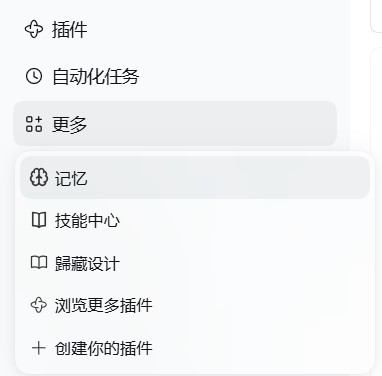
装好后的默认状态:插件与自动化任务留在主列表,其余面板收在「更多」里
🎛️ 拖动
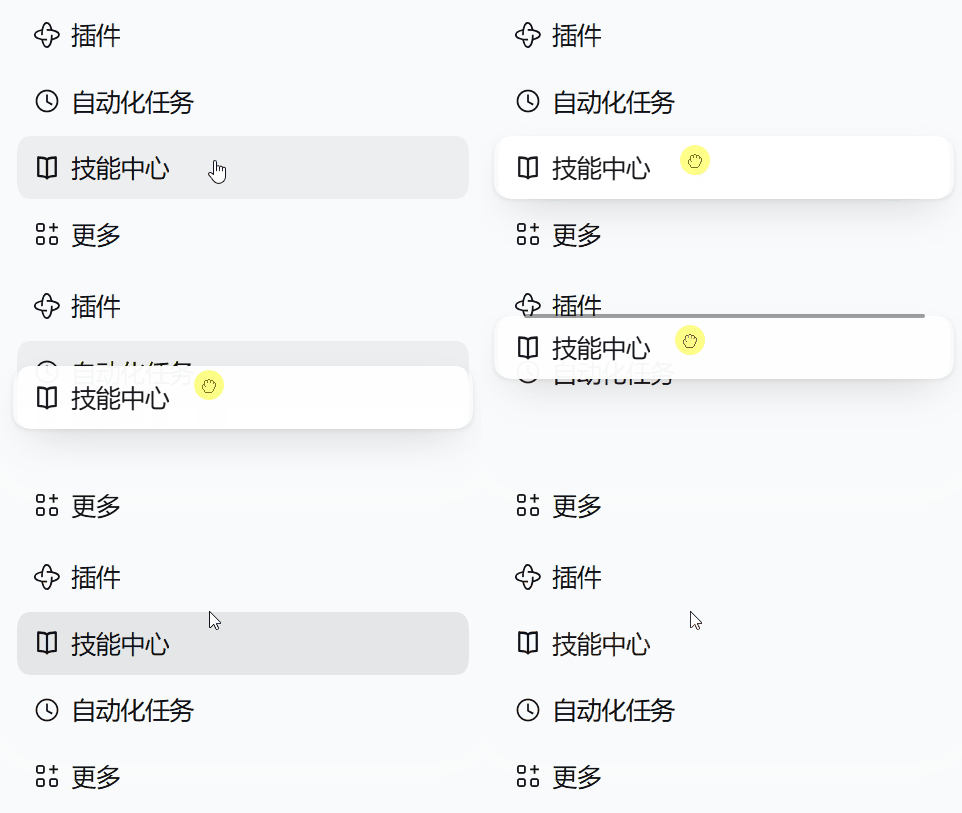
长按才进入拖动。 鼠标左键按住 500ms,行落到官方按下态底色并渐染一点品牌色;这段时间里移动超过 8px 视为点击或误触,直接放弃,点击行为不受影响。悬停时行光标保持原样,不出现抓手。
进入拖动后光标变 grabbing,被拖的那一行自己跟手(半透明 + 轻投影)。
| 松手位置 | 结果 |
|---|---|
| 另一行上方/下方 | 插到那一行前/后 |
| 「更多」 | 收进二级菜单,并自动展开菜单 |
| 左侧栏空白处 | 排到队尾 |
| 菜单条目拖回左侧栏 | 放回主列表 |
菜单行与官方两条长得一样:左侧是面板自己的图标(取自主列表那一行的同一个 svg,缩放到 16px),没有分隔线,没有拖动手柄。
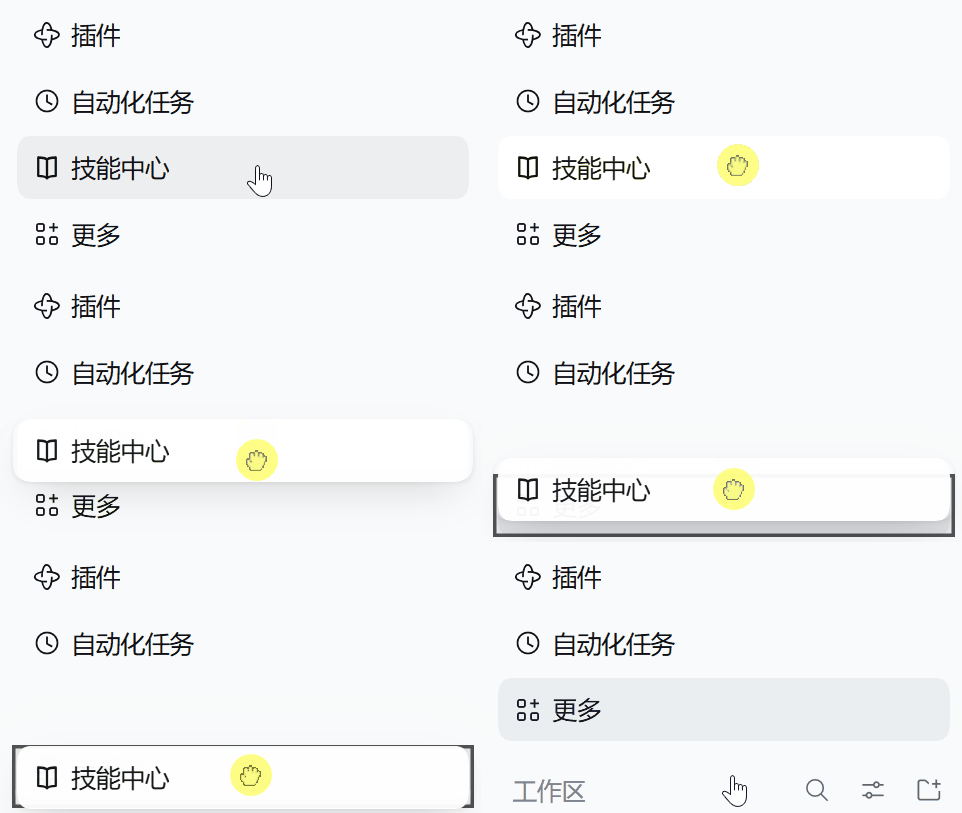
拖到「更多」上松手即收纳,菜单跟着展开
🎨 视觉
行高、内边距、悬停底色沿用官方面板行本身,插件只叠加状态层。
颜色与圆角取运行时主题 token(--dsw-alias-interactive-bg-hover、--dsw-alias-brand-primary、--dsw-radius-md、--ds-ease-in-out),都带兜底值,深浅色主题下不失配。
落点提示是一条 2px 圆角线,从中轻微展开;落到「更多」上是一圈品牌色描边。落位后该行闪一次极浅的品牌色底。系统开启「减少动态效果」时,全部动效与过渡关闭。
⚙️ 它怎么做的
面板身份取自 ctx.slots.entriesOfSlot('sidebar.panellist') 的 options.id,与主列表每一行 button[aria-label] 的文字对齐。
拖动是纯指针事件,不用原生 HTML5 拖放:元素一旦可拖,浏览器就把光标变成抓手,而按下之后再设 draggable 也不会触发 dragstart。拖动期间被拖行的 pointer-events 设为 none,让 elementFromPoint 落到它下面那一行;落点判定统一走一次解析,空白与行间退化为按几何取最近一行。
收纳用 CSS display:none 隐藏主列表行,不用官方 pin:官方 pin 状态在侧栏组件的内存 store 里,而 sidebar.panellist.actions 的组件只在「更多」菜单展开时挂载,加载阶段拿不到 setPinned;直接隐藏 DOM 是首屏就生效的做法,也不改动官方 pin 状态。
被收纳的入口由插件注册进 sidebar.panellist.actions(order: -1),因此排在「浏览更多插件」之前;行组件复用 @deepseek-ai/dsh-client-ui-primitives 的 MenuItemButton。
状态由宿主半边在 /dsh-panel-tidy/state 上提供读写,见下一节。
🚀 安装
要求 DSH >=0.2.0 <0.3.0、Node ^22.19 || >=24。
在 DSH 里打开左侧栏的插件页,安装并启用 dsh-panel-tidy。装完重启 DSH。
命令行等价操作(先装依赖,再到插件页把它打开):
# 从 npm
dsh plugin --profile desktop add dsh-panel-tidy

# 从 GitHub
dsh plugin --profile desktop add "github:SternChiri/dsh-panel-tidy"
package.json 声明了 dsh.bundle.patch,启用后这一行会自动插入 profile 的 patch 层:
- insert:
    - id: panel-tidy
      name: dsh-panel-tidy
卸载:在插件页关掉,或
dsh plugin --profile desktop remove dsh-panel-tidy
让 Agent 替你装
请帮我安装 dsh-panel-tidy(仓库:https://github.com/SternChiri/dsh-panel-tidy)。先读该仓库 README 的「安装」,用 plugin_manager 把它装进 desktop profile,重启 DSH 后确认侧栏面板能长按拖动、「更多」里有收纳条目,并告诉我怎么把它关掉。
💾 状态存在哪
三处,取时间戳最新的那份:
| 位置 | 活得过什么 | 什么时候会丢 |
|---|---|---|
$DSH_HOME/panel-tidy/state.json(宿主半边写入) | 清浏览器数据、换浏览器、换端口、换域名 | 删掉 DSH 主目录、换一台机器 |
cookie dsh.panel-tidy(一年) | 换端口、重启、换浏览器标签 | 清站点数据、无痕窗口、127.0.0.1 ↔ localhost 互切 |
localStorage dsh.panel-tidy.v1 | 同端口刷新 | 换端口即换 origin |
$DSH_HOME 指 DSH 主目录,默认 ~/.dsh,启动时可用环境变量覆盖。
浏览器存活时用浏览器里那份;页面挂载后与宿主文件比一次时间戳,谁新用谁。宿主文件在时,即使 cookie 与 localStorage 全被清掉,下一次打开仍恢复成上次的布局。三处都没有时回默认布局。
写入只在确认读到宿主之后发生,避免网络抖动用旧状态盖掉宿主那份;宿主文件先写临时文件再改名,不会留下半截 JSON。宿主没有 Web 服务(headless)时不注册路由,浏览器半边退回 cookie 与 localStorage。
✅ 验证
node test.mjs # 137 项,桩 DOM + 极简 React + 临时目录,离线跑
覆盖拖动(长按判定、跟手、落点结算、落位提示)、收纳与保留、菜单行渲染(图标、无分隔线、无手柄)、顺序与状态落盘、prefers-reduced-motion,以及宿主半边的状态校验、文件读写、路由响应、装配在有无 Web 服务时的行为、三处存储的对齐。
🗺️ 已知边界
- 依赖官方侧栏的 DOM 结构(
nav下的button[aria-label]、带aria-haspopup="menu"的「更多」按钮)与槽名sidebar.panellist/sidebar.panellist.actions。DSH 改动这两处时插件会失效,需要跟着改。 - 只处理左侧栏面板区。会话列表、页头、右侧栏不在范围内。
- 不接管官方 pin 与官方「更多」里的两条固定项。
- 不读写会话数据,不碰沙箱与终端。
- 状态路由在 loopback 上不额外鉴权,本机进程可以改写这份布局。
📄 License
MIT —— 详见 LICENSE。
dsh-panel-tidy
Drag any sidebar panel — drop it into More to put it away.
🌟 What this is
DSH's sidebar panel area is the sidebar.panellist slot. Every plugin that registers a sidebar entry adds one more row, ordered by registration; enough rows squeeze out the space left for conversations.
This plugin makes every panel draggable: keep the ones you use in your own order, drag the rest into the More submenu, drag them back when you need them.
Out of the box, non-core entries sit in More above "browse more plugins", and the main list is Plugins, Schedules, More.
🧩 What it does
| # | Behaviour | Detail |
|---|---|---|
| 1 | Drag | Reorder rows in the main list; drop on More to collect (the menu opens); reorder inside the menu; drag a menu row back to the sidebar to release it |
| 2 | Collect | Every sidebar panel except plugins and schedules lives in the More menu by default; panels registered later are collected the same way |
| 3 | Remember | Order and folded state go to $DSH_HOME/panel-tidy/state.json, the dsh.panel-tidy cookie, and localStorage; restarts, port changes and cleared cookies all recover |
The default after install: Plugins and Schedules stay in the list, everything else sits in More
🎛️ Dragging
Hold the left button for 500ms to arm a row: it takes the pressed background and fades in a little brand color. Moving more than 8px in that window cancels and leaves the click untouched. Hover never turns the cursor into a grab hand.
While dragging, the cursor turns grabbing and the row follows the pointer (translucent, light shadow).
| Release over | Result |
|---|---|
| Another row | Insert before/after it |
| More | Collect into the submenu and open it |
| Empty sidebar space | Move to the end |
| Sidebar, from a menu row | Release back to the main list |
Menu rows match the stock ones: the panel's own icon (the svg from its main-list row, scaled to 16px), no separators, no drag handle.
Release on More to collect the row — the menu opens with it
🎨 Visuals
Row height, padding, and hover background come from the stock panel row; the plugin only layers state classes on top.
Colors and radii use runtime theme tokens (--dsw-alias-interactive-bg-hover, --dsw-alias-brand-primary, --dsw-radius-md, --ds-ease-in-out) with fallbacks, so light and dark themes both fit.
Drop placement is a 2px rounded line that opens from the middle; over More it is a brand-colored ring. After a drop the row flashes a faint brand tint. Under prefers-reduced-motion: reduce all animation and transitions are off.
⚙️ How it works
Panel identity comes from options.id in ctx.slots.entriesOfSlot('sidebar.panellist'), matched against each main-list row's button[aria-label].
Dragging uses pointer events, not native HTML5 drag and drop: a draggable element turns the cursor into a grab hand, and setting draggable after mousedown does not start a drag. While dragging, the dragged row gets pointer-events: none so elementFromPoint reaches the row beneath it; hit testing resolves through one function, falling back to the nearest row by geometry for gaps and empty space.
Collection uses CSS display:none rather than the official pin: the pin state lives in the sidebar component's in-memory store, and sidebar.panellist.actions mounts only while the More menu is open, so setPinned is unavailable at load time; hiding the DOM row works on first paint and leaves the pin state alone.
Collected entries are registered into sidebar.panellist.actions with order: -1, so they render above "browse more plugins"; rows reuse MenuItemButton from @deepseek-ai/dsh-client-ui-primitives.
State is served by the host half at /dsh-panel-tidy/state, described below.
🚀 Install
Requires DSH >=0.2.0 <0.3.0 and Node ^22.19 || >=24.
Open the Plugins page in the DSH sidebar, then install and enable dsh-panel-tidy. Restart DSH afterwards.
The command line equivalent (installs the dependency; enable it on the Plugins page):
# from npm
dsh plugin --profile desktop add dsh-panel-tidy

# from GitHub
dsh plugin --profile desktop add "github:SternChiri/dsh-panel-tidy"
package.json declares dsh.bundle.patch, so enabling inserts this row into the profile's patch layer:
- insert:
    - id: panel-tidy
      name: dsh-panel-tidy
Uninstall on the Plugins page, or
dsh plugin --profile desktop remove dsh-panel-tidy
Let an agent install it
Install dsh-panel-tidy for me (repo: https://github.com/SternChiri/dsh-panel-tidy). Read the Install section of that README first, add it to the desktop profile with plugin_manager, restart DSH, then confirm sidebar panels drag with a long press and that collected entries show up in the More menu, and tell me how to turn it off.
💾 Where state lives
Three places; the newest timestamp wins:
| Place | Survives | Lost when |
|---|---|---|
$DSH_HOME/panel-tidy/state.json (written by the host half) | Clearing site data, switching browsers, port changes, host changes | Deleting the DSH home directory, moving to another machine |
cookie dsh.panel-tidy (one year) | Port changes, restarts, new tabs | Clearing site data, private windows, 127.0.0.1 ↔ localhost |
localStorage dsh.panel-tidy.v1 | Refreshing on the same port | A port change is a different origin |
$DSH_HOME is the DSH home directory: ~/.dsh by default, overridable with an environment variable at launch.
The browser copy is used while the page runs; once mounted, its timestamp is compared with the host file and the newer one wins. With the host file in place, a wiped cookie and a wiped localStorage still restore the last layout on the next load. When all three are gone the layout falls back to defaults.
Writes happen only after the host state was read successfully, so a network hiccup cannot overwrite the host copy with stale data; the host file is written to a temporary path and renamed, so a half-written JSON never lands. On hosts without a web server (headless) the route is not registered and the browser half falls back to the cookie and localStorage.
✅ Verify
node test.mjs # 137 checks, offline, stub DOM, a minimal React and a temp directory
Covers dragging (hold detection, following, drop resolution, settle feedback), collection and retention, menu row rendering (icon, no separator, no handle), persistence, prefers-reduced-motion, plus host-side state validation, file IO, route responses, assembly with and without a web server, and three-way store reconciliation.
🗺️ Known limitations
- Depends on the stock sidebar DOM (rows under
navasbutton[aria-label], the More button witharia-haspopup="menu") and on the slot namessidebar.panellistandsidebar.panellist.actions. A change to either breaks the plugin. - Left sidebar panel area only. Session list, header, and right sidebar are out of scope.
- Does not touch the official pin state or the two stock More entries.
- Reads and writes no session data, no sandbox, no terminals.
- The state route adds no authentication on loopback, so a local process can rewrite the layout.
📄 License
MIT — see LICENSE.