dsh-t3-inbox
tungloong/dsh-t3-inbox
Attention-first, T3 Code-inspired inbox sidebar for DeepSeek Harness with Pinned, Active, Working, Snoozed, and Settled shelves, customizable snooze presets and calendar, ranked search, multi-select project filter, vertical sweep with 5-second undo, auto theme detection, 8-language UI, and one-click switch back to the native Workspaces sidebar.
설치
dsh plugin --profile web add github:tungloong/dsh-t3-inboxREADME
dsh-t3-inbox
An attention-first, T3 Code–inspired inbox sidebar for DeepSeek Harness — stop babysitting running agents and focus only on what needs your decision right now.
English | 简体中文



Disclaimer: Visual design and attention-inbox workflow are inspired by T3 Code. This is an independent community plugin and is not affiliated with Ping Labs or DeepSeek.
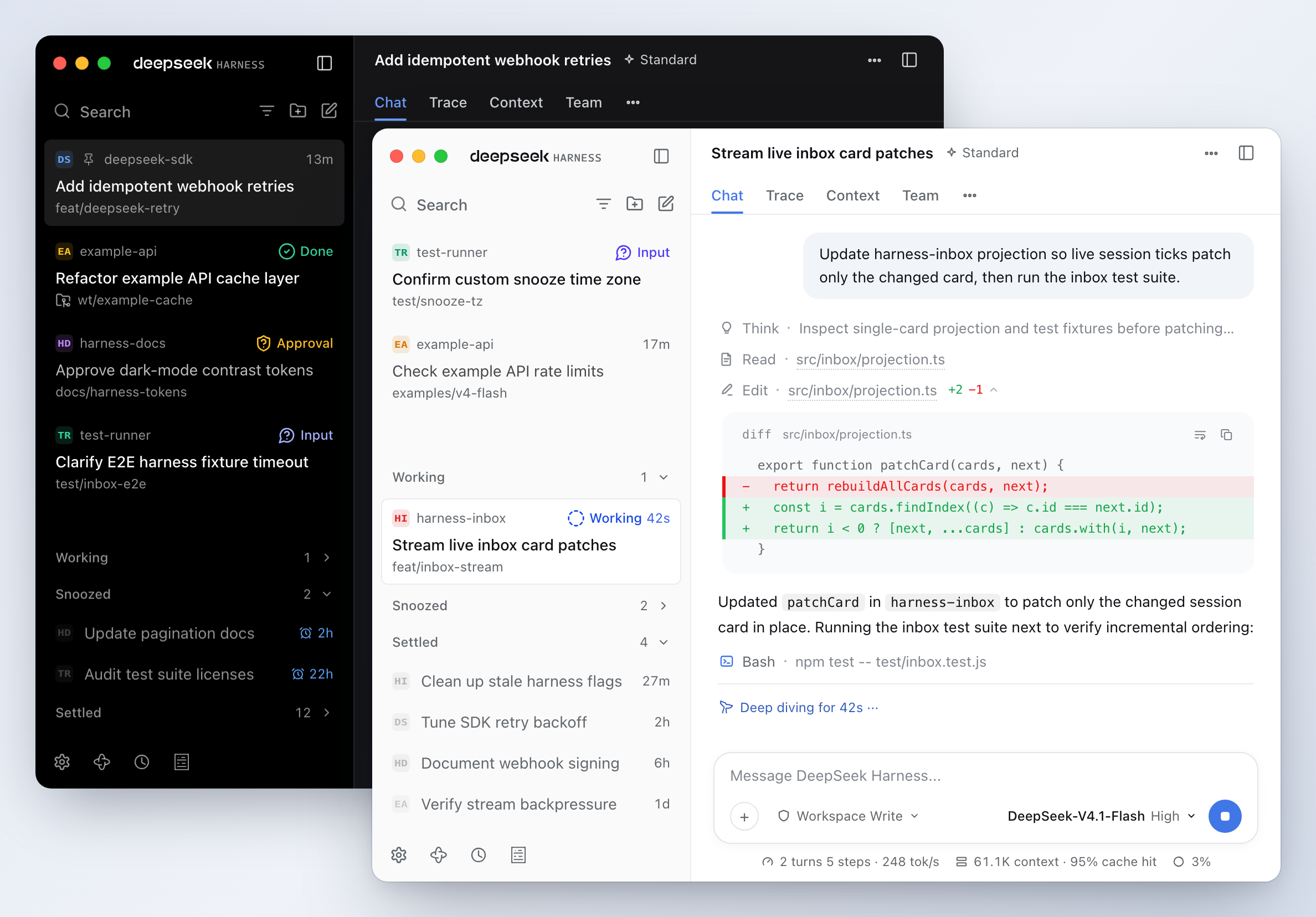
Why dsh-t3-inbox?
When you run 10+ coding agent sessions across repositories, chronological sidebars and folder trees turn into noise. You end up burning attention on two things: compulsively checking threads that are still working, and hunting for which chat is stuck waiting on a "Yes".
dsh-t3-inbox reorganizes your DeepSeek Harness sidebar around human attention instead of chronology:
- Separate running work from what needs you: In-progress threads sit apart in a quieter Working section below (collapsible anytime) instead of cluttering your queue, then surface back to the inbox the moment they finish or need input.
- Status and context right on the card: Every card shows explicit status text (
Approval,Input,Failed,Limited,Woke,Done), a colored project monogram, and its Git branch / worktree context so you can see who is waiting at a glance. - Keep the queue clean with Settle and Snooze: Click Settle to move finished threads to the bottom shelf without deleting them, or Snooze anything that can wait until later — keeping only what needs action right now in your inbox.
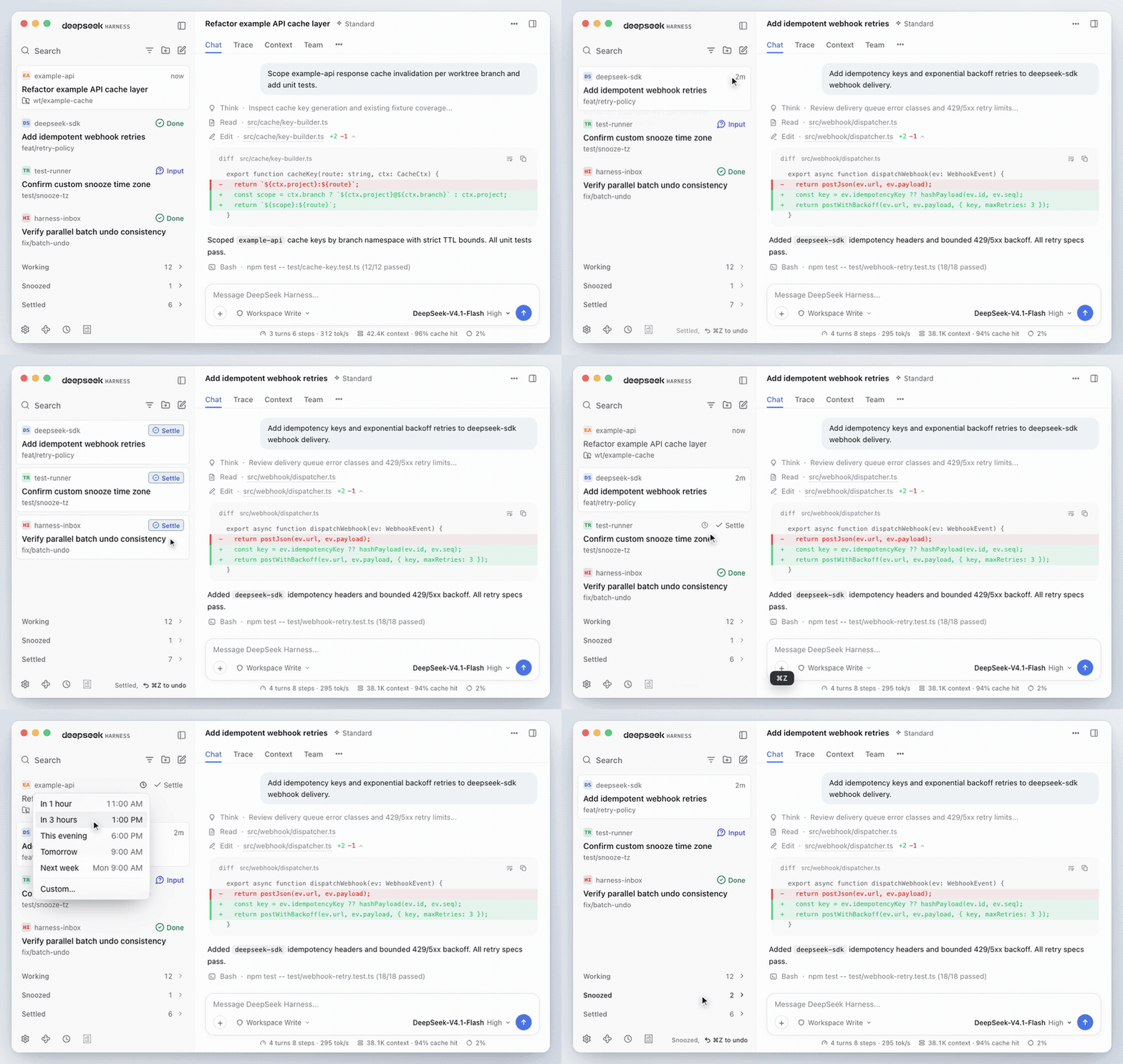
In Action
Click to Settle one thread, hold and sweep vertically to clear the rest, press ⌘Z to bring everything back in one frame, or Snooze a thread for later:
Features
- Attention Shelves: Pinned, Active & Working Flow
- Automatically routes threads across Pinned, Active, and a dedicated Working section (muted visual weight, live elapsed timers, collapsible anytime) — keeping running tasks cleanly separated from what needs your decision, then rising back to the top when done, complete with subagent tree aggregation and
Waitingstatus indicators. - Every card surfaces explicit status text (
Approval,Input,Failed,Limited,Woke,Done), a colored project monogram, and Git branch & worktree indicators, plus hover preview cards with full title, project, branch, and current model.
- Automatically routes threads across Pinned, Active, and a dedicated Working section (muted visual weight, live elapsed timers, collapsible anytime) — keeping running tasks cleanly separated from what needs your decision, then rising back to the top when done, complete with subagent tree aggregation and
- Settle Instead of Archive
- Settle moves finished threads to a quiet bottom-anchored Settled shelf (
10 + 25pagination) instead of hiding them away — your inbox stays calm while every thread remains one click away. - Press and sweep vertically across Settle, Wake, or Un-settle buttons to process a whole batch at once, backed by a 5-second
⌘Z/Ctrl+ZUndo bar. - Viewing a session clears its unread
Donemarker automatically; Mark unread brings any thread back to attention anytime.
- Settle moves finished threads to a quiet bottom-anchored Settled shelf (
- Snooze for Mental Overload & Deferred Follow-Ups
- Not done yet, just not right now? Move low-urgency threads to compact
36pxSnoozed rows with live wake countdowns so they stop cluttering your active queue. - Customize up to 8 quick-snooze presets (
minutes,hours,days, or specific weekday clocks) or open the Custom snooze modal with a keyboard-accessible calendar and duration picker. - Urgent Approvals and newly arrived prompts still surface immediately so critical work is never missed.
- Not done yet, just not right now? Move low-urgency threads to compact
- Ranked Search, Project Filter, Keyboard & Drag
- Ranked search across titles, Git branches, project names, short IDs, and debounced message excerpts (
<mark>highlights), paired with a multi-select Project filter (Shift+Click). - Hold
⌘/Ctrl(Desktop) to reveal1–9jump badges;⌘+Click/⇧+Clickmulti-select with batch context menus; drag-and-drop acrossPinned,Active, andSettled;F2or double-click inline rename.
- Ranked search across titles, Git branches, project names, short IDs, and debounced message excerpts (
- Zero-Risk Integration, Auto Theme Detection & 8 Languages
- Stores only lightweight plugin attention metadata — never modifies session logs, archives conversations, stops running turns, answers prompts, or cancels queued work.
- 1-click escape hatch: Switch back to the native Workspaces View anytime in Settings → Inbox with all sessions and preferences intact.
- Auto background applies T3 colors on the native DSH theme and automatically follows third-party skins; bottom-left Global panels keep the chrome flush; localized in English, 简体中文, 日本語, Español, Français, Deutsch, Русский, and Português.
Installation
Option 1: Via Plugin Manager / Market (Recommended)
Search for dsh-t3-inbox in dshmarket or the Harness Plugins → Discover tab, install it, and restart DeepSeek Harness when prompted.
Option 2: Via CLI
dsh plugin add dsh-t3-inbox
For a specific profile:
dsh plugin --profile <profile> add dsh-t3-inbox
Restart DeepSeek Harness after installation.
Non-invasive & Reversible: Prefer the original layout? Flip back to native Workspaces View anytime from Settings → Inbox (or via the view-switch icon when Global panels are placed at the top) without losing any sessions or settings.
Keyboard Shortcuts
| Action | macOS | Windows / Linux | Notes |
|---|---|---|---|
| Previous / Next thread | ⌘⇧[ / ⌘⇧] | Ctrl+Shift+[ / Ctrl+Shift+] | Traverses visible active order |
| Settle / Un-settle thread | ⌘⇧S | Ctrl+Shift+S | Operates on current thread |
| Pin / Unpin thread | ⌘⇧P | Ctrl+Shift+P | Promoted/demoted cleanly |
| Jump to thread 1–9 | ⌘1 – ⌘9 | Ctrl+1 – Ctrl+9 | Desktop; hold ⌘/Ctrl 200ms to preview |
| Undo Settle / Snooze / Unpin | ⌘Z | Ctrl+Z | Active for 5s while Undo bar is shown |
| Inline rename thread | F2 / Double-click | F2 / Double-click | Press Enter to save, Esc to cancel |
| Batch select cards / projects | ⌘+Click / ⇧+Click | Ctrl+Click / Shift+Click | Range or toggle selection |
| Navigate & clear search/menus | ↑ ↓ ← → Esc | ↑ ↓ ← → Esc | Full ARIA keyboard support |
Settings (Settings → Inbox)
Open Settings from the gear button at the lower left of Inbox View, then choose Inbox:
- Sidebar view: Switch between Inbox View and native Workspaces View at any time.
- Appearance & layout (shown in Inbox View):
- Background:
Auto (default)(T3#fafafa/#000000on the native DSH theme, automatically following third-party skins),T3 colors,DSH theme, orCustomlight/dark color pickers. - Global panels: Choose
Footer (Default)(next to Settings, up to 3 icons + More menu),Top, orHidden.
- Background:
- Inbox behavior (shown in Inbox View):
- Working section: Fold running/waiting threads into a collapsible Working shelf (returns to Active automatically when an unread completion arrives).
- Snooze shortcuts: Add, edit, reorder, or reset up to 8 quick-snooze presets with live wake-time previews.
- Time format:
System default,12-hour, or24-hourfor Snooze menu wake times.
All preferences persist locally per profile across restarts.
Compatibility & Known Limitations
- Host requirement:
dsh >= 0.2.2-rc.1(verified on DeepSeek Harness0.2.2-rc.5and configured for0.2.xprerelease ranges). - Sidebar shell CSS coupling: Seamless wide-mode shell styling targets the current
@deepseek-ai/dsh-client-ui-sidebarlayout classes (kB3qhq_*). Major upstream host sidebar redesigns may require plugin updates; switching to Workspaces View always restores the unmodified native UI. - Scope notes:
capabilities.awaitedWorkisfalse; live running status uses native Host runtime/queue signals.- Large-scale
1000-root /200-member projections are verified via synthetic benchmarks rather than production telemetry.
Development & Architecture
git clone https://github.com/tungloong/dsh-t3-inbox.git
cd dsh-t3-inbox
npm install --ignore-scripts
npm test
npm run check
npm audit --omit=dev
Architecture & Reliability
Built for responsiveness and state safety under concurrent sessions: O(1) incremental Host refreshes, optimistic Client updates with automatic failure rollback, HMAC-signed writeContext tokens, revision CAS + idempotent operation IDs, and order-preserving batch mutations.
index.js: Host service (T3InboxService), progress projection, bounded child-tree aggregation (concurrency = 2), persistent attention domain, HMAC-signedwriteContext, CAS actions, and conditional Undo.lib/model.js: Pure progress fold, attention state classification, return sorting, ranked search, drag projection, and candidate selection.lib/snooze-presets.js: Strict preset validation, weekday/DST calculation, and custom duration/date resolution.lib/schemas.js: Strict Zod persistence and Typert wire schemas.lib/git-branch.js: Repository branch and Git worktree detection.typert.js: Strict Typert Host contribution (unary+stream).client.js: Browser Remote mount, stream lifecycle, sidebar React UI, native context menus, keyboard shortcuts, tooltips, and Settings integration.locale/*.json: Localized manifest metadata across 8 languages.test/: Unit, protocol, DOM/React (jsdom, strict512MBheap cap), and concurrency tests (160tests total).
Related Projects
- T3 Code — inspiration for the sidebar visual design and attention-inbox workflow.
- DeepSeek Harness — the host application and plugin ecosystem this plugin is built for.