dsh-no-long-sit
wangzhanchao883/dsh-no-long-sit
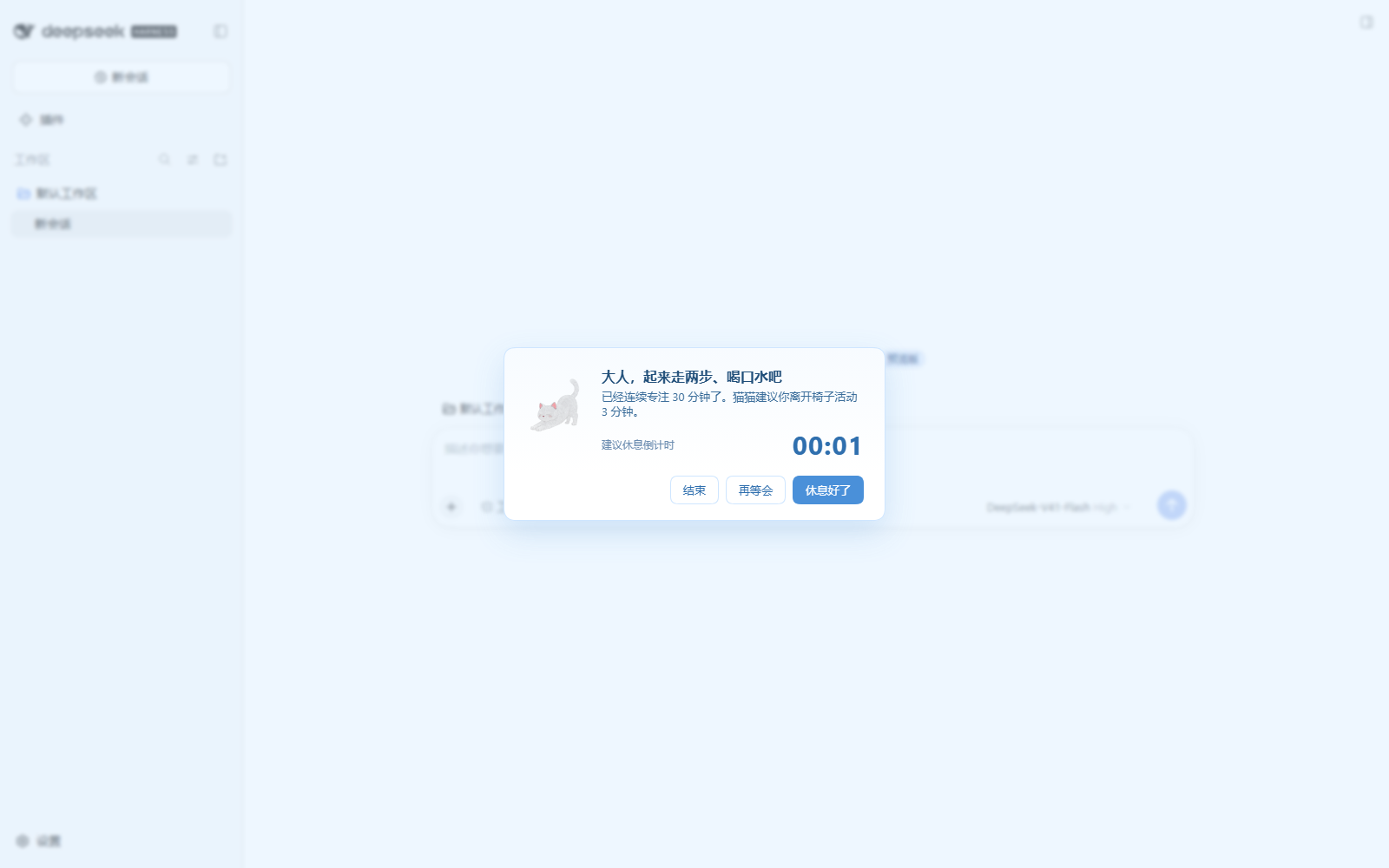
DeepSeek Harness용 앉기/물 마시기 알림입니다. Web GUI 구석에 고양이를 표시합니다. 30~90분 집중 주기가 끝나면 중앙 오버레이와 3회 알림음으로 일어나 걷고 물을 마시도록 알립니다. ‘later’ 버튼은 오래 앉기와 탈수에 대한 출처 있는 실제 사례를 각각 하나씩 보여줍니다(발행처, 날짜, 원문 링크가 있는 17개 항목 내장). 중지 시 작업 시간, 완료 주기, 성공한 중단, 미루기, 권장 음료, 좋음/보통/나쁨 등급을 포함한 세션 보고서를 냅니다. 고양이는 끌어 옮길 수 있고 위치를 기억하며 상태별 애니메이션을 반복합니다. 타이머와 기록은 호스트 측에 있어 페이지를 새로고침해도 주기가 유지됩니다. DSH 페이지가 열려 있을 때만 알립니다. 주기 길이, 알림음 크기, 고양이 불투명도, 등급 기준을 설정할 수 있습니다.
설치
dsh plugin --profile web add github:wangzhanchao883/dsh-no-long-sitREADME
dsh-no-long-sit
A sit-and-water reminder for DeepSeek Harness, delivered by a cat that sits in the corner of the Web GUI. A 30–90 minute focus cycle ends in a centered popup plus a triple chime that gets you up to walk and drink; "later" answers with real sourced cases; "finish" gives you a session report. The cat can be dragged anywhere and loops an animation per state — more capabilities are planned, the reminder is where it starts.
What it does today
The pet
- Bottom-right cat with a looping animation per state:
idle(lying),rise(stretching up),drink(holding a cup),sleep(asleep). Animated WebP, played natively by the browser — no frame timer in the plugin. - Draggable: grab it and drop it anywhere; the position is kept in
localStorage, so it survives a page refresh and a DSH restart. Dragging never opens the menu by accident (a 4 px movement threshold separates a drag from a click). - Pet opacity is configurable (
petOpacity, default0.75). - Missing or half-delivered art degrades to a built-in cat SVG instead of a blank spot.
The reminder (first feature)
- When a focus cycle ends: a centered overlay popup plus a triple chime (synthesized with Web Audio, no audio asset needed; there is a "preview" button in settings).
- Three buttons: 【休息好了】starts the next round · 【再等会】shows cases · 【结束】ends the session.
- When the break countdown finishes it chimes again and asks you to come back; if nobody answers
within
awaitReturnTimeoutMinutes(default 10) the next round starts on its own. - The case window shows exactly one sedentary case and one dehydration case per visit, drawn from a
shuffle bag over a built-in library of 17 entries (each with a real source URL and date): nothing
repeats within a cycle, two consecutive visits never match, and the bag is kept in
localStorage, so a page refresh or a DSH restart continues where it left off instead of starting over at case #1. - The session report gives worked time, completed rounds, successful interruptions, snoozes, suggested drinks and a good/mid/bad grade.
Install
dsh plugin --profile <profile> add dsh-no-long-sit
# restart DSH afterwards: bundle layers are composed at boot
Or from the repository:
dsh plugin --profile <profile> add https://github.com/wangzhanchao883/dsh-no-long-sit
Settings
Settings → Plugins → 猫猫桌宠 · 久坐提醒: address/nickname, focus cycle (30–90 min), break cycle (3–15 min), snooze interval and cap, chime on/off and volume, pet opacity, "come back" timeout, grade thresholds, case refresh, floating pet on/off, and a debug-only time scale. Changes take effect within ~2 seconds.
Two safety valves sit in that card: Restore defaults (two-step confirm — clears every user override in one atomic write and falls back to the schema defaults) and, whenever the debug time scale is below 1, a warning banner with a one-click "back to normal speed" button.
How it works
- Host half (
index.mjs+lib/) owns the authoritative timer and the ledger (<DSH_HOME>/data/dsh-no-long-sit/state.json, atomic writes), the case library, and five read-only routes under/dsh-no-long-sit/. Every route checks for cross-origin calls itself and asset paths go through a whitelist + sanitizer. - Browser half (
client.js) is a classic script (no build step): it registers intoshell.overlay, renders the pet and the three windows, polls the host, and renders the settings card throughctx.configForms. - Timer state is authoritative in the host, so a refresh never loses a cycle; settings are re-read
through
settings.describe()on every entry point, because a settings write does not re-apply a plugin.
Requirements
- DSH
0.1.7–0.2.xwith the Web GUI (webprofile, or the desktop app) - Node.js
^22or>=24
Notes
- The pet only appears while a DSH page is open; when every page is closed there is nothing to pop up on.
- A chime requires one user interaction with the page first (browser autoplay policy) — the plugin unlocks audio on your first click or keypress.
- Case refresh uses the host's web search + host LLM and keeps only entries whose URL came back from the search; if it fails, the old library is kept and the reason is shown in settings.
License
MIT