dsh-idea-mode
yanweiyi11/dsh-idea-mode
JetBrains IDEA agent preset for DeepSeek Harness that adds an IDEA mode with IDE MCP tools plus projectPath, parameter-name, and tool-name compatibility helpers.
설치
dsh plugin --profile web add github:yanweiyi11/dsh-idea-modeREADME
dsh-idea-mode
JetBrains IDEA agent preset for DeepSeek Harness.
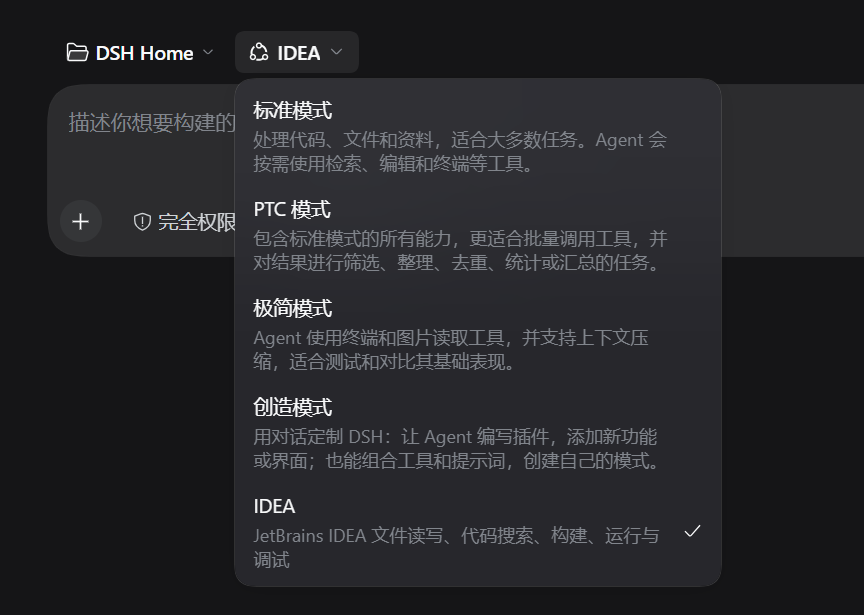
Use IDEA project files, symbol search, builds, run configurations, and debugging directly from DSH. It fits Java, Spring Boot, and Vue projects already open in IDEA.
dsh plugin --profile <profile> add https://github.com/yanweiyi11/dsh-idea-mode
中文说明 · Install · Configuration · Troubleshooting
What it provides
- A new
IDEAagent preset. - IDEA MCP tools registered from
http://127.0.0.1:64342/stream. - A policy layer that keeps IDEA calls usable:
- fills a missing
projectPathfrom the session working directory - normalizes snake_case and camelCase argument names such as
file_pathandfilePath - redirects common tool-name mistakes such as
mcp__IDEA__grepor baresearch_file - appends a short compatibility note to the tool result so the model can use the correct name next time
- fills a missing
- Local DSH
read,glob,grep,write, andeditremain available for files outside the IDEA project. - Optional skills:
idea-database,idea-debug, andidea-refactor. - Reconnect retries when DSH starts before IDEA.
Requirements
- DSH
0.2.2-rc.1or newer. - IntelliJ IDEA
2026.2or newer with the MCP Server plugin enabled. - DSH and IDEA running under the same user on the same machine.
The default MCP endpoint is http://127.0.0.1:64342/stream. Override it with the IDEA_MCP_URL environment variable when the MCP Server uses another port.
Install
From the DSH plugin manager, install dsh-idea-mode and enable the bundle. From the command line, install the GitHub repository:
dsh plugin --profile <profile> add https://github.com/yanweiyi11/dsh-idea-mode
Restart DSH after installation, create or open a session, and select the IDEA preset.
Configuration
The preset is defined in cordis.patch.yml. The policy settings are:
- id: idea-policy
  name: 'dsh-idea-mode/policy'
  config:
    serverName: IDEA
    allowSqlWrite: true
    openAccess: true
serverName: MCP server name. It determines themcp__IDEA__*tool prefix.allowSqlWrite: whentrue, the IDEAexecute_sql_querytool can change data. Use a read-only database account unless writes are intended.openAccess: whentrue, local file tools and all IDEA tools stay visible. Set it tofalseto hide global file tools and router-only IDEA tools.
The shipped defaults are intentionally open. Install this preset only for projects and database connections you trust.
Troubleshooting
- If IDEA starts after DSH, the MCP client keeps retrying. Tools are registered when the connection succeeds.
- If tools are still missing after a long outage, restart DSH or disable and re-enable the plugin.
- If a tool result contains
兼容提示, the call was repaired by the compatibility layer. The note contains the correct tool or argument name. - IDEA must be running with the project open. A missing project or a project outside the current workspace produces an MCP error instead of a silent fallback.
Development
node --check lib/policy.js
node test/policy.test.mjs
License
MIT
中文说明
dsh-idea-mode 是 DeepSeek Harness 的 JetBrains IDEA agent preset。它通过 IDEA 自带的 MCP Server 提供项目感知的文件读写、代码搜索、构建、运行、调试和数据库元数据能力。
主要特性:
- 新增
IDEAagent preset。 - 接入
http://127.0.0.1:64342/stream的 IDEA MCP 工具。 - 自动补全
projectPath,兼容file_path和filePath等参数命名差异。 - 兼容
mcp__IDEA__grep、裸名search_file等常见工具名错误,并在结果中返回一条温和提示。 - 项目外文件继续使用 DSH 本地
read、glob、grep、write、edit。 - 附带
idea-database、idea-debug、idea-refactor三个技能。 - DSH 比 IDEA 先启动时会持续重连,IDEA 启动后自动恢复。
安装前请确认 DSH 版本不低于 0.2.2-rc.1,IDEA 版本不低于 2026.2,并且 MCP Server 插件已启用。
默认配置启用了 openAccess 和 allowSqlWrite。请只在可信项目和数据库连接上使用;执行 SQL 时建议使用只读账号。
MIT License。