dsh-server-manager
yqdnsjs-qq/dsh-server-manager
Manage SSH servers and NAS web UIs from the DSH sidebar, including status probes, Docker control, PVE updates, and 1Panel app versions.
설치
dsh plugin --profile web add github:yqdnsjs-qq/dsh-server-managerREADME
dsh-server-manager

Multi-server operations for DeepSeek Harness: let the agent see, log into, operate and deploy to your servers — with the same connection the panel uses.
中文说明 · Documentation · Security · Changelog
dsh-server-manager is a DSH plugin with two halves that share one configuration:
- Host half — registers ten
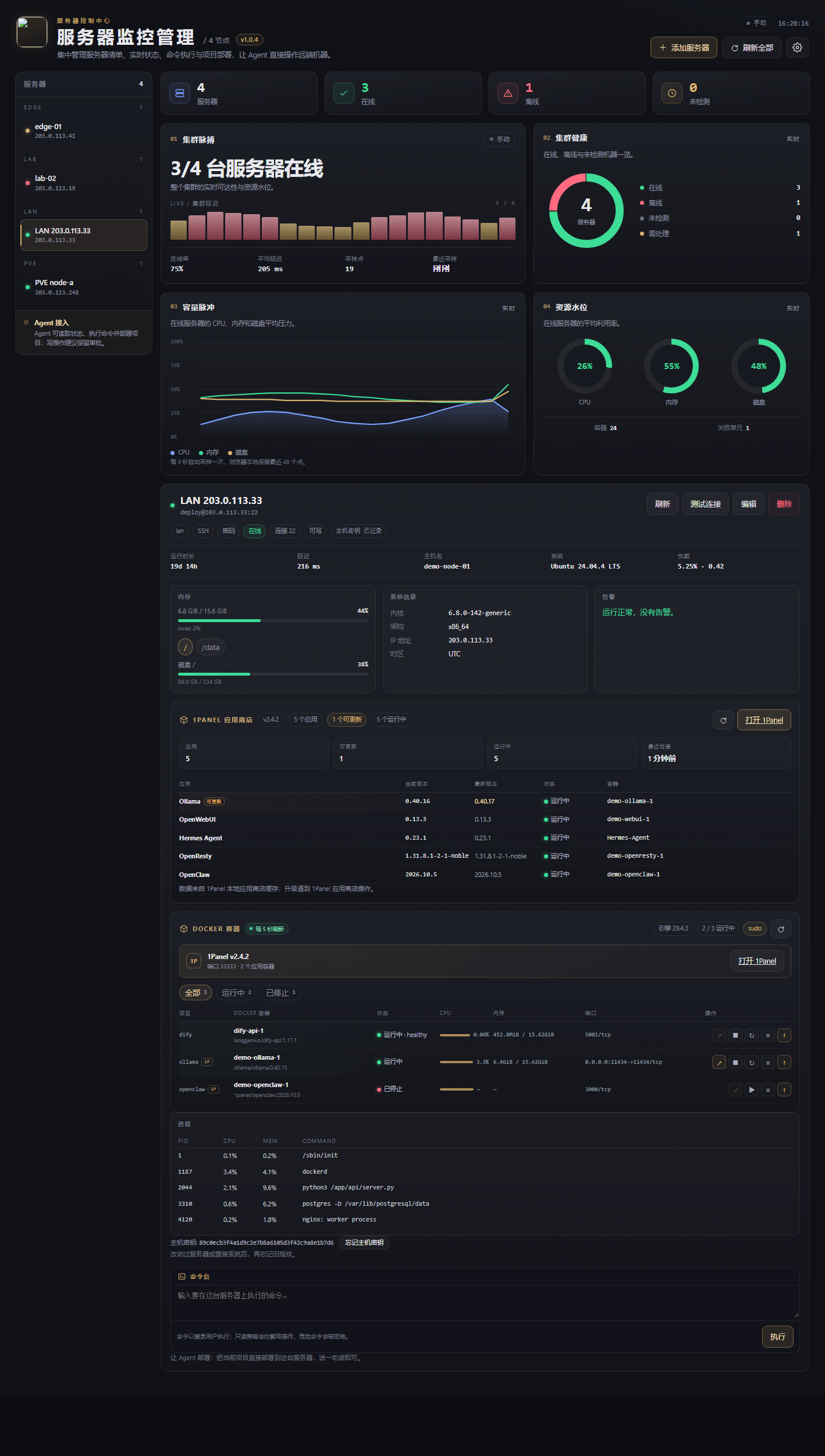
server_*tools for the agent (list, status, exec, transfer, logs, services, Docker, deploy, rollback, config) and an authenticated HTTP API for the dashboard. - Browser half — a first-class Server Deck page (labeled 服务器监控管理 in the sidebar) in DSH's left sidebar: fleet stats, cluster pulse, health ring, capacity trend, resource gauges, the server list, Docker containers, Proxmox VE guests, add/edit forms and a command console.
Everything runs locally: the plugin speaks SSH (ssh2) for servers and the native web APIs for NAS boxes, keeps credentials on your machine, and never sends them to a model.
Why
An agent that can write a project should be able to ship it. This plugin closes that loop:
- The agent writes and builds a project in your workspace.
server_deploypackages it, uploads it over SFTP, extracts it into a timestamped release, swaps acurrentsymlink, runs your post-deploy commands, checks health and prunes old releases.server_statusandserver_logsprove whether it actually worked.server_rollbackputs the previous release back if it did not.
No CI, no pipeline YAML, no copy-pasting scp commands.
Features
- Many servers, one deck — fleet counters, cluster health, capacity trend and per-server cards; probe all with one click.
- Password, private key, or SSH agent — per server. Passwords are stored in an AES-256-GCM vault (
vault:name);env:NAMEandfile:pathremain available for CI. - Live health — uptime, load, CPU %, memory/swap, disks, top processes, Docker containers (and permission errors), failed systemd units, reboot-required.
- Docker deck — every container with state, health, ports, CPU/memory, compose project and 1Panel origin; open its web UI in a new tab, start, stop, restart, pause, tail logs, and upgrade compose services in place. Falls back to
sudo dockerwhen the login user cannot reach the socket. - 1Panel aware, automatically — detects 1Panel on every server (version, port, managed apps/containers, catalog updates) and links to its web UI; no per-server opt-in. The deck works with or without it.
- Proxmox VE aware — read-only VM/CT inventory with state, CPU, memory, disk and uptime, plus node and storage capacity and a one-click jump to the PVE console. Start/stop stays in PVE itself.
- PVE update alerts — reads the cached apt update lists per node, shows pending packages, security count and last check time, and offers an explicit “check updates” action that triggers
pvesh create …/apt/updateonce. - NAS over the web UI — read-only connectors for QNAP QTS, Synology DSM and fnOS. All three sign in with the NAS admin account and expose CPU, memory, uptime and every volume (with a volume switcher), plus one-click launchers for the NAS apps that have a stable web entry point (File Station, Synology Photos, Audio/Video Station, QNAP Photo Station, Container Station, and fnOS path-based apps). fnOS also reads network, Docker containers, installed apps and system-update state through its encrypted WebSocket API. No SSH required.
- 1Panel app-store board — reads 1Panel’s local app database (read-only, with
sudofallback) and lists every installed app with current/latest version, update flag and container status. It never calls the 1Panel API or upgrades an app by itself. - Agent-callable shell — multi-line scripts over
bash -s; exit code, stdout, stderr and duration come back. Optionalsudo -S. - Deploys with releases — atomic-ish
currentsymlink, kept releases, local build step, deploy hooks, HTTP or command health checks, deploy manifests. - Rollback — one call, optional post-commands and health check.
- Seatbelts — per-server read-only mode, command allow/deny lists, built-in blocks for
rm -rf /,mkfs,ddto disks, fork bombs, database drops, and a JSONL audit log of every mutating action. - Host-key pinning (TOFU) — first connection records the SHA-256 fingerprint; a later change is refused instead of silently trusted.
- No runtime dependencies —
ssh2is bundled to ESM at release time; the client half is plain ESM too.
Install
From the plugin manager (local checkout)
plugin_manager install_bundle target=file:/absolute/path/to/dsh-server-manager
From npm
dsh plugin --profile web add dsh-server-manager
Restart or refresh the DSH window, then open 服务器监控管理 (Server Deck) in the left sidebar (next to Plugins, Automation tasks and Self-media workspace).
Requires DSH ≥ 0.2.1 and Node.js ≥ 20.
The plugin has no runtime npm dependencies: ssh2 is pre-bundled to ESM at release time, so
there are no install scripts, no native build, and no compiler needed. If you install from a source
checkout with npm install, ssh2 is present as a dev dependency only for rebuilding that bundle.
Quick start
-
Open 服务器监控管理, click Add server, fill host / user / password (or key), save.
-
Click Refresh — the node turns green with load, memory, disk and uptime.
-
Ask the agent:
Check all my servers and tell me which one is unhealthy.
It will call
server_statusand summarize. -
Deploy something:
Build this project and deploy it to prod at /opt/apps/shop, run
npm ci --omit=dev, then check http://127.0.0.1:3000/health. Roll back if the health check fails.The agent calls
server_deploy, reads the step report, and usesserver_rollbackif needed.
Tools
| Tool | What it does |
|---|---|
server_list | List configured servers, policy, host-key trust and cached status. |
server_status | Probe one or every server (uptime, load, CPU, memory, disks, Docker, systemd). |
server_exec | Run a shell script over SSH; returns exit code, stdout, stderr. |
server_transfer | Upload or download a single file over SFTP. |
server_logs | Tail journalctl, Docker logs, or a file. Read-only safe. |
server_service | Inspect/control systemd units, Docker containers, compose projects. |
server_docker | Live container inventory (state, health, ports, stats, compose project); start/stop/restart/pause, logs, compose upgrade. |
server_deploy | Package → upload → release → hooks → health → prune. |
server_rollback | Move current back to a previous release. |
server_manage | Add/update/remove/test/import servers; forget a pinned host key. |
Full parameter reference: docs/tools.md.
Configuration
Configuration lives in ~/.dsh/server-manager/ ($DSH_HOME/server-manager when set):
| File | Purpose |
|---|---|
servers.json | Servers, defaults, policy (mode 600 on POSIX). |
known_hosts.json | Pinned host-key fingerprints. |
status-cache.json | Last probe result per server. |
audit.jsonl | Append-only audit trail, rotated at 5 MiB. |
Minimal servers.json:
{
  "version": 1,
  "servers": [
    {
      "id": "prod-web",
      "name": "Prod web",
      "host": "203.0.113.10",
      "port": 22,
      "username": "deploy",
      "auth": "key",
      "privateKeyPath": "~/.ssh/id_ed25519",
      "policy": { "readOnly": false }
    }
  ]
}
Prefer references over literals:
{ "password": "env:PROD_SSH_PASSWORD" }
{ "password": "file:~/.secrets/prod-web" }
Details: docs/configuration.md.
Safety model
This plugin intentionally grants real shell access — that is the point. The guardrails are:
- Read-only servers refuse exec/transfer/deploy/service but still allow status and logs.
- Danger rules block the commands that are almost always catastrophic unless the server opts in with
allowDangerous: true. - Allow/deny lists let one server expose only e.g.
^systemctl status, while another stays open. - Host keys are pinned. A changed key is a hard failure.
- Every mutating action is audited locally with the actor, target, command, exit code and duration.
- Secrets never reach the model. Tools return redacted projections; credentials are resolved only inside the connection layer.
Read docs/security.md before pointing this at production.
Development
npm install --ignore-scripts
npm test              # node:test, no network required
npm run check         # syntax check for host and client bundles
npm run build:vendor  # regenerate src/vendor/ssh2.js after upgrading ssh2
Layout:
src/        host half (config, ssh, probe, deploy, tools, routes)
client/     browser half (sidebar panel, plain ESM)
test/       unit tests with fake transports
docs/       user and maintainer documentation
examples/   sample configuration
See CONTRIBUTING.md.
Compatibility
Tested against the DSH desktop 0.2.2-rc.x line on Windows 11 with an Ubuntu 24.04 target (password auth), including deploy, rollback and file transfer. Key and SSH-agent auth use the same ssh2 paths; macOS/Linux hosts should work but are less exercised — please report issues.
License
MIT © dsh-server-manager contributors