dsh-mcp-manager
zhang-guo-wen/dsh-mcp-manager
MCP server management for DeepSeek Harness: author composition rows, choose when an allowed server loads, and filter which of its tools a session may call
설치
dsh plugin --profile web add github:zhang-guo-wen/dsh-mcp-managerREADME
description: "MCP server management for DeepSeek Harness: author composition rows, choose when an allowed server loads, and filter which of its tools a session may call." kind: "plugin-readme"
@guowenzhang/dsh-mcp-manager
中文 | English
Background: DeepSeek Harness
DeepSeek Harness (dsh) is the open-source agent harness from DeepSeek AI, where nearly every capability is a plugin on Cordis. It is in developer preview and iterating fast, so expect compatibility-breaking changes (docs, 0.1.7-alpha.*); this plugin is a standalone third-party package that resolves @deepseek-ai/* from the running host.
The problem this plugin solves
MCP servers were hand-written composition rows whose whole tool set always sat in context, and an existing Claude Code setup had to be retyped; this plugin manages the rows from the settings page, loads a server on demand with only the tools you pick, and imports your Claude MCP configuration in one click.
Screenshots
设置 → MCP 管理 — loading modes and server rows
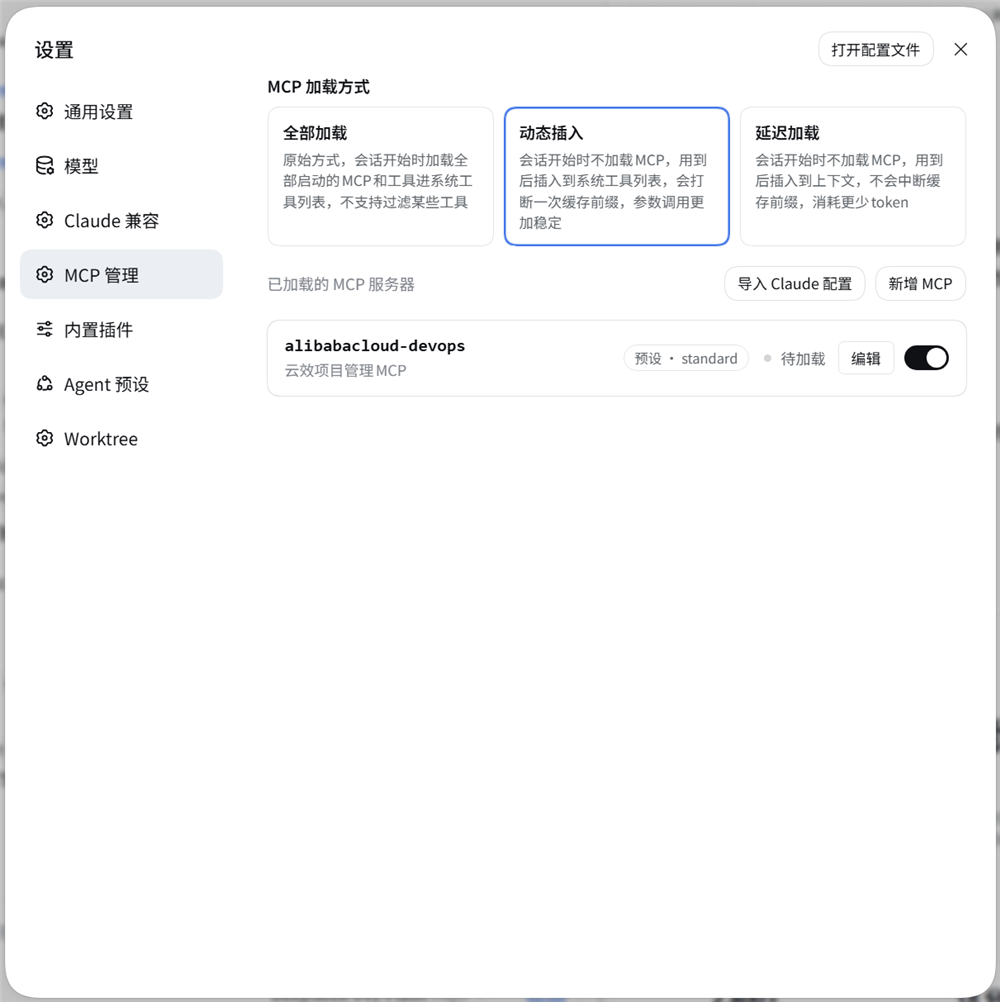
The three loading modes and the configured servers, each row carrying its plane, live status, Edit, and enable switch.
新增 MCP — the JSON configuration and the tool picker
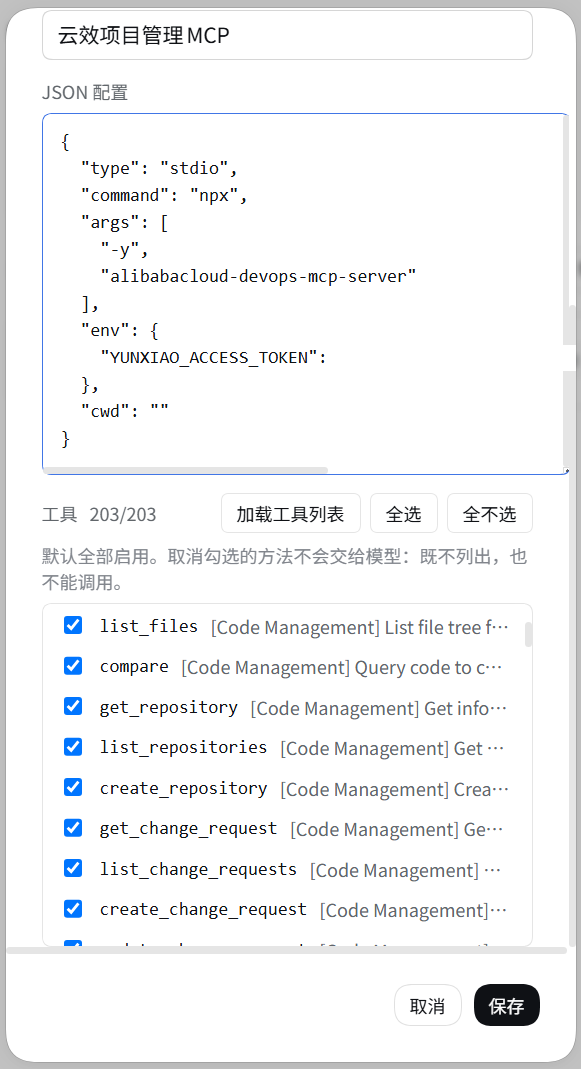
A server's JSON configuration, and the tools it publishes: every one is ticked by default, and an unticked method never reaches the model.
导入 Claude MCP 配置 — pick the servers to bring over
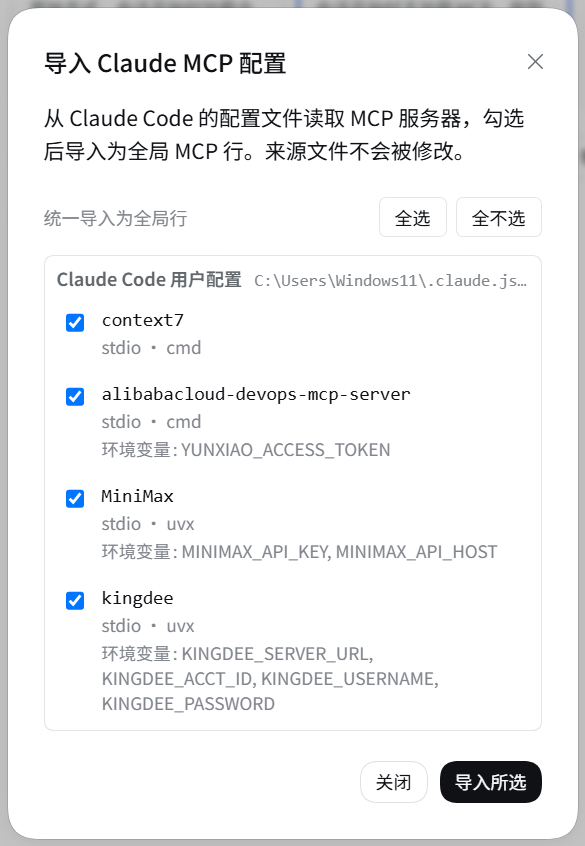
Every MCP server found in the Claude Code configuration files; the ticked ones are imported as global rows.
Install
npx @deepseek-ai/dsh plugin --profile web add @guowenzhang/dsh-mcp-manager
From the npm registry: https://www.npmjs.com/package/@guowenzhang/dsh-mcp-manager — restart the host afterwards; local checkouts, git sources and troubleshooting are in AGENTS.md.
Usage
Loading modes
The enable switch says whether a server may be used; the mode says when an allowed server enters context. Set it in 设置 → MCP 管理 → MCP 加载方式; the choice is stored in the mcp-manager settings namespace and applies from the next request on.
| Mode | Behavior |
|---|---|
Load all (eager) | Allowed servers mount at session start; their tools are always in the request |
Dynamic insert (dynamic, default) | They stay unmounted; mcp_load mounts one into the calling session — best tool binding, but the tool list changes once per load. A filtered row mounts only its visible tools |
Lazy (lazy) | mcp_load connects without registering anything and returns the tool schemas, called through the fixed mcp_call proxy — the tool list never changes, so the request-cache prefix is never invalidated |
Under dynamic / lazy the system prompt lists every loadable server as name — the description you wrote on its row, and the model calls mcp_load / mcp_unload by name. Names are always listed; descriptions are truncated to 80 characters under a 900-character budget. Load state is deliberately absent — reporting it would rewrite the system prompt on every mcp_load and invalidate the whole cache prefix.
Connections are per-session: a repeated mcp_load reuses one, different sessions each get their own, and a session that ends closes what it opened; eager shares one standing instance instead. Toggling a row shows a brief starting / stopping state while the child process comes up.
Tool filters
Settings → MCP 管理 → a row's Edit → the Tools tab lists every method the server publishes, all checked. Unchecking one hides it: it never enters context, and calling it is refused. Filtering does not change the cost model — the loading mode decides that.
For wildcards, write the rules yourself in the mcp-manager settings under tools, keyed by the row key (preset:<preset id>:<serverName>):
| Form | Meaning |
|---|---|
create_workitem | Allow list: one entry without ! keeps only matching tools |
!delete_* | Deny list: when every entry starts with !, matching tools are hidden |
*, ? | Wildcards: * matches any run of characters, ? matches exactly one |
Rules are read at the next mcp_load; an already-loaded server keeps the tools it was admitted with. eager ignores filters, and an unparsable rule set hides nothing.
Importing a Claude Code configuration
设置 → MCP 管理 → 导入 Claude 配置 reads the files Claude Code writes and offers every server it finds as a checklist; ticked servers are imported as global rows.
| Source | File |
|---|---|
| Claude Code user config | ~/.claude.json → mcpServers |
| Per-directory scope inside it | ~/.claude.json → projects["<working directory>"].mcpServers |
| Claude Code settings | ~/.claude/settings.json, settings.local.json |
| Project scope | <project root>/.mcp.json |
Nothing is modified — the scan only reads — and each server is imported on its own, so one failure does not stop the rest. env / headers come along so the server can connect, but the dialog shows only those keys' names.
Notes and caveats
- Enabling a server still waits on the child process (
npx -y …/uvx …, usually 1–3 seconds). The UI never blocks; installing the server as a direct executable shortens this noticeably. - Switching to the edit dialog's Tools tab connects to that server once (to list its tools), with the same 1–3 second cost; renaming a row only never connects.
- Global-plane rows ignore the loading mode: they always mount.
- A preset's first mount starts and then kills each server once. On-demand loading works by unmounting rows at runtime, which cannot beat the child process's spawn, so the first session to use a preset after a host restart pays one short start-up.
- Import reads Claude Code and the project
.mcp.jsononly. Cursor, Cline, Roo, and VS Code configuration files are not scanned, and an import always targets the global plane; move a row into a preset afterwards if you want it on-demand. - A filtered row under
dynamicgets no server instructions and no resource tools. The harness's mcp-client provides both, and this row registers through the plugin's own carrier instead. The tools themselves — argument binding, results, image projection — match a native mount.
License
Apache License 2.0 — see LICENSE. This project includes MIT-licensed portions derived from DeepSeek Harness; see NOTICE.
Further reading
- AGENTS.md — full install variants, build and wiring, deployment and live-update semantics, release steps, the traps, and the tests.
- docs/design-decisions.md — why three loading modes, which alternatives were rejected, and how Claude's tool search compares.
- docs/competitive-landscape.md — comparison with other DSH MCP plugins and the feature roadmap it produces.
- DeepSeek Harness documentation.