no-ai-style
01ngvi-qingyi/no-ai-style
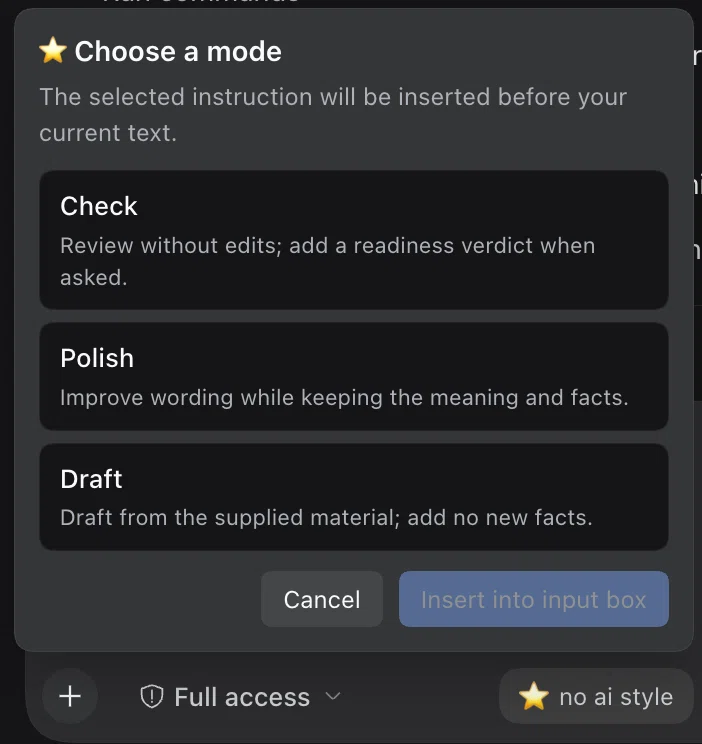
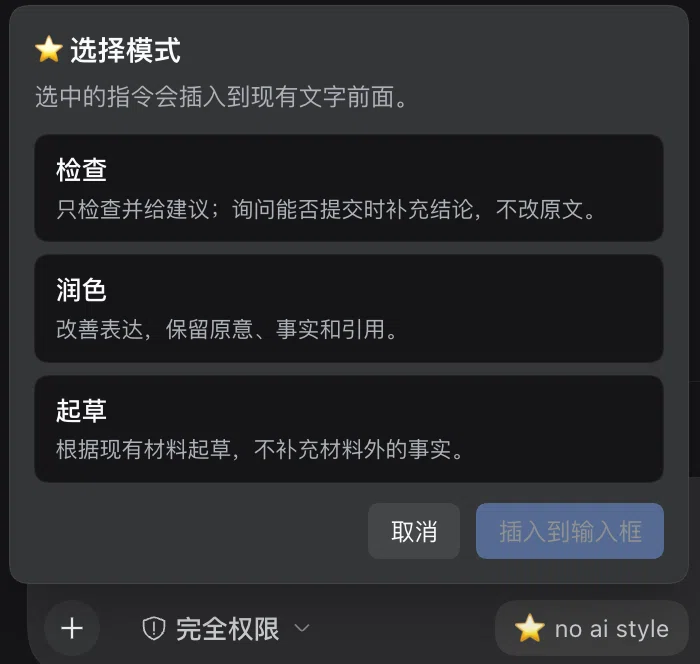
Prose-editing skill for academic and professional writing. The composer offers three modes: Check — review and suggest without editing, with a verdict when readiness is asked; Polish — improve the wording while keeping the meaning, facts and citations; Draft — draft from the supplied material without adding facts.
Install
dsh plugin --profile web add github:01ngvi-qingyi/no-ai-styleREADME
No AI Style
Natural writing. Faithful meaning.
An agent skill and DeepSeek Harness plugin for academic and professional writing




What it does
It removes the phrasing that makes a text read like a template — the throat-clearing, the stacked hedges, the self-justification — and leaves the claims alone. Facts, numbers, citations, methods and limitations survive as written, and the voice stays yours.
Before — For clarity, it should be mentioned that the device supports two USB ports.
After — The device supports two USB ports.
The three modes
| Mode | Name | What you get |
|---|---|---|
audit | Check | Findings and suggestions only. Ask whether it is ready to submit and you also get a verdict and the unresolved issues. The source file is never touched. |
revise | Polish | An edited version within the scope you asked for. |
compose | Draft | A draft built from the notes and evidence you supplied. |
Light editing is the default; ask for a stronger rewrite when you want one. The skill follows the language of the text and leaves passages that already work untouched.
Use no-ai-style to check this.
Use no-ai-style to polish it.
Use no-ai-style to draft from these notes.
Two markers keep it honest: [EVIDENCE GAP] flags a claim that needs a source and blocks a ready verdict, and [INTERPRETATION FLAG] flags a reading the author should confirm.
In the composer
The DSH plugin adds a ⭐ no ai style button to the input row. Pick a mode and the matching instruction lands at the front of your draft — in the interface language, Chinese, English or Japanese — with whatever you already typed left intact.
Insertion is undoable. A draft that carries file or command references is refused rather than flattened, so those references survive.
Install
DeepSeek Harness
From the app: Settings → Plugins → add github:01NGVI-QINGYI/no-ai-style, then restart.
From the CLI — --profile is the profile you actually run, web for the dsh web build and desktop for the desktop app:
dsh plugin --profile web add github:01NGVI-QINGYI/no-ai-style
The plugin registers its own skill provider, so the skill reaches every session in that profile without touching your project, custom or user skill roots.
Prefer the skill on its own, without the plugin?
Run this inside your DSH project; it installs to .agents/skills:
npx skills add 01NGVI-QINGYI/no-ai-style --agent universal --copy
Any other agent
npx skills add 01NGVI-QINGYI/no-ai-style
Choose your agent when prompted. Omit --global for a project install.
Per-agent commands
| Agent | Command |
|---|---|
| Codex | npx skills add 01NGVI-QINGYI/no-ai-style --global --agent codex |
| Claude Code | npx skills add 01NGVI-QINGYI/no-ai-style --global --agent claude-code |
| Cursor | npx skills add 01NGVI-QINGYI/no-ai-style --global --agent cursor |
| Pi | npx skills add 01NGVI-QINGYI/no-ai-style --global --agent pi |
To install by hand, copy skills/no-ai-style/ into your agent's skills directory.
Optional checks
Two local scripts, Python 3.9+, no dependencies. Run them from the repository root:
python3 skills/no-ai-style/scripts/audit_prose.py draft.md --lang auto
python3 skills/no-ai-style/scripts/compare_anchors.py before.md after.md --format json
Neither uploads text. Findings still need a human read: an unclosed comment or code fence produces a warning, and --strict turns missing-evidence markers or unclosed markup into exit code 1.
License
MIT · skill v1.0 · DSH plugin v1.2.2 · by 01NGVI-QINGYI
The goal is readable, faithful prose, not AI-detector evasion. Full rules are in SKILL.md.
Related plugins
auto-claude-code-research-in-sleep
wanshuiyin/auto-claude-code-research-in-sleep
archify
tt-a1i/archify
dsh-web (dsh-skill-explorer)
zhu1090093659/dsh-web
dsh-web-ui (dsh-skill-explorer)
zhu1090093659/dsh-web-ui