dsh-my-plugins
7gzgn/dsh-my-plugins
See what you actually installed: a chip shows how many plugins your profile really loads, and a searchable panel lists every one with its version, its author-written one-liner, and whether it is built-in or third-party. Read-only, zero config.
Install
dsh plugin --profile web add github:7gzgn/dsh-my-pluginsREADME
dsh-my-plugins(我装的插件)
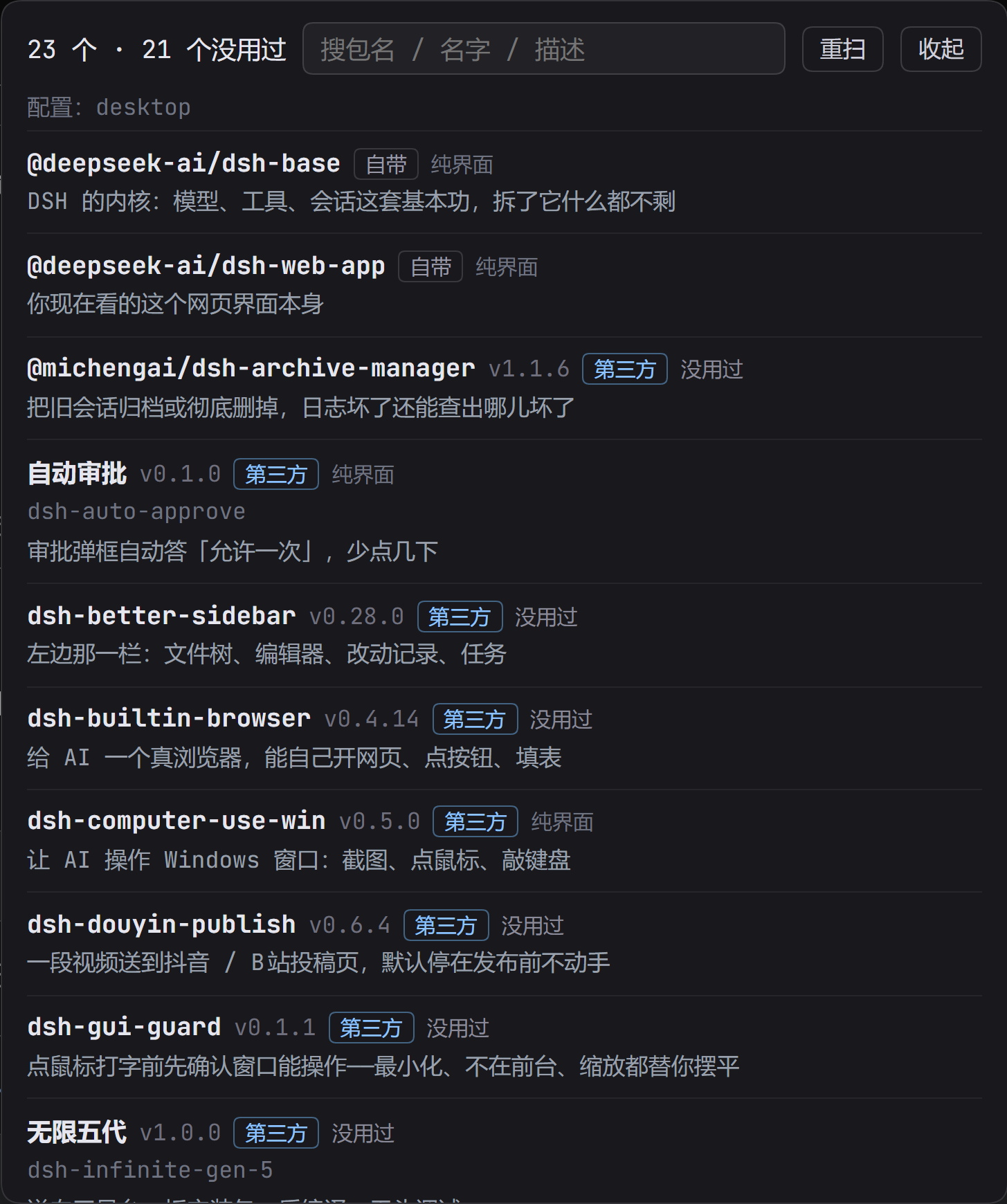
顶栏一颗药丸:「我装的插件 · 23」。点开是你这个 DSH 到底装了什么。
每个插件一行:它的名字、版本、作者自己写的一句作用,自带的还是第三方, 带搜索框——装到三十几个以后靠翻是翻不完的。
为什么会有这个东西
装了二十几个插件之后,界面上的变化你天天看得见,但谁也说不清到底装了什么: 市场里点过的、朋友推荐的、自己 link 进来的,全混在一起。
所以这颗药丸只回答一个问题:我现在到底装了什么,它们各自是干什么的。
它怎么知道
读 当前 profile 的 package.json——dsh.profile.bundles 是真正被加载的名单,
dependencies 给声明的版本,实装版本看 node_modules/<包名>/package.json。
不去扫目录猜,也不用你填任何东西。插件的一句话作用取自它自己的 package.json,
作者怎么写就怎么显示,我们不替它编、不翻译、不打分。
安装
dsh plugin --profile web add dsh-my-plugins
或者从市场里点安装。
你会看到什么
- 顶部药丸:
我装的插件 · N,N 是实际加载的插件数(不含自己) - 面板:
N 个 · 第三方 M - 每行:名字 · 版本 ·
自带/第三方· 一句描述 - 搜索框:按包名、名字、描述都能搜
- 「重扫」按钮:刚装完新插件不想重启时,强制重读一次
边界
- 只读:不改 profile、不动插件文件、不联网
- 一个无参 GET 接口
/dsh-my-plugins/report,60 秒缓存,?force=1强刷 - 读不到某个包的
package.json时留空,不报错、不影响其他行
已知的限制
- 只在 web / desktop 界面有这个药丸;纯 CLI profile 看不到(但接口在)
- 显示的是"被加载的插件",不含 DSH 内置的宿主能力
- 第三方插件的描述如果是英文,就显示英文——那是作者写的,我们不改
License
MIT
Related plugins
dsh-web (dsh-task-board)
zhu1090093659/dsh-web
dsh-web (dsh-web-all)
zhu1090093659/dsh-web
dsh-web-ui (dsh-task-board)
zhu1090093659/dsh-web-ui
dsh-web-ui (dsh-web-ui-all)
zhu1090093659/dsh-web-ui