dsh-shortcut
9087/dsh-shortcut
DeepSeek Harness plugin: saved shortcuts (name + target agent + text) with a workspace/session/agent tree picker, a sidebar menu that delivers a shortcut's text to its target without switching sessions, and per-message capture from user bubbles
Install
dsh plugin --profile web add github:9087/dsh-shortcutREADME
dsh-shortcut
English | 中文



Shortcuts for DeepSeek Harness: save a message together with its target — a session, or one agent inside it — and send it there with one click.
Features
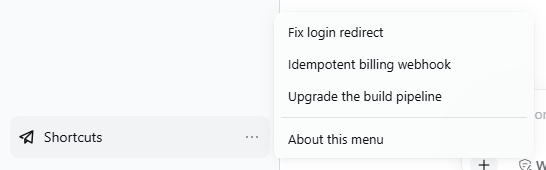
- A Shortcuts row in the sidebar-foot list above Settings. Its menu groups every saved shortcut into the session you are looking at, any-session shortcuts, and the others; pressing one sends its text to that shortcut's target.
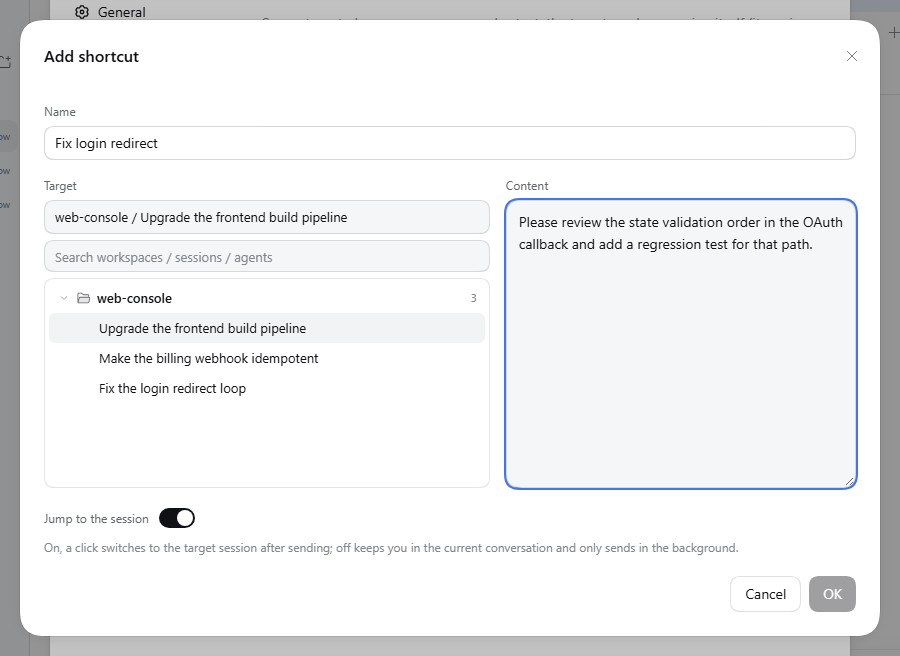
- An add/edit switch, Sendable to any session, makes a shortcut deliver to whatever conversation you have open when you trigger it — that conversation itself, so a subagent opened on its own receives it too — instead of the one it was captured from. While the switch is on, the target list is shown but locked, and its path line reads Any session.
- After sending, the target session opens by default. A per-shortcut Jump to the session switch (in the add/edit dialog) can turn that off and keep the old background-only delivery.
- The target is picked from an inline tree: workspace → session → the session's main agent, a continuable subagent, or an agent-team member.
- Add shortcuts from any of your messages ("Add to shortcuts", left of the copy control), or manage them all under Settings → Shortcuts (add, edit, retarget, delete).
- Records live in
$DSH_HOME/shortcut/entries.json; delivery failures are reported with a reason.
Install
dsh plugin --profile web add dsh-shortcut
From a checkout, add the directory instead: dsh plugin --profile web add /path/to/dsh-shortcut.
Then restart dsh web and refresh the page.
Usage
- Hover one of your messages and press Add to shortcuts, or open Settings → Shortcuts and press Add shortcut.
- Pick the target in the tree — press a session for its main agent, or expand it for a subagent or team member — then fill in the prompt and confirm. Generate from prompt, beside the name, asks the model for a short title for that prompt and puts it in the name field (available once the prompt has text; with no model configured, or on failure, it falls back to the prompt's first line instead of getting stuck).
- Press that row in the sidebar menu: the message is sent to its target.
Notes
- Built and tested against
@deepseek-ai/dsh0.2.0-rc.2. - A session's main agent is delivered through the host Session Controller; a subagent or team member through the host subagent runtime, because that is the only way to address a child session.
- "Add to shortcuts" is injected next to the copy control (the chat shell exposes no slot there), so
a future DSH chat redesign may need
src/client/bubble-capture.tsupdated.
Development
Setup, tests, E2E and pitfalls: DEVELOP.md. Publishing: PUBLISH.md. Changes: CHANGELOG.md.
License
MIT — see LICENSE.
Related plugins
dsh-web (dsh-task-board)
zhu1090093659/dsh-web
dsh-web (dsh-web-all)
zhu1090093659/dsh-web
dsh-web-ui (dsh-task-board)
zhu1090093659/dsh-web-ui
dsh-web-ui (dsh-web-ui-all)
zhu1090093659/dsh-web-ui