dsh-autopilot-harness
adamsshen/dsh-autopilot-harness
Adds a plan-then-execute loop to DSH: /autopilot-on runs grill rounds and writes brief, plan and checklist files, /autopilot-run works the checklist item by item, and after a product-code edit the plugin intercepts the turn boundary and steers the agent through rotating self-review rounds before advancing.
Install
dsh plugin --profile web add github:adamsshen/dsh-autopilot-harnessREADME
Autopilot Harness for DeepSeek Harness (DSH)


Structured planning → checklist execution → multi-lens self-review inside DeepSeek Harness, as an in-process DSH plugin.
Part of the Autopilot Harness family. Core engine:
@autopilot-harness/core.
What it does
Autopilot intercepts DSH's turn boundary (agent/turn-stopping). After the agent edits product code, instead of stopping and waiting for you, it injects a follow-up and keeps going through five rotating review lenses. When the checklist item is clean, it advances — local commit, no auto-push.
/autopilot-on  →  grill rounds  →  brief / plan / checklist
       ↓
/autopilot-run →  per item: implement → fix → confirm×N → advance
       ↓
done (checklist clear)
| Lens | Round |
|---|---|
| Correctness & invariants | 1 |
| Nulls, boundaries & error paths | 2 |
| Concurrency, races & partial failure | 3 |
| Security & trust boundaries | 4 |
| Test gaps & regression (read-only) | 5 |
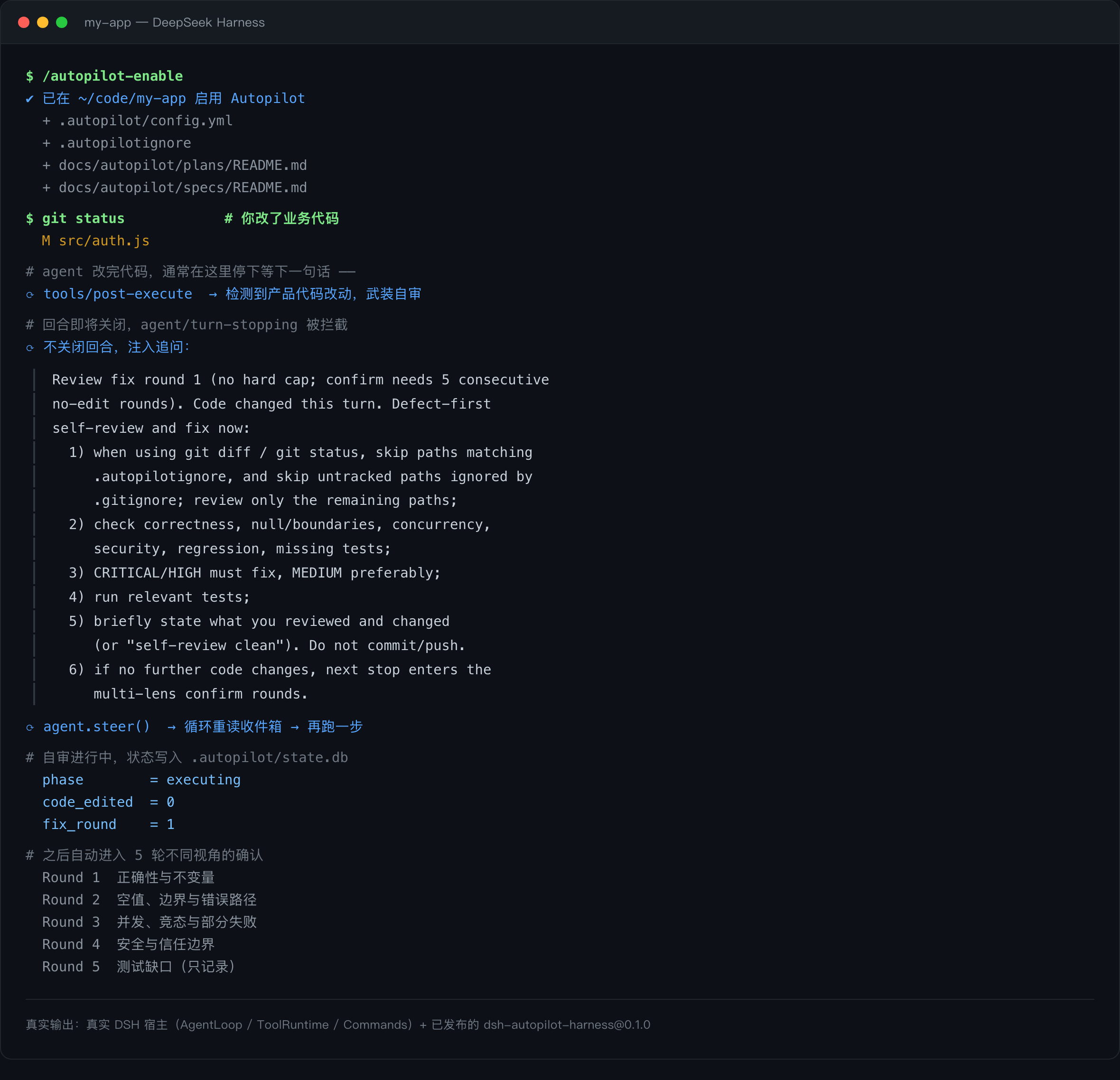
Real output: a real DSH host running the published dsh-autopilot-harness@0.1.0.
Why "Harness", and how this differs from other DSH Autopilot plugins
Several DSH plugins use the word autopilot. This one is the DeepSeek Harness port of Autopilot Harness — an engine that already ships for Cursor, Claude Code, Codex, Kimi, Copilot CLI, Grok, Gemini CLI, Factory Droid, Hermes, Antigravity, Pi, Devin, and a runner. What that background buys you:
| This plugin | A generic "keep going until done" loop | |
|---|---|---|
| Where it intervenes | At the turn boundary, only when a product-code edit happened | Continuously, regardless of what changed |
| What it does at that boundary | Runs five rotating review lenses, each with a different focus | Repeats the same instruction until the task looks finished |
| What it debugs from | Diffs, invariants, error paths, races, trust boundaries, test gaps | The agent's own claim of completion |
| Planning | /autopilot-on runs grill rounds and writes brief.md / plan.md / checklist.md | Usually none — one prompt, one loop |
| Progress record | checklist.md in the repo, plus a SQLite state DB | In-context only; lost on restart |
| State boundary | Per project, keyed by the session's working directory | Often per process |
| File discipline | Writes nothing until you run /autopilot-enable | Varies |
The practical difference: a plain continuation loop makes the agent talk longer. Autopilot makes it look again from an angle it was not using — then move on.
What it deliberately does not do
- Not a task manager. No board UI, no sprint planning. It is a checklist plus an execution FSM.
- Not a test framework. Lens 5 records test gaps; it does not invent test suites.
- Not autonomous overnight work. Every advance is grounded in an edit you can review.
- No network, no credentials, no telemetry. See Compatibility and permissions.
Quick start
# ① 安装(一次性)
dsh plugin --profile web add dsh-autopilot-harness

# ② 把下面这行加进 ~/.dsh/profiles/web/package.json 的 dsh.profile.bundles
#    "dsh-autopilot-harness"

# ③ 完全退出 DSH 再打开(Node 模块缓存需要重启)

# ④ 在目标项目的会话里启用(每个项目一次)
/autopilot-enable
到这里就生效了。最直接的验证方式:随便改一个源文件,然后什么都不说。几秒后 agent 应该自己开始自审——那就是 Autopilot 在工作。
想做一件有规划的功能,再走清单模式:
/autopilot-on user-login · 实现手机号+验证码登录
     ↓  回答几轮提问
     ↓  产出 docs/autopilot/plans/user-login/{brief,plan,checklist}.md
/autopilot-run
     ↓  逐项实现 → 自审 → 勾掉 → 本地 commit
Install
From npm — recommended; this is what the DSH plugin center installs:
dsh plugin --profile web add dsh-autopilot-harness
From source (works even before an npm release):
dsh plugin --profile web add github:AdamsShen/dsh-autopilot-harness
dist/ is committed, so the source install needs no build step.
plugin add only installs the dependency. It does not append the bundle entry — add it by hand in ~/.dsh/profiles/<profile>/package.json:
{
  "dsh": {
    "profile": {
      "bundles": [
        "@deepseek-ai/dsh-base",
        "@deepseek-ai/dsh-web-app",
        "dsh-autopilot-harness"
      ]
    }
  }
}
Verify composition:
dsh --profile <profile> --dump-config | grep autopilot-harness
Then fully restart DSH.
Installing the plugin creates no project files. Enabling is explicit — see below.
Enable a project
Inside a session for the project you want to instrument:
/autopilot-enable
If @autopilot-harness/cli is installed (globally or in the project), this runs the full init. If it is not, the plugin performs a minimal local init instead — so /autopilot-enable works out of the box.
| Full init (CLI present) | Minimal init (CLI absent) | |
|---|---|---|
.autopilot/config.yml | ✅ | ✅ |
.autopilotignore | ✅ | ✅ |
docs/autopilot/{plans,specs} | ✅ | ✅ |
docs/autopilot/workflows, quickstart.md | ✅ | — |
.autopilot/bin/ (vendor runtime + migrations) | ✅ | — (unused by DSH) |
state.db is created lazily on first real use either way.
Full init tree:
<project>/.autopilot/
├── config.yml      settings
├── state.db        SQLite: sessions, review chains, checklist progress
├── pin.json        version anchor
└── bin/            hook runtime + migrations
<project>/docs/autopilot/
├── plans/          brief.md / plan.md / checklist.md
├── specs/          cross-track behaviour specs
└── workflows/      planning + executing guidance
Until .autopilot/config.yml exists, every Autopilot hook is a no-op for that project. A stray state.db alone does not count as enabled.
Commands
| Command | Effect |
|---|---|
/autopilot-enable | Run init for the current project (only command that writes to disk) |
/autopilot-on [slug · brief] | Enter planning; grill rounds produce brief/plan/checklist |
/autopilot-run | Execute the checklist item by item |
/autopilot-off | Pause |
/autopilot-replan | Revise the plan |
/autopilot-resume | Resume execution |
Text triggers work too, matched at line start: Autopilot ON, Autopilot RUN, Autopilot OFF, Autopilot RESUME, Autopilot REPLAN, 开启自动驾驶, 开始执行, …
/autopilot-on argument rules:
- a single slug-shaped token → track name:
/autopilot-on user-login - anything else → treated as the brief; the slug is generated later
- both → separate with
·(middle dot):/autopilot-on user-login · add phone login
Configuration
Project-level, in <project>/.autopilot/config.yml (takes effect on the next operation, no restart):
review:
  scope: project        # project = any product-code edit; executing_only = only during RUN
  confirm_rounds: 5     # 5 = full lens set; 3 = light (lenses 1→2→5)
  verify:
    enabled: false      # run test commands and record the result
  stuck:
    max_idle_stops: 5
  errors:
    max_before_pause: 0 # 0 = never pause on errors
    recover: true
Plugin-level, in the profile's bundle entry:
| Option | Default | Meaning |
|---|---|---|
autoInit | false | Initialise automatically. Keep false; prefer /autopilot-enable. |
maxSteerPerTurn | 32 | Max continuations per turn (loop guard). |
projectRoot | (empty) | Pin the project root. Normally leave empty — the project is resolved from the session's own working directory. |
DSH port mechanics
Every other host blocks its stop event with a decision object. DSH has no such decision: agent/turn-stopping is a serial hook, and continuation is a data side effect.
// this port's stop result — not { decision, reason }
interface DshStopResult { steerMessage?: string }
The plugin calls agent.steer(message); DSH's loop re-reads its inbox and runs another step. DSH publishes no stop-continue cap, so this port does not clamp review.confirm_rounds.
Two consequences worth knowing:
turn-stoppingfires multiple times per turn with an unchanged turn number — rounds are tracked internally, never derived frompayload.turn.- There is no
hooks.json. Hooks are registered in code viactx.on(...)insideapply(ctx);cordis.patch.ymlonly makes DSH load the plugin.
Project boundary
DSH installs plugins globally, so one host process serves sessions from many projects. process.cwd() is the host directory, not the project. This port resolves the project from the session's own working directory (session.header.cwd) and caches state per project root — two sessions in two projects get two independent .autopilot/ trees.
Compatibility and permissions
| Capability category | Workflow & automation (工作流与自动化) |
| DSH target | >=0.2.1-rc.2 <0.3.0 (declared as engines.dsh) |
| Platforms | macOS / Windows / Linux — pure Node.js, no native code |
| Profiles | Any DSH profile; examples use web |
| Network | None. The plugin makes no outbound requests. |
| Filesystem | Writes only inside an explicitly enabled project: .autopilot/, docs/autopilot/, .autopilotignore. Never writes before /autopilot-enable. |
| Credentials | None. No API keys, no tokens. |
| External services | None |
Requirements
- Node.js ≥ 22
- DSH ≥ 0.2.1-rc.2 (< 0.3.0)
- Optional:
@autopilot-harness/clifor the fullinittree (vendor runtime, migrations, workflow docs). Without it,/autopilot-enablefalls back to a minimal local init that writes only what DSH uses.
Development
npm install
npm run typecheck
npm test               # unit tests (44)
npm run test:e2e       # boots a real DSH host, 23 assertions
npm run build
npm run check          # all of the above + npm pack --dry-run
tests/e2e/ runs the built plugin inside a real DSH host (real AgentLoop, ToolRuntime, Commands) rather than calling handlers directly. It is what catches host-version drift — see tests/e2e/README.md.
Layout
| File | Role |
|---|---|
src/index.ts | Pure adapters — no @deepseek-ai/* imports, fully unit-testable |
src/plugin.ts | DSH plugin entry (name / Config / apply); only file touching DSH types, via import type |
src/auto-init.ts | Optional auto-initialisation with safety guards |
src/dsh-events.d.ts | Minimal local event contracts so DSH stays an optional peer |
cordis.patch.yml | Loader entry DSH composes into the profile |
Publishing
npm run check
npm publish            # prepack runs the build
files ships dist/, cordis.patch.yml, assets/, and the READMEs.
License
MIT — see LICENSE.
Related plugins
webnovel-writer
lingfengqaq/webnovel-writer
loopx (dsh-loopx-plugin)
loopx-project/loopx
ouroboros (dsh-plugin)
q00/ouroboros
loopx (dsh-loopx-plugin)
huangruiteng/loopx