dsh-video-gen-plugin
adithyanraj03/dsh-video-gen-plugin
Generates video through the user's own OpenAI-style asynchronous endpoint and plays the finished clip in the conversation, with live progress and cancel.
Install
dsh plugin --profile web add github:adithyanraj03/dsh-video-gen-pluginREADME

dsh-video-gen
English | 中文
Video generation for DeepSeek Harness: text-to-video, image-to-video from a start frame, a clip that plays in the conversation, live progress, and cancel — against your own OpenAI-style asynchronous video API. No vendor is baked in; you add endpoints in Settings.







What it does
| Surface | Behaviour |
|---|---|
generate_video | Queues a clip. prompt is required; seconds, size, orientation, fps, seed, enhance, negative_prompt and model are optional. |
| Start frame | Pass image_url, source_attachment_id (an image already in the chat), or source_path (a file in the session workspace). That picture becomes the clip's first frame. |
check_video | One job by id, or the recent list. Also adopts a job id this host never saw by asking the server. |
cancel_video | Stops a queued or running render so the GPU frees up. |
| Tool card | The finished MP4 plays inline with native controls and seeks via Range requests; while rendering, the card shows a "being made" sheet — ripples, plain-words stage, percent, and time — with a cancel button, and ripples the first frame in when the clip is ready. |
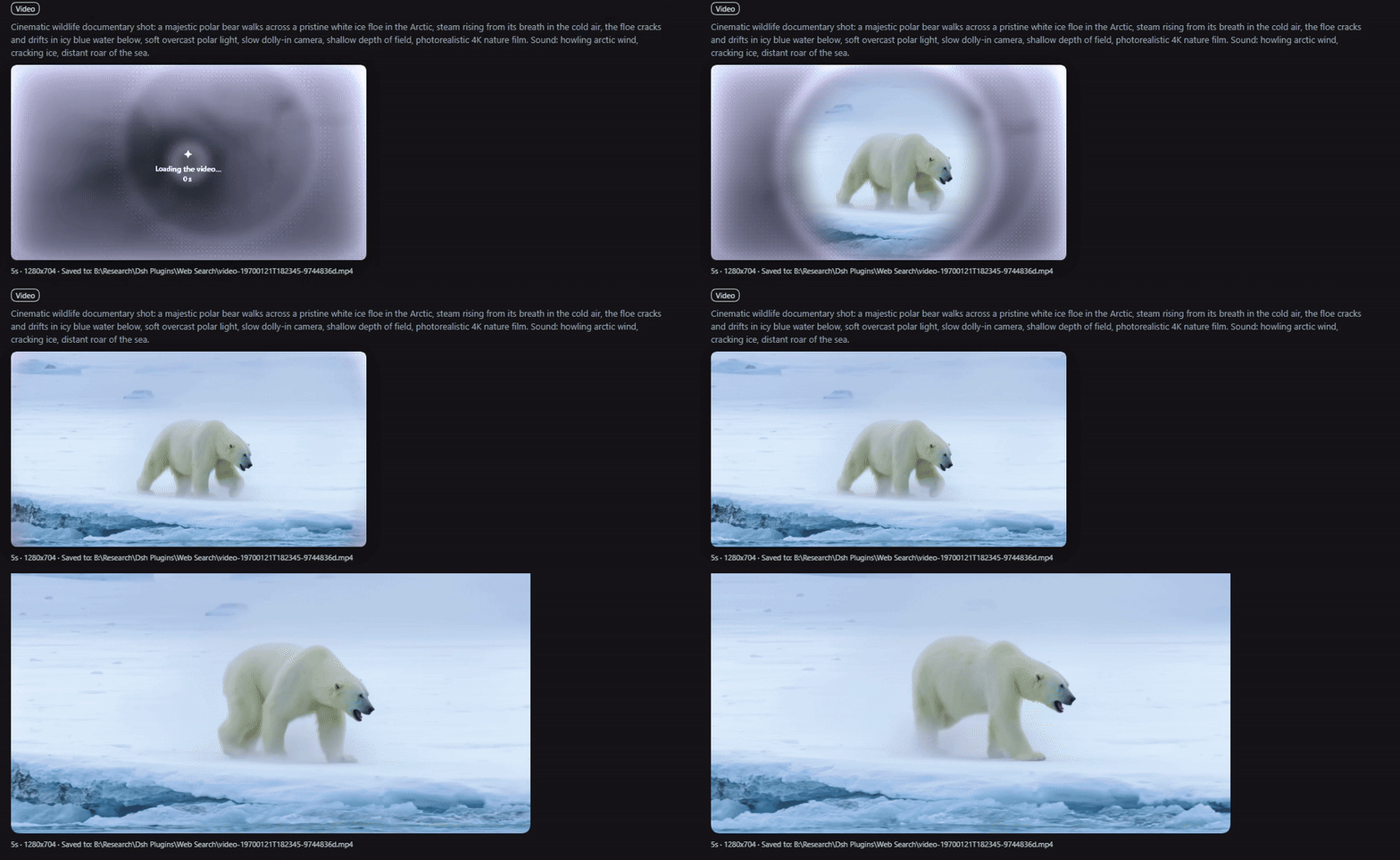
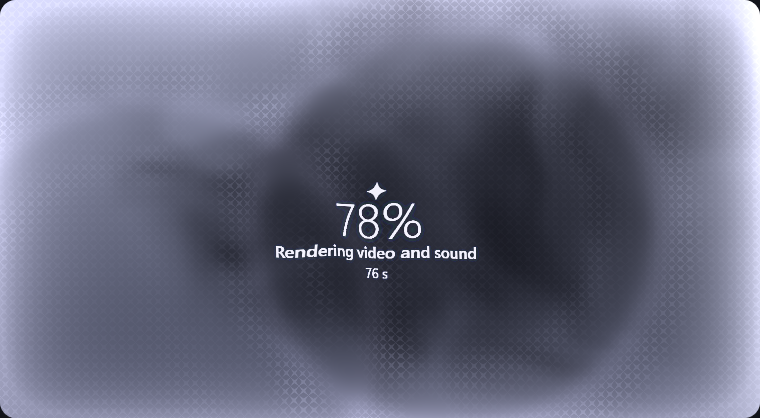
Long renders do not hold the conversation: generate_video waits for waitGraceMs (default 2 minutes) and then returns the job id. Use wait: "until_done" to block for the whole render, or wait: "none" to return immediately.
The plugin ships with no endpoint configured. That is deliberate: it is published for anyone, so the first thing you see is the settings card, not a request to a host you never chose.
Requirements
- DeepSeek Harness 0.1.7-rc.2 or newer (
@deepseek-ai/dsh-*peer generation 0.1.7). - One video API that speaks the OpenAI-style asynchronous shape (see below), plus its API key.
- A web profile: the clip card, the progress poll, and the settings card use the harness web server.
Install
dsh plugin --profile web add dsh-video-gen-plugin
dsh --profile web
That resolves through npm. To pin the plugin to one release instead, install its tarball — every release carries plugin.tgz:
cd C:\Users\<you>\.dsh\profiles\web
pnpm add https://github.com/adithyanraj03/dsh-video-gen-plugin/releases/latest/download/plugin.tgz
Either way the package must end up in both dependencies and dsh.profile.bundles of that profile's package.json, and the host has to restart for the tools and routes to register:
"dsh": { "profile": { "bundles": ["dsh-video-gen-plugin"] } }
Install the name
dsh-video-gen-plugin, notdsh-video-gen: the latter is a different plugin (Yang-wudi's DashScope/Veo/Sora tool) and unrelated to this one.
From a local checkout (what this repo's own development uses):
pnpm install
pnpm run build
Then link it into a profile and add it to that profile's bundles:
# C:\Users\<you>\.dsh\profiles\web\package.json
#   "dependencies": { "dsh-video-gen-plugin": "link:B:/Research/dsh-video-gen" }
#   "dsh": { "profile": { "bundles": ["dsh-video-gen-plugin", ...] } }
pnpm install --dir C:\Users\<you>\.dsh\profiles\web
In the desktop app — Settings → Plugins → Add plugin, then paste the repository address (https://github.com/adithyanraj03/dsh-video-gen-plugin). Installed plugins do not update themselves yet: uninstall and install again to upgrade.
A profile must load exactly one copy. Installing the package while the link row (or a tarball row) is still there boots the plugin twice.
Configure: add an endpoint
Open Settings → Plugins → Video generation (the card also appears on this plugin's own page in the plugin manager). Then:
- Add endpoint and give it a name.
- Base URL — the API root including its version prefix, for example
https://your-host/v1. - API key — paste the bearer token and press Save key. The token goes to the harness credential store under the name in the Credential name field (
VIDEO_GEN_KEY_<ENDPOINT>by default); it never enters the settings JSON, the page state after saving, or any log. Point Credential name at a credential you already store (for exampleMY_VIDEO_KEY) to reuse it. - Test & fetch models — the host calls
GET /modelson that endpoint with the key and puts the ids in the model picker. If your server does not expose/models, type the model id by hand; the probe then says so instead of failing silently. - Save settings. The endpoint marked use this endpoint is the one tool calls use.
Every field is per endpoint, and the endpoint can override the global defaults (seconds, size, fps, orientation, prompt enhancer).
Settings reference
| Option | Default | Meaning |
|---|---|---|
connections | [] | Endpoint rows: id, label, base URL, model, credential name, per-endpoint defaults. |
activeConnection | empty | Endpoint tool calls use; empty means the first row. |
defaultSeconds / defaultSize / defaultFps | 5 / 720p / 24 | Used when the call omits them. |
defaultEnhance | false | Server-side prompt enhancer before rendering (adds 1–2 minutes). |
waitGraceMs | 120000 | How long generate_video holds the turn. |
jobTimeoutMs | 3600000 | Overall budget per job before it is abandoned. |
saveToWorkspace / workspaceFolder | true / videos | Also copy finished clips into the session workspace. |
videosDir | empty | Clip directory override; empty keeps ~/.dsh/plugins/video-gen/videos. |
toolNameSet | generic | generic registers generate_video / check_video / cancel_video; prefixed registers videogen_generate_video / videogen_check_video / videogen_cancel_video. |
toolNameSet exists because tool names are global across plugins. The default verbs deliberately avoid video_generate, which dsh-plugin-subscriptions already registers for its Grok video tool — with both installed, claiming that name aborts the boot. If another plugin ever owns one of these names, the boot fails with tool "<name>" is already registered; switching toolNameSet to prefixed and restarting fixes that without uninstalling anything.
A config-only setup also works without the card: set baseUrl, model, and apiKeyRef in the plugin's cordis.patch.yml row. The card then shows that endpoint as Configured endpoint and can still take over.
The API shape it expects
One endpoint per row, all calls bearer-authenticated:
| Call | Purpose |
|---|---|
POST /videos | Submit. JSON body, or multipart with the start frame in input_reference (PNG/JPEG/WebP, one image, ≤ 20 MB). |
GET /videos/{id} | Poll: status (queued, in_progress, completed, failed, others are tolerated), progress, stage, queue_position, error.code. |
GET /videos/{id}/content | MP4 bytes; ?variant=thumbnail for the middle-frame JPEG. |
DELETE /videos/{id} | Cancel. |
GET /models | Model ids for the settings probe. |
Fields sent on submit: model, prompt, seconds (as a string), size (WxH), orientation, fps, seed, enhance, negative_prompt, input_reference.
How a job runs
- Submit; the id comes back with
status: queued. - The store polls every 3 s, backing off up to 30 s while the network or the server misbehaves. Polling survives a host restart: unfinished jobs are re-attached on boot.
- On completion the MP4 is streamed (bounded by
maxVideoBytes), written atomically, and the thumbnail is fetched. - A finished clip is copied into the session workspace exactly once; job history is kept in
jobs.jsonnext to the clips (last 50 by default).
Browser routes
Served same-origin by the plugin, gated by the harness connection trust decision:
| Route | Purpose |
|---|---|
/plugins/dsh-video-gen-plugin/video?job=<id> | MP4 stream, Range/ETag/304 aware. |
/plugins/dsh-video-gen-plugin/thumb?job=<id> | Stored middle-frame JPEG (poster). |
/plugins/dsh-video-gen-plugin/jobs | Recent job state the tool card polls while rendering. |
/plugins/dsh-video-gen-plugin/cancel | POST { id } to stop a job. |
/plugins/dsh-video-gen-plugin/models | POST { baseUrl, apiKeyRef, keyValue? } — probe one endpoint and list its models. |
/plugins/dsh-video-gen-plugin/credential | GET ?ref=NAME describes a key; POST { ref, value } stores it (blank removes). |
/plugins/dsh-video-gen-plugin/test | POST probe of the active endpoint. |
/plugins/dsh-video-gen-plugin/settings-health | Which settings generation the host serves. |
Development
pnpm run typecheck   # tsc --noEmit
pnpm run build       # clean lib/, ts scoped to lib/types, tsdown host + client bundles
pnpm run test        # vitest: 146 cases
pnpm run test:package
pnpm run pack:check
Layout: src/*.ts is the host fiber (index.ts registers the tools and routes), src/client/ is the browser bundle (the settings card, the tool result card, and the dsh-video-result conversation node), tests/ covers the pure parts and the HTTP surfaces. lib/index.js and lib/client.js are build outputs and are not committed. The icon is artwork from the image-gen tool, framed and masked by the make_icon pipeline into assets/icon.png (a deterministic fallback exists in scripts/make-icon.py).
Limits and known behaviour
- Clips are 1–30 s, fps 8–50, one start frame per job, PNG/JPEG/WebP ≤ 20 MB. GIF is refused.
- Sizes snap to a 64-pixel lattice inside 1920×1088; a tier name picks the box,
WxHis honoured, andorientationflips it. - A start frame without an explicit
sizepicks the box orientation from the picture's aspect ratio. image_urlis fetched by the host, so an authenticated or local-only URL will not work — usesource_attachment_idorsource_pathinstead.- Without a web profile the tools still run, but no card, no progress, and no settings form.
- A restarted server forgets job ids it was tracking only if the history file was lost; clip files stay addressable anyway, because a job id's last eight hex characters name its file.
- The desktop app and
dsh webcan both load this plugin and share one clip directory. Each keeps its ownjobs.json, so they used to overwrite each other's history; the history is now written merge-safe, and the clip routes find a file by its job-id suffix when a record is missing. PointvideosDirat a separate folder per host when you run both anyway.
Compatibility
| dsh-video-gen | DeepSeek Harness | Notes |
|---|---|---|
| 0.2.2 | 0.1.7-rc.2 | The card stops assuming one vendor's engine: the stage matcher reads any engine name, so a server this plugin has never seen still resolves "Starting the video engine", "Loading the models", "Generating the frames". The README gains the banner, the badge row and a GIF of the reveal. |
| 0.2.1 | 0.1.7-rc.2 | The sheet now also renders during the generate_video wait grace, tracking the real job through the host's own selection rule (prompt match, else a single active job), so percent and stage move instead of freezing at 0%; the water/ripples/words actually draw, the words follow every poll (they live in the sheet texture), and a progress log under the sheet keeps one line per distinct engine answer; a settled generate result is promoted to a session-located chat row (kind dsh-video-result) that appears while the turn is still running and survives Tool-process folding; clip history is written merge-safe and the clip routes fall back to the job id's file suffix, so a restart or a second host sharing the folder no longer leaves old clips unplayable. |
| 0.2.0 | 0.1.7-rc.2 | The "being made" sheet, first-frame reveal, and cancel button in the render card; check_video with one job shows the same card; createdAt (epoch ms) on the tool output. |
| 0.1.0 | 0.1.7-rc.2 | Settings card renders on plugins.bundle.config; the legacy settings.plugin.item seat is kept for hosts at or below 0.1.5. Schema uses the 0.1.7 volatile form with the installSection relay as fallback. |
License
Apache-2.0. See LICENSE.
Related plugins
dsh-web-ui (dsh-tool-describe-image)
zhu1090093659/dsh-web-ui
modlens
liustack/modlens
ipollowork
devin-axis/ipollowork
dsh-image-gen
shanliuling/dsh-image-gen