dsh-mobile-harness (dsh-mobile-harness)
afeack/dsh-mobile-harness/plugins/dsh-mobile-harness
Remote access gateway for DSH: a browser, or the optional 4 MB Android app, scans a QR code and joins the session already running on the desktop. One-time QR tickets (10 minutes, single use), a 6-digit pairing code matched on both screens, four network entries (SakuraFrp / Cloudflare quick tunnel / LAN / Tailscale), and per-device admission: an online-device limit, online devices pinned first with a green dot, and remove = disconnect plus revoke trust. The gateway listens on 127.0.0.1 only.
Install
dsh plugin --profile web add github:afeack/dsh-mobile-harnessThis plugin lives in the plugins/dsh-mobile-harness subdirectory of the repository.
README
DSH Mobile Harness
把电脑上的 DeepSeek Harness,装进你的手机。
扫码即连 · 浏览器就能用(App 可选)· 四条网络入口 · 设备逐台准入


-3ddc84)

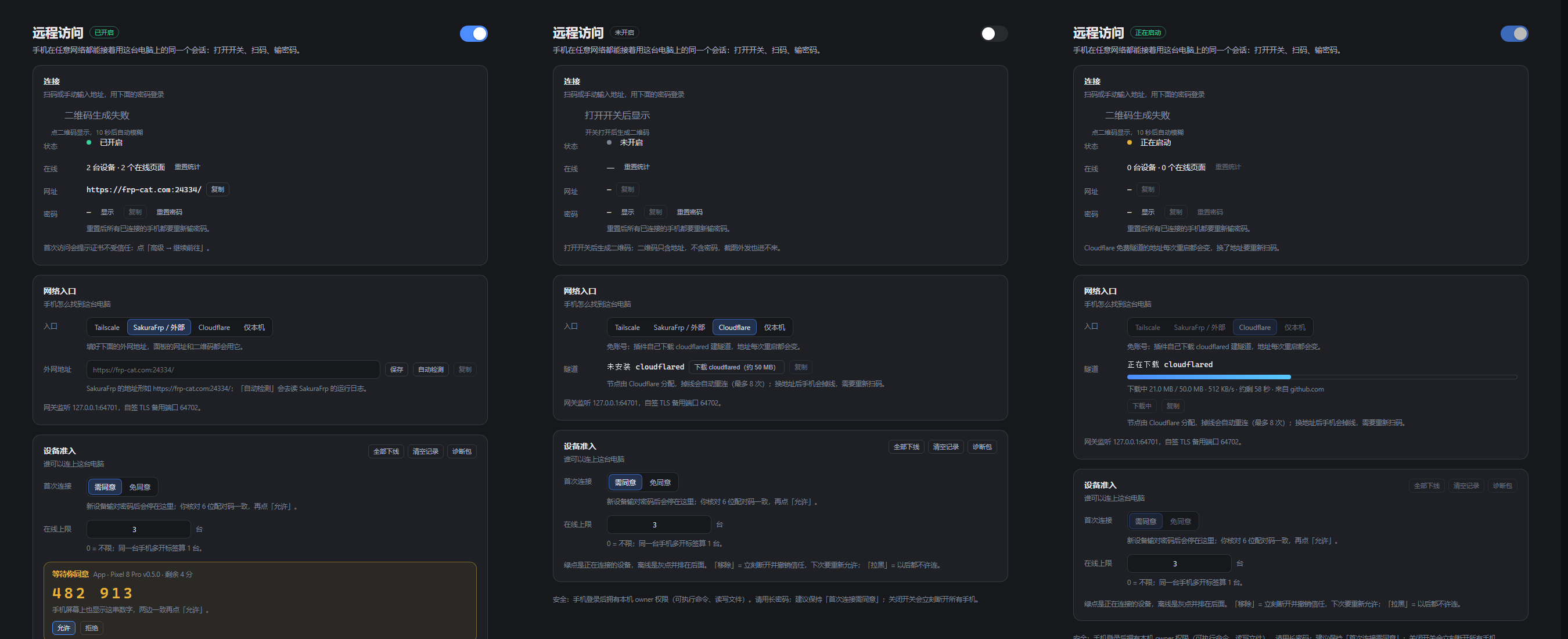
电脑端面板:一个总开关——连接 / 网络入口 / 设备准入。
下载:插件(电脑端)→ npm 或 离线包 1.0.2;手机 App(Android,可选)→ v1.0.0 APK。两者分开发布,版本各自独立。
功能
为DSH添加了远程控制功能,仅需使用浏览器,扫码即可体验随走随身的DSH。 在您不满足于网页版的体验时,可以选择下载我们的APK我们会不断更新我们的安卓客户端。 担心被别人连接电脑?不用担心,首次授权确认+设备管理+随机密码,保护您的连接安全。
- 我们提供四种远程方式,适用于不同人群:
- ①cloudflare(免注册、免费、最省事、代价是每次重启DSH需要重新扫码登录)
- ②外部隧道(内网穿透、需注册、可能付费、需实名,但好处是最稳定且重启DSH后保留原本的登录,无需再次扫码)
- ③Tailscale(手机电脑需额外软件,数据走的境外服务器,延迟高,不推荐,需注册)
- ④LAN(适用于局域网范围,稳定但距离有限)
| 部分 | 是什么 | 必需吗 |
|---|---|---|
| 插件 | 在 DSH 里加一页「远程访问」:网关、密码、二维码、隧道、设备准入 | 必需 |
| App | 4 MB 的 Android 壳:相机扫码、记住密码、下载落盘 | 可选(只有 Android) |
手机不一定需要 App。 使用浏览器(最好使用chrome)扫一下面板上的二维码、确认一次,就能接着用电脑上的同一个DSH。
iPhone / iPad、鸿蒙不装 App 也行:浏览器打开同一个网址即可,还能「添加到主屏幕」当 PWA。
不是另开一个账号,是同一台电脑、同一个会话:上下文、工具、文件都还是电脑上那份。
安全
- 网关只监听
127.0.0.1,不监听0.0.0.0、不做端口映射。 - 三层准入:密码 → 6 位配对码两端核对 → 设备白名单。
- 扫码不等于放行:扫完落地的是等待页,页面上那串配对码要和你电脑面板上的一致,点了「允许」才真正进站。
- 移除 = 立刻断开 + 撤销信任,下次要重新配对;拉黑 = 永久拒绝。
- 诊断包是白名单字段,不含密码、session、设备 token。细节见 SECURITY.md。
快速开始
0. 你需要
- 一台跑着 DSH 的电脑(Windows / macOS / Linux;本项目在 Windows 11 上开发与实测)
- DSH ≥ 0.2.1-rc.3,Node ≥ 22
- 一个浏览器(手机、平板、另一台电脑都行);想用相机扫码再准备一台 Android 8.0+
1. 装插件
方式 A:npm(最快)
dsh plugin --profile desktop add dsh-mobile-harness
方式 B:一键脚本(从仓库)
git clone https://github.com/afeack/dsh-mobile-harness.git
cd dsh-mobile-harness
node scripts/install-plugin.mjs --profile desktop   # 换成你的 profile 名字
cd ~/.dsh/profiles/desktop && pnpm install
脚本会往 profile 的 package.json 里写一条依赖和一个 bundle 条目,重复跑是幂等的。
方式 C:手动改 profile
profile 在 ~/.dsh/profiles/<名字>(Windows 是 %USERPROFILE%\.dsh\profiles\<名字>),改两处:
{
  "dependencies": {
    "dsh-mobile-harness": "^1.0.2"
  },
  "dsh": { "profile": { "bundles": ["...", "dsh-mobile-harness"] } }
}
dsh.profile.bundles 里必须有包名,否则 DSH 不会去加载它。改完在 profile 目录里 pnpm install。
方式 D:离线 tgz
从 插件 1.0.2 release 下 dsh-mobile-harness-1.0.2.tgz(内容和 npm 包一致),解开到 <profile>/node_modules/dsh-mobile-harness/,再把 dsh-mobile-harness 写进 dsh.profile.bundles;或者 pnpm add file:./dsh-mobile-harness-1.0.2.tgz。内网 / 连不上 npm 时用这条。
2. 重启 DSH
退出托盘图标,重新打开。会话侧栏会出现「远程」入口,点进去是「远程访问」面板。
3. 选择你的方式、打开开关
面板右上角把总开关打开,再选一个网络入口(见下一节),拿到网址。
4. 手机接入
A. 浏览器(先试这个)
- 手机浏览器打开面板上的网址,或者直接扫面板上的二维码。
- 浏览器停在等待页,页面上有一串 6 位配对码。
- 电脑面板「设备准入」里出现同一串数字 —— 核对一致,点「允许」,再点「数字一致,允许」。
- 手机上自动进站,之后直接刷新就能继续用。
B. 装 App(可选)
- 装 App 1.0.0 release 里的
dsh-mobile-harness-1.0.0.apk(或仓库里的app/dist/dsh-mobile-harness-1.0.0.apk)。iOS / 鸿蒙没有 App,用浏览器即可。 - 打开 App → 相机扫码(或从相册选图)→ 同样核对 6 位配对码。
- 勾「记住地址和密码」,以后换地址也能自动填。
四个入口怎么选
| 入口 | 推荐度 | 要准备什么 | 说明 |
|---|---|---|---|
| SakuraFrp / 任意外部隧道 | ✅ 推荐 | 已有一条 frp 隧道,填外网地址(如 https://frp-cat.com:12345/) | 地址稳定,延迟低;「自动检测」会去读 SakuraFrp 的运行日志 |
| Cloudflare 快速隧道 | ✅ 推荐(零准备) | 什么都不用 | 免账号、一键建隧道;地址每次重启都变,换地址要重新扫码;首次要下约 50 MB 的 cloudflared |
| 仅本机 | ✅ 局域网内 | 手机和电脑同一个 Wi-Fi | 最安全,出了局域网连不上 |
| Tailscale | ⚠️ 不推荐 | 两端都装 Tailscale、登录同一账号 | 能穿透 NAT,但流量常走 DERP 中继,延迟明显偏高;只在内网直连(同一局域网 / 同一 VPC)时才顺 |
为什么 Tailscale 排最后:它解决的是「没有公网入口也能连上」,代价是节点绕行——手机到电脑可能先绕到境外中继再回来,打字、翻页都能感觉到卡。有公网入口就用外部隧道,没有就开 Cloudflare;Tailscale 留给「内网直连 + 不想开公网」的场景。
第一次接入建议先用「仅本机」把扫码和配对码跑通,再切到公网入口。
常见问题
一定要装 App 吗? 不用。浏览器扫码就能用,App 只是把相机扫码、密码记忆、下载落盘这几件事做得更顺。
手机上一直转圈 / 打不开? 先确认入口选对了,地址带不带尾斜杠都试试;公网入口要等隧道状态变成「已连接」。自签证书(64702 端口)第一次会提示不受信任,点「高级 → 继续前往」。
扫码后停在「等待同意」? 这是设计。去电脑面板「设备准入」,核对那串 6 位数字,一致再点「允许」。
忘了网关密码? 面板上「重置密码」。重置后所有已连接设备都要重新输密码。
面板里找不到「远程」?
插件没装好或 DSH 没重启。检查 profile 的 package.json 里有没有依赖和 bundle 条目,然后重启。
Cloudflare 下载失败? 插件会依次试 8 个地址(官方 + 7 个镜像),全都不通才会报错。三条退路,任选一条:
- 自己的镜像:设环境变量
DSH_CLOUDFLARED_URL指向你能连的地址,下次点下载会先试它。 - 手动放置:下载 cloudflared-windows-amd64.exe,改名
cloudflared.exe,放到~/.dsh/remote-access/bin/(Windows 是C:\Users\<你>\.dsh\remote-access\bin\),面板会显示「程序已就绪」。 - 本来就有:只要
PATH里能找到cloudflared,插件直接用它,不再下载。
下载卡住时面板上有「停止下载」;下坏了(文件损坏、下到一半)用「删除」(点两次确认),删掉重下即可。
电脑重启后手机连不上了? Cloudflare 快速隧道每次重启都会换地址,重新扫码即可;外部隧道和 Tailscale 的地址是稳定的。
能同时连几台? 「在线上限」控制,默认 3,0 表示不限。同一台手机用不同浏览器或app开多个页面算多台。
密码、二维码会不会被写进日志? 诊断包是白名单导出,不含密码与 token;面板上的二维码只含一次性票据,不含密码。
目录结构
plugins/dsh-mobile-harness/     插件:网关、准入、二维码、隧道、面板 UI
  lib/proxy.js             网关(Cookie、会话、扫码票据、等待页)
  lib/registry.js          设备与信任、待同意队列、配对码
  lib/service.js           开关、快照、诊断包
  lib/cloudflared.js       Cloudflare quick tunnel
  lib/tailscale.js         Tailscale 探测
  lib/phone-tool.js        手机协助(读屏 / 点按)
  lib/client.js            面板 UI(React)
app/                       Android 客户端(Capacitor 6,可选)
  www/index.html           登录页、扫码、手机协助
  android/app/src/main/java/com/dsh/remote/   原生桥、轮询、无障碍服务
scripts/install-plugin.mjs 安装脚本
assets/                    README 截图
状态与路线图
- 1.0.0(2026-10-31):四条入口、扫码 + 配对码、设备准入、下载钩子;浏览器与 App 两条路都能用。
- 手机协助(P2):读屏、点按、输入、滚动、开 App 都已实现,但界面在 1.0 里默认隐藏,等验收后再放出来。需要系统无障碍服务;支付 / 银行 / 系统设置类界面一律拒绝。
- P3:通知、音量、勿扰、手电、亮度、深链打开 App。
致谢
License
MIT。第三方组件许可见 THIRD-PARTY-NOTICES.md。
English
DSH Mobile Harness brings your desktop DeepSeek Harness session to your phone. A DSH plugin adds a gateway with a password, a one-time QR ticket, four network entries and per-device admission control.
No app required. Any browser can scan the QR code, type the password, and continue the same desktop session. The 4 MB Android app is optional: camera scanning, remembered passwords, download-to-phone. The native app is Android-only for now — on iOS / iPadOS and HarmonyOS, just use the built-in browser (same gateway, same admission control, add to home screen as a PWA).
- Four network entries: external tunnel (SakuraFrp) and Cloudflare quick tunnel are recommended; LAN-only for local use; Tailscale works but usually relays traffic and adds latency.
- Pairing: password → 6-digit code shown on both ends → device allow-list. Scanning a QR never grants access by itself.
- Admission control: online limit, pending queue, remove / block devices, kick-all.
Install (plugin):
dsh plugin --profile desktop add dsh-mobile-harness
# or from source:
git clone https://github.com/afeack/dsh-mobile-harness.git
cd dsh-mobile-harness
node scripts/install-plugin.mjs --profile desktop
cd ~/.dsh/profiles/desktop && pnpm install
Downloads are split by component: plugin tarball in plugin-v1.0.2, APK in v1.0.0. License: MIT. See SECURITY.md before exposing the gateway to the public internet.
Related plugins
dsh-web (dsh-ssh)
zhu1090093659/dsh-web
dsh-web (dsh-remote-web-ui)
zhu1090093659/dsh-web
dsh-web-ui (dsh-ssh)
zhu1090093659/dsh-web-ui
dsh-web-ui (dsh-remote-web-ui)
zhu1090093659/dsh-web-ui