dsh-plugin-jira
angelomadara/dsh-plugin-jira
Jira integration for DSH: a Settings page stores the site, email and API token, /jira-do fetches the ticket and branches it for the agent, /jira-comment posts a comment or summarizes the branch changes, and the jira_ticket and jira_comment tools read and write issues.
Install
dsh plugin --profile web add github:angelomadara/dsh-plugin-jiraREADME
dsh-plugin-jira
Jira ticket intake for DeepSeek Harness (dsh), built against dsh 0.2.x.
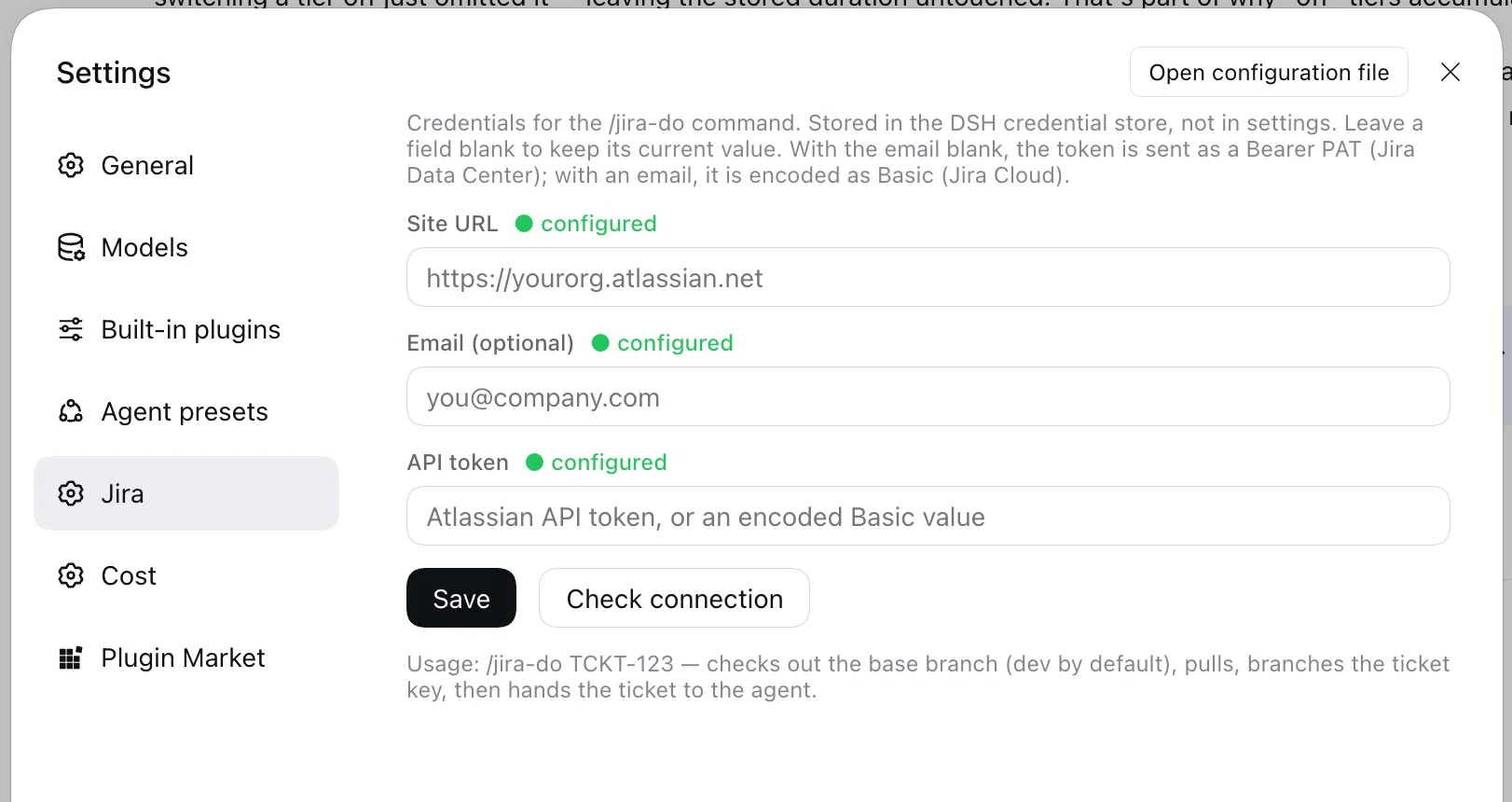
- Settings → Jira — store the site URL, email and API token; its Check connection button runs
/jira-checkin the current session. /jira-do TCKT-123— fetches the issue, checks out the base branch (dev, orbasefrom.dsh-jira.json), pulls, creates the branch from the configured template (defaultTCKT-123), downloads attachments intodocs/jira/TCKT-123/, then hands it to the agent with the richness of the ticket (components, fix versions, environment, parent/epic, subtasks, configured custom fields, full comment thread) and a fix brief (root cause, minimal change, tests, a full change report atdocs/jira/TCKT-123.md, no commit)./jira-check— shows which account the token authenticates as and which projects it can see; a 401 is reported with the exact fix./jira-find [JQL]— searches Jira; with no input it lists your open issues./jira-transition TCKT-123 [status]— lists the allowed transitions, or moves the ticket to the matching transition/destination status./jira-comment [TCKT-123] text— posts a comment; the key is taken from the current branch when the branch is a ticket key, so/jira-comment Fixed in this branchis enough. Omit the text (e.g./jira-commentonTCKT-123) and the agent analyzes all the branch's changes — committed sincedev/main/masterplus the working tree — and writes the comment itself.jira_tickettool — fetch one issue (summary, description, status, labels, components, fix versions, environment, parent/subtasks, attachments, full comment thread) without touching git.jira_searchtool — JQL search (max 50), read-only.jira_transitiontool — list or apply workflow transitions; writes to Jira.jira_commenttool — post a comment (progress, findings, completion) on one issue.
package.json      dsh.bundle.patch + dsh.client (platform: web); exports "." and "./client"
cordis.patch.yml  insert row  id: jira → dsh-plugin-jira
index.js          host entry: apply() wires the modules below
lib/config.js     credential refs, auth header, rejected-credential hint
lib/repo.js       .dsh-jira.json: base, branch template, worktree, dirty guard, field IDs
lib/attachments.js  download attachments into docs/jira/<KEY>/
lib/adf.js        Markdown → Atlassian Document Format
lib/jira.js       REST v3 (issues, comments, search, transitions), rich rendering, /jira-check
lib/git.js        branch/worktree prep, dirty guard, branch diff and status
lib/prompts.js    agent hand-off prompts
lib/commands.js   /jira-do, /jira-check, /jira-find, /jira-transition, /jira-comment
lib/tools.js      jira_ticket, jira_search, jira_transition, jira_comment
client.js         browser half: the settings page, in window.__ModuleLoader__ format
test.js           offline self-check: branch prep, hand-off, tools, comments, client registration
Install
Published package:
dsh plugin --profile web add dsh-plugin-jira
dsh web --dump-config | grep 'id: jira'   # confirm the layer mounted
# restart dsh web
From the repo (also what the Desktop Plugins → install dialog takes):
dsh plugin --profile web add github:angelomadara/dsh-plugin-jira
Local development:
dsh plugin --profile web add link:/absolute/path/to/dsh-plugin-jira
Then open Settings → Jira and store the site URL, email and API token. Remove it from the Plugins page, or dsh plugin --profile web remove dsh-plugin-jira and delete the jira row from the profile's cordis.patch.yml.
Create a Jira API token
Jira Cloud
-
Sign in to your Atlassian account.
-
Open Account Settings → Security → Create and manage API tokens — https://id.atlassian.com/manage-profile/security/api-tokens.
-
Click Create API token, name it (for example
DSH Jira), then Create. -
Copy the token right away — Atlassian shows it only once.
-
In DSH open Settings → Jira and fill in:
- Site URL —
https://yourorg.atlassian.net - Email — the Atlassian account that owns the token
- API token — the value you copied
Click Save, then Check connection. It should report your account and the projects the token can see.
- Site URL —
Jira Data Center
- Open your avatar → Account settings (or Profile) → Personal Access Tokens → Create token.
- Copy the token.
- In DSH Settings → Jira, set the Site URL (include a context path such as
https://jira.example.com/jirawhen your instance uses one), leave Email blank, paste the token, then Save → Check connection.
The token lives in the DSH credential store, never in this repository or the settings files. Check connection runs /jira-check in the current session, so its result also appears in that conversation.
Credentials
The page writes three credential references: JIRA_SITE, JIRA_EMAIL, JIRA_API_TOKEN. Env vars of the same names also resolve, so CI/headless can skip the page.
JIRA_EMAIL+JIRA_API_TOKEN→ encoded intoBasicauth (Jira Cloud API token).JIRA_EMAILblank →JIRA_API_TOKENis sent asBearer(Jira Data Center PAT), unless it already starts withBasic.
The site URL must be https (plain http is allowed only for localhost), so the token never travels in cleartext.
Repo config
Optional .dsh-jira.json at the repository root:
{
  "base": "develop",
  "branch": "feature/{key}-{slug}",
  "worktree": false,
  "allowDirty": false,
  "downloadAttachments": true,
  "fields": {
    "acceptanceCriteria": "customfield_10001",
    "storyPoints": "customfield_10002",
    "severity": "customfield_10003",
    "epic": "customfield_10014"
  }
}
base— branch to branch from (defaultdev).branch— template with{key}and{slug}(default{key}).worktree— create.dsh-jira-worktrees/<branch>instead of switching the current checkout;/jira-commentfinds it by ticket key.allowDirty— allow switching with tracked changes (default false; untracked files never block).downloadAttachments— download attachments intodocs/jira/<KEY>/(default true, 10 MB per file).fields— friendly label → Jira custom field id; rendered in the brief.
/jira-do reuses an existing branch and reports how many commits ahead it is. Issue-type briefs add specific focus: bug (root cause + repro), story (acceptance criteria), spike (options/recommendation).
Check
node test.js # ok — command, branch, hand-off, tools, comments, client registration
Notes: after the fix, the agent must write the full change report to docs/jira/<KEY>.md — ticket URL and summary, severity/impact, root cause, every changed file and why, verification commands and results, risks and follow-ups — and treat it as part of the deliverable. Comments are posted as Atlassian Document Format (REST v3): blank lines become paragraphs, single newlines hard breaks, and **bold**, *italic*, `code`, [links](url), -/1. lists and fenced code blocks are converted; the whole comment thread is fetched in pages (capped at 200) rather than trusting the issue field. /jira-comment without text hands the ticket branch's diff and git status to the agent (60k-char diff cap; the agent can run git for the rest) and asks it to post one summary comment. /jira-do fetches the ticket before touching git, so an unknown or unreachable key never leaves a new branch behind. Branch prep is checkout <base> → pull --ff-only → checkout -b <KEY> (base defaults to dev; set { "base": "develop" } in .dsh-jira.json at the repo root to override; an existing branch is reused); a failed pull is reported in the command reply, not fatal. The agent is instructed not to commit or push.
License
MIT
Related plugins
archify (deepseek-harness)
tt-a1i/archify
WeKnora (dsh-weknora)
tencent/weknora
next-ai-draw-io (dsh-plugin)
dayuanjiang/next-ai-draw-io
weknora
tencent/weknora